
FinalizerDS: Difference between revisions
More actions
m Text replacement - "{{Infobox homebrew" to "{{Infobox DS Homebrews" |
No edit summary |
||
| (12 intermediate revisions by the same user not shown) | |||
| Line 1: | Line 1: | ||
{{Infobox DS Homebrews | {{Infobox DS Homebrews | ||
| title | |title=FinalizerDS | ||
| image | |image=Finalizerds2.png | ||
| type | |description=Konami Finalizer Arcade emulator for DS. | ||
| version | |author=Fredrik Ahlström (FluBBa) | ||
| | |lastupdated=2024/03/21 | ||
| | |type=Arcade | ||
|version=0.3.2 | |||
| | |license=Mixed | ||
| source | |download=https://dlhb.gamebrew.org/dshomebrew2/finalizerds.7z?k33p0fil35 | ||
}} | |website=https://gbatemp.net/download/finalizerds.37039 | ||
|source=https://github.com/FluBBaOfWard/FinalizerDS | |||
}} | |||
This is a Finalizer - Arcade emulator for the NDS. | This is a Finalizer - Arcade emulator for the NDS. | ||
==Installation== | ==Installation== | ||
[[DLDI|DLDI]] patch the emulator for your flashcard. | [[DLDI|DLDI]] patch the emulator for your flashcard if needed. | ||
Create a folder named acds in either the root of your flash card or in the data folder. | Create a folder named acds in either the root of your flash card or in the data folder (eg h:\data\acds). This is where settings and save files end up. | ||
Put finalizr.zip into a folder where you have arcade roms. | Put finalizr.zip into a folder where you have arcade roms. | ||
==User guide== | ==User guide== | ||
===Menu=== | ===Menu=== | ||
'''File:''' | '''File:''' | ||
| Line 41: | Line 40: | ||
* Scaling - Flicker or barebones lineskip. | * Scaling - Flicker or barebones lineskip. | ||
* Gamma - Adjust gamma (brightness). | * Gamma - Adjust gamma (brightness). | ||
'''Settings:''' | '''Settings:''' | ||
| Line 56: | Line 52: | ||
* Powersave 2nd Screen - If graphics/light should be turned off for the GUI screen when menu is not active. | * Powersave 2nd Screen - If graphics/light should be turned off for the GUI screen when menu is not active. | ||
* Emulator on Bottom - Select if top or bottom screen should be used for emulator, when menu is active emulator screen is always on top. | * Emulator on Bottom - Select if top or bottom screen should be used for emulator, when menu is active emulator screen is always on top. | ||
* Autosleep - Does not work. | |||
'''Debug:''' | |||
* Debug Output - Show an FPS meter for now. | * Debug Output - Show an FPS meter for now. | ||
* | * Disable Background - Turn on/off background rendering. | ||
* Disable Sprites - Turn on/off sprite rendering. | |||
* Step Frame - Emulate one frame. | |||
'''Dipswitches:''' | '''Dipswitches:''' | ||
| Line 90: | Line 91: | ||
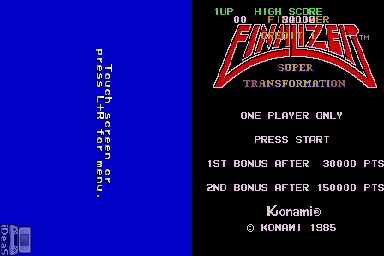
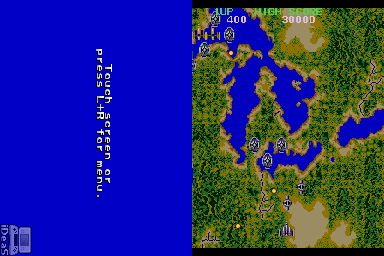
https://dlhb.gamebrew.org/dshomebrew/finalizerds2.png | https://dlhb.gamebrew.org/dshomebrew/finalizerds2.png | ||
https://dlhb.gamebrew.org/dshomebrew/finalizerds3.png | https://dlhb.gamebrew.org/dshomebrew/finalizerds3.png | ||
==Known issues== | ==Known issues== | ||
| Line 98: | Line 96: | ||
==Changelog== | ==Changelog== | ||
'''V0.3.2 2024/03/21''' | |||
* Added new debug menu. | |||
* Better menu traversing. | |||
'''V0.3.0 2021/03/23''' | '''V0.3.0 2021/03/23''' | ||
* Added load/save state. | * Added load/save state. | ||
| Line 128: | Line 130: | ||
* GBAtemp - https://gbatemp.net/download/finalizerds.37039 | * GBAtemp - https://gbatemp.net/download/finalizerds.37039 | ||
{{DS emulators}} | |||
Latest revision as of 07:27, 18 December 2024
| FinalizerDS | |
|---|---|
| Error creating thumbnail: Unable to save thumbnail to destination | |
| General | |
| Author | Fredrik Ahlström (FluBBa) |
| Type | Arcade |
| Version | 0.3.2 |
| License | Mixed |
| Last Updated | 2024/03/21 |
| Links | |
| Download | |
| Website | |
| Source | |

This is a Finalizer - Arcade emulator for the NDS.
Installation
DLDI patch the emulator for your flashcard if needed.
Create a folder named acds in either the root of your flash card or in the data folder (eg h:\data\acds). This is where settings and save files end up.
Put finalizr.zip into a folder where you have arcade roms.
User guide
Menu
File:
- Load Game - Choose a game to load.
- Load State - Load a previously saved state for the currently running game.
- Save State - Save a state for the current game.
- Save Settings - Save the current settings.
- Reset Game - Reset the currently running game.
Options
Controller:
- Autofire - Select to enable autofire.
- Controller - 2P start a 2 player game.
- Swap A/B - Swap which NDS button is mapped to which arcade button.
Display:
- Display - Scaled or unscaled screenmode (L/R to scroll screen up/down).
- Scaling - Flicker or barebones lineskip.
- Gamma - Adjust gamma (brightness).
Settings:
- Speed - Switch between speed modes.
- Normal - Game runs at it's normal speed.
- 200% - Game runs at double speed.
- Max - Game runs at 4 times normal speed (might change in the future).
- 50% - Game runs at half speed.
- Autoload State - Toggle Savestate autoloading.
- Autosave Settings - Save settings when leaving menu if any changes are made.
- Autopause Game - Toggle if the game should pause when opening the menu.
- Powersave 2nd Screen - If graphics/light should be turned off for the GUI screen when menu is not active.
- Emulator on Bottom - Select if top or bottom screen should be used for emulator, when menu is active emulator screen is always on top.
- Autosleep - Does not work.
Debug:
- Debug Output - Show an FPS meter for now.
- Disable Background - Turn on/off background rendering.
- Disable Sprites - Turn on/off sprite rendering.
- Step Frame - Emulate one frame.
Dipswitches:
- Lot of settings for the actual arcade game, difficulty/lives etc.
Controls
Menu:
L+R or Touchscreen - Open up menu
D-Pad or Touchscreen - Navigate menus
A or Double tap - Select an option
B or Top of the screen - Go back
R/L or Touchscreen - Switch between tabs
In game:
Select - Insert coin
Start - Start
D-Pad - Move ship
A - Special attack
B - Shoot
Screenshots
Known issues
Some distortion in the sound, vertical layout not rotated on the DS.
Changelog
V0.3.2 2024/03/21
- Added new debug menu.
- Better menu traversing.
V0.3.0 2021/03/23
- Added load/save state.
V0.2.6 2020/06/08
- Added support for flipped sprites.
V0.2.5 2018/07/28
- Fixes to graphic.
V0.2.0 2018/05/10
- Code clean up.
V0.1.0 2016/08/30
- Initial release, plays Finalizer.
V0.0.0 2016/08/22
- Started coding.
Credits
Huge thanks to Loopy for the incredible PocketNES, without it this emu would probably never have been made.
Thanks to:
- Dwedit for help and inspiration with a lot of things.
- Nicola Salmoria, for the MAME driver.
- More MAME people + Maxim for the SN76496 info.
External links
- GitHub - http://www.github.com/FluBBaOfWard
- GBAtemp - https://gbatemp.net/download/finalizerds.37039
| |||||||||||||||||||||||||||||||||||||||||||||||||||||||||||||||||||||||||||||||||||||||||||||||||||||||||||||||||||||||||||||||||||