
Sprite Editor DS: Difference between revisions
More actions
Created page with "{{Infobox homebrew | title = SEDS(Sprite Editor) | image = File:Spiriteditordscover.png | type = Other | version = 0.4 | licence = Mixed | author ..." |
No edit summary |
||
| (25 intermediate revisions by the same user not shown) | |||
| Line 1: | Line 1: | ||
{{Infobox | {{Infobox DS Homebrews | ||
| title | |title=SEDS (Sprite Editor) | ||
| image | |image=Seds2.png | ||
| type | |description=Small drawing and animation tool. | ||
| version | |author=PypeBros | ||
| | |lastupdated=2011/05/29 | ||
| | |type=Other Apps | ||
| website | |version=0.4 | ||
| | |license=Mixed | ||
|download=https://dlhb.gamebrew.org/dshomebrew2/spriteeditor4ds.zip | |||
|website=http://sylvainhb.blogspot.com/p/sprite-editor.html | |||
|source=https://sourceforge.net/projects/dsgametools/files/Sprite%20Editor%20DS | |||
}} | }} | ||
SEDS is a small drawing and animation tool for the homebrew-enabled Nintendo DS. It is targeted at tiles and medium-sized sprites in 256 colours mode. | |||
The homebrew was released as part of dsgametools, a suite of developer tools for creating games on and for the Nintendo DS. Built on a custom 2D game engine, the collection includes (you can find the latest version of the package [https://sourceforge.net/projects/dsgametools/files/dsgametools/dsgametools-nova24.zip/download here]): | |||
* runME (the uploader/downloader/launcher tool) | |||
[[ | * [[Level Editor DS]] (the level editor) | ||
* [[Sprite Editor DS]] (the sprite editor) | |||
* [[AnimEDS]] (the animation editor) | |||
==User guide== | ==User guide== | ||
You | You draw directly with the stylus on a 16x16 or 32x32 grid canvas that you can save in a sprite table shown on the right of the screen. | ||
The whole user interface uses the concept of aLt-click, which is touching the screen while holding the L shoulder button. That's how you can pick a color in the grid rather than painting a pixel, or save your work in the spritetable. | |||
It also works by copying information. You don't directly edit the spritetable: you copy a sprite from the table on the grid, where you can edit it, and then copy it again back on the table (L+click), either where it comes from or on another slot. | |||
.SPR | ===Saving/resuming your work=== | ||
* SEDS manages 4 sprite sets, stored at the root of your media card, named SPRITEA.SPR, SPRITEB.SPR, SPRITEX.SPR and SPRITEY.SPR. | |||
* Quick save your work with START-R-(ABXY) and load it back with START-L-(ABXY). | |||
* An additional backup level will archive a spriteset in the /data/seds directory when you overwrite it with new data. | |||
===. | ===.spr file format=== | ||
[http://dsgametools.sourceforge.net/seds-spr.html | * .spr file is a container format for the native content of the nintendo DS VRAM, which allows fast loading and saving (unknown by most PC-based software but compatible with [[Level Editor DS]]. | ||
* For regular user you can convert your art into .png file using with the [http://dsgametools.sourceforge.net/seds-spr.html online conversion tool]. | |||
===.spr converter=== | |||
An online convertion tool is availble from [http://dsgametools.sourceforge.net/seds-spr.html this page] for converting .spr into .png file. | |||
Simply select the picture with the Browse... button, then click Post and wait a couple of seconds for the conversion to complete. | |||
===Interface=== | |||
https://dlhb.gamebrew.org/dshomebrew/seds2.png | |||
==Controls== | |||
Touching grid - Draw | |||
Touching palette - Select new color | |||
A - Pencil tool (L+B - Horizontal flood fill) | |||
X/Y - Automated darken/lighten brushes | |||
B - Block tool (click the two corners separately to fill it) | |||
L+ | L+B - Horizontal bucket fill tool | ||
L+R - Show some more help | |||
Start - File management | |||
Select - Palette edition | |||
==Changelog== | ==Changelog== | ||
'''Version 0.4''' | '''Version 0.4''' | ||
*Full palette editor and more ergonomic | *Full palette editor and more ergonomic. | ||
*Mirror functions, superimposed images and rapid filling (L + B) | *Mirror functions, superimposed images and rapid filling (L + B). | ||
*Reorganization and color reduction (undocumented) | *Reorganization and color reduction (undocumented). | ||
*Compatibility with animations produced by Animed | *Compatibility with animations produced by Animed. | ||
*32x32 or 16x16 edition, anywhere on the sheet of sprites | *32x32 or 16x16 edition, anywhere on the sheet of sprites. | ||
*Mini-integrated animation editor | *Mini-integrated animation editor. | ||
*Integrated Help (L + R) | *Integrated Help (L + R). | ||
'''Version 0.3.2''' | '''Version 0.3.2''' | ||
*"cursor mode" that can be enabled with R-shoulder button to load/save anywhere in the grid. | *"cursor mode" that can be enabled with R-shoulder button to load/save anywhere in the grid. | ||
*"quick palette" widget below the grid that automatically fills when you L-click the grid to pick some color and which can be used to reorganize your palette after a messy conversion | *"quick palette" widget below the grid that automatically fills when you L-click the grid to pick some color and which can be used to reorganize your palette after a messy conversion. | ||
'''Version 0.2''' | '''Version 0.2''' | ||
*WiFi integration support and updates to the software, support the planks multiple sprites | *WiFi integration support and updates to the software, support the planks multiple sprites | ||
| Line 75: | Line 82: | ||
*it pixelise to save it. | *it pixelise to save it. | ||
==External links== | |||
* Author's website - http://sylvainhb.blogspot.com/p/sprite-editor.html | |||
* SourceForge - https://sourceforge.net/projects/dsgametools/files/Sprite%20Editor%20DS | |||
{{DS editors and readers}} | |||

Latest revision as of 13:44, 8 March 2025
| SEDS (Sprite Editor) | |
|---|---|
 | |
| General | |
| Author | PypeBros |
| Type | Other Apps |
| Version | 0.4 |
| License | Mixed |
| Last Updated | 2011/05/29 |
| Links | |
| Download | |
| Website | |
| Source | |
SEDS is a small drawing and animation tool for the homebrew-enabled Nintendo DS. It is targeted at tiles and medium-sized sprites in 256 colours mode.
The homebrew was released as part of dsgametools, a suite of developer tools for creating games on and for the Nintendo DS. Built on a custom 2D game engine, the collection includes (you can find the latest version of the package here):
- runME (the uploader/downloader/launcher tool)
- Level Editor DS (the level editor)
- Sprite Editor DS (the sprite editor)
- AnimEDS (the animation editor)
User guide
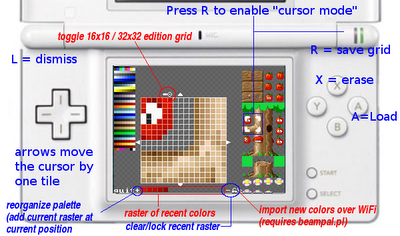
You draw directly with the stylus on a 16x16 or 32x32 grid canvas that you can save in a sprite table shown on the right of the screen.
The whole user interface uses the concept of aLt-click, which is touching the screen while holding the L shoulder button. That's how you can pick a color in the grid rather than painting a pixel, or save your work in the spritetable.
It also works by copying information. You don't directly edit the spritetable: you copy a sprite from the table on the grid, where you can edit it, and then copy it again back on the table (L+click), either where it comes from or on another slot.
Saving/resuming your work
- SEDS manages 4 sprite sets, stored at the root of your media card, named SPRITEA.SPR, SPRITEB.SPR, SPRITEX.SPR and SPRITEY.SPR.
- Quick save your work with START-R-(ABXY) and load it back with START-L-(ABXY).
- An additional backup level will archive a spriteset in the /data/seds directory when you overwrite it with new data.
.spr file format
- .spr file is a container format for the native content of the nintendo DS VRAM, which allows fast loading and saving (unknown by most PC-based software but compatible with Level Editor DS.
- For regular user you can convert your art into .png file using with the online conversion tool.
.spr converter
An online convertion tool is availble from this page for converting .spr into .png file.
Simply select the picture with the Browse... button, then click Post and wait a couple of seconds for the conversion to complete.
Interface
Controls
Touching grid - Draw
Touching palette - Select new color
A - Pencil tool (L+B - Horizontal flood fill)
X/Y - Automated darken/lighten brushes
B - Block tool (click the two corners separately to fill it)
L+B - Horizontal bucket fill tool
L+R - Show some more help
Start - File management
Select - Palette edition
Changelog
Version 0.4
- Full palette editor and more ergonomic.
- Mirror functions, superimposed images and rapid filling (L + B).
- Reorganization and color reduction (undocumented).
- Compatibility with animations produced by Animed.
- 32x32 or 16x16 edition, anywhere on the sheet of sprites.
- Mini-integrated animation editor.
- Integrated Help (L + R).
Version 0.3.2
- "cursor mode" that can be enabled with R-shoulder button to load/save anywhere in the grid.
- "quick palette" widget below the grid that automatically fills when you L-click the grid to pick some color and which can be used to reorganize your palette after a messy conversion.
Version 0.2
- WiFi integration support and updates to the software, support the planks multiple sprites
Version 0.1
- support for basic animations, a small palette editor any beast
Version 0.0
- it pixelise to save it.
External links
- Author's website - http://sylvainhb.blogspot.com/p/sprite-editor.html
- SourceForge - https://sourceforge.net/projects/dsgametools/files/Sprite%20Editor%20DS
| |||||||||||||||||||||||||||||||||||||||