
Textview: Difference between revisions
From GameBrew
More actions
Created page with "{{Infobox homebrew | title = Textview | image = | type = Utilities | version = 1.2b2(standalone) | licence = Mixed | author = JongHyuk Park (B..." |
No edit summary |
||
| (19 intermediate revisions by the same user not shown) | |||
| Line 1: | Line 1: | ||
{{Infobox | {{Infobox DS Homebrews | ||
| title | |title=Textview | ||
| image | |image=Textview.png | ||
| type | |description=Standalone text viewer. | ||
| version | |author=JongHyuk Park (Bliss) | ||
| | |lastupdated=2008/07/21 | ||
| | |type=Utilities | ||
| website | |version=1.2b2 Standalone | ||
|license=Mixed | |||
|download=https://dlhb.gamebrew.org/dshomebrew2/textview_1.2b2.zip | |||
|website=http://bliss.hanirc.org | |||
}} | }} | ||
Textview (Korean) is a standalone text viewer for NDS. | |||
==Features== | ==Features== | ||
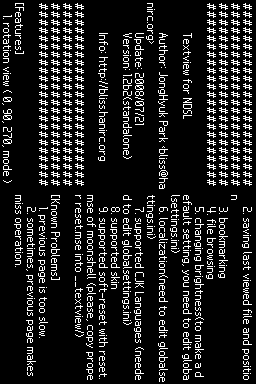
*Rotation view (0, 90, 270, mode) | * Rotation view (0, 90, 270, mode). | ||
*Saving last viewed file and position | * Saving last viewed file and position. | ||
*Bookmarking | * Bookmarking. | ||
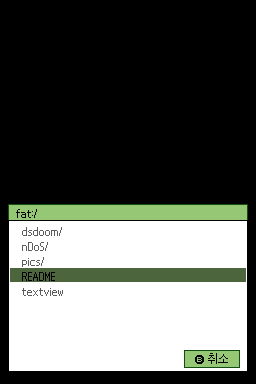
*File browsing | * File browsing. | ||
*Changing brightness | * Changing brightness. | ||
*Localization | * Localization. | ||
*Supported CJK Languages | * Supported CJK Languages. | ||
*Supported skin | * Supported skin. | ||
*Supported soft-reset with reset.mse of moonshell | * Supported soft-reset with reset.mse of moonshell. | ||
==User guide== | ==User guide== | ||
| Line 29: | Line 29: | ||
For CJK Languages suppors and Localization, edit globalsettings.ini. | For CJK Languages suppors and Localization, edit globalsettings.ini. | ||
Copy proper reset.mse into | Copy proper reset.mse into /textview/ for soft-reset supported with reset.mse of [[MoonShell|MoonShell]]. | ||
==Controls== | ==Controls== | ||
R - | R - Adjust Brightness (will not be saved) | ||
Start - Setup menu | |||
Select - Browse file | |||
Down/B - Next page | |||
Up/X - Previous page | |||
Right/A - Go to top page | |||
Left/Y - Go to next bookmark, Add/remove bookmark | |||
'''Note:''' Parenthesis stands for Buttons in 270″ rotated screen. | |||
==Screenshots== | |||
https://dlhb.gamebrew.org/dshomebrew/textview2.png | |||
https://dlhb.gamebrew.org/dshomebrew/textview3.png | |||
==Known issues== | ==Known issues== | ||
Previous page is | Previous page is slow. | ||
Sometimes, previous page makes miss operation. | Sometimes, previous page makes miss operation. | ||
| Line 55: | Line 59: | ||
==Changelog== | ==Changelog== | ||
'''Version 1.2b2 2008/07/21''' | '''Version 1.2b2 2008/07/21''' | ||
* | * Supported to changing font in setting menu. | ||
'''Version 1.2b1 2008/07/17''' | '''Version 1.2b1 2008/07/17''' | ||
*Implemented as standalone from akrpg/ak2 plugin. | * Implemented as standalone from akrpg/ak2 plugin. | ||
==External links== | |||
* Author's website - http://bliss.hanirc.org | |||
{{DS editors and readers}} | |||
Latest revision as of 05:48, 14 December 2024
| Textview | |
|---|---|
| Error creating thumbnail: Unable to save thumbnail to destination | |
| General | |
| Author | JongHyuk Park (Bliss) |
| Type | Utilities |
| Version | 1.2b2 Standalone |
| License | Mixed |
| Last Updated | 2008/07/21 |
| Links | |
| Download | |
| Website | |

Textview (Korean) is a standalone text viewer for NDS.
Features
- Rotation view (0, 90, 270, mode).
- Saving last viewed file and position.
- Bookmarking.
- File browsing.
- Changing brightness.
- Localization.
- Supported CJK Languages.
- Supported skin.
- Supported soft-reset with reset.mse of moonshell.
User guide
To change brightness, user needs to edit globalsettings.ini to make a default setting.
For CJK Languages suppors and Localization, edit globalsettings.ini.
Copy proper reset.mse into /textview/ for soft-reset supported with reset.mse of MoonShell.
Controls
R - Adjust Brightness (will not be saved)
Start - Setup menu
Select - Browse file
Down/B - Next page
Up/X - Previous page
Right/A - Go to top page
Left/Y - Go to next bookmark, Add/remove bookmark
Note: Parenthesis stands for Buttons in 270″ rotated screen.
Screenshots
Known issues
Previous page is slow.
Sometimes, previous page makes miss operation.
Changelog
Version 1.2b2 2008/07/21
- Supported to changing font in setting menu.
Version 1.2b1 2008/07/17
- Implemented as standalone from akrpg/ak2 plugin.
External links
- Author's website - http://bliss.hanirc.org
| |||||||||||||||||||||||||||||||||||||||