
The Time & Magik Trilogy: Difference between revisions
More actions
Created page with "{{Infobox homebrew | title = The Time & Magik Trilogy | image = File:Timemagikds.jpg | type = Adventure | version = 1.01 | licence = Mixed | aut..." |
No edit summary |
||
| (22 intermediate revisions by the same user not shown) | |||
| Line 1: | Line 1: | ||
{{Infobox | {{Infobox DS Homebrews | ||
| title | |title=The Time & Magik Trilogy | ||
| image | |image=thetimemagik.png | ||
| type | |description=Classic Graphic Adventure by Austin brothers. | ||
| version | |author=papafuji | ||
| | |lastupdated=2007/01/15 | ||
| | |type=Adventure | ||
| website | |version=1.01 | ||
|license=Mixed | |||
|download=https://dlhb.gamebrew.org/dshomebrew2/thetimemagik_1.01.zip | |||
}} | |website=http://gugusse.central.free.fr/papafuji/adventures.html | ||
}} | |||
The Time & Magik Trilogy is a text and graphic classic adventure game/interactive fiction written by Austin brothers, ported to the Nintendo DS, as part of the Nintendo DS Classic Adventures series. | |||
The Nintendo DS Classic Adventures series contains a range of text and graphic classic adventure games and interactive fictions ported to NDS created in the 80's for old computer like the TRS-80, ZX Spectrum, Acorn Electron, Commodore 64, Atari 8 bits or 16 bits machines like the Atari ST or the Amiga. | |||
The collection was ported to the NDS by papafuji, divided into 3 categories (see [[#External links|complete list]]): | |||
* Classic Graphic Adventures. | |||
* Magnetic Scrolls Adventures. | |||
* Classic Text Adventures. | |||
This homebrew is under the category of Classic Graphic Adventures, which you can find Level 9's adventures as well as Scott Adams and Brian Howarth adventures, with Atari 8 bits graphics or brand new NDS illustrations. | |||
==User guide== | ==User guide== | ||
All games from the Classic Adventure series have the same interface (stories on the top screen and text inputs on the bottom screen), and can be played exactly the same way. | |||
===Gameplay=== | |||
A time-travel trilogy of wonderous, terrifying quests where you'll combat every force from eternity´s most horrifying evil. You will fight for the preservation of time against dinosaurs, vikings, mystic robots, the sinister Timelords and finally The Mad Guardian of the Crystal and the grotesque creatures that guard his treasure. | A time-travel trilogy of wonderous, terrifying quests where you'll combat every force from eternity´s most horrifying evil. You will fight for the preservation of time against dinosaurs, vikings, mystic robots, the sinister Timelords and finally The Mad Guardian of the Crystal and the grotesque creatures that guard his treasure. | ||
Game titles include: | |||
* Lords of Time - [http://gugusse.central.free.fr/papafuji/adventures/solutions/LordsOfTime.html Walkthrough]. | |||
* Red Moon - [http://gugusse.central.free.fr/papafuji/adventures/solutions/RedMoon.html Walkthrough]. | |||
* The Price of Magik - [http://gugusse.central.free.fr/papafuji/adventures/solutions/ThePriceOfMagik.html Walkthrough]. | |||
===Input text=== | |||
* There are two ways to type words with the stylus of your Nintendo DS. | |||
** By default, you can directly draw the letters on the screen, according to the [https://www.gamebrew.org/wiki/The_Time_%26_Magik_Trilogy#Screenshots PA-Grafiti alphabet]. | |||
** Second way is to use the mini keyboard or the numerical keyboard. | |||
===Icons=== | |||
* To avoid typing always the same things, the most used orders can be called via the icons. | |||
=== | * Each icon has two or three states, for example: | ||
** The hand means GET, DROP and GIVE. | |||
** The N button means GO NORTH and GO UP. | |||
* Just pick an icon twice or more to select the good order. | |||
To avoid typing always the same things, the most used orders can be called via the icons | |||
===Vocabulary=== | ===Vocabulary=== | ||
A sentence in these games is defined by a verb + a noun, | * A sentence in these games is defined by a verb + a noun, such as OPEN DOOR, GO NORTH, etc. | ||
* Some sentences can have only one word, e.g. INVENTORY (to see what you're carrying) or SCORE (to see your score). | |||
Each game has | * Each game has its own vocabulary, but a lot a verbs are common to all the games. | ||
* In many cases, you don't have to write the entire word, only the first letters are necessary. For example: | |||
** G HELM is equivalent to GET HELMET. | |||
** CLIM DRAWB is equivalent to CLIMB DRAWBRIDGE. | |||
In many cases, you don't have to write the entire word | |||
{| class="wikitable" style="width: 800px;" | |||
! colspan="4"| List of the most common words | |||
= | |- | ||
| GO || ENTER || CLIMB || SWIM | |||
|- | |||
| HELP || LOOK || EXAMINE || GET | |||
|- | |||
| DROP || THROW || CAST || WEAR | |||
|- | |||
| REMOVE || OPEN || CLOSE || LOCK | |||
|- | |||
| UNLOCK || BREAK || CUT || CHOP | |||
|- | |||
| SAY || KILL || || | |||
|- | |||
! colspan="1"| Shortcuts | |||
! colspan="3"| Actions | |||
|- | |||
| colspan="1"| N S E W | |||
| colspan="3"| GO NORTH, GO SOUTH, GO EAST and GO WEST. | |||
|- | |||
| colspan="1"| NE NW SE SW | |||
| colspan="3"| NORTH-EAST, NORTH-WEST, etc (Level9 and Frotz games). | |||
|- | |||
| colspan="1"| H | |||
| colspan="3"| HELP. | |||
|- | |||
| colspan="1"| I | |||
| colspan="3"| INVENTORY. | |||
|- | |||
| colspan="1"| X | |||
| colspan="3"| EXAMINE (in classic games), EXITS (in Level 9 games). | |||
|- | |||
| colspan="1"| G | |||
| colspan="3"| GET (or AGAIN for Inform/Frotz games). | |||
|- | |||
| colspan="1"| L | |||
| colspan="3"| LOOK. | |||
|- | |||
| colspan="1"| SV | |||
| colspan="3"| SAVE. | |||
|- | |||
| colspan="1"| LD | |||
| colspan="3"| LOAD. | |||
|- | |||
| colspan="1"| R | |||
| colspan="3"| RESTORE. | |||
|- | |||
|} | |||
==Controls== | ==Controls== | ||
X - | X - Swap keyboard and grafiti input modes | ||
Y/A - | Y/A - YES | ||
B - | B - NO | ||
L/R - | L/R - Change image size (Level 9 and Magnetic games only) | ||
Start/Select - | Start/Select - Save, Restore, Pause, Exit the game | ||
==Screenshots== | |||
https://dlhb.gamebrew.org/dshomebrew/thetimemagik2.png | |||
https://dlhb.gamebrew.org/dshomebrew/thetimemagik3.png | |||
<!--BEGIN Online Emulator Section--> | |||
==Online emulator== | |||
{{EmulatorJS Main | |||
|width=515px | |||
|height=384px | |||
|EJS_backgroundImage=https://www.gamebrew.org/images/1/12/Thetimemagik.png | |||
|EJS_core=desmume2015 | |||
|EJS_gameName=The Time & Magik Trilogy | |||
|EJS_gameUrl=https://dlhb.gamebrew.org/onlineemulators/nds/thetimemagik.7z | |||
}} | |||
{{DS Control Settings}} | |||
<!--END Online Emulator Section--> | |||
==Credits== | ==Credits== | ||
Author - Austin brothers | Author - Austin brothers | ||
| Line 78: | Line 138: | ||
Game engine - Level9 | Game engine - Level9 | ||
==External links== | |||
* Author's website - http://gugusse.central.free.fr/papafuji/adventures.html | |||
{{DS classic adventure games}} | |||

Latest revision as of 00:25, 16 December 2024
| The Time & Magik Trilogy | |
|---|---|
 | |
| General | |
| Author | papafuji |
| Type | Adventure |
| Version | 1.01 |
| License | Mixed |
| Last Updated | 2007/01/15 |
| Links | |
| Download | |
| Website | |
The Time & Magik Trilogy is a text and graphic classic adventure game/interactive fiction written by Austin brothers, ported to the Nintendo DS, as part of the Nintendo DS Classic Adventures series.
The Nintendo DS Classic Adventures series contains a range of text and graphic classic adventure games and interactive fictions ported to NDS created in the 80's for old computer like the TRS-80, ZX Spectrum, Acorn Electron, Commodore 64, Atari 8 bits or 16 bits machines like the Atari ST or the Amiga.
The collection was ported to the NDS by papafuji, divided into 3 categories (see complete list):
- Classic Graphic Adventures.
- Magnetic Scrolls Adventures.
- Classic Text Adventures.
This homebrew is under the category of Classic Graphic Adventures, which you can find Level 9's adventures as well as Scott Adams and Brian Howarth adventures, with Atari 8 bits graphics or brand new NDS illustrations.
User guide
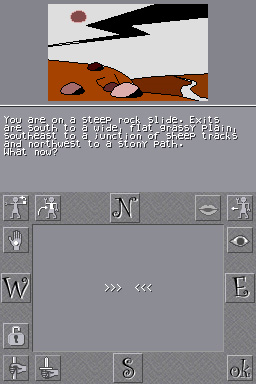
All games from the Classic Adventure series have the same interface (stories on the top screen and text inputs on the bottom screen), and can be played exactly the same way.
Gameplay
A time-travel trilogy of wonderous, terrifying quests where you'll combat every force from eternity´s most horrifying evil. You will fight for the preservation of time against dinosaurs, vikings, mystic robots, the sinister Timelords and finally The Mad Guardian of the Crystal and the grotesque creatures that guard his treasure.
Game titles include:
- Lords of Time - Walkthrough.
- Red Moon - Walkthrough.
- The Price of Magik - Walkthrough.
Input text
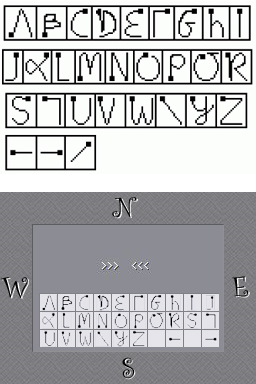
- There are two ways to type words with the stylus of your Nintendo DS.
- By default, you can directly draw the letters on the screen, according to the PA-Grafiti alphabet.
- Second way is to use the mini keyboard or the numerical keyboard.
Icons
- To avoid typing always the same things, the most used orders can be called via the icons.
- Each icon has two or three states, for example:
- The hand means GET, DROP and GIVE.
- The N button means GO NORTH and GO UP.
- Just pick an icon twice or more to select the good order.
Vocabulary
- A sentence in these games is defined by a verb + a noun, such as OPEN DOOR, GO NORTH, etc.
- Some sentences can have only one word, e.g. INVENTORY (to see what you're carrying) or SCORE (to see your score).
- Each game has its own vocabulary, but a lot a verbs are common to all the games.
- In many cases, you don't have to write the entire word, only the first letters are necessary. For example:
- G HELM is equivalent to GET HELMET.
- CLIM DRAWB is equivalent to CLIMB DRAWBRIDGE.
| List of the most common words | |||
|---|---|---|---|
| GO | ENTER | CLIMB | SWIM |
| HELP | LOOK | EXAMINE | GET |
| DROP | THROW | CAST | WEAR |
| REMOVE | OPEN | CLOSE | LOCK |
| UNLOCK | BREAK | CUT | CHOP |
| SAY | KILL | ||
| Shortcuts | Actions | ||
| N S E W | GO NORTH, GO SOUTH, GO EAST and GO WEST. | ||
| NE NW SE SW | NORTH-EAST, NORTH-WEST, etc (Level9 and Frotz games). | ||
| H | HELP. | ||
| I | INVENTORY. | ||
| X | EXAMINE (in classic games), EXITS (in Level 9 games). | ||
| G | GET (or AGAIN for Inform/Frotz games). | ||
| L | LOOK. | ||
| SV | SAVE. | ||
| LD | LOAD. | ||
| R | RESTORE. | ||
Controls
X - Swap keyboard and grafiti input modes
Y/A - YES
B - NO
L/R - Change image size (Level 9 and Magnetic games only)
Start/Select - Save, Restore, Pause, Exit the game
Screenshots
Online emulator
| Nintendo DS | Keyboard |
|---|---|

|

|

|

|

|

|

|

|

|

|

|

|

|

|

|

|

|

|
Credits
Author - Austin brothers
Editor - Level 9 Computing
1st release - 1983
Game engine - Level9
External links
- Author's website - http://gugusse.central.free.fr/papafuji/adventures.html
| |||||||||||