
Emerald Isle: Difference between revisions
More actions
Created page with "{{Infobox homebrew | title = Emerald Isle | image = File:Emeraldisleds.jpg | type = Adventure | version = 1.0 | licence = Mixed | author =..." |
No edit summary |
||
| (29 intermediate revisions by the same user not shown) | |||
| Line 1: | Line 1: | ||
{{Infobox | {{Infobox DS Homebrews | ||
| title | |title=Emerald Isle | ||
| image | |image=emeraldisle.png | ||
| type | |description=Classic Graphic Adventure by Austin brothers. | ||
| version | |author=papafuji | ||
| | |lastupdated=2007/01/12 | ||
| | |type=Adventure | ||
| website | |version=1.0 | ||
|license=Mixed | |||
|download=https://dlhb.gamebrew.org/dshomebrew2/emeraldisle_1.0.zip | |||
}} | |website=http://gugusse.central.free.fr/papafuji/adventures.html | ||
}} | |||
Emerald Isle is a text and graphic classic adventure game/interactive fiction written by Austin brothers, ported to the Nintendo DS, as part of the Nintendo DS Classic Adventures series. | |||
The Nintendo DS Classic Adventures series contains a range of text and graphic classic adventure games and interactive fictions ported to NDS created in the 80's for old computer like the TRS-80, ZX Spectrum, Acorn Electron, Commodore 64, Atari 8 bits or 16 bits machines like the Atari ST or the Amiga. | |||
The collection was ported to the NDS by papafuji, divided into 3 categories (see [[#External links|complete list]]): | |||
* Classic Graphic Adventures. | |||
* Magnetic Scrolls Adventures. | |||
* Classic Text Adventures. | |||
This homebrew is under the category of Classic Graphic Adventures, which you can find Level 9's adventures as well as Scott Adams and Brian Howarth adventures, with Atari 8 bits graphics or brand new NDS illustrations. | |||
==User guide== | ==User guide== | ||
Emerald Isle. Fierce winds seize your aircraft over the Bermuda Triangle and hul it to destruction. You escape by parachute, floating downwards to the lonely atoll, the | All games from the Classic Adventure series have the same interface (stories on the top screen and text inputs on the bottom screen), and can be played exactly the same way. | ||
===Gameplay=== | |||
Emerald Isle. Fierce winds seize your aircraft over the Bermuda Triangle and hul it to destruction. You escape by parachute, floating downwards to the lonely atoll, the Emerald Isle, from which few escape. The only way out is to solve its challenges... | |||
Walkthrough can be found [http://gugusse.central.free.fr/papafuji/adventures/solutions/EmeraldIsle.html here]. | Walkthrough can be found [http://gugusse.central.free.fr/papafuji/adventures/solutions/EmeraldIsle.html here]. | ||
=== | ===Input text=== | ||
There are two ways to type words with stylus of Nintendo DS | * There are two ways to type words with the stylus of your Nintendo DS. | ||
** By default, you can directly draw the letters on the screen, according to the [https://www.gamebrew.org/wiki/Emerald_Isle#Screenshots PA-Grafiti alphabet]. | |||
** Second way is to use the mini keyboard or the numerical keyboard. | |||
To avoid typing always the same things, the most used orders can be called via the icons | ===Icons=== | ||
* To avoid typing always the same things, the most used orders can be called via the icons. | |||
* Each icon has two or three states, for example: | |||
** The hand means GET, DROP and GIVE. | |||
** The N button means GO NORTH and GO UP. | |||
* Just pick an icon twice or more to select the good order. | |||
===Vocabulary=== | ===Vocabulary=== | ||
A sentence in these games is defined by a verb + a noun, | * A sentence in these games is defined by a verb + a noun, such as OPEN DOOR, GO NORTH, etc. | ||
* Some sentences can have only one word, e.g. INVENTORY (to see what you're carrying) or SCORE (to see your score). | |||
Each game has | * Each game has its own vocabulary, but a lot a verbs are common to all the games. | ||
* In many cases, you don't have to write the entire word, only the first letters are necessary. For example: | |||
** G HELM is equivalent to GET HELMET. | |||
** CLIM DRAWB is equivalent to CLIMB DRAWBRIDGE. | |||
In many cases, you don't have to write the entire word | |||
{| class="wikitable" style="width: 800px;" | |||
! colspan="4"| List of the most common words | |||
= | |- | ||
| GO || ENTER || CLIMB || SWIM | |||
|- | |||
| HELP || LOOK || EXAMINE || GET | |||
|- | |||
| DROP || THROW || CAST || WEAR | |||
|- | |||
| REMOVE || OPEN || CLOSE || LOCK | |||
|- | |||
| UNLOCK || BREAK || CUT || CHOP | |||
|- | |||
| SAY || KILL || || | |||
|- | |||
! colspan="1"| Shortcuts | |||
! colspan="3"| Actions | |||
|- | |||
| colspan="1"| N S E W | |||
| colspan="3"| GO NORTH, GO SOUTH, GO EAST and GO WEST. | |||
|- | |||
| colspan="1"| NE NW SE SW | |||
| colspan="3"| NORTH-EAST, NORTH-WEST, etc (Level9 and Frotz games). | |||
|- | |||
| colspan="1"| H | |||
| colspan="3"| HELP. | |||
|- | |||
| colspan="1"| I | |||
| colspan="3"| INVENTORY. | |||
|- | |||
| colspan="1"| X | |||
| colspan="3"| EXAMINE (in classic games), EXITS (in Level 9 games). | |||
|- | |||
| colspan="1"| G | |||
| colspan="3"| GET (or AGAIN for Inform/Frotz games). | |||
|- | |||
| colspan="1"| L | |||
| colspan="3"| LOOK. | |||
|- | |||
| colspan="1"| SV | |||
| colspan="3"| SAVE. | |||
|- | |||
| colspan="1"| LD | |||
| colspan="3"| LOAD. | |||
|- | |||
| colspan="1"| R | |||
| colspan="3"| RESTORE. | |||
|- | |||
|} | |||
==Controls== | ==Controls== | ||
X - | X - Swap keyboard and grafiti input modes | ||
Y/A - YES | |||
B - NO | |||
L/R - Change image size (Level 9 and Magnetic games only) | |||
Start/Select - Save, Restore, Pause, Exit the game | |||
==Screenshots== | |||
https://dlhb.gamebrew.org/dshomebrew/emeraldisle2.png | |||
https://dlhb.gamebrew.org/dshomebrew/emeraldisle3.png | |||
<!--BEGIN Online Emulator Section--> | |||
==Online emulator== | |||
{{EmulatorJS Main | |||
|width=515px | |||
|height=384px | |||
|EJS_backgroundImage=https://www.gamebrew.org/images/6/61/Emeraldisle.png | |||
|EJS_core=desmume2015 | |||
|EJS_gameName=Emerald Isle | |||
|EJS_gameUrl=https://dlhb.gamebrew.org/onlineemulators/nds/emeraldisle.7z | |||
}} | |||
{{DS Control Settings}} | |||
<!--END Online Emulator Section--> | |||
==Credits== | ==Credits== | ||
Author - | Author - Austin brothers | ||
Editor - Level 9 Computing | |||
1st release - 1985 | |||
Game engine - Level9 | |||
==External links== | |||
* Author's website - http://gugusse.central.free.fr/papafuji/adventures.html | |||
{{DS classic adventure games}} | |||

Latest revision as of 00:22, 16 December 2024
| Emerald Isle | |
|---|---|
 | |
| General | |
| Author | papafuji |
| Type | Adventure |
| Version | 1.0 |
| License | Mixed |
| Last Updated | 2007/01/12 |
| Links | |
| Download | |
| Website | |
Emerald Isle is a text and graphic classic adventure game/interactive fiction written by Austin brothers, ported to the Nintendo DS, as part of the Nintendo DS Classic Adventures series.
The Nintendo DS Classic Adventures series contains a range of text and graphic classic adventure games and interactive fictions ported to NDS created in the 80's for old computer like the TRS-80, ZX Spectrum, Acorn Electron, Commodore 64, Atari 8 bits or 16 bits machines like the Atari ST or the Amiga.
The collection was ported to the NDS by papafuji, divided into 3 categories (see complete list):
- Classic Graphic Adventures.
- Magnetic Scrolls Adventures.
- Classic Text Adventures.
This homebrew is under the category of Classic Graphic Adventures, which you can find Level 9's adventures as well as Scott Adams and Brian Howarth adventures, with Atari 8 bits graphics or brand new NDS illustrations.
User guide
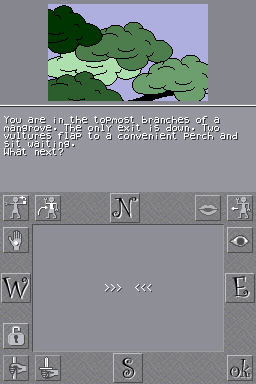
All games from the Classic Adventure series have the same interface (stories on the top screen and text inputs on the bottom screen), and can be played exactly the same way.
Gameplay
Emerald Isle. Fierce winds seize your aircraft over the Bermuda Triangle and hul it to destruction. You escape by parachute, floating downwards to the lonely atoll, the Emerald Isle, from which few escape. The only way out is to solve its challenges...
Walkthrough can be found here.
Input text
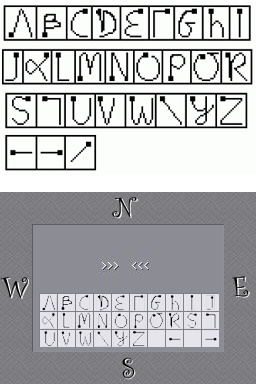
- There are two ways to type words with the stylus of your Nintendo DS.
- By default, you can directly draw the letters on the screen, according to the PA-Grafiti alphabet.
- Second way is to use the mini keyboard or the numerical keyboard.
Icons
- To avoid typing always the same things, the most used orders can be called via the icons.
- Each icon has two or three states, for example:
- The hand means GET, DROP and GIVE.
- The N button means GO NORTH and GO UP.
- Just pick an icon twice or more to select the good order.
Vocabulary
- A sentence in these games is defined by a verb + a noun, such as OPEN DOOR, GO NORTH, etc.
- Some sentences can have only one word, e.g. INVENTORY (to see what you're carrying) or SCORE (to see your score).
- Each game has its own vocabulary, but a lot a verbs are common to all the games.
- In many cases, you don't have to write the entire word, only the first letters are necessary. For example:
- G HELM is equivalent to GET HELMET.
- CLIM DRAWB is equivalent to CLIMB DRAWBRIDGE.
| List of the most common words | |||
|---|---|---|---|
| GO | ENTER | CLIMB | SWIM |
| HELP | LOOK | EXAMINE | GET |
| DROP | THROW | CAST | WEAR |
| REMOVE | OPEN | CLOSE | LOCK |
| UNLOCK | BREAK | CUT | CHOP |
| SAY | KILL | ||
| Shortcuts | Actions | ||
| N S E W | GO NORTH, GO SOUTH, GO EAST and GO WEST. | ||
| NE NW SE SW | NORTH-EAST, NORTH-WEST, etc (Level9 and Frotz games). | ||
| H | HELP. | ||
| I | INVENTORY. | ||
| X | EXAMINE (in classic games), EXITS (in Level 9 games). | ||
| G | GET (or AGAIN for Inform/Frotz games). | ||
| L | LOOK. | ||
| SV | SAVE. | ||
| LD | LOAD. | ||
| R | RESTORE. | ||
Controls
X - Swap keyboard and grafiti input modes
Y/A - YES
B - NO
L/R - Change image size (Level 9 and Magnetic games only)
Start/Select - Save, Restore, Pause, Exit the game
Screenshots
Online emulator
| Nintendo DS | Keyboard |
|---|---|

|

|

|

|

|

|

|

|

|

|

|

|

|

|

|

|

|

|
Credits
Author - Austin brothers
Editor - Level 9 Computing
1st release - 1985
Game engine - Level9
External links
- Author's website - http://gugusse.central.free.fr/papafuji/adventures.html
| |||||||||||