
Wasabi GBA: Difference between revisions
More actions
No edit summary |
No edit summary |
||
| (20 intermediate revisions by 2 users not shown) | |||
| Line 1: | Line 1: | ||
{{Infobox GBA Homebrews | |||
|title=Wasabi | |||
|image=wasabigba.png | |||
|description=Supervision emulator. | |||
|author=FluBBa (Fredrik Ahlström) | |||
|lastupdated=2024/04/10 | |||
|type=Handheld | |||
|version=0.2.4 | |||
|license=Mixed | |||
|downloadraw=[https://dlhb.gamebrew.org/gbahomebrews/wasabigbapogo.7z 1.0] - [https://dlhb.gamebrew.org/gbahomebrews/wasabigba.7z 0.2.4 Download] | |||
|website=https://github.com/FluBBaOfWard/WasabiGBA | |||
|source=https://github.com/FluBBaOfWard/WasabiGBA | |||
}} | |||
{{#seo: | {{#seo: | ||
|title= (Handheld) - GameBrew | |title= (Handheld) - GameBrew | ||
| Line 5: | Line 18: | ||
|image_alt=Wasabi | |image_alt=Wasabi | ||
}} | }} | ||
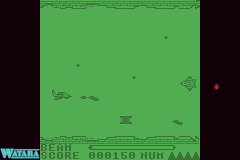
Wasabi is a Watara Supervision emulator for the GBA. It was first release as a [[PogoShell GBA|PogoShell]] plugin, the homebrew was re-released in 2022. | |||
| | The release currently does not include a builder, you can use [[GBA_Emulator_Compilation_Build_Scripts|patters's Python build scripts]] to compile the ROM. | ||
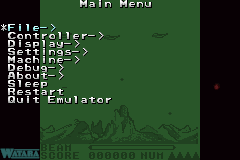
==User guide== | |||
'''File:''' | |||
*Load Game - Select a game to load. | |||
*Load State - Load a previously saved state of the currently running game. | |||
*Save State - Save a state of the currently running game. | |||
*Save Settings - Save the current settings. | |||
*Reset Game - Reset the currently running game. | |||
'''Controller:''' | |||
*Autofire - Choose to enable or disable autofire. | |||
*Swap A/B - Swap which GBA button is mapped to which SV button. | |||
'''Display:''' | |||
*Gamma - Adjust the gamma ("brightness"). | |||
*Contrast - Change palette contrast. | |||
*Palette - Select from different palettes. | |||
'''Settings:''' | |||
*Speed - Switch between speed modes (Normal, 200%, Max, 50%). | |||
*Autoload State - Toggle savestate autoloading. | |||
**Automagically load the savestate associated with the selected game. | |||
*Autosave Settings - Save settings when leaving the menu if any changes are made. | |||
*Autopause Game - Toggle if the game should pause when opening the menu. | |||
*Overclock EWRAM - Adjust waitstates on EWRAM (use at your own risk, doesn't work on Gameboy Micro). | |||
*Autosleep - Change autosleep time (see also Sleep). | |||
'''Machine Settings:''' | |||
* Machine - Select the emulated machine. | |||
'''Debug:''' | |||
*Debug Output - Show an FPS meter for now. | |||
*Step Frame - Emulate one frame. | |||
'''Sleep:''' | |||
*Put the GBA into sleep mode. | |||
*Start+Select wakes up from sleep mode (activated from this menu or from 5/10/30 minutes of inactivity). | |||
'''Quit Emulator:''' | |||
*Tries to reset the Flashcart and reboots the GBA. | |||
==Controls== | ==Controls== | ||
GBA A/B - Supervision A/B | |||
GBA Start - Supervision Start | |||
GBA Select - Supervision Select | |||
GBA D-Dad - Supervision D-Pad | |||
R | L+R - Menu | ||
Start+Select - Wake up from sleep mode | |||
==Screenshots== | |||
https://dlhb.gamebrew.org/gbahomebrews/wasabigba2.png | |||
https://dlhb.gamebrew.org/gbahomebrews/wasabigba3.png | |||
==Changelog== | |||
'''V0.2.4 2024/04/10''' | |||
* Added sound. | |||
* Optimized CPU core. | |||
'''V0.2.3 2022/10/14''' | |||
* Added Quit Emulator menu item. | |||
* Added Overclock EWRAM menu item. | |||
'''V0.2.2 2022/10/07''' | |||
* Added new debug menu. | |||
* Better menu traversing. | |||
'''V0.2.1 2022/09/26''' | |||
* First re-release of Wasabi for GBA, this time all games should "work". | |||
* Still missing sound. | |||
'''V1.0 2004/11/30''' | '''V1.0 2004/11/30''' | ||
*First release: cpu, vram emulated. | *First release: cpu, vram emulated. | ||
| Line 53: | Line 101: | ||
==Credits== | ==Credits== | ||
Huge thanks to Loopy for the incredible PocketNES. | Huge thanks to Loopy for the incredible PocketNES, without it this emu would probably never have been made. | ||
Peter Trauner for | Thanks to: Peter Trauner & Kevin Horton for docs about the Supervision. | ||
Osman Celimli for docs, tests & help about the Supervision. http://tailchao.com/Wataroo/ | |||
==External links== | ==External links== | ||
* Author's website - [https://web.archive.org/web/20060720235823/http://hem.passagen.se/flubba/gba.html http://hem.passagen.se/flubba/gba.html] (archived) | * Author's website - [https://web.archive.org/web/20060720235823/http://hem.passagen.se/flubba/gba.html http://hem.passagen.se/flubba/gba.html] (archived) | ||
* GitHub - https://github.com/FluBBaOfWard/WasabiGBA | |||
{{GBA emulators}} | |||
[[Category:GBA plugins for PogoShell]] | |||
[[Category:GBA | |||
Latest revision as of 09:00, 13 December 2024
| Wasabi | |
|---|---|
 | |
| General | |
| Author | FluBBa (Fredrik Ahlström) |
| Type | Handheld |
| Version | 0.2.4 |
| License | Mixed |
| Last Updated | 2024/04/10 |
| Links | |
| 1.0 - 0.2.4 Download | |
| Website | |
| Source | |
Wasabi is a Watara Supervision emulator for the GBA. It was first release as a PogoShell plugin, the homebrew was re-released in 2022.
The release currently does not include a builder, you can use patters's Python build scripts to compile the ROM.
User guide
File:
- Load Game - Select a game to load.
- Load State - Load a previously saved state of the currently running game.
- Save State - Save a state of the currently running game.
- Save Settings - Save the current settings.
- Reset Game - Reset the currently running game.
Controller:
- Autofire - Choose to enable or disable autofire.
- Swap A/B - Swap which GBA button is mapped to which SV button.
Display:
- Gamma - Adjust the gamma ("brightness").
- Contrast - Change palette contrast.
- Palette - Select from different palettes.
Settings:
- Speed - Switch between speed modes (Normal, 200%, Max, 50%).
- Autoload State - Toggle savestate autoloading.
- Automagically load the savestate associated with the selected game.
- Autosave Settings - Save settings when leaving the menu if any changes are made.
- Autopause Game - Toggle if the game should pause when opening the menu.
- Overclock EWRAM - Adjust waitstates on EWRAM (use at your own risk, doesn't work on Gameboy Micro).
- Autosleep - Change autosleep time (see also Sleep).
Machine Settings:
- Machine - Select the emulated machine.
Debug:
- Debug Output - Show an FPS meter for now.
- Step Frame - Emulate one frame.
Sleep:
- Put the GBA into sleep mode.
- Start+Select wakes up from sleep mode (activated from this menu or from 5/10/30 minutes of inactivity).
Quit Emulator:
- Tries to reset the Flashcart and reboots the GBA.
Controls
GBA A/B - Supervision A/B
GBA Start - Supervision Start
GBA Select - Supervision Select
GBA D-Dad - Supervision D-Pad
L+R - Menu
Start+Select - Wake up from sleep mode
Screenshots
Changelog
V0.2.4 2024/04/10
- Added sound.
- Optimized CPU core.
V0.2.3 2022/10/14
- Added Quit Emulator menu item.
- Added Overclock EWRAM menu item.
V0.2.2 2022/10/07
- Added new debug menu.
- Better menu traversing.
V0.2.1 2022/09/26
- First re-release of Wasabi for GBA, this time all games should "work".
- Still missing sound.
V1.0 2004/11/30
- First release: cpu, vram emulated.
- Probably the last release as well.
Credits
Huge thanks to Loopy for the incredible PocketNES, without it this emu would probably never have been made.
Thanks to: Peter Trauner & Kevin Horton for docs about the Supervision.
Osman Celimli for docs, tests & help about the Supervision. http://tailchao.com/Wataroo/
External links
- Author's website - http://hem.passagen.se/flubba/gba.html (archived)
- GitHub - https://github.com/FluBBaOfWard/WasabiGBA
| |||||||||||||||||||||||||||||||||||||||||||||||||||||||||||||||||||||||||||||||||||||||||||||||