
vitaImmich
More actions
| vitaImmich | |
|---|---|
 | |
| General | |
| Author | SadsArches |
| Type | Other Apps |
| Version | 1.0 |
| License | N/A |
| Last Updated | 2026/06/18 |
| Links | |
| Download | |
| Website | |
| Source | |
vitaImmich is a native Immich client for the Sony PlayStation Vita, created by SadsArches. It lets the handheld browse, search and map an entire self-hosted photo and video library over Wi-Fi, play videos on the Vita's hardware decoder, and back up the device's camera roll. The project is described by its author as a proof-of-concept port of Immich to the PS Vita, and uses the app title id VIMM00001.
Features
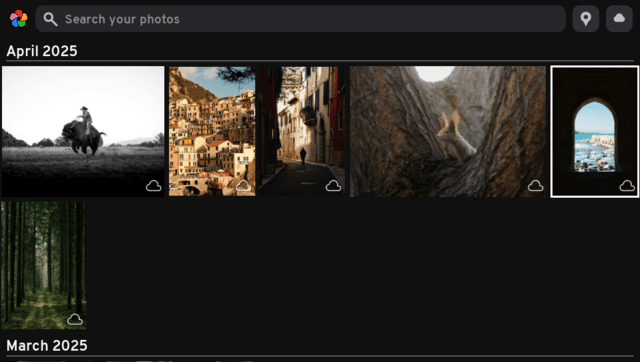
- Timeline — the entire library shown as a justified, date-grouped grid (newest first), styled after the Immich web app.
- Smart search — free-text CLIP search entered from the Vita's keyboard.
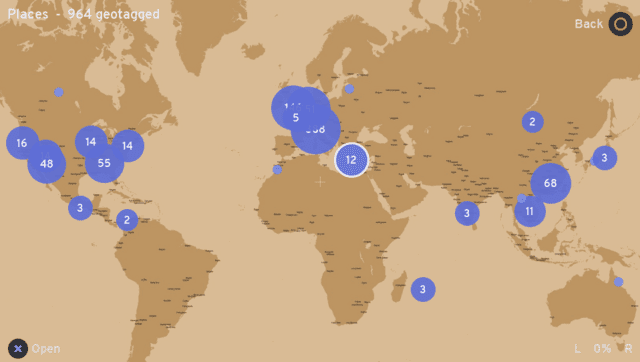
- Places map — geotagged photos clustered on a world map; pan/zoom with the sticks and open any cluster as its own gallery.
- Full-screen viewer — pinch/stick zoom and pan, swipe between photos, and hardware-accelerated H.264 video playback.
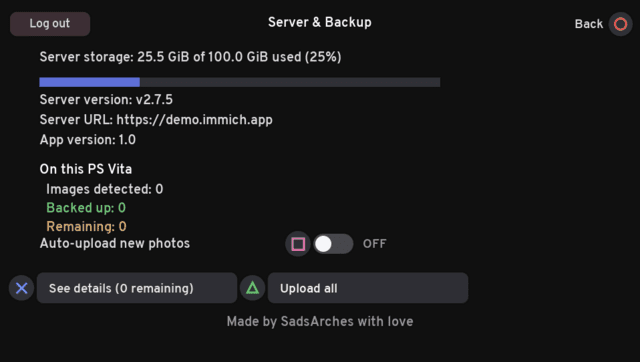
- Camera-roll backup — scans the Vita's photos and videos, dedupes against the server, and uploads on request.
- Server overview — storage usage, server/app versions, and per-device backup status.
- Touch and buttons — the whole UI can be driven with the front touchscreen or the d-pad/sticks.
Installation
Requirements:
- A PS Vita running HENkaku/h-encore with VitaShell.
- A reasonably recent Immich server reachable over the Vita's Wi-Fi.
- An Immich API key (web UI → Account Settings → API Keys), or an email/password.
Steps:
- Get
vitaImmich.vpkfrom the latest release (or build it from source) and install it with VitaShell. - Launch it once; it creates
ux0:data/vitaimmich/config.txt. - Edit that file (VitaShell's FTP via SELECT makes this easy):
server=http://192.168.1.100:2283
apikey=your-immich-api-key
Behind a reverse proxy without NAT loopback, the domain can be pinned to the LAN IP so the Host header / TLS SNI stay on the domain but the connection goes straight to the server:
server=https://immich.example.com
apikey=your-immich-api-key
serverip=192.168.1.100
- Relaunch.
Additional config.txt tunables for backup: syncdir=<folder> (repeatable) and syncmaxmb=<MB> (size cap; files over 512 MB are skipped by default, 0 disables).
Camera-roll backup
The camera-roll backup mounts the Photos app storage (photo0: / ux0:picture) plus ux0:video/CAMERA, scans for .jpg/.jpeg/.png/.mp4 files, and merges them into the same date-sorted timeline as the server library. Each cell shows a status badge: blue-grey dot (cloud only), orange up-arrow (local only), blinking (queued/uploading), green check (backed up), and red dot (failed). A background thread SHA-1-hashes each local file and checks the server for existing copies; uploads only start when queued by the user. Backup is one-way (Vita → server). Note that TLS verification is disabled (no CA bundle ships), so plain HTTP on a trusted LAN is preferred. Video playback uses the Vita's hardware decoder (SceAvPlayer), so only MP4 (H.264/AAC) plays, via Immich's transcoded playback stream.
Limitations
- TLS verification is disabled (no CA bundle ships) — prefer plain HTTP on a trusted LAN, or treat HTTPS as unverified.
- Videos download in full to the memory card before playing (deleted after). Playback is the Vita's hardware decoder via SceAvPlayer, so only MP4 (H.264/AAC) plays — Immich's transcoded video/playback stream is used.
- Backup is one‑way (Vita → server); deviceId is hard‑coded to "PS Vita" and uploads aren't added to an album.
- Thumbnails stream in one at a time on a background thread (grey placeholder until loaded); hashing the camera roll fills statuses in gradually.
Controls
Timeline
| Button | Action |
|---|---|
| D-pad / sticks | Move selection (hold to repeat) |
| L / R | Jump a month up / down |
| △ | Smart search |
| X | Open full screen |
| Places / server icons (touch) | Open the Places map / server page |
| SELECT | Sync overview |
| START | Exit |
Places map
| Button | Action |
|---|---|
| Left stick / d-pad / drag | Pan |
| Right stick / L · R | Zoom out / in |
| X | Open the centred cluster as a gallery |
| △ | Toggle the lat/lon graticule |
| O | Back |
Full-screen viewer
| Button | Action |
|---|---|
| ← / → | Previous / next |
| Right stick / L · R | Zoom (left stick pans) |
| X | Play video / retry a failed load |
| O | Back |
Video playback: X pause/resume · ←/→ seek ±10 s · O stop.
Screenshots
Changelog
v1.0
- First Release.