
Adrenaline Vita by Isage
More actions
| Adrenaline | |
|---|---|
 | |
| General | |
| Author | TheFloW, isage |
| Type | Custom Firmwares |
| Version | 8.0.2 |
| License | GPL-3.0 |
| Last Updated | 2026/07/12 |
| Links | |
| Download | |
| Website | |
| Source | |
This is a fork of Adrenaline for the PS Vita.
Adrenaline is a software that modifies the official PSP Emulator using taiHEN CFW framework to make it run a PSP 6.61 custom firmware. Thanks to the power of taiHEN, Adrenaline can inject custom code into the IPL which allows unsigned code to run at boottime.
Installation
How to update
If you have already been using Adrenaline, simply open Adrenaline.vpk as zip file and copy all modules from sce_module to ux0:app/PSPEMUCFW/sce_module.
Alternatively, use "System update" from XMB and follow instructions.
How to install
Please only do this approach for a fresh installation, otherwise please refer to the guide above.
- Remove the Adrenaline bubble and the
ux0:app/PSPEMUCFW/sce_module/adrenaline_kernel.skprxpath from the taiHEN config.txt and finally reboot your device. - Download Adrenaline.vpk and install it using VitaShell.
- Launch Adrenaline and press Cross to download the 6.61 firmware. After finishing it will automatically terminate.
- Relaunch Adrenaline, this time it will go into pspemu mode. Follow the instructions on screen.
Getting rid of double launch bug
Adrenaline has been redesigned in 6.61 Adrenaline-6, so you'd need to launch Adrenaline twice everytime you reboot your device. To get rid of that, simply write this line to *KERNEL
*KERNEL
ux0:app/PSPEMUCFW/sce_module/adrenaline_kernel.skprx
Manuals for ISO games
Adrenaline now supports displaying manuals for ISO-format games:
- Obtain/create DOCUMENT.DAT for you game.
- Rename it to <your_iso_name>.DAT and place next to it. E.g.: if you have
ux0:/pspemu/ISO/MYGAME.isoname your manualux0:/pspemu/ISO/MYGAME.DAT
Screenshots
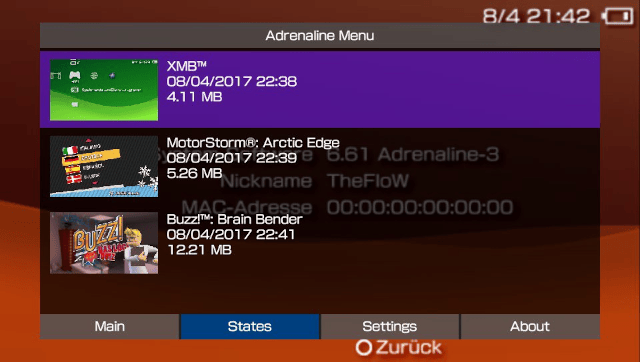
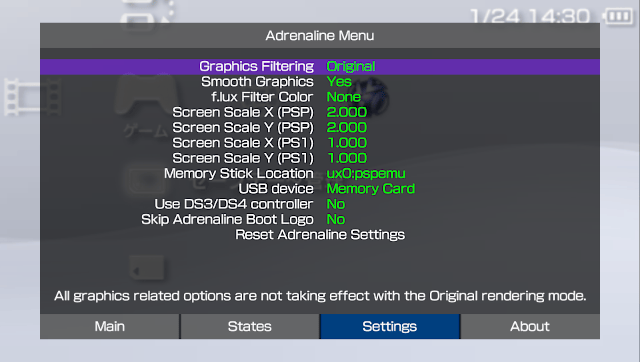
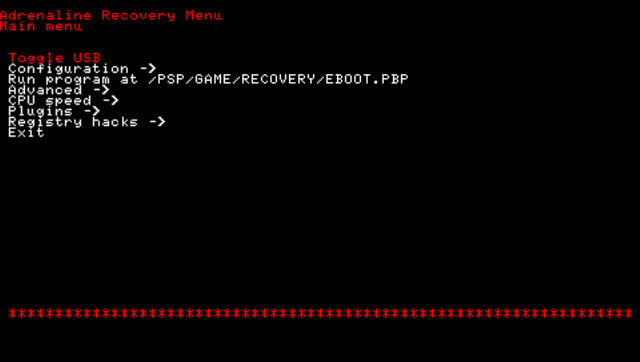
Changelog
v8.0.2
- Adrenaline
- Fix the PS1 overlay image not processing correctly
- Epinephrine CFW
- Fix Saved Data Utility not opening with System Storage set to disabled.
- Fix XMB Memory Stick item showing zero free space after accessing Saved Data Utility
- Fix plugins failing to load on POPS (PS1 titles)
- Fix crash in opening context menu when XMB CFW Settings is disabled
- Fix Uncategorized category on Categories Lite showing corrupt icons
- Refactor: Don't try to load userlevel plugins on extra RAM
- Refactor: Make fake TotalFreeMem more precise
- DEV: Fix guglue library not exported with weak reference support
- Updater
- Feature: Upgrade the design of the updater
v8.0.1
- Epinephrine CFW
- Fixed Categories Lite not able to find the categorized ISO files
v8.0.0
- Adrenaline
- Add option to select the vPSP Custom Firmware to use
- Add
Scale2xgraphical filter options - Add
Scale2x Plusgraphical filter options - Add
Scale3xgraphical filter options - Add image overlay filter for PS1 game/apps
- Add an option to select a System Storage location to expose
ef0:to the chosen CFW. - Implement a GPU-rendered VSH Menu
- The classical version is still available through configuration
- "Fix" manual double launch on first install
- Improve frame pacing on Original graphics filtering
- Implement hold
Squareto hide Adrenaline Menu on graphics-related settings - Pauses PSP game when Adrenaline Menu is opened
- Implement the ability to hide the Adrenaline Menu to better look at the screen for differences
- Epinephrine CFW
- Breaking change: New plugin configuration format
- Only one configuration file
/pspemu/seplugins/plugins.txtfor all runlevels - Finer control over when to enable/disable plugins
- Support for plugins in specific games
- Support for plugin only on homebrew apps
- Migration instructions in the docs
- Only one configuration file
- Update the Inferno Driver to Inferno 2
- Introduce March33 Driver v2: An evolution of the March33 ISO driver
- Introduce MinimalEdition Driver v2: An evolution of the ME ISO driver
- Introduce an improved implementation of the GalaxyController
- Add support for launching
JSO,ZSO,CSOv2, andDAXcompressed ISO formats using any ISO driver. - Add support for per-file descriptor UMD seek/read speed emulation to ISO drivers
- Add CFW file hider in games
- Introduce CFW Settings on the XMB
- Introduce Plugin Manager on the XMB
- Add support to show the
System Storageon the XMB - Improve stability of the
Force High MemoryCFW option - Improve the speed and efficiency of all UMDemu ISO drivers
- Add Custom POPS Configuration injection for custom or converted PS1 game/apps
- Patch libcrypt for custom or converted PS1 game/apps
- Add
Memory Stick Cacheto speedup I/O operations in the Memory Stick drive (ms0) - Add
Use Graphic Engine 2andUse Media Engine 2advanced CFW options - Add
Fake max free memoryadvanced CFW option - Add
Hide CFW files in PSP gamesgeneral CFW option - Add
TTY redirectionadvanced CFW option - Add support to show app version on XMB info for ISO games
- Support to show the correct version with game updates (
PBOOT.PBP)
- Support to show the correct version with game updates (
- Implement "Hold L while launching apps" to not load plugins
- Implement "Hold R while launching ISO apps/games" to execute
BOOT.BINinstead ofEBOOT.BIN - Implement PSP native music player and
SenseMeto continue to play music after system suspend - Add quick exit to VSH key combos
- PSP games/homebrew:
L+R+Down+SelectorL+R+Down+Start - PS1 games:
L2+R2+Down+SelectorL2+R2+Down+Start
- PSP games/homebrew:
- Fix recovery menu crashing on empty plugin list when d-pad is clicked.
- Fix module privilege level reset on official apps wrongly and set it to the user privilege level on homebrews
- Fix
SenseMelaunch error - Fix potential issues related to privilege level for other official apps
- Fix homebrew software not able to call some
sceKernelLoadModule*functions that they should be able to use
- Fix
- Game Compatibility:
- Fix PBP collection games (e.g.
Ys I&II,Sega Genesis Collection) crashing after game selection - Fix
BEATScustom tracks - Fix the infinite loading screen on
Jackass: The Game - Fix
The Simpsons Gamecrashing during the start of the game - Fix
TwinBee Portablecrashing when not using English or Japanese language - Fix
Smakdown vs RAW 2009by bypassing anti-CFW check - Fix
Smakdown vs RAW 2010by bypassing anti-CFW check - Fix
Smakdown vs RAW 2011by bypassing anti-CFW check - Fix
Aces of Warby bypassing anti-CFW check - Fix
Pangya Fantasy Golfby bypassing anti-CFW check - Fix freeze on
Bust-A-Moveby bypassing anti-CFW check - Fix
Lego Star Wars IIWLAN switch state wrongly returning "off" - Fix
Megpoid the Music#audio and synchronization issues when run as ISO/CISO - Patch to remove the "overclocked" message on
ATV Pro - Fix
Rainbow Six: Vegasinstabilities with high memory layout options - Fix
Assassin's Creed: Bloodlinesinstabilities with Stable high memory layout - Fix
PaRappa The Rapperinstabilities with Stable high memory layout - Fix
Tony Hawk's Underground 2: Remix(US) erroring with a lack of space on save - Fix
DJ Maxby bypassing anti-CFW checks
- Fix PBP collection games (e.g.
- Breaking change: New plugin configuration format
- Developer environment
- DEV: Introduce the CFW library
SysclibForUser: Export many C-lib functions for app and user-level plugins developers to use to help avoid linking to newlibc and reduce binary size - DEV: Expand CFW libraries API
- DEV: Improve CFW API compatibility with other CFWs' API (M33, ME, PRO, and ARK):
KUBridge,SystemCtrlForUser,SystemCtrlForKernel, andSysclibForUser - DEV: Introduce CFW API to use
sceGUon XMB/VSH:guglue - DEV: Add support for
MEMSIZE=2(to request only stable extra RAM) - DEV: Add support for
EFAWARE=1 - DEV: Make PSPemu
sceKernelPowerTickto behave as the VITAsceKernelPowerTick - DEV: Introduce
Adrenaline Log, a C header library that developers can use even outside of Adrenaline (i.e. your project) - DEV: Fix homebrew software not able to call some
sceKernelLoadModule*functions that they should be able to use - DEV: Add stubs for the UMDemu ISO drivers
- DEV: Add NID translation table to
sceAudioRouting_driver(Improve plugin compatibility) - DEV: Create, use, and share with ARK a PSP CFW SDK
- DEV: Split patches to make vPSP possible in its own module:
Pentazemin - DEV: Load user plugins to extra memory if possible
- Internal: Big refactoring to better share code and modules
- Internal: Some code reorganization
- Internal: Code clean ups
- DEV: Introduce the CFW library
v7.1.7
- Fix autoboot option.
- Support vita firmwares 3.71-3.74.
v7.1.6
- Fix recovery plugin manager.
v7.1.5
- New recovery/installer.
- Support for displaying manuals for ISO-format games.
Adrenaline now supports displaying manuals for ISO-format games:
- Obtain/create DOCUMENT.DAT for you game.
- Rename it to <your_iso_name>.DAT and place next to it.
- E.g.: if you have ux0:/pspemu/ISO/MYGAME.iso name your manual ux0:/pspemu/ISO/MYGAME.DAT
v7.1.4
- Fix 661 fw installer by reverting fancier recovery.
v7.1.3
- THERE'S KNOWN ISSUE WHERE FRESH INSTALL DOESN'T WORK. USE 7.1.4.
- Don't load plugins in recovery (for real).
- Support for downloading official updates for EBOOT/ISO.
- Support for loading updates/dlc for EBOOT/ISO. (you still need npdrm_free for EBOOT-format games)
- Support for autoboot /PSP/GAME/EBOOT.PBP.
- Update version in LiveArea automatically (if using network update. otherwise version will be updated after first launch).
- Support for logging psp printf's via catlog.
v7.1.2
- Fixed photo/video browser in xmb.
- Stop loading plugins in recovery.
- You can update from 7.1+ by using "System Update" from XMB.
- Known issues: if you stop video in video player it hangs pspemu.
v7.1.1
- Fixed version info display.
- You can update from 7.1 by using "System Update" from XMB.
v7.1.0
- Fixed XMB camera app.
- Added support for PS2/PS3 <-> PSP game link.
- Cleaner recovery with adjustable color.