
NitroGrafx
More actions
| NitroGrafx | |
|---|---|
 | |
| General | |
| Author | Fredrik Ahlstrom (FluBBa) |
| Type | Console |
| Version | 0.9 |
| License | Mixed |
| Last Updated | 2026/02/15 |
| Links | |
| Download | |
| Website | |
| Source | |
NitroGrafx is an emulator for the Nintendo DS (NDS) that allows users to play games originally developed for the PC-Engine/TurboGrafx-16 console. In addition to emulating the original hardware, it also has the capability to emulate some (Super) CD-ROM^2 & Arcade Card games. However, it should be noted that not all games are fully compatible, with some US games not working due to encryption.
To play these games, users may need to decrypt them using another emulator such as PCEToy or Ootake before using NitroGrafx. Additionally, it is important to avoid using "overdumps" as they can cause issues with the PC Engine.
Installation
Note: You will need to prepare the compatible BIOS images in order to use this emulator.
Download and extract file. Depending on your flashcart you might have to DLDI patch the emulator file.
You should also create a NitroGrafx directory either in the root of your card or in the data directory (eg h:\NitroGrafx or h:\data\NitroGrafx).
Put your games on your flash card, max 512 games per folder. Supports zipped files (uncompressed). Filenames must not be longer than 62 characters.
CD-ROM games can be in .iso or .bin/.cue formats.
User guide
Loading CD-ROM games
Select a CD-ROM System rom from Options> Machine> BiosSettings> SelectBios.
Select a .iso file or a .cue file from a bin/cue combo.
Press the Start button when the CD-ROM System screen shows up.
Right now NitroGrafx supports loose .iso files for games that only has 1 data track (or 2 where the last one is a backup), or bin/cue files for complete cd rips.
CD-Rom games tested
| Title | Status |
|---|---|
| Addams Family (U) | Ok, fullscreen images flicker. |
| Cosmic Fantasy 2 (U) | Intro & game ok. |
| Download 2 (J) | Ok. |
| Exile (U) | Crashes if you hit the Ants. |
| Final Zone II (U) | Ok, need to skip intro. |
| Gain Ground | Too big. |
| Golden Axe | Ok, need to skip intro. |
| HellFire S | Ok. |
| Jyuohki (J)/(Altered Beast) | Ok. |
| Macross 2036 (J) | Ok. |
| MineSweeper (J) | Ok. |
| Monster Lair | Ok. |
| Rayxanber II (U) | Palette issues on first Boss, corrupt "Game Over" screen. |
| Red Alert (J) | Ok. |
| Road Spirits | Ok. |
| Space Fantasy Zone (J/U) | Ok. |
| Splash Lake (U) | Ok. |
| Spriggan (J) | Ok, stops after 3rd level? |
| Super Darius | Ok. What is different from the Hucard version? A bigger logo? |
| Valis II (U) | Ok, need to skip intro. |
| Valis III (U) | Works. |
| Valis IV (J) | Same as Valis III. |
| Ys Book 1&2 (U) | Ok. |
| Ys 3: Wanderers From Ys (U) | ? |
Super CD-Rom games tested
| Title | Status |
|---|---|
| Conan | Intro Ok. |
| Cotton - Fantastic Night Dream (U) | Ok. |
| Double Dragon 2 | Ok. |
| Dracula X (J) | Ok. |
| Forgotten Worlds (J) | Ok. |
| Genocide (J) | Ok. |
| Gradius 2 (J) | Ok. |
| Image Fight 2 (U) | Ok. |
| Loom (U) | Ok. |
| Lords Of Thunder (U) | Ok. |
| Nexzr | Ok. |
| Rayxanber III (J) | Ok. |
| Riot Zone | Ok. |
| R-Type Complete CD (J) | Ok. |
| Shadow of the Beast (U) | Ok. |
| Winds Of Thunder (J) | Ok. |
Additional notes
You can rip your own CDs with program such as Cdrwin. If you already have your games make sure to check the rip with TocFixer, and test them on audio player (.wav) and virtual CD device (.cue)/ mount it in a virtual CD device and run in an emulator like Ootake (.bin/.cue).
Also note that all games are not perfect (a lot of US games doesn't work because they are encrypted, use PCEToy or the emulator Ootake to decrypt these before you use them). And don't use overdumps as these are evil on PC Engine.
Controls
L+R or Touchscreen - Access GUI
A/B - PC-Engine II & I
Start - PC-Engine Run
Select - PC-Engine Select
D-Pad - PC-Engine d-pad
Close/Open DS - Sleep mode/resume emulator
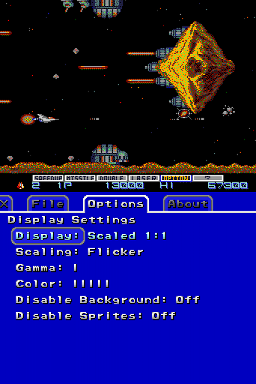
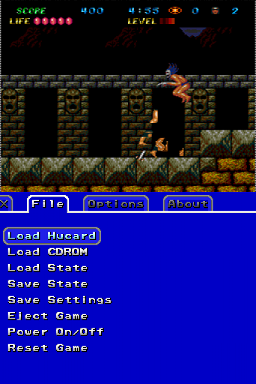
Screenshots
Media
Akumajou Dracula X - Chi no Rondo, NDS (Fredrik Ahlström)
Changelog
V0.9.0 2026/02/15
- Fixed unscaled & aspect scaling.
- Fixed setting of vertical scroll value.
- Fixed horizontal centring of screen.
- Fixed sound amplitude/envelope.
- Fixed timer counting.
- Fixed sprite DMA.
- Fixed save states.
- Added descrambling of US ROMs.
- Added new debug menu.
- Better menu traversing.
- Cleaned up code.
V0.8.1 2018/07/20
- Moved Timer code from cpu to H6280.
- Cleaned up code.
V0.7 2013/03/23
- Added multitap emulation.
- Added 6 button joypad emulation.
- Added support for arguments (for cards that support it).
- Added exit to flashcard menu (for cards that support it).
- Fixed a few things with savestate loading.
V0.6 2010/11/06
- Fixed graphics rendering.
- Support for all 2048 tiles.
- Support for 1024 wide tilemaps.
- Support for 320 pixel wide screenmode.
- Better caching of tiles/sprites, less flickering
- Optimised everything.
V0.5 2010/05/06
- Added support for CD-ROM images in .bin/.cue format.
- support CD audio playing.
V0.4 2010/04/16
- Fixed CPU cycles per scanline (455, confirmed on hardware).
- Fixed timing of scroll register writes.
- Fixed Sprite DMA IRQ handling.
- Fixed savestates a bit (should be compatible between versions now).
- Fixed scaling after loading savestate.
- Fixed caching of Bios.
- Better timing of ADPCM playing (still no sound though).
- Debug output now optional, also more info is written.
V0.3 2010/04/10
- Fixed cache for 16x64 sprites.
- Fixed sprite DMA flag.
- Fixed more CD-ROM emulation issues.
V0.2 2010/03/23
- Added support for the SF2 mapper.
- Fixed loading of roms with headers.
- Fixed sprite scaling when switching modes.
- Fixed directory cache misses.
- Fixed some CD-ROM emulation issues.
V0.1 2010/03/19
- Initial release, allmost everything from PCEAdvance seems to work.
V0.0 2010/01/19
- Started Coding.
Credits
Zeograd for a lot of help with the debugging. Charles MacDonald and David Shadoff for a lot of the info on the PC-Engine.
External links
- Official website - http://www.ndsretro.com
- GitHub - https://github.com/FluBBaOfWard/NitroGrafx
- emutopia - https://emutopia.com/index.php/item/815-nitrografx-0-7
- GBAtemp - https://gbatemp.net/threads/nitrografx.313817/page-2#post-4591072