PSV VSH Menu Mod Vita: Difference between revisions
From GameBrew
More actions
No edit summary |
No edit summary |
||
| Line 28: | Line 28: | ||
==Installation== | ==Installation== | ||
Copy the .suprx file to ur0:tai/ | Copy the .suprx file to ur0:tai/ or ux0:tai/. | ||
Add the following lines to tai/config.txt (change accordingly if you are using ux0) | Add the following lines to tai/config.txt (change accordingly if you are using ux0) | ||
Revision as of 06:29, 6 January 2023
| PSV-VSH-Menu Mod | |
|---|---|
 | |
| General | |
| Author | SHROOM |
| Type | Plugins |
| Version | 1.420-2 |
| License | Mixed |
| Last Updated | 2017/11/17 |
| Links | |
| Download | |
| Website | |
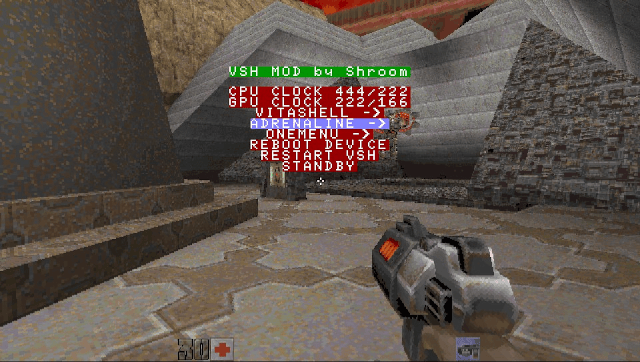
A modification of the VSH Menu taiHEN plugin.
This plug-in aims to provide an equivalent of the VSH menu under HENkaku, it does not work under LiveArea.
Features
- Launch VitaShell/Adrenaline/OneMenu.
- Manually change CPU/GPU clock frequency.
- Quick reboot, pause, or sleep, restart VSH menu.
Installation
Copy the .suprx file to ur0:tai/ or ux0:tai/.
Add the following lines to tai/config.txt (change accordingly if you are using ux0)
*ALL
ur0:tai/vsh.suprx
Go to Settings > HENkaku Settings > Reload taiHEN config.txt.
Launch the game, then open the menu with hotkeys.
Controls
L+R+Left - Open PSV VSH Menu
Screenshots