
DTK 3DS: Difference between revisions
From GameBrew
More actions
No edit summary |
No edit summary |
||
| Line 16: | Line 16: | ||
D.T.K. is an application that downloads games from Nintendo's CDN using [[FunKeyCIA 3DS]]. | D.T.K. is an application that downloads games from Nintendo's CDN using [[FunKeyCIA 3DS]]. | ||
'''Note:''' DTK is no longer in development | '''Note:''' DTK is no longer in development. | ||
==Installation== | ==Installation== | ||
| Line 74: | Line 74: | ||
==Credits== | ==Credits== | ||
* HouseBreaker - [https://github.com/HouseBreaker/NintendoCDN-TicketParser Took its work without permission. Sorry.] | * HouseBreaker - [https://github.com/HouseBreaker/NintendoCDN-TicketParser Took its work without permission. Sorry.] | ||
Thanks to: | |||
* cearp - For FunKeyCIA. | * cearp - For FunKeyCIA. | ||
* Ptrk25 - For the GroovyCIA/CDN-FX database. | * Ptrk25 - For the GroovyCIA/CDN-FX database. | ||
Alternatives: | |||
* [[CDN-FX 3DS|CDN-FX]] or [[Shameless 3DS|Shameless]]. | |||
==External links== | ==External links== | ||
Revision as of 00:55, 22 February 2022
| D.T.K. - D.T.K. Takes Keys | |
|---|---|
| File:Dtk3ds2.png | |
| General | |
| Author | justync7 |
| Type | PC Utilities |
| Version | 2.0 |
| License | Mixed |
| Last Updated | 2016/04/24 |
| Links | |
| Download | |
| Website | |
| Source | |

| This application has been obsoleted by one or more applications that serve the same purpose, but are more stable or maintained. |

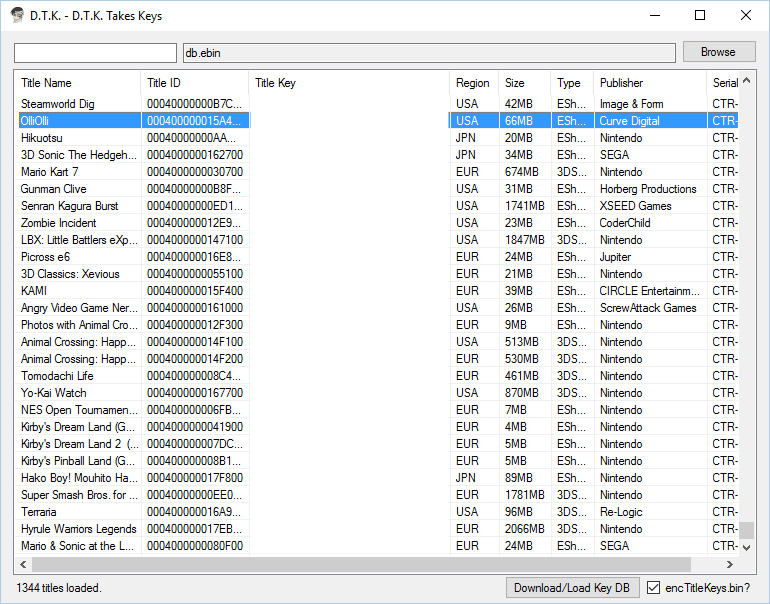
D.T.K. is an application that downloads games from Nintendo's CDN using FunKeyCIA 3DS.
Note: DTK is no longer in development.
Installation
Dependencies
Setup (Windows)
- Download release and extract it.
- Run DTK.exe and wait for it to download the needed files (this can take a while).
- Close DTK.
- Open config.xml in your favorite text editor.
- Modify the config to your liking.
Setup (Linux)
- Download release and extract it.
- Run "mono DTK.exe" in your terminal and wait for it to download the needed files (this can take a while).
- Close DTK.
- Open config.xml in your favorite text editor.
- Modify the config to your liking.
User guide
How to use that key site
- Open config.xml in your favorite text editor.
- Replace the "undefined" on KeyDBUrl with the encTitleKeys download link from "that key site".
- Replace the "false" on AutoLoad with "true".
- Run DTK.exe and it will download the DB automatically.
Download from the CDN using FunKeyCIA
- Find the title you wish to download in DTK.
- Highlight it and double click to open a command window for FunKeyCIA.
- Your download will automatically begin.
Screenshots
Changelog
v2.0
- Linux support.
- Title CIA sorting.
v1.2
- New config entries.
- Fixed copyright issues.
- Made all 3DS titles have types.
- Reworked code.
v1.1
- Add column sorting.
- Some anchoring fixes.
- Some code reworked.
v1.0
- Attempt at fixing search
- Add lots of automatic file downloads (deps, key db).
Credits
- HouseBreaker - Took its work without permission. Sorry.
Thanks to:
- cearp - For FunKeyCIA.
- Ptrk25 - For the GroovyCIA/CDN-FX database.
Alternatives: