
Super Haxagon 3DS: Difference between revisions
More actions
No edit summary |
No edit summary |
||
| Line 5: | Line 5: | ||
|author=RedTopper | |author=RedTopper | ||
|lastupdated=2021/02/20 | |lastupdated=2021/02/20 | ||
|type= | |type=Action | ||
|version=3.4.0 | |version=3.4.0 | ||
|license= | |license=MIT | ||
|download=https://dlhb.gamebrew.org/ | |download=https://dlhb.gamebrew.org/3dshomebrews/superhaxagon.7z | ||
|website=https://github.com/RedTopper/Super-Haxagon | |website=https://github.com/RedTopper/Super-Haxagon | ||
|source=https://github.com/RedTopper/Super-Haxagon | |source=https://github.com/RedTopper/Super-Haxagon | ||
}} | }} | ||
Super Haxagon, formerly named Super Hexaspire, is a cross platform, open source [http://superhexagon.com Super Hexagon] clone for the Nintendo 3DS, Nintendo Switch, Windows, Linux, and the [https://education.ti.com/en/products/calculators/graphing-calculators/ti-nspire-cx-cas TI-Nspire] (yes, the calculator). | |||
It is developed in C++ and uses no additional libraries for the core logic, making it easy (in theory) to port to new platforms. It also has a GUI based level editor called [https://github.com/RedTopper/Haxa-Editor Haxa Editor]. | |||
==Features== | |||
* Cross Platform. | |||
* Widescreen support. | |||
* High Refresh Rate support. | |||
* Custom Levels. | |||
* OGG decoder for BGM. | |||
* High Score Saving. | |||
== | ==Installation== | ||
Available in 3DSX and CIA formats. | |||
* CIA - Install the .cia with the CIA manager of your choice. | |||
* 3DSX - Use the .3dsx provided with the Homebrew Launcher. | |||
'''Note:''' You must dump your [[DSP1 3DS|DSP firmware]] to hear the music. | |||
== | ==User guide== | ||
Super Hexagon is a fast-paced twitch game in which you control a triangle on a hexagonal grid in the center while walls come from the edges of the screen. | |||
The controls are simple: you must pivot the triangle to the opening in order to survive. | |||
==Screenshots== | |||
https://dlhb.gamebrew.org/3dshomebrews/superhaxagon3.png | |||
=== | https://dlhb.gamebrew.org/3dshomebrews/superhaxagon4.png | ||
==Credits== | |||
Thanks everyone for: | Thanks everyone for: | ||
* The toolchain by [https://github.com/devkitPro devkitPro]. | |||
* The 3DS 2D engine by fincs at [https://github.com/devkitPro/citro2d devkitPro/citro2D]. | |||
* The CTR User library by Smea at [https://github.com/devkitPro/libctru devkitPro/libctru]. | |||
* The Switch User library by Switchbrew at [https://github.com/switchbrew/libnx switchbrew/libnx]. | |||
* The font Bump IT UP by aaronamar at [http://fontstruct.com/fontstructions/show/155156/bump_it_up fontstruct.com]. | |||
* Steveice10 for the build tools at [https://github.com/Steveice10/buildtools Steveice10/buildtools]. | |||
* Sean T. Barrett for OGG decoding at [https://github.com/nothings/stb nothings/stb]. | |||
* The SFML developers for, well, [https://www.sfml-dev.org/ SFML]. | |||
* Audio from Open Hexagon at [https://github.com/SuperV1234/SSVOpenHexagon SuperV1234/SSVOpenHexagon]. | |||
* ...and Kevin MacLeod for more music at [http://incompetech.com/ incompetech.com]. | |||
* and all of the people on the [https://github.com/RedTopper/Super-Haxagon/graphs/contributors contributors page]. | |||
Music Attribution: | |||
* [https://incompetech.filmmusic.io/song/4616-werq Werq] by Kevin MacLeod (http://creativecommons.org/licenses/by/4.0 License). | |||
* [https://incompetech.filmmusic.io/song/5715-screen-saver Screen Saver] by Kevin MacLeod [http://creativecommons.org/licenses/by/4.0 License]. | |||
* [https://github.com/SuperV1234/SSVOpenHexagonAssets Call Me Katla, Baby] by Dunderpatrullen: | |||
** Captain Cool by Bossfight. | |||
** Commando Steve by Bossfight. | |||
** Dr. Finkelfracken's Cure by Bossfight. | |||
** Jack Russel by Bossfight. | |||
** The Maze Of Mayonnaise by Bossfight. | |||
* | |||
Call Me Katla, Baby by Dunderpatrullen Captain Cool by Bossfight Commando Steve by Bossfight Dr. Finkelfracken's Cure by Bossfight Jack Russel by Bossfight The Maze Of Mayonnaise by Bossfight | |||
Super-Haxagon Timeline: | |||
* 2021: TI-Nspire release | |||
* 2020: Nintendo Switch release | |||
* 2020: Windows and Linux release | |||
* 2020: 3DS version 3 (Complete Rewrite) | |||
* 2017: 3DS version 2 (Complete Rewrite) | |||
* 2016: 3DS version 1 | |||
* 2013: TI-Nspire version Alpha | |||
==External links== | |||
* GitHub - https://github.com/RedTopper/Super-Haxagon | |||
* GBAtemp - https://gbatemp.net/threads/release-super-haxagon-3-0.571175 | |||
* GBAtemp - https://gbatemp.net/threads/release-super-haxagon.455778 | |||
* Reddit - https://www.reddit.com/r/3dshacks/comments/i2zxjp/super_haxagon_30_a_super_hexagon_clone | |||
* Reddit - https://www.reddit.com/r/3dshacks/comments/5m2eiz/release_super_haxagon_a_super_hexagon_clone_for | |||
[[Category:3DS homebrew games]] | |||
[[Category:Homebrew puzzle games on 3DS]] | |||
Revision as of 09:28, 25 December 2021
| Super Haxagon | |
|---|---|
| File:SuperHaxagon.jpg | |
| General | |
| Author | RedTopper |
| Type | Action |
| Version | 3.4.0 |
| License | MIT License |
| Last Updated | 2021/02/20 |
| Links | |
| Download | |
| Website | |
| Source | |

Super Haxagon, formerly named Super Hexaspire, is a cross platform, open source Super Hexagon clone for the Nintendo 3DS, Nintendo Switch, Windows, Linux, and the TI-Nspire (yes, the calculator).
It is developed in C++ and uses no additional libraries for the core logic, making it easy (in theory) to port to new platforms. It also has a GUI based level editor called Haxa Editor.
Features
- Cross Platform.
- Widescreen support.
- High Refresh Rate support.
- Custom Levels.
- OGG decoder for BGM.
- High Score Saving.
Installation
Available in 3DSX and CIA formats.
- CIA - Install the .cia with the CIA manager of your choice.
- 3DSX - Use the .3dsx provided with the Homebrew Launcher.
Note: You must dump your DSP firmware to hear the music.
User guide
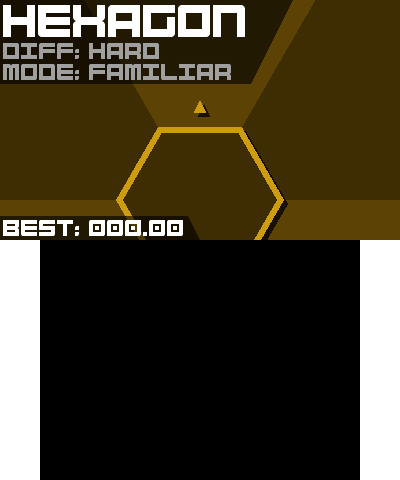
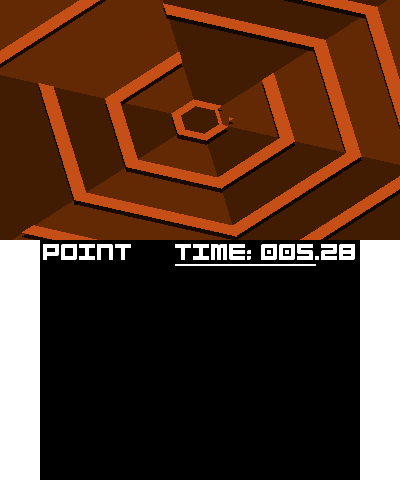
Super Hexagon is a fast-paced twitch game in which you control a triangle on a hexagonal grid in the center while walls come from the edges of the screen.
The controls are simple: you must pivot the triangle to the opening in order to survive.
Screenshots
Credits
Thanks everyone for:
- The toolchain by devkitPro.
- The 3DS 2D engine by fincs at devkitPro/citro2D.
- The CTR User library by Smea at devkitPro/libctru.
- The Switch User library by Switchbrew at switchbrew/libnx.
- The font Bump IT UP by aaronamar at fontstruct.com.
- Steveice10 for the build tools at Steveice10/buildtools.
- Sean T. Barrett for OGG decoding at nothings/stb.
- The SFML developers for, well, SFML.
- Audio from Open Hexagon at SuperV1234/SSVOpenHexagon.
- ...and Kevin MacLeod for more music at incompetech.com.
- and all of the people on the contributors page.
Music Attribution:
- Werq by Kevin MacLeod (http://creativecommons.org/licenses/by/4.0 License).
- Screen Saver by Kevin MacLeod License.
- Call Me Katla, Baby by Dunderpatrullen:
- Captain Cool by Bossfight.
- Commando Steve by Bossfight.
- Dr. Finkelfracken's Cure by Bossfight.
- Jack Russel by Bossfight.
- The Maze Of Mayonnaise by Bossfight.
Super-Haxagon Timeline:
- 2021: TI-Nspire release
- 2020: Nintendo Switch release
- 2020: Windows and Linux release
- 2020: 3DS version 3 (Complete Rewrite)
- 2017: 3DS version 2 (Complete Rewrite)
- 2016: 3DS version 1
- 2013: TI-Nspire version Alpha
External links
- GitHub - https://github.com/RedTopper/Super-Haxagon
- GBAtemp - https://gbatemp.net/threads/release-super-haxagon-3-0.571175
- GBAtemp - https://gbatemp.net/threads/release-super-haxagon.455778
- Reddit - https://www.reddit.com/r/3dshacks/comments/i2zxjp/super_haxagon_30_a_super_hexagon_clone
- Reddit - https://www.reddit.com/r/3dshacks/comments/5m2eiz/release_super_haxagon_a_super_hexagon_clone_for