3DS Mii Edit Tool: Difference between revisions
From GameBrew
More actions
m Text replacement - "Infobox 3DS homebrew" to "Infobox-3DS-Homebrews" |
No edit summary |
||
| (12 intermediate revisions by the same user not shown) | |||
| Line 1: | Line 1: | ||
{{Infobox | {{Infobox 3DS Homebrews | ||
| title = 3DS Mii Edit Tool | |title=3DS Mii Edit Tool | ||
| image = | |image=3dsmiiedittool2.png | ||
| type = PC Utilities | |description=Edit your Miis right on your PC. | ||
| version = | |author=Fernando51 | ||
| | |lastupdated=2017/01/14 | ||
| | |type=PC Utilities | ||
| website = https://gbatemp.net/threads/release-3ds-mii-edit-tool-edit-your-miis-right-on-your-pc.456607 | |version=2017 | ||
|license=Mixed | |||
|download=https://dlhb.gamebrew.org/3dshomebrews/3dsmiieditor.rar | |||
|website=https://gbatemp.net/threads/release-3ds-mii-edit-tool-edit-your-miis-right-on-your-pc.456607 | |||
}} | }} | ||
3DS Mii Edit Tool is a program that allows you to edit your Miis directly on your PC. | |||
'''Note:''' By using this tool you are responsible of any data lost, so please keep a backup of your CFL_DB.dat file. | |||
==Features== | |||
* Edit your Miis. | |||
* Take ownership of any Mii (so you can edit them). | |||
* Set any Mii as your personal Mii (this will swap any Mii you want with you personal Mii). | |||
* Delete a Mii. | |||
* Export Miis from CFL_DB.dat to a file (*.3dsmii). | |||
* Import Miis from a file (*.3dsmii) to your CFL_DB.dat. | |||
* Supports UTF-16. | |||
''' | ==User guide== | ||
'''Note:''' This was made with VisualStudio so it needs .NET Framework (4) to run. | |||
The program was made to work with a CFL_DB.dat file, it can be obtained with [[JKSM 3DS|JKSM]] (Shared ExtData > F000000B > Export) and restored with the same tool (Shared ExtData > F000000B > Import); alternatively you can use [[Extdata dump 3DS|extdata_dump]]. | |||
* Name/Author ( | Editable settings include: | ||
* Name/Author (you can use special characters from DS/DSi/PictoChat/Wii/3DS). | |||
* Favorite color. | * Favorite color. | ||
* Gender. | * Gender. | ||
* Birthday. | * Birthday. | ||
* Change its | * Change its "Favorite", "Sharing" and "Allow Copying" properties. | ||
* Set its specialness (keep in mind that a Mii can't be special and have | * Set its specialness (keep in mind that a Mii can't be special and have "sharing" on at the same time as it will crash Mii Maker). | ||
Miis are known to save in real-time, the only thing you need to do is save the CFL_DB.dat file to keep any change made. | |||
==Screenshots== | |||
https://dlhb.gamebrew.org/3dshomebrews/3dsmiiedittool3.png | |||
https://dlhb.gamebrew.org/3dshomebrews/3dsmiiedittool4.png | |||
==External links== | |||
* GBAtemp - https://gbatemp.net/threads/release-3ds-mii-edit-tool-edit-your-miis-right-on-your-pc.456607 | |||
Latest revision as of 10:31, 22 June 2024
| 3DS Mii Edit Tool | |
|---|---|
 | |
| General | |
| Author | Fernando51 |
| Type | PC Utilities |
| Version | 2017 |
| License | Mixed |
| Last Updated | 2017/01/14 |
| Links | |
| Download | |
| Website | |
3DS Mii Edit Tool is a program that allows you to edit your Miis directly on your PC.
Note: By using this tool you are responsible of any data lost, so please keep a backup of your CFL_DB.dat file.
Features
- Edit your Miis.
- Take ownership of any Mii (so you can edit them).
- Set any Mii as your personal Mii (this will swap any Mii you want with you personal Mii).
- Delete a Mii.
- Export Miis from CFL_DB.dat to a file (*.3dsmii).
- Import Miis from a file (*.3dsmii) to your CFL_DB.dat.
- Supports UTF-16.
User guide
Note: This was made with VisualStudio so it needs .NET Framework (4) to run.
The program was made to work with a CFL_DB.dat file, it can be obtained with JKSM (Shared ExtData > F000000B > Export) and restored with the same tool (Shared ExtData > F000000B > Import); alternatively you can use extdata_dump.
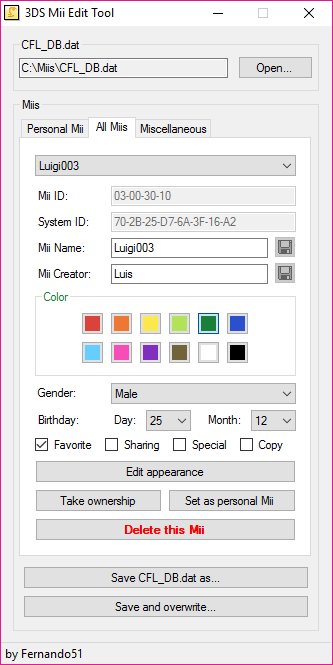
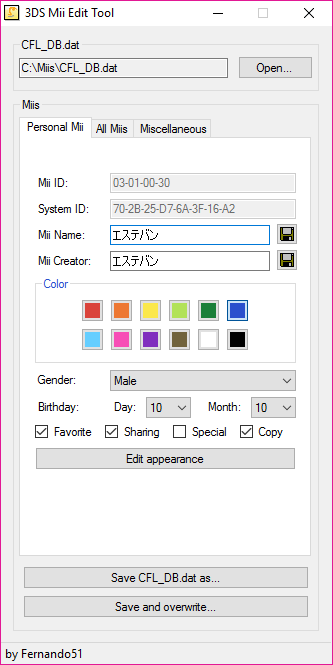
Editable settings include:
- Name/Author (you can use special characters from DS/DSi/PictoChat/Wii/3DS).
- Favorite color.
- Gender.
- Birthday.
- Change its "Favorite", "Sharing" and "Allow Copying" properties.
- Set its specialness (keep in mind that a Mii can't be special and have "sharing" on at the same time as it will crash Mii Maker).
Miis are known to save in real-time, the only thing you need to do is save the CFL_DB.dat file to keep any change made.
Screenshots