
VitaImmich: Difference between revisions
More actions
No edit summary |
|||
| (One intermediate revision by one other user not shown) | |||
| Line 19: | Line 19: | ||
|image_alt= | |image_alt= | ||
}} | }} | ||
vitaImmich is a native [https://immich.app/ Immich] client for the Sony PlayStation Vita (POC). Browse, search and map your whole photo & video library over Wi‑Fi, play videos on the Vita's hardware decoder, and back up the camera roll, all on a 12‑year‑old handheld. | |||
== Features == | == Features == | ||
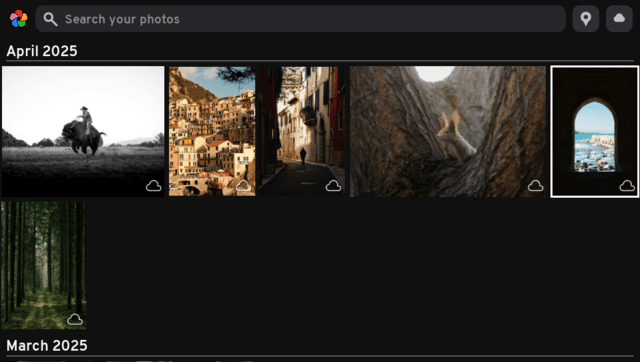
* '''Timeline''' | * '''Timeline''' - the entire library shown as a justified, date-grouped grid (newest first), styled after the Immich web app. | ||
* '''Smart search''' | * '''Smart search''' - free-text CLIP search entered from the Vita's keyboard. | ||
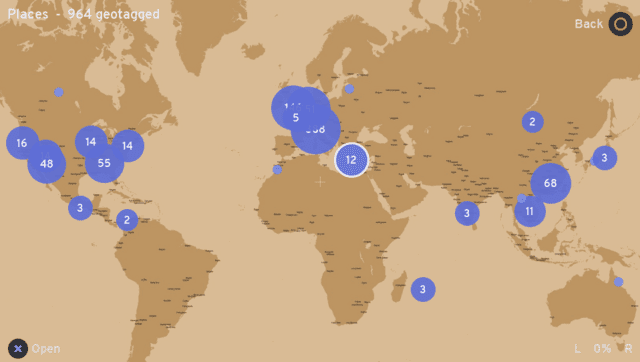
* '''Places map''' | * '''Places map''' - geotagged photos clustered on a world map; pan/zoom with the sticks and open any cluster as its own gallery. | ||
* '''Full-screen viewer''' | * '''Full-screen viewer''' - pinch/stick zoom and pan, swipe between photos, and hardware-accelerated H.264 video playback. | ||
* '''Camera-roll backup''' | * '''Camera-roll backup''' - scans the Vita's photos and videos, dedupes against the server, and uploads on request. | ||
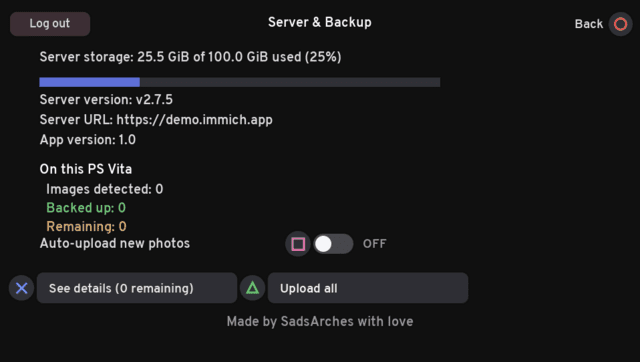
* '''Server overview''' | * '''Server overview''' - storage usage, server/app versions, and per-device backup status. | ||
* '''Touch and buttons''' | * '''Touch and buttons''' - the whole UI can be driven with the front touchscreen or the d-pad/sticks. | ||
== Installation == | == Installation == | ||
Requirements | ===Requirements=== | ||
* A PS Vita running HENkaku/h-encore with [[VitaShell]]. | * A PS Vita running HENkaku/h-encore with [[VitaShell]]. | ||
* A reasonably recent Immich server reachable over the Vita's Wi-Fi. | * A reasonably recent Immich server reachable over the Vita's Wi-Fi. | ||
* An Immich API key (web UI | * An Immich API key (web UI > Account Settings > API Keys), or an email/password. | ||
===Instructions=== | |||
Download the .vpk from [https://codeberg.org/SadsArches/vitaImmich/releases Releases] and install it with [[VitaShell]]. | |||
Launch it once; it creates <code>ux0:data/vitaimmich/config.txt</code>. | |||
Edit that file (VitaShell's FTP via SELECT makes this easy): | |||
server=http://192.168.1.100:2283 | server=http://192.168.1.100:2283 | ||
apikey=your-immich-api-key | apikey=your-immich-api-key | ||
Behind a reverse proxy without NAT loopback, the domain can be pinned to the LAN IP so the Host header / TLS SNI stay on the domain but the connection goes straight to the server: | Behind a reverse proxy without NAT loopback, the domain can be pinned to the LAN IP so the Host header / TLS SNI stay on the domain but the connection goes straight to the server: | ||
server=https://immich.example.com | server=https://immich.example.com | ||
apikey=your-immich-api-key | apikey=your-immich-api-key | ||
serverip=192.168.1.100 | serverip=192.168.1.100 | ||
Relaunch. | |||
Additional <code>config.txt</code> tunables for backup: <code>syncdir=<folder></code> (repeatable) and <code>syncmaxmb=<MB></code> (size cap; files over 512 MB are skipped by default, 0 disables). | Additional <code>config.txt</code> tunables for backup: <code>syncdir=<folder></code> (repeatable) and <code>syncmaxmb=<MB></code> (size cap; files over 512 MB are skipped by default, 0 disables). | ||
==Camera-roll backup== | ===Camera-roll backup=== | ||
On startup the app mounts the Photos app's storage (<code>photo0:</code> / <code>ux0:picture</code>) plus <code>ux0:video/CAMERA</code>, scans for <code>.jpg/.jpeg/.png/.mp4</code>, and merges those files into the same date‑sorted timeline as your server library. A badge in each cell's corner shows status: | |||
* Blue‑grey dot - '''cloud only''' | |||
* Orange up‑arrow - '''local only''' | |||
* Blinking - '''queued / uploading''' | |||
* Green check - '''backed up''' (on both; shown once, as the server asset) | |||
* Red dot - '''failed''' | |||
A background thread SHA‑1‑hashes each local file and asks the server which already exist (<code>bulk-upload-check</code>). Uploads never start on their own - open the sync overview (SELECT) and press X to queue every local‑only file. Tunables in <code>config.txt</code>: <code>syncdir=<folder></code> (repeatable) and <code>syncmaxmb=<MB></code> (size cap; files over 512 MB are skipped by default, 0 disables). | |||
==Limitations== | ==Limitations== | ||
*TLS verification is disabled (no CA bundle ships) | * TLS verification is disabled (no CA bundle ships) - prefer plain HTTP on a trusted LAN, or treat HTTPS as unverified. | ||
*Videos download in full to the memory card before playing (deleted after). Playback is the Vita's hardware decoder via SceAvPlayer, so only MP4 (H.264/AAC) plays | * Videos download in full to the memory card before playing (deleted after). Playback is the Vita's hardware decoder via SceAvPlayer, so only MP4 (H.264/AAC) plays - Immich's transcoded video/playback stream is used. | ||
*Backup is one‑way (Vita | * Backup is one‑way (Vita > server); deviceId is hard‑coded to "PS Vita" and uploads aren't added to an album. | ||
*Thumbnails stream in one at a time on a background thread (grey placeholder until loaded); hashing the camera roll fills statuses in gradually. | * Thumbnails stream in one at a time on a background thread (grey placeholder until loaded); hashing the camera roll fills statuses in gradually. | ||
== Controls == | == Controls == | ||
=== Timeline === | |||
D‑Pad/Analog - Move selection (hold to repeat) | |||
L/R - Jump a month up/down | |||
Triangle - Smart search | |||
Cross - Open full screen | |||
Map icon/Cloud icon (touch) - Open the Places map/server page | |||
Select - Sync overview | |||
Start - Exit | |||
=== Places map === | |||
Left Analog/D‑Pad/Drag - Pan | |||
Right Analog or L/R - Zoom out/in | |||
Cross - Open the centred cluster as a gallery | |||
Triangle - Toggle the lat/lon graticule | |||
Circle - Back | |||
=== Full‑screen viewer === | |||
Left/Right - Previous/next | |||
Right Analog or L/R - Zoom, Left Analog pans | |||
Cross - Play video/retry a failed load | |||
Circle - Back | |||
=== Video playback === | |||
Cross - Pause/Resume | |||
Left/Right - Seek +/-10s | |||
Circle - Stop | |||
==Screenshots== | ==Screenshots== | ||
Latest revision as of 06:41, 22 June 2026
| vitaImmich | |
|---|---|
 | |
| General | |
| Author | SadsArches |
| Type | Other Apps |
| Version | 1.0 |
| License | N/A |
| Last Updated | 2026/06/18 |
| Links | |
| Download | |
| Website | |
| Source | |
vitaImmich is a native Immich client for the Sony PlayStation Vita (POC). Browse, search and map your whole photo & video library over Wi‑Fi, play videos on the Vita's hardware decoder, and back up the camera roll, all on a 12‑year‑old handheld.
Features
- Timeline - the entire library shown as a justified, date-grouped grid (newest first), styled after the Immich web app.
- Smart search - free-text CLIP search entered from the Vita's keyboard.
- Places map - geotagged photos clustered on a world map; pan/zoom with the sticks and open any cluster as its own gallery.
- Full-screen viewer - pinch/stick zoom and pan, swipe between photos, and hardware-accelerated H.264 video playback.
- Camera-roll backup - scans the Vita's photos and videos, dedupes against the server, and uploads on request.
- Server overview - storage usage, server/app versions, and per-device backup status.
- Touch and buttons - the whole UI can be driven with the front touchscreen or the d-pad/sticks.
Installation
Requirements
- A PS Vita running HENkaku/h-encore with VitaShell.
- A reasonably recent Immich server reachable over the Vita's Wi-Fi.
- An Immich API key (web UI > Account Settings > API Keys), or an email/password.
Instructions
Download the .vpk from Releases and install it with VitaShell.
Launch it once; it creates ux0:data/vitaimmich/config.txt.
Edit that file (VitaShell's FTP via SELECT makes this easy):
server=http://192.168.1.100:2283
apikey=your-immich-api-key
Behind a reverse proxy without NAT loopback, the domain can be pinned to the LAN IP so the Host header / TLS SNI stay on the domain but the connection goes straight to the server:
server=https://immich.example.com
apikey=your-immich-api-key
serverip=192.168.1.100
Relaunch.
Additional config.txt tunables for backup: syncdir=<folder> (repeatable) and syncmaxmb=<MB> (size cap; files over 512 MB are skipped by default, 0 disables).
Camera-roll backup
On startup the app mounts the Photos app's storage (photo0: / ux0:picture) plus ux0:video/CAMERA, scans for .jpg/.jpeg/.png/.mp4, and merges those files into the same date‑sorted timeline as your server library. A badge in each cell's corner shows status:
- Blue‑grey dot - cloud only
- Orange up‑arrow - local only
- Blinking - queued / uploading
- Green check - backed up (on both; shown once, as the server asset)
- Red dot - failed
A background thread SHA‑1‑hashes each local file and asks the server which already exist (bulk-upload-check). Uploads never start on their own - open the sync overview (SELECT) and press X to queue every local‑only file. Tunables in config.txt: syncdir=<folder> (repeatable) and syncmaxmb=<MB> (size cap; files over 512 MB are skipped by default, 0 disables).
Limitations
- TLS verification is disabled (no CA bundle ships) - prefer plain HTTP on a trusted LAN, or treat HTTPS as unverified.
- Videos download in full to the memory card before playing (deleted after). Playback is the Vita's hardware decoder via SceAvPlayer, so only MP4 (H.264/AAC) plays - Immich's transcoded video/playback stream is used.
- Backup is one‑way (Vita > server); deviceId is hard‑coded to "PS Vita" and uploads aren't added to an album.
- Thumbnails stream in one at a time on a background thread (grey placeholder until loaded); hashing the camera roll fills statuses in gradually.
Controls
Timeline
D‑Pad/Analog - Move selection (hold to repeat)
L/R - Jump a month up/down
Triangle - Smart search
Cross - Open full screen
Map icon/Cloud icon (touch) - Open the Places map/server page
Select - Sync overview
Start - Exit
Places map
Left Analog/D‑Pad/Drag - Pan
Right Analog or L/R - Zoom out/in
Cross - Open the centred cluster as a gallery
Triangle - Toggle the lat/lon graticule
Circle - Back
Full‑screen viewer
Left/Right - Previous/next
Right Analog or L/R - Zoom, Left Analog pans
Cross - Play video/retry a failed load
Circle - Back
Video playback
Cross - Pause/Resume
Left/Right - Seek +/-10s
Circle - Stop
Screenshots
Changelog
v1.0
- First Release.