
Super Haxagon 3DS: Difference between revisions
More actions
Created page with "{{Infobox 3DS homebrew | title = Super Haxagon | image = https://dlhb.gamebrew.org/3dshomebrew/SuperHaxagon.jpg|250px | type = Puzzle | version = 3.4.0 | licence = Mixed | aut..." |
No edit summary |
||
| (20 intermediate revisions by 2 users not shown) | |||
| Line 1: | Line 1: | ||
{{Infobox 3DS | {{Infobox 3DS Homebrews | ||
| title = Super Haxagon | |title=Super Haxagon | ||
| image = | |image=Superhaxagon2.png | ||
| type = | |description=Super Haxagon is a Super Hexagon like clone for the 3DS. | ||
| version = 3. | |author=RedTopper | ||
| | |lastupdated=2025/04/23 | ||
| | |type=Action | ||
| website = https://github.com/RedTopper/Super-Haxagon | |version=3.9.1 | ||
|license=MIT | |||
| source = https:// | |download=https://dlhb.gamebrew.org/3dshomebrews/superhaxagon.7z | ||
|website=https://github.com/RedTopper/Super-Haxagon | |||
|source=https://github.com/RedTopper/Super-Haxagon | |||
}} | }} | ||
Super Haxagon, formerly named Super Hexaspire, is a cross platform, open source [http://superhexagon.com Super Hexagon] clone for the Nintendo 3DS, Nintendo Switch, Windows, Linux, and the [https://education.ti.com/en/products/calculators/graphing-calculators/ti-nspire-cx-cas TI-Nspire] (yes, the calculator). | |||
It is developed in C++ and uses no additional libraries for the core logic, making it easy (in theory) to port to new platforms. It also has a GUI based level editor called [https://github.com/RedTopper/Haxa-Editor Haxa Editor]. | |||
==Features== | |||
* Cross Platform. | |||
* Widescreen support. | |||
* High Refresh Rate support. | |||
* Custom Levels. | |||
* OGG decoder for BGM. | |||
* High Score Saving. | |||
== | ==Installation== | ||
Available in 3DSX and CIA formats. | |||
* CIA - Install the .cia with the CIA manager of your choice. | |||
* 3DSX - Use the .3dsx provided with the Homebrew Launcher. | |||
Additionally, feel free to check out the level editor at [https://github.com/RedInquisitive/Haxa-Editor Haxa-Editor]. There's a wiki that documents how to use it. External levels are supported by dropping the levels.haxagon in sdmc:/3ds/data/haxagon/. They'll load on the home menu after the builtin levels. | |||
'''Note:''' You must dump your [[DSP1 3DS|DSP firmware]] to hear the music. | |||
==User guide== | |||
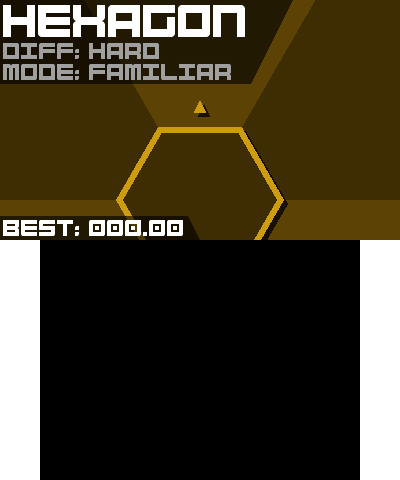
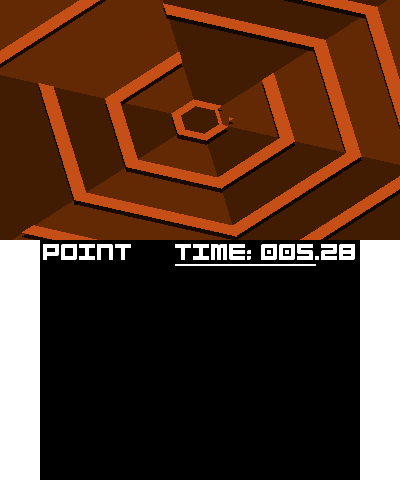
Super Hexagon is a fast-paced twitch game in which you control a triangle on a hexagonal grid in the center while walls come from the edges of the screen. | |||
The controls are simple: you must pivot the triangle to the opening in order to survive. | |||
==Screenshots== | |||
https://dlhb.gamebrew.org/3dshomebrews/superhaxagon3.png | |||
https://dlhb.gamebrew.org/3dshomebrews/superhaxagon4.png | |||
# | ==Changelog== | ||
'''v3.9.1''' | |||
* nspire: There are now at least two buttons to perform all basic actions, in case one of your keys is sticky. | |||
* sdl2 and sfml: Drivers and downloads have been renamed to better show what back-end the driver is using. | |||
* all: Downloads now have a README.md that gives offline instructions on how to set up your platform, as well as a link back to this repo. | |||
* all: Downloads now have a vX.X.X.txt file that includes some metadata for the release, like which commit hash the download came from, version information, how it was built, and the time it was built. | |||
'''v3.9.0''' | |||
* macos: new platform! | |||
** GitHub Actions will now build a macOS (M1) bundle automatically for new PRs going forward! | |||
** Intel-based macOS devices should still build, but there is no automated builds at this time. | |||
** Thanks [https://github.com/adc-ax @adc-ax] for helping out with macOS bugs! | |||
** (macOS support was previously added by [https://github.com/mathieudel @mathieudel], but unfortunately I did not maintain it.) | |||
* steamdeck: new platform! | |||
** The SDL2 flatpak build will auto-detect SteamDeck and enter fullscreen. | |||
** Switched to SDL2 for controller support in flatpak. | |||
** Tested on hardware! | |||
** (Technically you could install the flatpak on SteamDeck, but the experience wasn't very good.) | |||
* all: License change to GPLv3 (or later) for the core game. | |||
** Drivers are dual licensed under GPLv3-or-later OR MIT. | |||
** All downloads now include a copy of the license AND licenses for all dependencies. | |||
* all: Levels no longer speed up during "level ups" | |||
** Instead, one big speedup happens at 60 seconds. | |||
** Thanks [https://github.com/zaphod77 @zaphod77] (Fixes [https://github.com/RedTopper/Super-Haxagon/issues/34 #34]) | |||
* all: LAST Major driver refactor, ALL platform specific files are now located in <code>driver</code> | |||
* all: All platforms now build with GitHub actions! | |||
'''v3.8.3''' | |||
* New features: | |||
** 3ds, switch: For platforms that embed music into the ROM, you can add custom title music by placing a <code>title.ogg</code> next to your scores.db file. [https://github.com/RedTopper/Super-Haxagon/issues/35 #35] | |||
** miyoo: This release uses the Ports folder instead of the Apps folder on OnionOS [https://github.com/RedTopper/Super-Haxagon/issues/39 #39] | |||
* Fixes: | |||
** all: Pressing right no longer has priority over pressing left. Instead, the last direction to be pressed "wins". This makes switching directions faster and easier. [https://github.com/RedTopper/Super-Haxagon/issues/36 #36] | |||
'''v3.8.2''' | |||
* New features for this release: | |||
** portmaster: new platform! | |||
*** Please use the "autoinstall" folder to install the zip manually from this repo. It is "Ready to Run" and contains all assets, including the romfs folder. | |||
*** For muOS: <code>/mnt/mmc/MUOS/PortMaster/autoinstall/</code> | |||
*** For Knulli: <code>/media/SHARE/system/.local/share/PortMaster/autoinstall/</code> | |||
*** For other CFWs, see the Portmaster documentation for your platform.. | |||
** miyoo mini: new platform! | |||
*** Tested only on OnionOS. | |||
*** Install by placing SuperHaxagon folder into <code>/mnt/SDCARD/App/</code>, then place <code>romfs</code> folder in <code>/mnt/SDCARD/App/SuperHaxagon/romfs/</code> | |||
*** Pixelation filter applied to look extra retro (and totally not because I have to do software rasterization and rendering at full resolution would be too taxing for the CPU!). | |||
** 3ds: fixed a bug that prevented the proper loading of stereo .WAV files. | |||
** all: Replaced SFX with ones created by [https://github.com/TwistBit @TwistBit]! Thanks! (Fixes [https://github.com/RedTopper/Super-Haxagon/issues/32 #32]). | |||
** all: Pumped up the level beats (Fixes [https://github.com/RedTopper/Super-Haxagon/issues/31 #31]). | |||
** all: Controls are shown on the title screen by pressing "back". | |||
** all: Main menu has new "tilt" effects while selecting levels. | |||
** all: New main menu music (I got tired of Werq). | |||
** all: Tilt effects for levels 2-4. | |||
** all: Zoom effects for levels 2-4. | |||
** all: Platform now shown on the top of the title screen. | |||
'''v3.7.0''' | |||
*New features for this release: | |||
**all: New title menu before the level select. | |||
**all: Camera pans and color transitions between most states. | |||
**switch: You can now use "X" to rotate right, like the 3ds. | |||
*Under the hood features: | |||
**all: Drivers cleaned up to officially use "Pimpl". | |||
**all: Drivers no longer make excessive pointer de-references and instead direct calls to the Impl itself. | |||
**all: Drivers now have "Surface" classes that contain core rendering logic, split out from Platform. | |||
**all: Game uses new SurfaceGame class, which implements software matrix transforms. | |||
**all: Code cleanup, where applicable. | |||
==Credits== | |||
Thanks everyone for: | Thanks everyone for: | ||
* The toolchain by [https://github.com/devkitPro devkitPro]. | |||
* The 3DS 2D engine by fincs at [https://github.com/devkitPro/citro2d devkitPro/citro2D]. | |||
* The CTR User library by Smea at [https://github.com/devkitPro/libctru devkitPro/libctru]. | |||
* The Switch User library by Switchbrew at [https://github.com/switchbrew/libnx switchbrew/libnx]. | |||
* The font Bump IT UP by aaronamar at [http://fontstruct.com/fontstructions/show/155156/bump_it_up fontstruct.com]. | |||
* Steveice10 for the build tools at [https://github.com/Steveice10/buildtools Steveice10/buildtools]. | |||
* Sean T. Barrett for OGG decoding at [https://github.com/nothings/stb nothings/stb]. | |||
* The SFML developers for, well, [https://www.sfml-dev.org/ SFML]. | |||
* Audio from Open Hexagon at [https://github.com/SuperV1234/SSVOpenHexagon SuperV1234/SSVOpenHexagon]. | |||
* ...and Kevin MacLeod for more music at [http://incompetech.com/ incompetech.com]. | |||
* and all of the people on the [https://github.com/RedTopper/Super-Haxagon/graphs/contributors contributors page]. | |||
Music Attribution: | |||
* [https://incompetech.filmmusic.io/song/4616-werq Werq] by Kevin MacLeod (http://creativecommons.org/licenses/by/4.0 License). | |||
* [https://incompetech.filmmusic.io/song/5715-screen-saver Screen Saver] by Kevin MacLeod [http://creativecommons.org/licenses/by/4.0 License]. | |||
* | * [https://github.com/SuperV1234/SSVOpenHexagonAssets Open Hexagon]: | ||
** Call Me Katla, Baby by Dunderpatrullen. | |||
** Captain Cool by Bossfight. | |||
** Commando Steve by Bossfight. | |||
** Dr. Finkelfracken's Cure by Bossfight. | |||
** Jack Russel by Bossfight. | |||
** The Maze Of Mayonnaise by Bossfight. | |||
Call Me Katla, Baby by Dunderpatrullen Captain Cool by Bossfight Commando Steve by Bossfight Dr. Finkelfracken's Cure by Bossfight Jack Russel by Bossfight The Maze Of Mayonnaise by Bossfight | |||
Super-Haxagon Timeline: | |||
* 2021: TI-Nspire release | |||
* 2020: Nintendo Switch release | |||
* 2020: Windows and Linux release | |||
* 2020: 3DS version 3 (Complete Rewrite) | |||
* 2017: 3DS version 2 (Complete Rewrite) | |||
* 2016: 3DS version 1 | |||
* 2013: TI-Nspire version Alpha | |||
==External links== | |||
* GitHub - https://github.com/RedTopper/Super-Haxagon | |||
* GBAtemp - https://gbatemp.net/threads/release-super-haxagon-3-0.571175 | |||
* GBAtemp - https://gbatemp.net/threads/release-super-haxagon.455778 | |||
* Reddit - https://www.reddit.com/r/3dshacks/comments/i2zxjp/super_haxagon_30_a_super_hexagon_clone | |||
* Reddit - https://www.reddit.com/r/3dshacks/comments/5m2eiz/release_super_haxagon_a_super_hexagon_clone_for | |||
Latest revision as of 02:13, 27 April 2025
| Super Haxagon | |
|---|---|
 | |
| General | |
| Author | RedTopper |
| Type | Action |
| Version | 3.9.1 |
| License | MIT License |
| Last Updated | 2025/04/23 |
| Links | |
| Download | |
| Website | |
| Source | |
Super Haxagon, formerly named Super Hexaspire, is a cross platform, open source Super Hexagon clone for the Nintendo 3DS, Nintendo Switch, Windows, Linux, and the TI-Nspire (yes, the calculator).
It is developed in C++ and uses no additional libraries for the core logic, making it easy (in theory) to port to new platforms. It also has a GUI based level editor called Haxa Editor.
Features
- Cross Platform.
- Widescreen support.
- High Refresh Rate support.
- Custom Levels.
- OGG decoder for BGM.
- High Score Saving.
Installation
Available in 3DSX and CIA formats.
- CIA - Install the .cia with the CIA manager of your choice.
- 3DSX - Use the .3dsx provided with the Homebrew Launcher.
Additionally, feel free to check out the level editor at Haxa-Editor. There's a wiki that documents how to use it. External levels are supported by dropping the levels.haxagon in sdmc:/3ds/data/haxagon/. They'll load on the home menu after the builtin levels.
Note: You must dump your DSP firmware to hear the music.
User guide
Super Hexagon is a fast-paced twitch game in which you control a triangle on a hexagonal grid in the center while walls come from the edges of the screen.
The controls are simple: you must pivot the triangle to the opening in order to survive.
Screenshots
Changelog
v3.9.1
- nspire: There are now at least two buttons to perform all basic actions, in case one of your keys is sticky.
- sdl2 and sfml: Drivers and downloads have been renamed to better show what back-end the driver is using.
- all: Downloads now have a README.md that gives offline instructions on how to set up your platform, as well as a link back to this repo.
- all: Downloads now have a vX.X.X.txt file that includes some metadata for the release, like which commit hash the download came from, version information, how it was built, and the time it was built.
v3.9.0
- macos: new platform!
- GitHub Actions will now build a macOS (M1) bundle automatically for new PRs going forward!
- Intel-based macOS devices should still build, but there is no automated builds at this time.
- Thanks @adc-ax for helping out with macOS bugs!
- (macOS support was previously added by @mathieudel, but unfortunately I did not maintain it.)
- steamdeck: new platform!
- The SDL2 flatpak build will auto-detect SteamDeck and enter fullscreen.
- Switched to SDL2 for controller support in flatpak.
- Tested on hardware!
- (Technically you could install the flatpak on SteamDeck, but the experience wasn't very good.)
- all: License change to GPLv3 (or later) for the core game.
- Drivers are dual licensed under GPLv3-or-later OR MIT.
- All downloads now include a copy of the license AND licenses for all dependencies.
- all: Levels no longer speed up during "level ups"
- all: LAST Major driver refactor, ALL platform specific files are now located in
driver - all: All platforms now build with GitHub actions!
v3.8.3
- New features:
- Fixes:
- all: Pressing right no longer has priority over pressing left. Instead, the last direction to be pressed "wins". This makes switching directions faster and easier. #36
v3.8.2
- New features for this release:
- portmaster: new platform!
- Please use the "autoinstall" folder to install the zip manually from this repo. It is "Ready to Run" and contains all assets, including the romfs folder.
- For muOS:
/mnt/mmc/MUOS/PortMaster/autoinstall/ - For Knulli:
/media/SHARE/system/.local/share/PortMaster/autoinstall/ - For other CFWs, see the Portmaster documentation for your platform..
- miyoo mini: new platform!
- Tested only on OnionOS.
- Install by placing SuperHaxagon folder into
/mnt/SDCARD/App/, then placeromfsfolder in/mnt/SDCARD/App/SuperHaxagon/romfs/ - Pixelation filter applied to look extra retro (and totally not because I have to do software rasterization and rendering at full resolution would be too taxing for the CPU!).
- 3ds: fixed a bug that prevented the proper loading of stereo .WAV files.
- all: Replaced SFX with ones created by @TwistBit! Thanks! (Fixes #32).
- all: Pumped up the level beats (Fixes #31).
- all: Controls are shown on the title screen by pressing "back".
- all: Main menu has new "tilt" effects while selecting levels.
- all: New main menu music (I got tired of Werq).
- all: Tilt effects for levels 2-4.
- all: Zoom effects for levels 2-4.
- all: Platform now shown on the top of the title screen.
- portmaster: new platform!
v3.7.0
- New features for this release:
- all: New title menu before the level select.
- all: Camera pans and color transitions between most states.
- switch: You can now use "X" to rotate right, like the 3ds.
- Under the hood features:
- all: Drivers cleaned up to officially use "Pimpl".
- all: Drivers no longer make excessive pointer de-references and instead direct calls to the Impl itself.
- all: Drivers now have "Surface" classes that contain core rendering logic, split out from Platform.
- all: Game uses new SurfaceGame class, which implements software matrix transforms.
- all: Code cleanup, where applicable.
Credits
Thanks everyone for:
- The toolchain by devkitPro.
- The 3DS 2D engine by fincs at devkitPro/citro2D.
- The CTR User library by Smea at devkitPro/libctru.
- The Switch User library by Switchbrew at switchbrew/libnx.
- The font Bump IT UP by aaronamar at fontstruct.com.
- Steveice10 for the build tools at Steveice10/buildtools.
- Sean T. Barrett for OGG decoding at nothings/stb.
- The SFML developers for, well, SFML.
- Audio from Open Hexagon at SuperV1234/SSVOpenHexagon.
- ...and Kevin MacLeod for more music at incompetech.com.
- and all of the people on the contributors page.
Music Attribution:
- Werq by Kevin MacLeod (http://creativecommons.org/licenses/by/4.0 License).
- Screen Saver by Kevin MacLeod License.
- Open Hexagon:
- Call Me Katla, Baby by Dunderpatrullen.
- Captain Cool by Bossfight.
- Commando Steve by Bossfight.
- Dr. Finkelfracken's Cure by Bossfight.
- Jack Russel by Bossfight.
- The Maze Of Mayonnaise by Bossfight.
Super-Haxagon Timeline:
- 2021: TI-Nspire release
- 2020: Nintendo Switch release
- 2020: Windows and Linux release
- 2020: 3DS version 3 (Complete Rewrite)
- 2017: 3DS version 2 (Complete Rewrite)
- 2016: 3DS version 1
- 2013: TI-Nspire version Alpha
External links
- GitHub - https://github.com/RedTopper/Super-Haxagon
- GBAtemp - https://gbatemp.net/threads/release-super-haxagon-3-0.571175
- GBAtemp - https://gbatemp.net/threads/release-super-haxagon.455778
- Reddit - https://www.reddit.com/r/3dshacks/comments/i2zxjp/super_haxagon_30_a_super_hexagon_clone
- Reddit - https://www.reddit.com/r/3dshacks/comments/5m2eiz/release_super_haxagon_a_super_hexagon_clone_for