
vsh cale PSP
More actions
| vsh_cale | |
|---|---|
 | |
| General | |
| Author | wn |
| Type | Plugins |
| Version | 1.20 |
| License | Mixed |
| Last Updated | 2011/04/22 |
| Links | |
| Download | |
| Website | |
vsh_cale is a plugin that allows you to display pre-set schedules or messages on the screen based on the current time.
Installation
Copy vsh_cale.prx and the vsh_cale folder to ms0(ef0):/seplugins/.
Then, add the following line to vsh.txt:
ms0:/seplugins/vsh_cale.prx 1
For PSP Go add this line instead:
ef0:/seplugins/vsh_cale.prx 1
Once you restart your PSP, it will be activated.
User guide
msg.txt
This plugin manages a month of message in a single file (msg.txt). The text must be written in UTF-8.
Create files named msgXX.txt (where XX is from 01 to 12) inside the vsh_cale folder. For example, msg05.txt refers to May.
The format is as follows:
[XX]
*Good morning
*Hello
XX represents the day (01 to 31). In the example above, “Good morning” and “Hello” will be shown on that day.
Each line from the to the line break is displayed as a block. You can set as many messages as you like.
Please make sure there is a line break at the end of the text.
Use half-width characters for symbols like [ and *.
Kanji characters are generally not supported. There are some sample files included for reference.
Count down
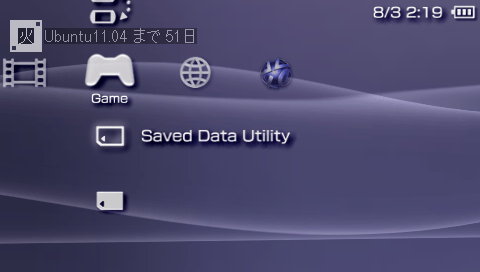
The countdown feature displays the number of days left until a set date. This feature becomes active starting from the previous month of the current month.
Set it in the msg_cd.txt file. The format is as follows:
[XX.YY]message
Where XX is the month (05 for May), YY is the day (13 for the 13th), and the message is what you want to display.
You can set as many messages as you want. Don’t forget to add a line break at the end. Example:
[12.25]Christmas
If today is December 10th, the message “15 days until Christmas” will be displayed.
Please refer to the included msg_cd.txt file for more examples.
Available fonts
The following characters can be used for display:
 !"#$%&'()*+,-./0123456789:;<=>?@ABCDEFGHIJKLMNOPQRSTUVWXYZ[\]^_`abcdefghijklmnopqrstuvwxyz{|}~

 、。〃〄々〆〇〈〉《》「」『』【】〒〓〔〕〖〗〘〙〚〛〜ぁあぃいぅうぇえぉおかがきぎくぐけげこごさざしじすずせぜそぞただちぢっつづてでとどなにぬねのはばぱひびぴふぶぷへべぺほぼぽまみむめもゃやゅゆょよらりるれろゎわゐゑをんゔゕゖゝゞァアィイゥウェエォオカガキギクグケゲコゴサザシジスズセゼソゾタダチヂッツヅテデトドナニヌネノハバパヒビピフブプヘベペホボポマミムメモャヤュユョヨラリルレロヮワヰヱヲンヴヵヶ・ー

日月火水木金土年曜
Settings
The settings file is vsh_cale.ini inside the vsh_cale folder.
Lines starting with '#' are comments. The basic format is:
setting_name = value
If nothing is written, the default will be used.
TEXT_COLR
- You can set the text color. Up to 5 colors can be set (1 to 5).
- Colors are in 32-bit format, with 8 bits for alpha, blue, green, and red channels.
- Example: ff0000ff (opaque red), 800000ff1 (semi-transparent red).
BACK_COLOR
- You can set the background color for the text.
- You can set up to 5 background colors, just like TEXT_COLR.
FADEIN_SPEED, FADEOUT_SPEED
- You can set the speed of fade-in and fade-out.
- The value ranges from 1 to 30, with lower values being faster.
OFFSET
- You can set the display position.
- The value ranges from 0 to 209, with smaller values moving the display towards the top of the screen.
Controls
R+Square - Change text color
R+Cross - Toggle display (hide or fade)
R+Analog Up/Down - Move the position of the display
L+Square - Change background color
L+Cross - Toggle background display
Screenshots
Compatibility
Tested on:
5.00M33-6
6.60 PROMOD-C2p
Changelog
1.20 2011/04/22
- Added countdown feature.
- The days of the week will now always be displayed without fading.
- Removed message loading limit (now can load more than 5 messages).
- Fixed a bug where the fade effect would shift over time.
- Fixed a bug related to message loading.
- Fixed an issue where colors were not applied correctly.
1.11 2011/04/15
- Fixed a bug where the PSP could not enter sleep mode if there was no entry for the day in the settings file.
1.10 2011/04/14
- Added a settings file (vsh_cale.ini).
- Added new fonts (year, weekday).
- Added ability to change background color and toggle background visibility.
1.00 2011/04/10
- Initial release.
Credits
libmenu1.5 by maxem.
The font used is a modified version of monafont.
External links
- Twitter - https://x.com/wnbyaku