
VSHInform PSP
More actions
| VSHInform | |
|---|---|
 | |
| General | |
| Author | SG57 |
| Type | Plugins |
| Version | 2007 |
| License | Mixed |
| Last Updated | 2007/03/05 |
| Links | |
| Download | |
| Website | |
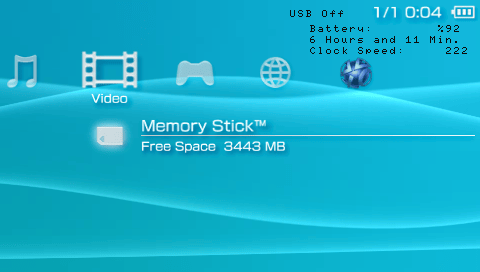
This is a neat and clean OE plugin that tells you:
- Battery percentage.
- Battery life.
- CPU frequency.
Features
- Display battery info and frequency.
- Change CPU frequency between 4 pre-defined values.
- Turn USB on/off with the touch of a button (see issues).
- Turn on/off the visibility and button input of it.
Installation
Extract VSHInformer.prx to ms0:/seplugins/ folder on your PSPs Memory Stick.
Depending on whether or not you want this in the game and/or in the XMB, edit game.txt and/or vsh.txt so a line in the file reads:
ms0:/seplugins/VSHInformer.prx
Go to the Plugins menu option in the Recovery Menu (boot holding R trigger) and enable the plugin.
Controls
Select - Turn visibility of the info on/off
Square - Cycle through 4 pre-defined CPU clock frequencies (222,266,300,333)
L - Toggle USB on/off
Screenshots
Compatibility
For 3.xx OE.
Tested on 6.60 PRO-C2.
Known issues
Currently the button input is pretty common buttons, so playing it in a game may require you to hide the info via SELECT if you are to use any of the buttons it uses.
The USB toggling isn't working correctly (allows you to view the USB Connection screen and whatnot when not even in that menu).
External links
- Author's website - http://jordansg57.googlepages.com/