
TwinTail LDE EUC-JP PSP
More actions
| TwinTail LDE [EUC-JP] | |
|---|---|
 | |
| General | |
| Author | ema |
| Type | Utilities |
| Version | 2.1 |
| License | Mixed |
| Last Updated | 2006/01/21 |
| Links | |
| Download | |
| Website | |
| Source | |
This is an alternative version of TTLDE Lua script editor that supports EUC-JP encoding.
Features
- Original input method named 'TwinTail'.
- LUA code execution (TTLDE catches syntax/runtime errors).
- Windows style selection & cut, copy, paste, search.
- Multi document interface.
- Auto indent.
- Word selector (from dictionary, from global).
- User plugin handling (see "plugins" folder).
User guide
'TwinTail' virtual keyboard
While inputting characters, hold R.
101 like
A standard QWERTY keyboard. It’s very easy to learn but doesn’t allow for particularly fast typing speeds.
Normal:
 12345 67890
 qwert yuiop
 -asdf ghjkl
 (zxc) vbnm~
 B, .\ /; ='   (B=Backspace)
Shifted:
 !@#$% ^&*[]
 QWERT YUIOP
 _ASDF GHJKL
 {ZXC} VBNM`
 E<t>| ?:T+"  (E=Enter, T=Tab)
'RapidTail'
A keyboard optimized for text input using a pad. With practice, you can achieve typing speeds of up to 150 characters per minute.
Normal:
 7q8"9 ~(-)*
 wfer0 yuiop
 4a5s6 ghjtk
 zcndv bl mx
 1+2=3 /;,.\
Shifted:
 &Q*'{ _[=]`
 WFER} YUIOP
 $A%S^ GHJTK
 ZCNDV BLtMX  (t=Tab)
 !b@e# ?:<>|  (b=Backspace, e=Enter)
How to input characters
This method has some ways to input same character.
This sample uses 101 mapping.
How to input 'a':
- Push Left Arrow and release.
How to input 'n':
- Push Cross and release.
How to input 'j':
- Push Circle, Left and release, OR
- Push Square, Right and release.
How to input 't':
- Hold Up Right, push Circle and release all, OR
- Hold Up, push Circle, Circle and release all.
How to input '_': (JIS)
- Hold L, Circle and Cross, push Right, Down and release all, OR
- Hold L and Circle, push Right, Down, Down and release all.
How to input 'which':
- Hold UpLeft, release
- Hold Square, release
- Hold Triangle, release
- Hold DownRight, release
- Hold Square, release
Customize
'ttlde.dic' - Dictionary used by quick word select.
'colorset/' - Color schemes (you can add new schemes by adding file)
'plugin/' - Plugins (you can add new plugins by adding file)
'osk/' - On-screen keyboard (you can modify the on-screen keyboard)
Controls
Analog - Move cursor(fast)
D-Pad - Move cursor
Cross+Analog/D-Pad - Fast move
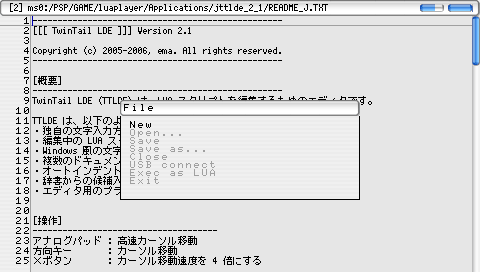
Start - "File" menu
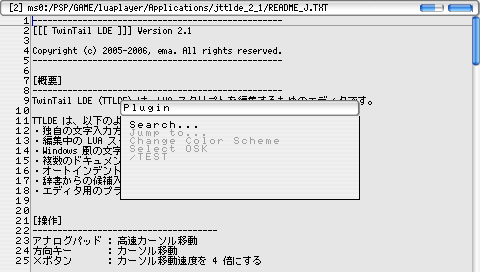
Select - "Plugin" menu
L (hold) - Shift
Select+D-Pad - Switch Buffer
L+D-Pad - Selection
Circle+D-Pad - Search selected words (F3, Shift+F3)
Square+D-Pad - Function jump
Triangle (hold)+D-Pad - Word Selector (from dictionary)
Triangle (push, release) - Word Selector (from global)
L+Square - Cut (Ctrl+X)
L+Triangle - Copy (Ctrl+C)
L+Circle - Paste (Ctrl+V)
L+Cross - Undo (Ctrl+Z) ... only 1 step
MultiLine Selection+Space - Indent
MultiLine Selection+Tab - Unindent
R - Enter virtual keyboard
Shortcuts:
L + RRR... - Enter
R + LLL... - Backspace
Select - Switch keyboard mapping
Screenshots
Changelog
2.1
- Added OSK selector(by plugin).
- Added new OSK.
- Modified skin.
- Modified file selector.
2.0
- Good bye TrueType.
- Deep optimizing.
1.7
- Font changed to TrueType.
- Added font caching.
1.6
- Added keyword hilighting (test).
- Became slower.
- Any ideas for optimize?
- Modified pad service to time based.
1.5
- Fixed keyboard mapping typo.
- Removed 106 key mapping.
1.4
- Fixed 'Get HTTP' plugin bug.
- Added shortcut to change keyboard mapping.
- Added new keyboard mapping named 'RapidTail'.
- Letter frequency based mapping.
- Numbers become easier to input than other mappings.
1.3
- Added png/jpg view.
- Optimized speed (always 60FPS).
- Current directory came to be restored after 'Exec LUA'.
- Fixed some bugs.
1.2
- Modified 'Function jump' more friendly.
- Fixed 'Jump to...' command bug.
- Added plugin handling.
- Added sample plugin using WLAN service.
- Moved some functions to plugin (search dialog etc.).
1.1
- Added 'global word select'.
- Added some color schemes.
- Simplified pad service.
- Environment came to be restored after 'Exec LUA'.
External links
- Author's website - https://www.geocities.ws/lua_ema/