
To Hide PSP
From GameBrew
More actions
| To Hide | |
|---|---|
 | |
| General | |
| Author | sebas_94, TheBlackKnight |
| Type | Utilities |
| Version | 4.0b |
| License | Mixed |
| Last Updated | 2008/09/27 |
| Links | |
| Download | |
| Website | |
| Source | |
To Hide (Spanish) is a homebrew that can hide/unhide contents on the XMB.
Since version 4.0 it also includes roe-ur-boat's AutoStart plugin so it the program will launch automatically at start up.
Installation
Copy the To Hide directory to ms0:/PSP/GAME/.
(Optional) Install the AutoStart plugin:
- Copy AutoStart.prx, conf.bin and Config.ROE in ms0:/seplugins/.
- Insert the path in game.txt and vsh.txt:
ms0:/seplugins/AutoStart.prx, then enable the plugin in the Recovery Menu. - Press Square while on boot to use it.
Controls
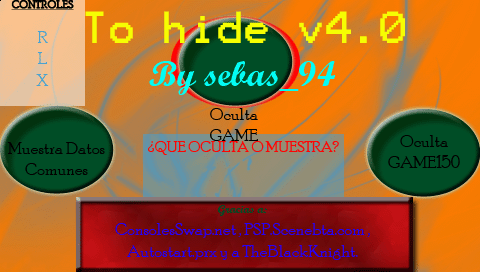
R/L - Switch between available options
Cross - Confirm/Accept
Screenshots
Changelog
V4.0b (TheBlackKnight)
- Fixed a bug that caused the GAME folder to be unrecoverable when hidden, as it would also be hidden in the app itself.
- Now, To Hide will not appear in the Games menu. To access the app, you need to press the Square button when you turn on the PSP or exit a game.
- To use this version, the AutoStart plugin, which comes with the download, must be activated in the recovery menu.
V4.0
- New graphical design.
- In addition to hiding and showing the following:
- Photos
- Music
- Games
- Videos
- Saves
- Now it also hides and shows:
- APP - Applications like GPS settings
- GAME - Homebrews not using 1.50 kernel
- GAME150 - Homebrew using 1.50 kernel
- SYSTEM - Browser data, cookies, etc.
- THEME - Official themes
- Added the AutoStart.prx plugin, which, once activated in recovery mode, will make the program run automatically when the PSP is turned on, by pressing the Square button simultaneously.
- If you want to know more about running plugins from your memory stick, check out this tutorial.
- Thanks to roe-ur-boat, creator of the plugin.
V3.1
- Changed the name from Ocultador to To Hide.
- Updated the Eboot.
- Improved the code (thanks to Falukito14 "Gladiator"), though it’s not fully clean yet.
- Reduced lag when switching between options.
- No graphical changes in the menu, but it’s still not necessary.
- Released the source code.
V3.0 (sebas_94)
- Updated the Eboot.
- Improved the graphical appearance, making it more visually appealing.
- We can now show/hide the following contents:
- Photos
- Music
- Videos
- Saved games
- ISOs, CSOs, DAXs, and JSOs
External links
- SceneBeta - https://psp.scenebeta.com/noticia/hide