
PSP Post it
From GameBrew
More actions
| PSP Post it | |
|---|---|
 | |
| General | |
| Author | Nicolas Lopez F. (pyroesp) |
| Type | Plugins |
| Version | 0.1.2 |
| License | Mixed |
| Last Updated | 2010/04/06 |
| Links | |
| Download | |
| Website | |
| Source | |
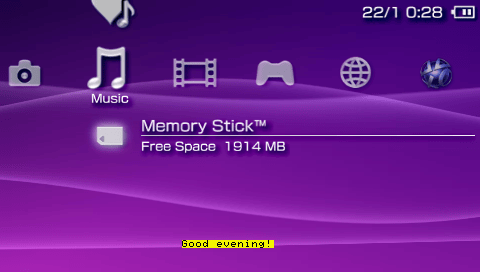
This plugin allows you to show a custom short note at a specific time and date.
All you have to do is to write your notes with the time and date, when it will show on the screen, in a txt file next to the plugin.
Installation
Copy PPi_by_pyroesp.prx to ms0:/seplugins/.
Insert the path in vsh.txt:
ms0:/seplugins/PPi_by_pyroesp.prx 1
To add your notes, create a .txt file named PPi.
Write your notes in the text file using this format:
HH:MM DD.MM.YYYY note goes here (50 characters max)
Example:
10:00 01.02.2010 1 example
10:30 01.12.2010 2 example
14:45 10.09.2010 3 example
18:10 29.03.2011 4 example
18:15 22.05.2012 5 example
Notes:
- You can write a maximum of 15 notes in PPi.txt.
- Each note must not have more than 50 characters.
- The .txt file must not end with an end of line char ('\n').
Reset VSH for the plugin to take effect.
Troubleshooting
Time/Date structure error:
- Check the time and date you wrote in the txt file, there should be an error somewhere.
- Example of error: 14:5 05.06.2010 note goes here.
- It needs to be: 14:05 05.06.2010 note goes here.
Same time and date in line X and Y:
- Check the time and date at line X and Y. Change one of the 2 lines.
- You can't run 2 or more notes at the same time and date.
You have written X notes //X > 15:
- The program supports only 15 notes, please delete (X - 15) notes from your PPi.txt file.
Controls
L+R - Check if the plugin is enabled
Screenshots
Credits
Special Thanks to:
- kevinr / K91220
- Mark Martinec for snprintf.c
External links
- PSPGEN - http://www.pspgen.com/forums/psp-post-it-v0-1-2-t203899.html (archived)