
FTP - Graphic ModifierX Edition 3DS
From GameBrew
More actions
| FTP - Graphic ModifierX Edition | |
|---|---|
 | |
| General | |
| Author | FloatingStar (aka Vorpal Blade) |
| Type | Utilities |
| Version | 2.2 |
| License | Mixed |
| Last Updated | 2016/01/27 |
| Links | |
| Download | |
| Website | |
| Source | |
FTP - Graphic ModifierX Edition, also referred as FTP-GMX, is a fork of ftpd by mtheall. This fork is solely for aesthetic modifications and CFW/Flashcart builds.
You can edit the banner, application icon, and bottom graphic of ftpd. For customized theme you will need to build it yourself.
Features
- Appears to work well with a variety of clients.
- Also compiles for Linux.
- Supports multiple simultaneous clients. The 3DS itself only appears to support enough sockets to perform 4-5 simultaneous data transfers, so it will help if you limit your FTP client to this many parallel requests.
- Your own cutting-edge graphics.
Building
Custom Graphics
Modify the .png files in the gfxfolder to add your own graphics:
- app_banner - This image will appear on the top screen before you run the application (.3ds and .cia).
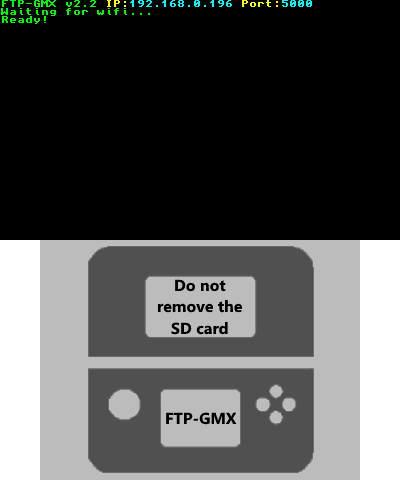
- app_bottom - This is the static in-app image on the bottom screen.
- app_icon - This is the icon for the .cia, .3ds, and .3dsx.
Prerequisites
- Install and set up devkitARM and libctru.
- Install the latest ctrulib (Note: devKitPro updater may not have the necessary files).
- Install sf2dlib.
- Install sfillib.
- Install portlibs.
Pre-compiled portlibs: available here and put the portlibs folder in your devKitPro folder.
How to build
- Download the .zip for this repo and extract.
- While holding Left-Shift on your keyboard, right click FTP-GMX-master and hit
Open command window here. - Run the following command
make. - You will have new files created in the folder.
Installing
The archive comes with a pre-build for Theme GBAtemp. Theme Nintendo Font is available here (.cia only).
- Homebrew - Copy .3dsx and .smdh to the directory /3ds/FTP-GMX-2.2/ of your SD card then run it with Homebrew Launcher.
- CFW - Copy .cia to your SD card and install it with a CIA installer.
- Flashcarts - Copy .3ds to your SD card.
User guide
Supported Commands
|
|
Screenshots
Media
Transfer to 3DS Via FTP (Game Poop)
Changelog
v2.2 2016/01/27
- .3ds file for Flashcarts.
- .cia file for CFW.
- .3dsx file for Homebrew.
Credits
- mtheall - Creator of ftpd.
- daxtsu - Post on how to make a .cia file.