
Digimon Universe: Appli Monsters 3DS - English Fan Translation
More actions
| Digimon Universe: Appli Monsters | |
|---|---|
 | |
| General | |
| Author | Geo |
| Type | Translations |
| Version | 1.2 |
| License | Mixed |
| Last Updated | 2026/06/08 |
| Links | |
| Download | |
| Website | |
English fan translation patch for Digimon Universe: Appli Monsters. The game is fully translated and can be played in English from start to finish on a modded 3DS console or an emulator.
Installation
You must prepare your own copy of the Digimon Universe: Appli Monsters ROM (the full version, not the free demo subtitled Cyber Arena).
The ROM needs to be an untrimmed decrypted .3ds dump of the physical cartridge. You can dump and decrypt your own copy using GodMode9 on a modded Nintendo 3DS. Please use the internet for help if necessary, it has plenty of relevant information.
Properties of the expected ROM:
- File size: 1.0 GiB
- SHA-1 hash: 5743d3f357d05d97124773618d5b6dde3c5e85b2
Other ROM variants are not supported. Issues caused by using them won't be addressed. Keep in mind that the patcher scripts included with the download may accept some incorrect ROMs and then produce a broken result, so make sure you provide a correct copy.
You can mark the steps you've completed with checkboxes to keep track of your progress. This is purely for your convenience. Reset all checkboxes
Patch instructions
- Create an empty folder anywhere on your computer. We'll refer to it as "work folder".
- Extract the contents of
appmon_en_patch_v1.2.zipinto the work folder. - Also place your decrypted original ROM in the work folder and rename it (the ROM) to
appmon.3ds. - Choose one that's relevant for you to apply the patch:
- If you're using Windows, double-click
appmon_patcher_windows.batin the work folder. - If you're using Linux, open your terminal in the work folder (or cd to it) and run:
chmod +x ./appmon_patcher_linux.sh; ./appmon_patcher_linux.sh
- If you're using macOS, open your terminal in the work folder (or cd to it) and run:
chmod +x ./appmon_patcher_macos.sh; ./appmon_patcher_macos.sh
- If you're using Windows, double-click
- Read the text in the console window carefully and press Enter when ready to start.
When the patching process finishes, you'll have two patched ROM variants in the work folder.
Expect both of them to be about half the size of the original ROM due to trimming.
- appmon_en_v1.2_console.cia is for installing and playing on a modded 3DS.
- appmon_en_v1.2_emulator.cci is for playing on an emulator.
Grab the one you need and install it on your modded 3DS, or launch it using an emulator.
Alternatively, you can use the online patcher from the official website.
Updating
If you've been playing an earlier version of the fan translation and want to update it, you must re-patch your original clean ROM, not the ROM that was already patched. Patch it "from scratch," and then install the newly patched version on your modded 3DS or launch it using an emulator.
Very important: If you're a modded console player, your first step before even thinking about updating should be to back up your save data, because the console will erase it if you uninstall the game or even simply overwrite it with a newer version. You can back up your save data by going to System Settings > Data Management > Nintendo 3DS > Save Data Backup > Backup > Digimon U Appli Monsters.
After installing the updated version, you'll have to follow similar steps to restore your backup: System Settings > Data Management > Nintendo 3DS > Save Data Backup > Restore > Digimon U Appli Monsters.
Emulator players generally don't have to worry about this (unless you're fully emulating the 3DS environment and installing everything through the 3DS home menu and FBI, like you would do on a real modded console, which nobody does). But backing up your save once in a while is a good idea in any case.
Screenshots
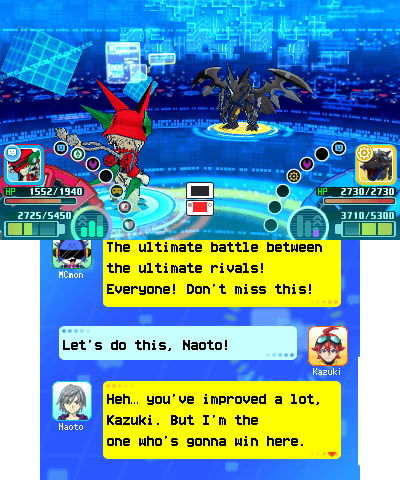
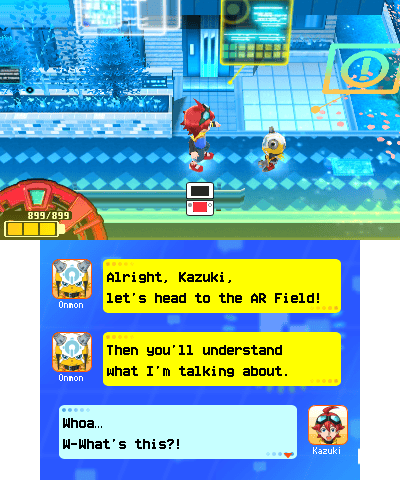
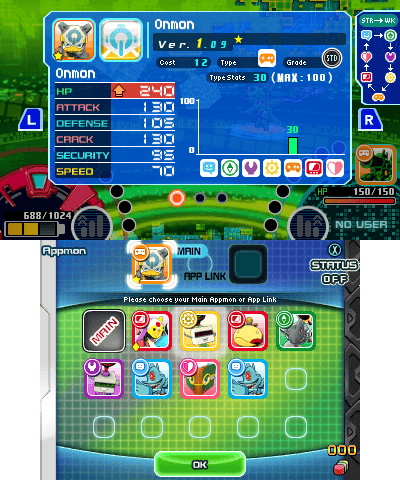
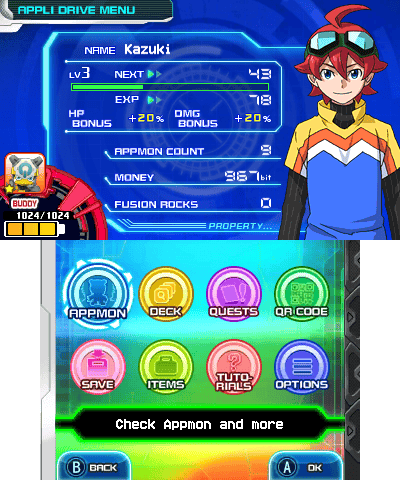
Media
Digimon Universe: Appli Monsters (3DS) - Fan Translation Proof of Concept (Geo)
Known issues
For the most part, everything in the patched game works perfectly fine. However, there are some minor unresolved issues that don't disrupt gameplay. Here's a list of them.
- If your save file was first created in the Japanese version of the game, expect all the Japanese characters in the player, Appmon and deck names to appear distorted when you load it in the fan translation, because the Japanese font is not well supported. You can simply rename your Appmon and decks to fix this, but changing the player name will require hex editing of the save file (
DGMGame0.bin). The player name is located at offset0x3c, you can modify it freely. - In local multiplayer battles, player names longer than 6 characters may be visually truncated to 6 characters. For example, the name
Benjaminwill be displayed asBenjam. This only occurs in the room creation/selection interface and during the following local multiplayer battles. The issue is purely visual and temporary, and it doesn't affect anything. Attempts to patch this limitation caused battles to desynchronize after the first turn, so the decision was made to leave it alone, at least for now. - The font of the "live chat messages" floating across the screen in Cyber Arena battles (overlayed on top of the action to simulate Niconico-style "danmaku comments") is slightly stretched horizontally compared to the rest of the text in the game. This will probably go competely unnoticed by most players, but the visual inconsistency is there. Changing it is non-trivial, so for now it has been left as is.
- Near the beginning of the game, when you're taught how to convert Appmon fragments for the first time, the tutorial highlight prompting you to select Tellermon fragments is slightly misaligned in size due to the menu being widened compared to the Japanese version. The highlight size isn't defined in a straightforward way, and fixing this minor issue would've required a significant amount of tinkering for something that's only visible for a few seconds and never seen again. Most players probably won't even notice that anything is off.
- (A theoretical issue.) Since support for all of this game's internet battle features ended long ago, there's currently no way to access any of the interfaces related to them. As a result, the translation of these parts had to be done "blindly," by translating text and textures without being able to see how everything actually comes together in-game. This means that if a service such as Pretendo ever adds support for this game in the future (unlikely, but not completely out of the question), and those features become accessible again, some of their visual elements may appear broken. But until that happens, if it ever does, there's no way to tell.
Changelog
v1.2
- Fixed Weatherdramon's name being wrapped onto a new line in the Appmon Index due to being too long.
- Corrected several typos.
- Improved the README file.
v1.1
- Corrected Mediamon's Signature Skill name: Virtual Birth → Virtualverse.
- Corrected an erroneous type reference in Raidramon's App Link description: Game → System.
- Fixed various typos and mistranslations in dialogue.
- Rephrased a number of dialogue lines to sound more natural.
- Improved the README file.
- Improved the patcher scripts.
v1.0
- This is the initial release of the fan translation.
Credits
- Main Translation: Geo
- Graphics Editing: Geo
- Programming: Geo, Romsstar
- Text Editing: Geo, birdboy2000
- Additional Translation: Fat Cat
- Title Logo Adaptation: LouLilie
- Testing: Geo, birdboy2000, Ren D., Lys T.