
3DS Starter Pack Downloader
From GameBrew
More actions
| 3DS Starter Pack Downloader | |
|---|---|
 | |
| General | |
| Author | sthetix |
| Type | PC Utilities |
| Version | 2.0.0 |
| License | MIT License |
| Last Updated | 2025/10/21 |
| Links | |
| Download | |
| Website | |
| Source | |
| Support Author | |
3DS Starter Pack Downloader (3DS-SPDL) is a Python GUI application that automatically downloads and organizes the latest versions of core files required for the "Finalizing Setup" step when installing custom firmware on a Nintendo 3DS console. It eliminates the need to manually download individual releases from multiple GitHub repositories and organizes them into the correct SD card file structure.
The tool fetches the latest releases of the following essential components for 3DS custom firmware setup:
- Luma3DS - The latest custom firmware (boot.firm).
- GodMode9 - The file system access tool (GodMode9.firm) and its scripts.
- Finalize - The required helper files for setup completion (x_finalize_helper.firm and finalize.romfs).
All files are automatically placed in the proper SD card directory structure, ready to copy directly to the 3DS.
Features
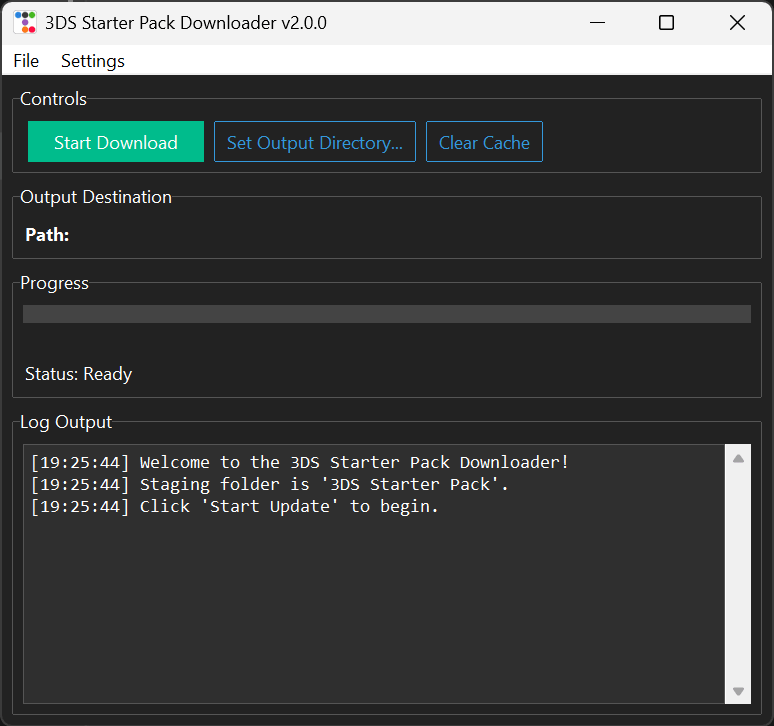
- Graphical user interface - A simple, modern interface with no command line required.
- Smart caching - Avoids GitHub API rate limits by caching release info for 24 hours.
- Cache management - A "Clear Cache" button allows forcing a fresh download of all files.
- GitHub PAT support - Users can add a GitHub Personal Access Token via the Settings > GitHub PAT menu to increase API rate limits. The token is saved in gui_updater_config.json.
- Direct-to-SD copy - The "Set Output Directory..." button allows selecting the SD card root. The app automatically copies files to the SD card after downloading.
- Clean organization - All files are placed in the correct SD card structure (e.g., /luma/payloads, /gm9) inside a staging folder named "3DS Starter Pack".
- Live progress - A full log window and progress bar show download and organization progress.
Requirements
- Windows, macOS, or Linux
- An internet connection
For Executable (Windows)
- No other requirements.
For Python Script (All Platforms)
- Python 3.x
- The
requestsandttkbootstrapPython libraries. Install the required libraries with:pip install requests ttkbootstrap
User guide
Option 1: Executable (Windows)
- Download 3DS-SPDL.exe from the Releases page.
- Run the executable.
- Click "Start Download".
Option 2: Python Script (All Platforms)
- Ensure Python 3.x is installed along with the required libraries (see Requirements above).
- Run the script from a terminal:
python 3DS-SPDL.py - Click "Start Download".
Output
The application first downloads and organizes all files into a local folder named 3DS Starter Pack.
- If no Output Directory has been set, copy the contents of the
3DS Starter Packfolder to the root of the SD card manually. - If an Output Directory has been set (such as the SD card root), the app will automatically merge and overwrite all downloaded files into that destination.
Compatibility
- Windows (executable and Python script)
- macOS (Python script)
- Linux (Python script)
Screenshots
Changelog
v2.0.0 2025/10/21
- Big Update (GUI overhaul).
- Added graphical user interface replacing the previous command-line workflow.
- Added "Clear Cache" button (replaces the old --clear-cache command-line argument).
- Added GitHub PAT management via Settings menu (replaces the need for environment variables).
- Added "Set Output Directory" feature for direct-to-SD card copying.
- Core logic retained: fetches latest releases for Luma3DS, GodMode9, and Finalize.
- Smart caching retained: uses 3ds_starter_pack_cache.json with 1-day cache duration.
- Correct file structure retained: organizes files into luma/payloads, gm9, and root-level structure.