
FMVita
More actions
| FMVita | |
|---|---|
 | |
| General | |
| Author | WolffsRoom |
| Type | File Browsers |
| Version | 0.5.0 |
| License | GPL-3.0 |
| Last Updated | 2026/06/17 |
| Links | |
| Download | |
| Website | |
| Source | |
FMVita (File Manager Vita) is an enhanced fork of VitaShell (originally created by TheFloW). This version focuses on usability, expanding touchscreen support for the PS Vita, introducing animated backgrounds, various Quality of Life (QoL) improvements, and a new program file organization under the independent directory ux0:FMVita/.
FMVita was designed to prevent conflicts with the current configuration. It features a unique Title ID and its own dedicated folder structure, and can be installed side-by-side with the original VitaShell, OneMenuPlus, MolecularShell, or any other file manager.
Features
Interface and Themes
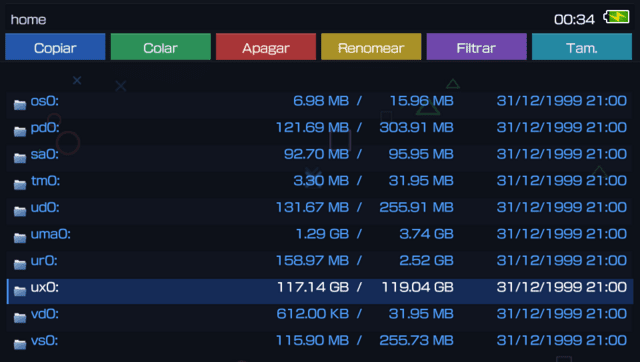
- Eight Color Presets: Dark, Light, Blue, Red, Purple, Brown, Gray, and Custom. The system automatically calculates text, highlight, selection, dialog, and border colors.
- Custom Theme Support: Select the Custom preset and edit
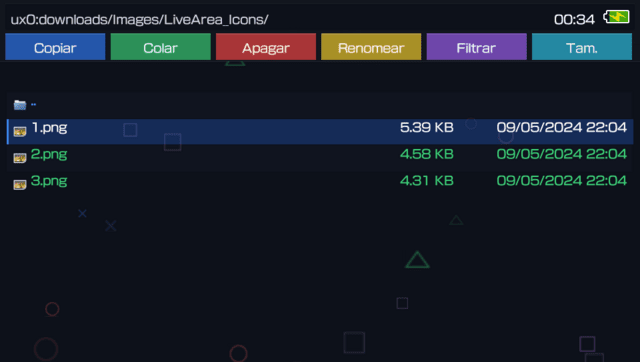
ux0:FMVita/colors.txtto fully define every color in the interface. - Quick Action Toolbar: A new toolbar featuring 9 quick shortcuts: Move, Copy, Paste, Delete, Rename, Filter, Group, Search, and New.
- Transparency: The interface elements (topbar, cards, and buttons) feature a reduced alpha channel when using image backgrounds (GIF or PNG) for better visibility.
- Themed Scrollbar: An adaptive scrollbar that matches the theme's highlight color.
- Redesigned Address Bar: Now displays the current directory path, battery status, and clock.
- Partial Support for VitaShell Themes: Due to the nature of the original project, themes developed for VitaShell are not 100% compatible with this version, only taking advantage of certain elements such as file icons.
Animated Backgrounds
- Four Procedural Animations: Particles (floating PlayStation icons), Waves (colored mist), Stars (starfield), and Squares (PS2-styled falling rectangles).
- Animated GIF Support: Loads from
ux0:FMVita/Gif/theme.gif(Mode 4) with multiple fallbacks. Powered by anstbimageengine featuring frame delay control, cover-fit scaling, and clipping. Requires 960×540, 8-bit color. - Static PNG Support: Native loading from
ux0:FMVita/Background/bg.png(Mode 5). Requires 960×540, 8-bit color.
Touchscreen Support
- Native Dialogs: The old system YES/NO prompt has been replaced by custom Touch Dialogs (Confirmation, Deletion, and FTP) styled with PlayStation button icons.
- Drag-and-Drop: Hold
Square+ Touch (or perform a long press) to drag files into other folders. Features Auto-scroll when moving items near the screen edges. - Swipe Gestures: Swipe Left to go Back, Swipe Right to Enter.
- Multi-tap: Double-tap and hold to open the context menu.
- Mouse Cursor: Control a mouse pointer using the right analog stick (click with
Cross), featuring a smooth fade effect after inactivity.
- View Modes: Four layout options available under Settings -> View Mode:
- List - Traditional single-column list view.
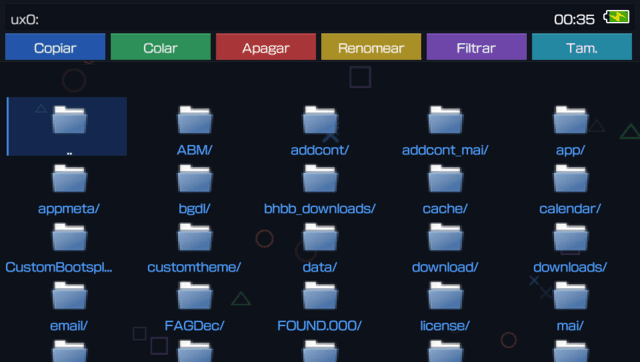
- Grid - Icon-based tile grid view.
- 2 Columns - Split-screen view showing Parent and Current folders side-by-side, each occupying exactly 50% of the screen width.
- 3 Columns - Three-panel view (Grandparent / Parent / Current) for ultra-fast directory browsing.
- Column View Touch Navigation: Highlights the active folder in gold within the upper columns and allows direct touch navigation on any column.
- Page Speed: Configurable scroll repeat speed in Settings -> Page Speed, applies to both D-PAD and analog stick navigation.
- Bookmarks and Recents: The
Squareshortcut jumps directly to your bookmarks; theTriangleshortcut navigates to recent files (which automatically generate.lnksymlinks). - Search Tools: A Filter system (All/Folders/Files) on the toolbar and case-insensitive Search within the current directory.
- Enhanced Scrolling: Infinite scroll wrapping (from top to bottom and vice versa) and smooth lerp-based scrolling with acceleration.
- Transition Animations: Configurable Slide, Smooth Slide, or Fade transitions when navigating between folders. Can be disabled.
- Symlinks: Optimized tracking via a
SymlinkDirectoryPathlinked list to ensure correct navigation through shortcuts.
VPK Management
- Batch VPK Installation: Mark multiple VPK files and install them all sequentially in one go - no need to install one at a time.
- Background VPK Installation: VPK installation runs from the file browser, no longer dependent on PKGj.
- Post-Install Launch: Optionally launch the just-installed application directly after installation.
- QR Code Download & Auto-Install: Scan a QR code containing a VPK URL to download and auto-install directly.
FTP Server
- Wi-Fi Auto-Check: If Wi-Fi is off, FMVita will prompt you to enable it before starting the FTP server - no more silent failures.
- Improved Status Messages: FTP operations now display human-readable progress descriptions and current activity (upload, download, rename, etc.).
- Progress Tracking: File transfer operations show 0–100% progress in the FTP status modal.
- Auto-Refresh on Close: The current folder is automatically refreshed when the FTP server is stopped.
Image Viewer
- Open any PNG, JPEG, BMP, or GIF image directly from the file browser.
- Supports zoom, pan, and mirror operations with touch and button controls.
Undo System
- Undo Move and Copy actions directly from the context menu (
UNDOACTION). - Undo Move: Reverts the
sceIoRenamecommand. - Undo Copy: Cleanly deletes the file copied by mistake.
- The Undo option appears dynamically and also registers actions performed via Drag-and-Drop.
Security and Configuration
- System Protection: Renaming locks on critical system folders (verified via
isProtectedPath()) with custom error messages. - Independent Settings: Reads and writes directly to
ux0:FMVita/settings.txt(usecustomconfig = 1by default; can be temporarily disabled by holdingLduring boot). - Language Switching: Change the interface language without rebooting the console - FMVita restarts itself to apply the change instantly.
- New Menu Options: USB Device (4 modes), SELECT Button (USB/FTP/QR), View Mode (List/Grid/2 Columns/3 Columns), Background Anim (7 modes), Theme Preset (8 options), Page Speed, Transition Mode, and Scroll Loop.
Removed Features and Optimizations
To keep the application lightweight and focused purely on file management, the following features from the original VitaShell have been deprecated or hidden:
- HENkaku Settings menu (PSN spoofing, unsafe homebrew toggle, version spoofing).
- Disable Auto-Update and Disable Warning Messages.
- Rear Touchpad support.
Installation
Transfer the FMVita .vpk file to the console (via FTP or USB) and install it using VitaShell (or any other file manager application currently in use).
FMVita completely isolates its data from the original VitaShell using the following directory structure:
| Original (VitaShell) | FMVita |
|---|---|
ux0:VitaShell/settings.txt
|
ux0:FMVita/settings.txt
|
ux0:VitaShell/language/
|
ux0:FMVita/language/
|
ux0:VitaShell/theme/
|
ux0:FMVita/theme/
|
ux0:data/lastdir.txt
|
ux0:FMVita/internal/lastdir.txt
|
ux0:VitaShell/bookmarks/
|
ux0:FMVita/bookmarks/
|
ux0:data/recent/
|
ux0:FMVITA/recent/
|
ux0:app/VITASHELL/module/*
|
ux0:FMVita/module/*
|
| (Did not exist) | ux0:FMVita/Gif/theme.gif
|
| (Did not exist) | ux0:FMVita/Background/bg.png
|
| (Did not exist) | ux0:FMVita/colors.txt
|
Screenshots
Changelog
v0.5.0
- 2 Columns view — 50/50 split: The two-column layout now divides the screen evenly (each column gets exactly 50% width), eliminating empty space on the right.
- Improved text clipping in column modes: Filename display boundaries are now dynamic — text is correctly clipped and scrolled within each column without spilling over.
- Grandparent panel restricted to 3 Columns: The grandparent folder panel is no longer drawn in 2 Columns mode, keeping the layout clean.
- Better mouse hover in column modes: Hover highlights are now correctly bounded to the active column area only.
- Language switch restarts FileManager (not console): Changing the language in Settings now triggers a FileManager restart instead of a full console reboot.
- Custom theme preset: Added a "Custom" theme option that reads colors from
ux0:FMVita/colors.txt. - Batch VPK installation: Mark multiple VPKs and install them all in sequence.
- FTP Wi-Fi check modal: FTP now warns if Wi-Fi is disabled before starting.
- FTP status improvements: More readable transfer descriptions and 0–100% progress tracking.
- Auto-refresh on FTP close: Current folder refreshes automatically after FTP is stopped.
- Background image validation: PNG/GIF backgrounds are now validated for 960×540 resolution and 8-bit color depth.
- Page Speed via D-PAD and Analog stick: Configurable scroll repeat rate now applies to both input methods.
- Transition animation fixes: Slide and Fade transitions overhauled to avoid visual bugs.
v0.4.3
- QR download auto-install, touch-friendly QR dialogs, post-install launch, VPK context menu (Launch app/game), i18n updates, built-in videoplayer, button_fav/button_plus textures, build fix.
v0.3.0
- Released 27 May.
v0.2.2 - Header overlay, status bar, GIF support, touch UX
- Header row now drawn on top of file list (overlay): scrolled items no longer pass over headers.
- HEADER_H increased from 22 to 26 for better readability.
- Header text uses full theme text color (brighter).
- STATUSBAR_H increased from 28 to 34, background opacity 230, brighter text.
- Fixed .GIF file selection freeze: FILE_TYPE_GIF added to file type system, routed to photo viewer.
- Toolbar buttons: action fires on touch RELEASE (not press), with hover highlight animation.
- Toolbar highlights fully colored when finger/mouse is over a button.
v0.2.1 - Fix header/status bar layout
- Header row labels moved up (ty=80) to prevent overlap with file list alternating strips.
- File info text (size/date) now skips drawing when it would extend into the status bar (y >= 516).
v0.1.0
- First functional version of FMVita (File Manager Vita), built on the base of VitaShell (by TheFloW), consolidating interface and usability modifications.
- Visual Customization: 6 new color presets; support for 4 native animations plus custom GIF and PNG backgrounds.
- Navigation and Interface: Column View (3-column layout); touch interaction with Touch Dialogs and Swipe Gestures; Mouse Cursor and Drag-and-Drop support; Quick Action Toolbar.
- File Management and Security: File Filter and Search system; quick-access buttons for Bookmarks and Recent Files; Undo System.
- Changes and Removals: Application data moved to the
ux0:FMVita/path; Trash removed to simplify direct file deletion; HENkaku Settings menu removed.
Credits
- TheFloW - Creator of the original VitaShell.
- Team Molecule - HENkaku.
- xerpi - ftpvitalib and vita2dlib libraries.
- Sean Barrett - stb_image implementation.
- WolffsRoom - FMVita development, visual modifications, and engine.