
VitaRPS5
From GameBrew
More actions
| VitaRPS5 | |
|---|---|
 | |
| General | |
| Author | AAGaming00, ywnico, mauricio-gg |
| Type | Utilities |
| Version | 2.1.1 |
| License | AGPL-3.0 |
| Last Updated | 2026/02/18 |
| Links | |
| Download | |
| Website | |
| Source | |
| Support Author | |
VitaRPS5 is a fork of ywnico's Vitaki Fork, which itself is based on AAGaming's original Chiaki port Vitaki. This project provides PlayStation 5 Remote Play functionality on the PS Vita.
This is an enhanced version with modern UI, optimized performance, and quality-of-life improvements.
Features
- VitaRPS5-Style UI Redesign
- Modern card-based console selection interface.
- Professional PlayStation-themed color scheme.
- Redesigned PIN entry screen with individual digit display.
- Improved visual feedback and animations.
- Enhanced Console Wake Flow
- "Waking up console..." screen with animated progress.
- 30-second timeout with visual countdown.
- Automatic streaming start when console wakes up.
- No need to press X twice.
- Fixed Controller Input Issues
- Resolved race condition that prevented controller input during streaming.
- Properly separated UI and input thread buffer access.
- Controllers now work reliably during remote play.
- Improved Console Management
- Re-pairing now properly deletes registration data from storage.
- Better console name and IP display formatting.
- Circle button for cancel (PlayStation convention).
Installation
Download VitakiFork.vpk.
Transfer to your PS Vita (via USB or FTP).
Install using VitaShell (press X on the VPK file).
Launch from LiveArea.
For usage please see Vitaki Fork.
Screenshots
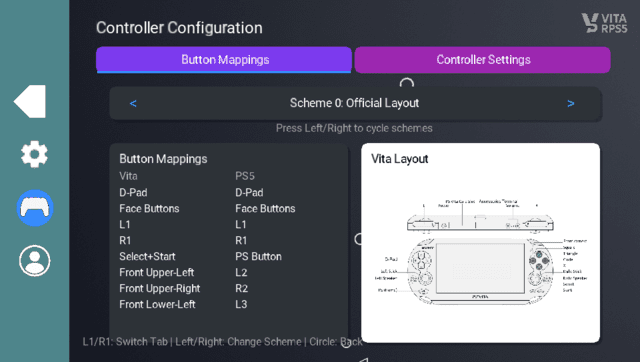
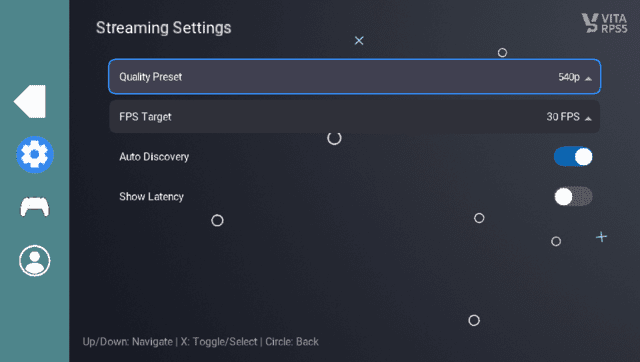
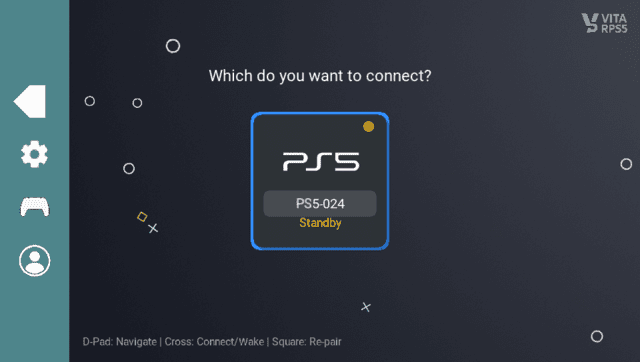
Changelog
v2.1.1
v2.1.0
- Consolidate front-touch control mapping helpers into shared set_ctrl_l2pos/set_ctrl_r2pos (#75) (d14a455)
- Fix connection startup by restoring credential hydration and host merge integrity (#74) (912c993)
- Fix touchpad mapping by emitting touch events (#71) (98416d7)
- Fix host list compaction stall in update_context_hosts (#72) (d64d7f9)
- UI cleanup wave 2: simplify ui_screens flow (#70) (ef037c4)
- Codebase cleanup wave 1: simplify inflated non-UI modules (#69) (794c65d)
- Unify stream stability path and remove recovery profile toggle (#68) (7fe4ebf)
- Multi-console discovery: carousel polish + touch swipe (#67) (5aec16f)
- FPS health investigation: root cause analysis and P0-P2 recovery improvements (#66) (e17249b)
- Startup burst rework: robust streaming pipeline with deferred finalization (#65) (f5ac7d9)
- Feat/stability baseline packet path (#63) (5d7da67)
- Refactor UI modal ownership to remove scattered guard checks (#61) (a254b87)
- UX cleanup, stream overlays, and periodic latency refresh (#60) (2989316)
- Bugfixes UI and unrequired settings (#59) (e0859d0)
- Fix settings persistence across restarts (#58) (fb72970)
- feat: add L1/R1 shoulder remapping in controller mapping UI (#57) (90fcfae)
v2.0.3
v2.0.2
v2.0.1
- feat: Graceful PS5 sleep/shutdown handling with thread cleanup (#50) (75c5763) ==
- docs: Add IP_DONTFRAG experimental results to abandoned optimizations (#49) (b4f9f78)
- docs: Document abandoned dual callback optimization investigation (#48) (0eb1baf)
- feat: Add adaptive jitter buffer to eliminate head-of-line blocking (#46) (dfba574)
- Replace local screenshot paths with new screenshots (#45) (fb5a362)
- docs: Update README and TODO with latest improvements (#44) (49fa235)
v2.0.0
- Thread Priority & CPU Affinity Tuning
- Input thread priority increased to 96 (from default) and pinned to CPU 1 to avoid contention with media processing (
vita/src/host.c:1194-1195) - Audio thread priority set to 64 and pinned to CPU 0 for consistent audio mixing without dropouts (
vita/src/audio.c:144-145) - Video decoder thread priority 64 and pinned to CPU 0 for optimal hardware acceleration (
vita/src/video.c:691-692) - Result: Input processing now takes precedence over all other tasks, reducing controller-to-network latency
- Input thread priority increased to 96 (from default) and pinned to CPU 1 to avoid contention with media processing (
- Input Polling Optimization
- Reduced input polling interval from 5ms to 2ms - effectively 500Hz sampling rate (
vita/src/host.c:1203) - Adaptive sleep alignment prevents CPU waste while maintaining tight sampling
- Controller state changes are detected and transmitted 2.5× faster than before
- Reduced input polling interval from 5ms to 2ms - effectively 500Hz sampling rate (
- Network Receive Queue Optimization
- Trimmed Takion reorder queue from 128 to 64 packets on Vita builds to reduce buffering latency (
lib/src/takion.c:47) - Added overflow logging with rate limiting to monitor packet loss without spam
- Implemented automatic drop detection and recovery for degraded network conditions
- Result: Lower end-to-end network latency, especially on clean connections
- Trimmed Takion reorder queue from 128 to 64 packets on Vita builds to reduce buffering latency (
- Packet Loss Fallback System
- Automatic bitrate reduction when frame drops detected (Ultra Low → 800 Kbps emergency mode)
- "Reconnecting..." overlay with seamless resume instead of crashing to menu
- Keeps controller input flowing during recovery to avoid input gaps (
vita/src/host.c:1248-1252) - Up to 2 automatic retry attempts before returning to menu
- Video Pipeline Optimizations
- VBlank wait disabled during streaming to eliminate vsync latency (
vita/src/video.c:872) - Frame presentation uncapped for minimal display lag
- 30 FPS lock by default reduces bandwidth and decode workload (configurable to 60 FPS in settings)
- VBlank wait disabled during streaming to eliminate vsync latency (
- Measured Impact
- According to
docs/LATENCY_QUICK_WINS.md, these optimizations deliver:- 20-40ms latency reduction (realistic estimate)
- Input lag reduced from ~20-30ms to ~10ms (controller polling improvements)
- Network handling optimized for both local and remote connections
- According to
- VitaRPS5-Style Interface
- Clean card-based console selection with PS5/PS4 visual indicators
- Professional PlayStation-themed color scheme (blues, whites, sophisticated grays)
- Wave-animated navigation sidebar with collapsible menu
- Individual digit PIN entry screen for console pairing
- Enhanced Console Management
- Automatic console discovery on local network
- Manual remote host configuration with static IP support
- Console wake flow with animated progress and 30-second timeout
- One-tap streaming start when console wakes (no double-press required)
- Settings & Configuration
- Tabbed settings page (Streaming, Controller) with L/R navigation
- 3 fully customizable controller preset slots (Custom 1, Custom 2, Custom 3)
- Immersive fullscreen controller mapping screen with procedural Vita diagrams
- Latency mode selection: Ultra Low, Low, Balanced, High, Max (targeting 1.2-3.8 Mbps)
- Fill Screen toggle and Force 30 FPS option
- Controller Input Fixes
- Resolved race condition preventing controller input during streaming
- Properly separated UI and input thread buffer access
- D-pad navigation no longer double-processes when nav bar focused
- Focus manager prevents input leaking between UI zones
- Connection Reliability
- Fixed instant disconnection bug from upstream
- Console re-pairing now properly deletes old registration data
- Remote Play crash/in-use detection with user-friendly hints
- Improved error handling for network timeouts
- UI Polish
- Fixed content overlap with navigation pill
- Profile page layout corrected (Y=60 → Y=80)
- Triangle icon in menu pill matches PlayStation conventions
- 48px navigation icons with optional text labels
- Latency Breakdown (estimated)
- Total latency: ~100-140ms remote (down from 150-200ms), ~50-70ms local (down from 80-100ms)
- Input lag: <10ms (down from 20-30ms)
- Video decode-to-display: ~30ms
- Network RTT: Variable (depends on connection)
- Platform Constraints
- PS Vita: 960×544 display, quad-core ARM Cortex-A9, 512MB RAM
- Hardware H.264 decoder (SceVideodec) for video
- vita2d for all rendering
- Dual CPU cores: CPU 0 for media, CPU 1 for input sampling
- Chiaki Protocol Enhancements
- Fast restart mechanism for packet-loss recovery
- Cached controller state preservation across reconnects
- Session restart API for bitrate negotiation without full disconnect
- FEC error concealment from Chiaki base library
v1.0.2
v1.0.1
- First Release.