
ARK PSP
More actions
| ARK | |
|---|---|
 | |
| General | |
| Author | Coldbird, hrimfaxi, Neur0n |
| Type | Custom Firmwares |
| Version | 4.20.63 |
| License | Mixed |
| Last Updated | 2023/08/12 |
| Links | |
| Download | |
| Website | |
| Source | |
ARK is a custom firmware for the PSP and PS Vita that has been actively developed and regularly updated. It enhances the functionality of these consoles by adding features not available in the official firmware.
Features
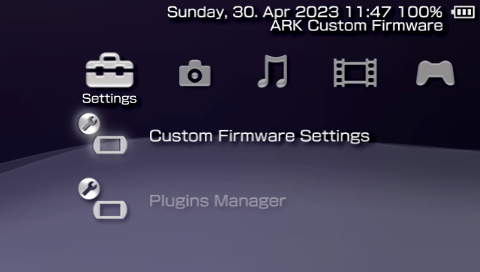
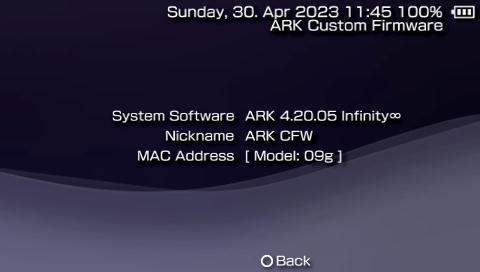
Coresystem heavily updated from traditional CFW with new exclusive features.Inferno 2Driver compatible with all formats (ISO,CSO,ZSO,JSO,CSOv2andDAX).Popcorncontroller for customPS1games. Compatible withPopsLoaderV3 and V4i.- Built-in
No-DRMengineStargate, fixes many anti-CFW games. Compatible withnpdrm_freeby qwikrazor87. Pluginsupport forPSPgames,PS1games andVSH(XMB), including the ability to enable and disable pluginsper-game.Region Freeplayback ofUMD Videoon all PSP models. Change the region of yourUMDdrive on-the-fly.- Compatible with all
PSPmodels on firmwares6.60and6.61. - Compatible with all
PS Vitamodels on firmware2.10up to3.74, either official firmware or viaAdrenaline. - Compatible with
6.60Testing ToolFirmware andTestkitUnits. - Compatible with
6.60Development ToolFirmware andDevkitUnits. - Can be fully installed and booted on memory stick in compatible models via
Time Machine. - Can be used to unbrick any PSP using
Despertar del Cementerioin combination with aPandoraorBaryon Sweeper. Minimalistic: only 6 files installed on PSP flash, CFW extensions are installed on memory stick.- Resistant to
soft-bricks, easy to recover from bad configurations with a new and improvedRecoveryapp. Custom game launcherwith built-in game categories, file browser,FTPserver and client, modernized look and more.- Fully configurable via the
XMB. - Compatible with
PRO OnlineandXlink Kai. - Compatible with Legacy Homebrew via
eLoaderandLeda. Compatible with the KXploit format. - Compatible with
cIPLandInfinity 2bootloaders for permanent CFW.
Installation
- Download the precompiled binaries from: https://github.com/PSP-Archive/ARK-4/releases/latest
- You can follow this video with instructions to install
ARKonPSPviaInfinityand/or onPS VitaviaAdrenaline: https://youtu.be/bE8mw7RRqGo
Compiling ARK ( For Developers )
Build script will allow you to use the correct SDK that ARK was built with.
- Docker container:
docker pull docker.io/krazynez/ark-4:latest
These are utlized either with cloning the repo or using the Docker container
- Release:
./build.sh - Debug:
./build.sh --debug - Manually: install the oldest possible SDK (ideally the one used to compile M33), then run
make
Use -h or --help to show all available flags
On PSP
Online PSP Installer
For an easy deployment of ARK on a PSP connected to the internet, you can follow this video
Manual installation
The instructions are as follows:
- Move or copy
ARK_01234folder into/PSP/SAVEDATA/folder. - Move or copy
ARK_Loaderfolder into/PSP/GAME/folder. - Launch
ARK Loader. It will install ARK modules on PSP Flash and boot the CFW.
Live CFW
- Delete
FLASH0.ARKfrom/PSP/SAVEDATA/ARK_01234to prevent flashing files every time you reload the CFW. - Run
ARK Loaderwhen you boot up the system after you've fully turned off or hard reboot the device to re-enableARK.
Permanent CFW via new cIPL
- Works on 1K models, 2K models and early 3K models (1g, 2g and 3g).
- Only works on
6.61. DoesNOTwork withTesting ToolorDevelopment Toolfirmwares. - cIPL will not install if not compatible, so no risk if running it even if you're unsure what specific model you're using - if not compatible, use
Infinity 2instead. - Move or copy
ARK_newIPLfolder to/PSP/GAME/and run the program. - Press the corresponding button in the installation page to install the cIPL patch.
- Warning: unlike classic cIPL, the new method can't be easily uninstalled.
Permanent CFW via classic cIPL
- Only works on 1K models and early 2K models (those compatible with Pandora).
- Works on
6.60and6.61, includingTesting Toolfirmware. DoesNOTwork withDevelopment Toolfirmware. - cIPL will not install if not compatible, so no risk if running it even if you're unsure what specific model you're using - if not compatible, use
Infinity 2instead. - Move or copy
ARK cIPLfolder to/PSP/GAME/and run the program. - Press the corresponding button in the installation page to install or remove the cIPL patch.
Permanent CFW via Infinity
*RECOMMNEDED* If already using another CFW with Infinity < 2.0.5, use chronoswitch to reinstall 6.60/6.61 OFW (Offical Firmware). If you do not when launching Infinity it can just lock your PSP up causing Infinity to not work properly (not harmful, just not properly). Then proceed with intructions. You can still bi/tri boot your CFW afterwards.
- Works on all PSP models on 6.60 or 6.61 firmwares.
- Copy or move the
EBOOT.PBP(orEBOOT_GO.PBPrenamed toEBOOT.PBPif using a PSP Go) from theInfinityfolder found in the ARK download into/PSP/GAME/UPDATE. - Run the
Infinityapp using Official Firmware to run the initial installation. If you previously had and older Infinity installed when prompted to update please do, as our Infinity version includes the ARK patches to autoboot. - Run
Infinitya second time to configure autoboot by selecting ARK within the Infinity app. Run the ARK CFW again to activate. ARK will now be automatically activated on boot up.
Full Flash Installation
- This allows you to install and use all of ARK's features from flash0, allowing you to entirely remove the
ARK_01234savedata folder or memory stick. - Copy
ARK_Full_Installerto/PSP/GAME/and run it fromARK. - It will install the necessary modules into the console's flash.
- This installation will make use of
Classic Recovery Menuwhen the regular one is not available. - Custom Firmware settings and other Custom Firmware files are installed in
ms0:/SEPLUGINS/, which is used as the default ARK path when no savedata folder is available.
Time Machine and Despertar del Cementerio
Time Machineallows to boot the6.61firmware andARKentirely from the Memory Stick.Despertar del Cementerioallows to revive a bricked PSP when used in combination with aPandoraorBaryon Sweeper.- To install
DC-ARKyou must first format the memory stick leaving enough space for the boot sector. You can usePSP Toolto do this. - You also need to be running a
CFWto installDC-ARK(ARK itself or any other). - Copy the
ARK_DCfolder to the/PSP/GAME/folder and run the installer from theXMB. - Follow the instructions to install DC-ARK and create a magic memory stick.
- On compatible models, use
Advanced VSH Menuto create aPandorabattery. - Use a
PandoraorBaryon Sweeperin combination with your newly createdMagic Memory Stickto boot upDespertar del Cementerio. - From here you can either boot ARK from memory stick, install 6.61 Firmware with ARK on the Nand or install 6.61 Official Firmware.
- Note that installing 6.61 firmware with ARK requires a cIPL-compatible PSP (1K and early 2K).
On PS Vita
Standalone via FastARK
- Works on Firmware 3.60 up to 3.74, requires Henkaku/h-encore or any native hack.
Recommended: download aPSPgame fromPSN(demo ofApe Quest,Locoroco, etc) to have a validPSPlicense available during installation.- Once installed, it will work on
Official Firmwareas long as the console has a validPSPlicense obtained fromPSN. - Download and install latest
ArkFastfrom this link: https://github.com/Yoti/ArkFast-4/releases/latest/. - Press
startbutton to install theSasuke Commanderminigame withARK. - If out of date with latest release, use the updater built into the
launcher. - To use right analog stick (i.e. gta_remastered plugin): ArkRightAnalog Vita
- To
exitfrom a game or homebrew back to thecustom launcher, pressL+R+Down+Start. Works onPSPtoo. - Some features are not available in standalone installations, mainly the official Sony
XMBand limitations withPS1games. - If you get a kernel exploit error, simply close the app and open it again.
Standalone via NoPspEmuDrm
- Works on Firmware 3.60 up to 3.74, requires Henkaku/h-encore or any native hack.
- Download and install latest
NoPspEmuDrmfrom here: NoPspEmuDrm Vita - Download and install latest
VitaShellfrom here: VitaShell - Copy
ARK_01234folder toux0:pspemu/PSP/SAVEDATA/. - Copy
K.BINfromPSVita/Standalone/intoARK_01234. - Copy
NPUZ01234fromPSVita/Standalone/intoux0:pspemu/PSP/GAME/. - Open
VitaShelland use theRefresh Live Areafunction for theARKbubble to appear. - To use right analog stick (i.e. gta_remastered plugin): ArkRightAnalog Vita
- To
exitfrom a game or homebrew back to thecustom launcher, pressL+R+Down+Start. Works onPSPtoo. - Some features are not available in standalone installations, mainly the official Sony
XMBand limitations withPS1games. - If you get a kernel exploit error, simply close the app and open it again.
Standalone via ChovySign
- Works on Official Firmware 2.10 up to 3.74, doesn't require Henkaku/h-encore or any native hack.
- NOTE: you might need henkaku/h-encore to facilitate the installation process, but it won't be needed anymore after installing.
- Requires
ChovySign: Chovy-sign Vita - Download a legit
PSPgame fromPSN, the free demo ofApe QuestorLocoRoco Midnight Carnivalis recommended. - Follow the instructions from the official
ChovySignproject to signark_loader.isofrom thePSVita/Standalonefolder. - This will generate an installable
ARK Loaderin QCMA's folder asNPUZ01234(i.e./Documents/PS Vita/PGAME/xxxxxxxxxxxxxxxx/NPUZ01234). - Follow these instructions to install
PBOOT.PBPfromPSVita/Standalone/NPUZ01234to the loader generated by ChovySign: https://github.com/TheOfficialFloW/Trinity#installation - Install the
ARK_01234savedata folder into/Documents/PS Vita/PSAVEDATA/xxxxxxxxxxxxxxxx/. - Copy
K.BINfromPSVita/Standalonefolder intoARK_01234savedata folder. - Transfer the generated
ARK LoaderandARK_01234savedata folders usingQCMA. - To use right analog stick (i.e. gta_remastered plugin): ArkRightAnalog Vita
- To
exitfrom a game or homebrew back to thecustom launcher, pressL+R+Down+Start. Works onPSPtoo. - Some features are not available in standalone installations, mainly the official Sony
XMBand limitations withPS1games. - If you get a kernel exploit error, simply close the app and open it again.
- If you are running an old firmware (<3.60), you will need a specialized
K.BIN, either build one yourself or open anFeature Request.
Adrenaline
- Works on Firmware 3.60 up to 3.74, requires Henkaku/h-encore and
Adrenaline(Adrenaline Vita). - Install
ARK_01234folder into/PSP/SAVEDATA/folder. - Install
ARK_Loaderfolder into/PSP/GAME/folder. - Copy
K.BINfromPSVita/Adrenalinefolder intoARK_Loadergame folder. - Use
Adrenaline Bubbles Managerto create an autoboot bubble forARK Loader: Adrenaline Bubble Manager Vita - Note: this does not permanently modify
Adrenalinein any way.
Legacy Game Exploits (PSP & Vita)
- Considering the savedata exploit loads
H.BINfrom the savedata path. - Copy every file from
ARK_01234exceptPARAM.SFO,SAVEDATA.BINandK.BIN(ICON0.PNGcan also be ignored), into the hacked savedata folder. - You need to have a
K.BINif you are running on an ancient Vita firmware (there's plenty of kernel exploit sources in ARK-2 and ARK-3 for reference). - Run the game and trigger the exploit as normal, it should load ARK.
- If you have issues with stability, it might be necessary to run
freemem()algorithm in the kernel exploit file (K.BIN).
Update ARK
There are three ways to update ARK:
- Option 1: Use the
System Updatefeature in the XMB. Requires your PSP/Vita to be connected to the internet. - Option 2: Copy the
UPDATEfolder to/PSP/GAME/and run it. - Option 3: Copy
ARK_01234folder and (on PSP) runARK Loaderagain to install new flash0 files.
Media
ARK-4 CFW For PSP & PS Vita Guide 2023 - (4.20.59) - (Robles Junior)
How to Install ARK CFW on a PSP over WiFi (no computer required!) - (lusidgames)
New CFW for PSP , the ARK-4 ! - (PSP Mav)
RECOVERY
There are various ways to recover from a bad installation, usually result of bad configuration or misbehaving plugins, which may lead to crashes and even bricks.
Recovery Menu =
This option allows you to boot up a Recovery App with settings and plugins completely disabled to prevent issues. You can use this app to change settings, plugins and use a file browser for various recovery operations.
The Recovery App is installed on Memory Stick located at /PSP/SAVEDATA/ARK_01234/RECOVERY.PBP and can be changed to just about any homebrew in PBP format.
To load into the Recovery App you must hold the R trigger while turning on the PSP console or running ARK Loader. You can also do the same when running any of the Bubbles on PS Vita, either Adrenaline or Standalone (except for ARK-X).
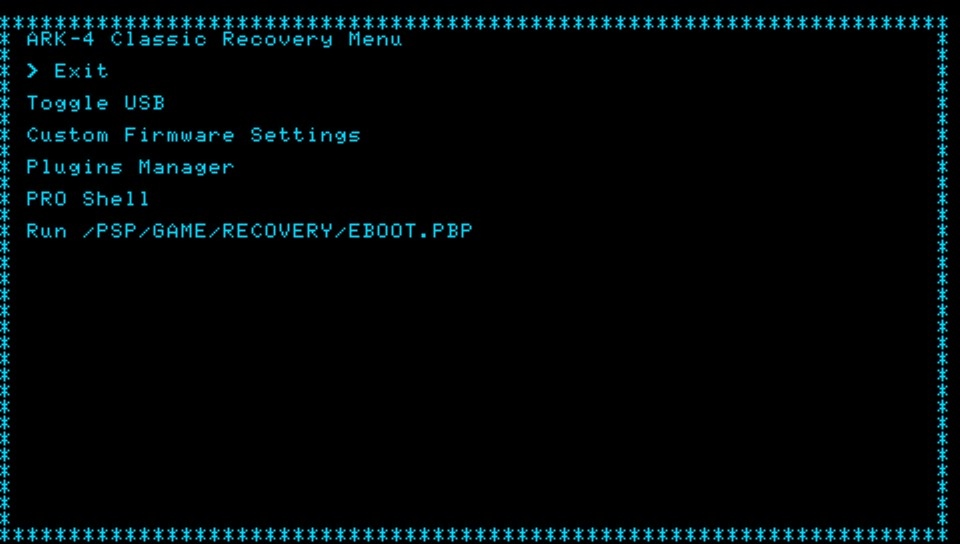
When using a Full Installation on PSP and no Recovery App is available, ARK will load the Classic Recovery Menu from flash0, which includes PRO Shell, a minimalistic File Manager and Launcher.
Classic Recovery
Pro Shell
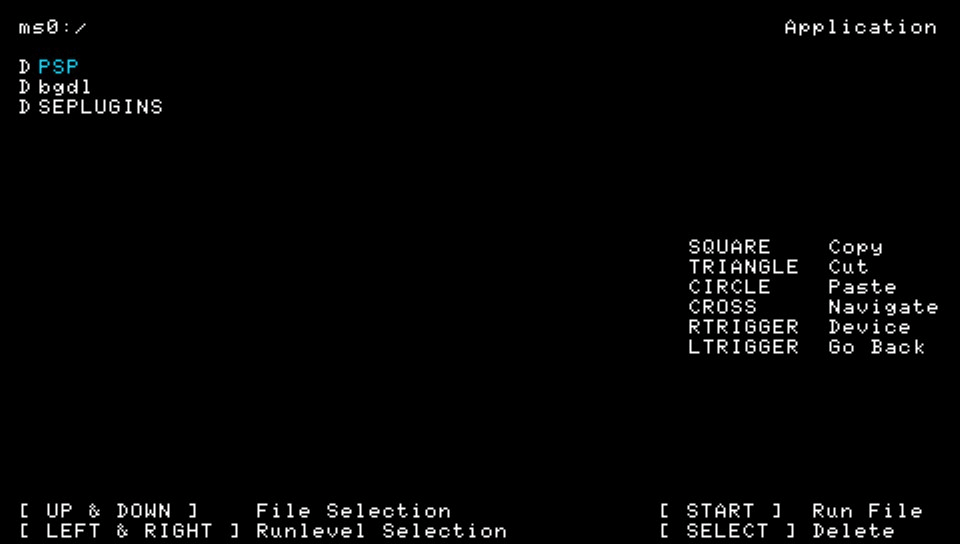
Vanilla Mode
If the Recovery App is unavailable (i.e. Full Installations), or for a better/easier diagnostics, you can run ARK in Vanilla Mode, which temporarily disables settings and plugins when running ARK or booting any game.
This will load the XMB as original as possible but you can still use features such as the VSH Menu or XMB Control (which will let you reconfigure all your settings and plugins), it also works for games.
To enable Vanilla Mode simply hold select and/or start during bootup or gameboot to disable settings and plugins respectively.
The effect of Vanilla Mode is temporary and goes away on the next game boot or reboot unless you enable it again.
Official Firmware (for PSP Permanent Installations)
For any PSP user that has a Permanent installation (i.e. Infinity or cIPL), you always have the option to boot the console in Official Firmware mode, which completely disables all Custom Firmware functionality until the next full reboot.
Pandora or Baryon Sweeper (for PSP)
If the console is Bricked and none of the above helps recovering the system, the last resort is to use a Pandora Battery or Baryon Sweeper in combination with a Magic Memory Stick.
You can find steps to install Despertar del Cementerio for Pandora models in this document.
For Baryon Sweeper users, you can use this tutorial: https://www.psx-place.com/threads/update-baryon-sweeper-unbrick-psp-1000-2000-3000-psp-slim-04g-07g-09g-psp-street-11g-model.32503/
Customization
Advanced VSH Menu Options
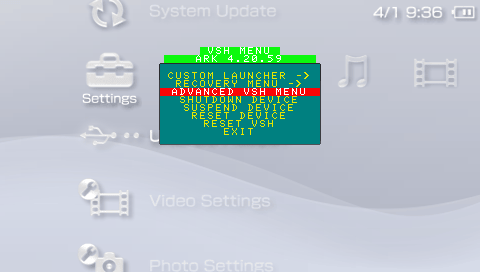
The default VSH menu packaged in ARK_01234 is a simplified, easier to use version of classic VSH menus. To have a more classic VSH menu with more advanced features you can select the Advanced VSH Menu from within the simplified VSH menu.
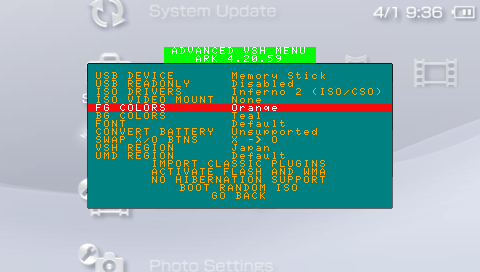
Some of the features available in Advanced VSH Menu include:
- Change USB Device mount (Memory Stick, Flash, UMD).
- Protect Flash in USB Device mount.
- View available ISO drivers.
- Mount UMD Video ISO.
- Change Foreground/Background VSH Menu colors.
- Convert battery from normal to pandora and viceversa.
- Activate flash and WMA playback.
- Swap X/O buttons.
- Delete hibernation (PSP Go paused game).
- Convert classic plugins to the new ARK format.
- Boot Random ISO.
And more.
Installing on PSP Flash:
WARNING: for advanced users only, do not attempt this if you're not familiar with the PSP flash.
By default, ARK's VSH Menu is installed on the Memory Stick (in /PSP/SAVEDATA/ARK_01234/VSHMENU.PRX). This has the limitation that you won't be able to access VSH menu without a memory stick. If you want to permanently install VSH Menu you need to copy VSHMENU.PRX to somewhere on your computer and rename it to ark_satelite.prx, which you can then copy to PSP's flash0:/vsh/module/, you can use the VSH Menu itself to enable flash0 via USB. The final path should be flash0:/vsh/module/ark_satelite.prx. You can also achieve the same result by using the Full Installer.
NOTE: even if you install VSH Menu on flash0, the one installed on Memory Stick takes precedence in loading.
Installing Plugins
The easiest method to install a plugin is to simply copy its .prx (and other files/folders the plugin needs) to its default installation folder (typically /SEPLUGINS/ folder) and navigate to it using the File Browser (built into Recovery Menu and Custom Launcher). Upon opening the .prx file, you will be given the options to select the runlevel, or type the game ID, where the plugin loads.
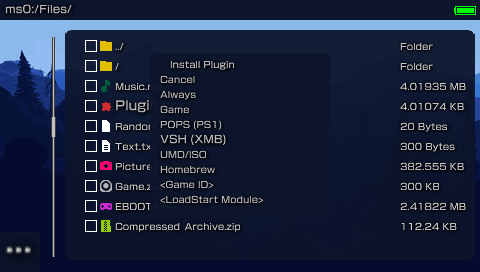
From there you can use the XMB or Recovery Menu to configure or remove your installed plugins.
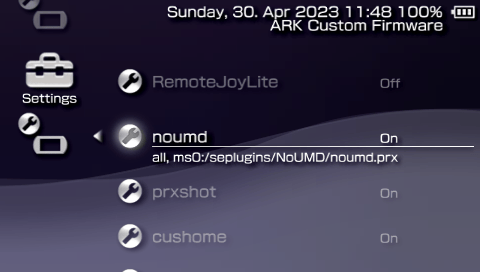
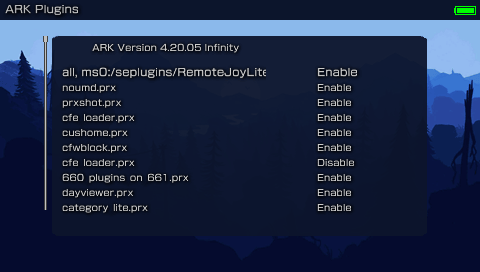
Alternately, you can manually install plugins by creating a file called PLUGINS.TXT in the /SEPLUGINS/ folder and/or ARK's savedata folder.
If coming from PRO/ME you can Import them from the Advanced VSH Menu section.
To install plugins use the comma-separated format (CSV). Where the header is: runlevel, path, switch. A few samples:
- game, ms0:/seplugins/cwcheat/cwcheat.prx, enabled
- pops, ms0:/seplugins/cdda_enabler.prx, 1
- vsh, ms0:/seplugins/cxmb.prx, true
- ULUS10041, ms0:/seplugins/lcscheatdevice.prx, on
You can enable plugins on more than one game:
- ULUS10041 ULES00502, ms0:/seplugins/cheatdevice_remastered.prx, on
You can use the following keywords to enable a plugin:
- 1
- on
- true
- enabled
- Anything else disables the plugin
You can use the following keywords to tell ARK when the plugin loads:
all/always: if either of these keywords are used, the plugin will always load.psp/umd: plugin should only load on retail games (UMD/ISO/PSN).homebrew: plugin should only load on homebrews.game: plugin can load on both retail games and homebrews.psx/ps1/pops: plugin only loads in PSX games.xmb/vsh: plugin only loads in the XMB.launcher: use this if the plugin should only load in the custom launcher.game ID: if you specify a game ID (i.e.SLUS000000), then the plugin will only load on that game.
You can also disable a plugin on certain games where they might be problematic. To do so, just add a disable line for the specific game ID after the enable line. For example, enable cwcheat on all retail games except for GTA LCS (US) and GTA VCS (EU).
- psp, ms0:/seplugins/cwcheat/cwcheat.prx, on
- ULUS10041 ULES00502, ms0:/seplugins/cwcheat/cwcheat.prx, off
Some noteworthy plugins that are compatible with ARK include (but not limited to):
- CXMB.
- Leda.
- PopsLoader V3 and V4i.
- Custom Firmware Extender.
- PSPLink.
- GTA LCS and VCS cheadevice (including the remastered version).
- CWCheat.
- pspstates kai.
- XMB Item Hider v1.3-r3
- DayViewer.
- Categories Lite.
- CDDA Enabler.
- PRO Online.
- PSP 3D.
- ZeroVSH Patcher.
Configuration and Settings
You can use the XMB and/or the Recovery Menu to easily handle CFW settings. However if you prefer you can also manually handle the settings yourself.
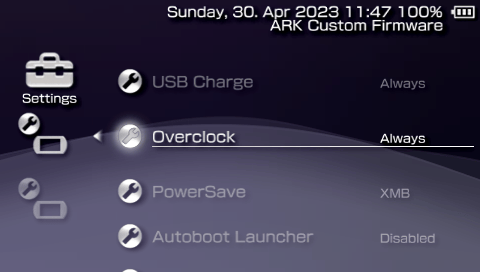
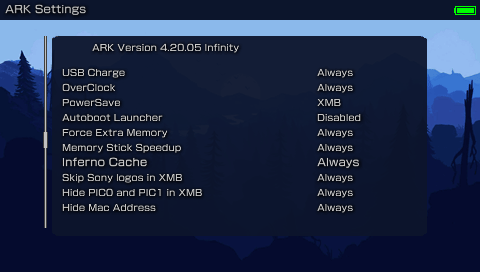
You can create a SETTINGS.TXT file using the same format as PLUGINS.TXT to enable/disable some CFW functionality on different parts of the system. Configuration settings you can use in ARK include:
overclock: use this for better performance at the expense of battery time. Sets CPU/BUS speed to 333/166.powersave: use this for better battery life at the expense of performance. Sets CPU/BUS speed to 133/66.usbcharge: enables USB charging wherever you want.launcher: replaces the XMB with a custom menu launcher.disablepause: disables the pause game feature on PSP Go.highmem: enables high memory on models above 1K. You should only use this on homebrew runlevel as retail games were not meant to use the extra memory, and this can cause issues with cheat devices or other plugins that expect games to have their data at specific memory addresses.infernocache: enables cache for Inferno driver, improving performance of some games.oldplugin: enables old plugins support on PSP Go (redirectsms0toef0).skiplogos: skips the coldboot and gameboot logos.
You can use the same runlevels as used in plugins to tell ARK when the settings take effect (all/always, umd, homebrew, game, pops, vsh).
For example, you can overclock to highest CPU speed like this:
- always, overclock, on
Another example, overclock only on games, use powersaving on VSH:
- game, overclock, on
- vsh, powersave, on
This also allows you to enable settings on specific games:
- ULUS01234, overclock, on
- ULES01234, powersave, on
ARK comes prepacked with a very powerful launcher with a built-in file browser and highly customizable.
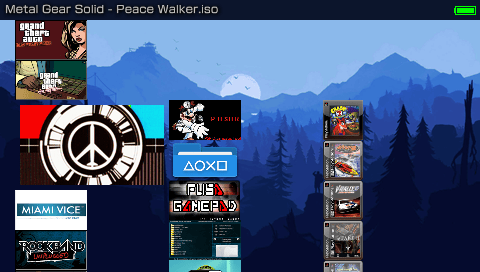
Some of its features include:
- Playback of ISO and all CSO formats with PMF video preview.
- Playback of UMD game discs.
- Categorized and organized game menu by PSP Games, PSP Homebrew and PS1 Games.
- Ability to scan savedata folders for games.
- Compatibility with old VHBL, ARK-2 and TN-CEF file names and folder paths.
- Ability to copy, move or delete entire folders.
- File browser has built-in FTP client, allowing you to browse and copy files from another PSP.
- FTP server and client can run simultaneously.
- Ability to mount UMD Video ISOs using the file browser.
- Ability to extract .zip files (up to highest compression) and .rar files (standard compression).
- Ability to edit text files (.txt, .cfg or .ini).
- Ability to install Plugins via the file browser.
- Different background animation effects.
- And more.
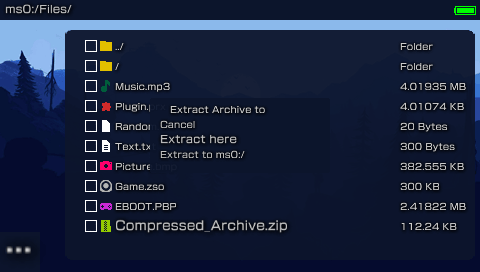
You can however change it to whatever you please. You can change the theme used by both the custom launcher and recovery menu by replacing THEME.ARK with your own.
Custom Themes
You can install themes within Custom Launcher (and Recovery Menu). Just place the themes folder anywhere on your PSP and use the file browser in the Custom Launcher to select which theme (THEME.ARK) you would like to install. By selecting it a submenu will pop up asking to install it or to preview the theme without installing.
Orbs are animations and not part of the actual Themes
Theme: ARK_Revamped

Theme: Red

Theme: Ubuntu

Theme: Peace Walker

Theme: Matrix
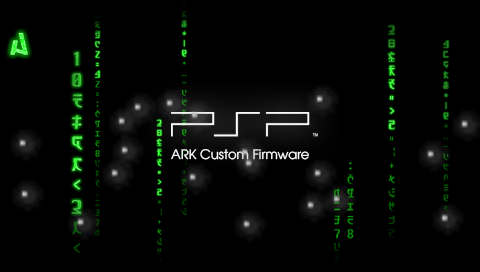
Theme: Material Dark

Theme: GX Classic

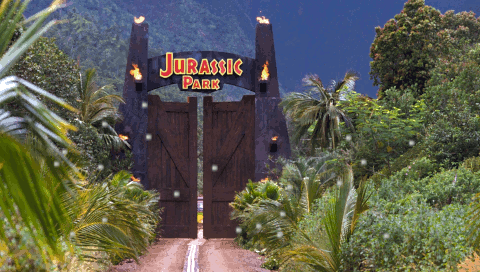
Theme: Jurassic Park
Theme: Classic

Theme: Blue 2

Theme: Blue

Theme: Black
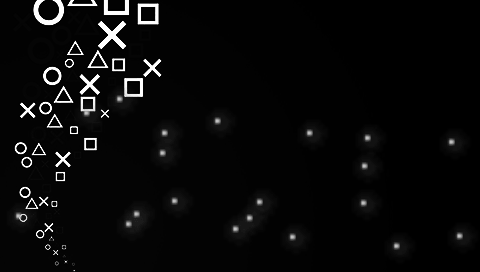
Theme: BadgerOS_Sprunk

Theme: BadgerOS
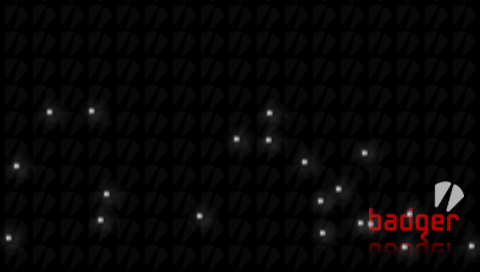
Theme: CyanogenPSP

Theme: Windows 7

Theme: Windows XP

Theme: Yokai

Other Launchers
Aside from the default launcher provided, there have been many other custom launchers created by scene members, some better looking, some with more features, some more simpler, but all of them with personality, dedication and love from the community.
Here is a list of all popular menus for ARK:
- ONEMenu by gdljjrod: https://github.com/ONElua/ONEmenu/releases
- vMenu by neur0n: http://www.mediafire.com/file/7acb5mhawx4gr9t/vMenu_ARK.7z/file
- yMenu by wth/yosh: https://docs.google.com/uc?export=download&id=0B0kWUCdtGmJwLUhRUlNJSWhMWVE
- gMenu by gbot: http://www.mediafire.com/file/oou5490qc99vr7d/gmenuARK.rar/file
- 138Menu by gbot: https://wololo.net/talk/viewtopic.php?f=53&t=33511
- pyMenu by Acid_Snake: https://wololo.net/talk/viewtopic.php?t=21942
You can find a collection here: https://github.com/PSP-Archive/ARK-Launchers
Note: some of these menus have not been updated or supported by their developers in a while, they may not work well with modern ARK or real PSP hardware.
Other
History
Despite being a relatively new Custom Firmware for the PSP, ARK has quite a history that goes back to the early days of the PS Vita scene.
ARK is a CFW that started as a port (more like rewrite) of PRO CFW to the PS Vita (named PROVITA) created by the original Team PRO members (Coldbird, Liquid Snake and Neur0n). After the original team left, the source code of PROVITA was handed over to me (Acid_Snake) and my long time scene friend qwikrazor87.
We quickly began a huge process of rewriting and restructuring code, more specifically a much more robust dynamic patching algorithms that would work on any 6.6X based firmware (including all Vita's ePSP firmwares). Thus ARK-2 was born.
Soon after, qwik, thefl0w and I began working on PSX exploits, which resulted in TN-X and ARK-3 (never publicly released).
Because the original PRO CFW hasn't been updated or maintained in a while, and it has become a little bloated and hard to work with, I decided to start working on porting ARK to the PSP since the core elements of the CFW are compatible with PSP 6.60 and 6.61 with minor changes.
After lots of work getting the same ARK binaries to properly work on both PSP and Vita, I am proud to announce that the release of ARK-4 is finally here!
Changelog
ARK-1: original port/rewrite ofPRO CFWfor thePS Vita. CodenamedPROVITA. Source code can be found here: https://github.com/PSP-Archive/ARK-1-PROVita-ARK-2: dynamic patching allows it to work with most ofPS Vitafirmwares. Source code can be found here: https://github.com/PSP-Archive/ARK-2ARK-3: device-specific runtime allowsARKto run in multiple scenarios (ePSPandePSX). Source code can be found here: https://github.com/PSP-Archive/ARK-3ARK-4: ported to the originalPSP. Huge amounts of improvements and fixes over previous versions.
Note: this is a simplified changelog, for a full version you can visit here: https://github.com/PSP-Archive/ARK-4/blob/main/CHANGELOG.md
Credits
Team PRO(the original developers of ARK):Coldbird,hrimfaxi(aka.Liquid Snake) andNeur0n.The Ancient Gods of the PSP Scene: mathieulth, davee, Proxima, zecoxao, among other tinkerers.qwikrazor87for being such a genius and all his hard work with kernel exploits and ARK-2.TheFl0w(aka.Total_Noob) for his advancements and research in CFW development and overall contributions to the scene.meetpattyfor his excellent work in fixing bugs and adding important features like cIPL and DevKit support as well as portingTime MachineandDespertar del Cementerio.Codestationfor his incredible work improving CSO speeds and creating the ZSO format.Krazynezfor his amazing work onAdvanced VSH Menuand other bugfixes and features.pyroespfor his excellent work improvingVSH Menuand refactoring code.TheSubPlayerfor all the wonderful themes made for the custom launcher.UnkownBrackets(maxcso) for his help understanding the DAX format and Inferno speed hacks as well as creating the CSOv2 format.Zer01ne,noname120,astartand other devs that have blessed me with their knowledge and wisdom.Zecoxaofor his great work creating dumpers that would allow us to archive rare firmwares.balikafor his research in porting M33 to modern firmware that has helped improve compatiblity in ARK.hrydgardfor the PMF player as well as being an inspiration for the custom launcher.- Every other giant shoulder I am standing on.
Warnings
- ARK comes with no warranty whatsoever. It was designed to be noob-proof, however it is possible for the universe to create an even greater noob capable of using ARK to destroy the Earth (or his PSP). I cannot be held responsible for this.
- ARK may cause ejectile malfunction if your hard drive is not hard enough.
- If this software malfunctions, you can turn it off and on again.
External links
- Github - https://github.com/PSP-Archive/ARK-4