
Ba-GUI-nnertool 3DS: Difference between revisions
More actions
No edit summary |
No edit summary |
||
| Line 8: | Line 8: | ||
|version=2.2 | |version=2.2 | ||
|license=Mixed | |license=Mixed | ||
|download=https://dlhb.gamebrew.org/ | |download=https://dlhb.gamebrew.org/3dshomebrews/baguinnertool.7z | ||
|website=https://gbatemp.net/threads/release-create-2d-3d-banner-smdh-with-ba-gui-nnertool.406433 | |website=https://gbatemp.net/threads/release-create-2d-3d-banner-smdh-with-ba-gui-nnertool.406433 | ||
}} | }} | ||
ba-GUI-nnertool is a homebrew prgoram for customizing 2D/3D banner and icon/SMDH. It was originally a simple tool that allows you to extract banner.bnr from any decrypted CIA, more features were later added and it is now more like a CIA editor/builder. | |||
== | ==User guide== | ||
=== | ===Extract/Rebuild CIA=== | ||
Prerequisite - a decrypted .cia (use Decrypt9). | |||
* Copy your decrypted .cia to the Projects folder (more practical). | |||
* Open ba-GUI-nnertool and click on Tool Box Tab. | |||
* Click on Browse and choose your decrypted .cia. | |||
* Click on Extract. | |||
** Choose the rom.0000.xxxxxxxx, it's the main content, by default: yourdecrypted.cia\rom.0000.00000000 (rom.0000.*). | |||
** (optional) Choose the rom.0001.xxxxxxxx. Only asked if the manual is not autodetected, you can choose another one or just click Cancel, by default: yourdecrypted.cia\rom.0001.00000001 (rom.0001.* ). | |||
* Launch [https://gbatemp.net/threads/wip-ohana3ds-tool.392576 Ohana3DS] then drag your bannerX.bcmdl on it (not Ohana3DS_Rebirth). | |||
* Export textures (do the same with others bannerX.bcmdl if it's multilang). | |||
* Edit textures of banner0.bcmdl, banner1.bcmdl,...(with GIMP, Paint.NET,etc). | |||
** (optional) Create your icon.icn with the Icon Tab. | |||
** (optional) Hex Edit data.bin. | |||
** (optional) Change Title ID with the VoodooChaos tool or click on the Customize ID button. | |||
===Change Title ID=== | |||
* Import new textures with Ohana3DS and save changes (not Ohana3DS_Rebirth). | |||
* Rebuild your banner.bnr with ba-GUI-nnertool: Banner Tab -> Banner bcmdl/png: Browse then choose your new banner0.bcmdl (make sure all components are in the same folder: banner.cbmd, banner.bcwav,...). | |||
* Replace banner.bnr to Exefs.O folder. | |||
** (optional) Replace data.bin to Romfs.O folder, icon.icn to Exefs.O folder,... | |||
* Go to Tool Box then click on the Build button (optional : you can change Version: XX.XX.XX, remove age rating with voodoochaos 2.1 and/or add manual if detected). | |||
==Fix missing banner=== | |||
'''Example - Zelda Hyrule Warriors Legends (JPN):''' | |||
* Decrypt the "game.cia" with [[Decrypt9_3DS|Decrypt9WIP]] then extract the banner.bnr with ba-GUI-nnertool. | |||
* Copy/Paste the banner9.bcmdl to create the missing banner. | |||
* Remane them to banner1.bcmdl, banner2.bcmdl, banner3.bcmdl... (don't touch the banner0.bcmdl or banner.cbmd). | |||
* With an exheditor open each "bannerX.bcmdl" then search for JPN_JP and modifiy to *corresponding region/language then save. (ex: EUR_EN for banner1.bcmdl). | |||
* Rebuild the banner.bnr with ba-GUI-nnertool. | |||
* Copy the NEW_banner.bnr to the decrypted exefs.O folder. | |||
* Rebuild the "NEW_game.cia" with ba-GUI-nnertool. | |||
'''Region/language:''' | |||
* banner1.bcmdl = English ~ EUR_EN | * banner1.bcmdl = English ~ EUR_EN | ||
* banner2.bcmdl = French ~ EUR_FR | * banner2.bcmdl = French ~ EUR_FR | ||
| Line 79: | Line 61: | ||
* banner12.bcmdl = Spanish ~ USA_SP | * banner12.bcmdl = Spanish ~ USA_SP | ||
* banner13.bcmdl = Portuguese ~ USA_PO | * banner13.bcmdl = Portuguese ~ USA_PO | ||
===FAQ=== | |||
'''Q. Whats the size constraints on the 3D banner tool?''' | |||
you can build a 2D banner with ba-GUI-nnertool and a 256x128.png. Banner should not exceed <700kb. | |||
If you want to make a flat 3D banner with maya (example) there is only a limitation about polygons (and size/visibility on homemenu). | |||
'''Q. How can I import 3D model in the banner?''' | |||
You can use 3D Studio Max to create your .OBJ file. Then import it as a new CGFX file in EveryFileExplorer. | |||
Choose .bcmdl/.cgfx (it's the same) to save the result and built a new banner.bnr. | |||
'''Q. How to I edit the Icon text?''' | |||
It is the description text wihch you can change in the Icon tab of ba-GUI-nnertool (the text is in the icon.icn). | |||
You may need to delete the cache afterwards for the the edited texts to [https://3dbrew.org/wiki/Home_Menu#Cache.dat_.26_CacheD.dat display]. | |||
'''Q. Error message EFE Msgbox: "Unblock 3DS, Version=1.0.0.0, Culture=neutral, PublicKeyToken=null from external sources!"''' | |||
You must unlock .dll. | |||
Go to 'EFE/Plugins' folder. | |||
Right click on .dlls then Properties and unlock it if necessary. | |||
==Screenshots== | |||
https://dlhb.gamebrew.org/3dshomebrews/baguinnertool2.png | |||
==Credits== | |||
* gdkchan & Rei for Ohana3DS. | |||
* Rohul1997 for VoodooChaos. | |||
* Steveice10 for bannertool. | |||
* dnasdw for 3dstool. | |||
* Relys for makerom. | |||
* elisherer for 3DS Explorer. | |||
* Gericom for Evey File Explorer. | |||
* Peter Pawlowski for Foobar2000. | |||
* Asia81 for all the 3D Banner Templates. | |||
* And others. | |||
==Changelog== | |||
'''v2.2 2016/04/09''' | |||
* Voodoochaos v2.1 (you can remove age rating). | |||
* Code clean up. | |||
* Some minor bugfix. | |||
'''v.2.1.1 2016/03/16''' | |||
* Fix a bug when extracting homebrew. | |||
* SMDH folder renamed into Icon. | |||
'''v2.1 2016/03/15''' | |||
* New tool made by Rohul1997: VoodooChaos v2.0 in order to hexedit ncch.header & exheader.bin quickly - THX A LOT M8. | |||
* Some UI modifications (improvements hopefully). | |||
* Fix a bug with manual not added during the .cia build process. | |||
* And a lot of bugfixes. | |||
'''v2.02 2016/03/08''' | |||
* New build of Ohana3DS_Rebirth. | |||
* Drag function for Ohana3DS ok. | |||
* Some bug fixes. | |||
'''v2.01 2016/03/05''' | |||
* ba-GUI-nnertool now use another build of Ohana3DS (in order to fix quickly flashes banner problem). | |||
* More .png detected. | |||
'''v2.0 2016/03/02''' | |||
* Added extract/build .cia. | |||
* And lot of bugfix. | |||
'''v1.01 2016/01/24''' | |||
* Use of .bcmdl instead of .cgfx. | |||
* New build of ohana3ds rebirth (2016-01-19). | |||
* Added banner-FIX- for Hyrule Warriors Legends (as an example). | |||
* And some bugfix. | |||
==External links== | |||
* GBAtemp - https://gbatemp.net/threads/release-create-2d-3d-banner-smdh-with-ba-gui-nnertool.406433 | |||
* | |||
[[Category:3DS homebrew emulators]] | |||
[[Category:PC utilities for 3DS homebrew]] | |||
Revision as of 09:45, 3 November 2021
| ba-GUI-nnertool | |
|---|---|
| File:Ba-GUI-nnertool.jpg | |
| General | |
| Author | FONZD |
| Type | PC Utilities |
| Version | 2.2 |
| License | Mixed |
| Last Updated | 2017/09/01 |
| Links | |
| Download | |
| Website | |

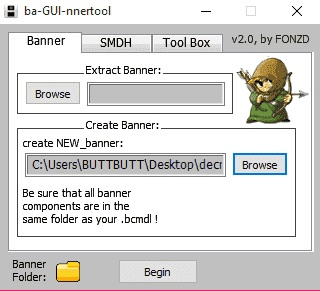
ba-GUI-nnertool is a homebrew prgoram for customizing 2D/3D banner and icon/SMDH. It was originally a simple tool that allows you to extract banner.bnr from any decrypted CIA, more features were later added and it is now more like a CIA editor/builder.
User guide
Extract/Rebuild CIA
Prerequisite - a decrypted .cia (use Decrypt9).
- Copy your decrypted .cia to the Projects folder (more practical).
- Open ba-GUI-nnertool and click on Tool Box Tab.
- Click on Browse and choose your decrypted .cia.
- Click on Extract.
- Choose the rom.0000.xxxxxxxx, it's the main content, by default: yourdecrypted.cia\rom.0000.00000000 (rom.0000.*).
- (optional) Choose the rom.0001.xxxxxxxx. Only asked if the manual is not autodetected, you can choose another one or just click Cancel, by default: yourdecrypted.cia\rom.0001.00000001 (rom.0001.* ).
- Launch Ohana3DS then drag your bannerX.bcmdl on it (not Ohana3DS_Rebirth).
- Export textures (do the same with others bannerX.bcmdl if it's multilang).
- Edit textures of banner0.bcmdl, banner1.bcmdl,...(with GIMP, Paint.NET,etc).
- (optional) Create your icon.icn with the Icon Tab.
- (optional) Hex Edit data.bin.
- (optional) Change Title ID with the VoodooChaos tool or click on the Customize ID button.
Change Title ID
- Import new textures with Ohana3DS and save changes (not Ohana3DS_Rebirth).
- Rebuild your banner.bnr with ba-GUI-nnertool: Banner Tab -> Banner bcmdl/png: Browse then choose your new banner0.bcmdl (make sure all components are in the same folder: banner.cbmd, banner.bcwav,...).
- Replace banner.bnr to Exefs.O folder.
- (optional) Replace data.bin to Romfs.O folder, icon.icn to Exefs.O folder,...
- Go to Tool Box then click on the Build button (optional : you can change Version: XX.XX.XX, remove age rating with voodoochaos 2.1 and/or add manual if detected).
Fix missing banner=
Example - Zelda Hyrule Warriors Legends (JPN):
- Decrypt the "game.cia" with Decrypt9WIP then extract the banner.bnr with ba-GUI-nnertool.
- Copy/Paste the banner9.bcmdl to create the missing banner.
- Remane them to banner1.bcmdl, banner2.bcmdl, banner3.bcmdl... (don't touch the banner0.bcmdl or banner.cbmd).
- With an exheditor open each "bannerX.bcmdl" then search for JPN_JP and modifiy to *corresponding region/language then save. (ex: EUR_EN for banner1.bcmdl).
- Rebuild the banner.bnr with ba-GUI-nnertool.
- Copy the NEW_banner.bnr to the decrypted exefs.O folder.
- Rebuild the "NEW_game.cia" with ba-GUI-nnertool.
Region/language:
- banner1.bcmdl = English ~ EUR_EN
- banner2.bcmdl = French ~ EUR_FR
- banner3.bcmdl = German ~ EUR_GE
- banner4.bcmdl = Italian ~ EUR_IT
- banner5.bcmdl = Spanish ~ EUR_SP
- banner6.bcmdl = Dutch ~ EUR_DU
- banner7.bcmdl = Portuguese ~ EUR_PO
- banner8.bcmdl = Russian ~ EUR_RU
- banner9.bcmdl = Japanese ~ JPN_JP
- banner10.bcmdl = English ~ USA_EN
- banner11.bcmdl = French ~ USA_FR
- banner12.bcmdl = Spanish ~ USA_SP
- banner13.bcmdl = Portuguese ~ USA_PO
FAQ
Q. Whats the size constraints on the 3D banner tool?
you can build a 2D banner with ba-GUI-nnertool and a 256x128.png. Banner should not exceed <700kb.
If you want to make a flat 3D banner with maya (example) there is only a limitation about polygons (and size/visibility on homemenu).
Q. How can I import 3D model in the banner?
You can use 3D Studio Max to create your .OBJ file. Then import it as a new CGFX file in EveryFileExplorer.
Choose .bcmdl/.cgfx (it's the same) to save the result and built a new banner.bnr.
Q. How to I edit the Icon text?
It is the description text wihch you can change in the Icon tab of ba-GUI-nnertool (the text is in the icon.icn).
You may need to delete the cache afterwards for the the edited texts to display.
Q. Error message EFE Msgbox: "Unblock 3DS, Version=1.0.0.0, Culture=neutral, PublicKeyToken=null from external sources!"
You must unlock .dll.
Go to 'EFE/Plugins' folder.
Right click on .dlls then Properties and unlock it if necessary.
Screenshots
Credits
- gdkchan & Rei for Ohana3DS.
- Rohul1997 for VoodooChaos.
- Steveice10 for bannertool.
- dnasdw for 3dstool.
- Relys for makerom.
- elisherer for 3DS Explorer.
- Gericom for Evey File Explorer.
- Peter Pawlowski for Foobar2000.
- Asia81 for all the 3D Banner Templates.
- And others.
Changelog
v2.2 2016/04/09
- Voodoochaos v2.1 (you can remove age rating).
- Code clean up.
- Some minor bugfix.
v.2.1.1 2016/03/16
- Fix a bug when extracting homebrew.
- SMDH folder renamed into Icon.
v2.1 2016/03/15
- New tool made by Rohul1997: VoodooChaos v2.0 in order to hexedit ncch.header & exheader.bin quickly - THX A LOT M8.
- Some UI modifications (improvements hopefully).
- Fix a bug with manual not added during the .cia build process.
- And a lot of bugfixes.
v2.02 2016/03/08
- New build of Ohana3DS_Rebirth.
- Drag function for Ohana3DS ok.
- Some bug fixes.
v2.01 2016/03/05
- ba-GUI-nnertool now use another build of Ohana3DS (in order to fix quickly flashes banner problem).
- More .png detected.
v2.0 2016/03/02
- Added extract/build .cia.
- And lot of bugfix.
v1.01 2016/01/24
- Use of .bcmdl instead of .cgfx.
- New build of ohana3ds rebirth (2016-01-19).
- Added banner-FIX- for Hyrule Warriors Legends (as an example).
- And some bugfix.