
VitaWave: Difference between revisions
More actions
No edit summary |
|||
| Line 8: | Line 8: | ||
|version=1.0 | |version=1.0 | ||
|license=N/A | |license=N/A | ||
| | |downloadraw=[https://jyotiraditya-samal.itch.io/vitawave Download on itch.io] | ||
|website=https://jyotiraditya-samal.itch.io/vitawave | |website=https://jyotiraditya-samal.itch.io/vitawave | ||
|source=https://github.com/Jyotiraditya-Samal/Vitawave | |source=https://github.com/Jyotiraditya-Samal/Vitawave | ||
| Line 18: | Line 18: | ||
|image=VitaWave.png | |image=VitaWave.png | ||
|image_alt=VitaWave | |image_alt=VitaWave | ||
}} | }}<!--VitaWave.7z--> | ||
VitaWave is a music player homebrew application for the PlayStation Vita. It plays MP3, FLAC, and OGG Vorbis audio files stored in the <code>ux0:music/</code> directory. The application is written in C and built using VitaSDK. | VitaWave is a music player homebrew application for the PlayStation Vita. It plays MP3, FLAC, and OGG Vorbis audio files stored in the <code>ux0:music/</code> directory. The application is written in C and built using VitaSDK. | ||
== Features == | == Features == | ||
* File browser with directory navigation | * File browser with directory navigation. | ||
* Supports MP3 (via libmpg123), FLAC (via dr_flac), and OGG Vorbis (via libvorbisfile) playback | * Supports MP3 (via libmpg123), FLAC (via dr_flac), and OGG Vorbis (via libvorbisfile) playback. | ||
* Now Playing screen displaying album art, title, artist, a progress bar, and scrolling text | * Now Playing screen displaying album art, title, artist, a progress bar, and scrolling text. | ||
* 10-band parametric equalizer with presets and custom preset storage | * 10-band parametric equalizer with presets and custom preset storage. | ||
* Spectrum visualizer (KissFFT) with bars and waveform display modes | * Spectrum visualizer (KissFFT) with bars and waveform display modes. | ||
* Playlist queue with shuffle, repeat, and crossfade between tracks | * Playlist queue with shuffle, repeat, and crossfade between tracks. | ||
* Named playlists saved as M3U files | * Named playlists saved as M3U files. | ||
* Theme system supporting color palettes, background images (PNG, JPG, GIF), and custom fonts | * Theme system supporting color palettes, background images (PNG, JPG, GIF), and custom fonts. | ||
* Animated GIF support for per-screen background images | * Animated GIF support for per-screen background images. | ||
* Background audio: continues playing when the screen is off or while in LiveArea | * Background audio: continues playing when the screen is off or while in LiveArea. | ||
* Rebuilds the Vita system music database on startup | * Rebuilds the Vita system music database on startup. | ||
* Rounded album art corners and custom button icon rendering | * Rounded album art corners and custom button icon rendering. | ||
* Multi-script text rendering supporting Latin, Japanese, Korean, and Chinese | * Multi-script text rendering supporting Latin, Japanese, Korean, and Chinese. | ||
== Installation == | == Installation == | ||
Download the latest <code>VitaWave.vpk</code> from the [https://github.com/Jyotiraditya-Samal/Vitawave/releases/tag/v1.0.0-stable releases page]. | |||
Copy the <code>.vpk</code> file to your Vita. | |||
Install it using [[VitaShell]]. The application installs with Title ID <code>VWAV00001</code> to <code>ux0:app/VWAV00001/</code>. | |||
Custom themes can be installed by placing a folder containing a <code>theme.ini</code> file into <code>ux0:data/VitaWave/themes/</code>. Full documentation for creating themes is available in the repository at <code>docs/creating_themes.md</code>. | |||
Custom fonts can be swapped at build time or on a per-theme basis. Documentation for changing fonts is available in the repository at <code>docs/changing_fonts.md</code>. | |||
== Controls == | == Controls == | ||
Cross - Play, Pause, Confirm | |||
Circle - Back | |||
Triangle - Queue, Open submenu | |||
Square - Visualizer | |||
L/R - Volume, EQ adjust | |||
Select - Settings | |||
Start - Exit | |||
==Screenshots== | ==Screenshots== | ||
| Line 83: | Line 75: | ||
== External links == | == External links == | ||
* itch.io - https://jyotiraditya-samal.itch.io/vitawave | * itch.io - https://jyotiraditya-samal.itch.io/vitawave | ||
* | * GitHub - https://github.com/Jyotiraditya-Samal/Vitawave | ||
* VitaDB - https://www.rinnegatamante.eu/vitadb/#/info/1376 | * VitaDB - https://www.rinnegatamante.eu/vitadb/#/info/1376 | ||
Latest revision as of 04:36, 9 April 2026
| VitaWave | |
|---|---|
 | |
| General | |
| Author | Stalgix |
| Type | Media Players |
| Version | 1.0 |
| License | N/A |
| Last Updated | 2026/03/29 |
| Links | |
| Download on itch.io | |
| Website | |
| Source | |
| Support Author | |
VitaWave is a music player homebrew application for the PlayStation Vita. It plays MP3, FLAC, and OGG Vorbis audio files stored in the ux0:music/ directory. The application is written in C and built using VitaSDK.
Features
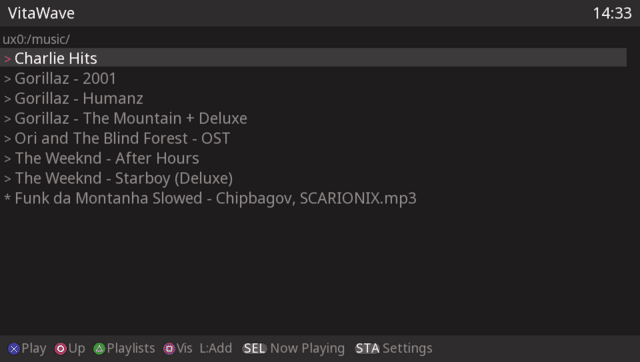
- File browser with directory navigation.
- Supports MP3 (via libmpg123), FLAC (via dr_flac), and OGG Vorbis (via libvorbisfile) playback.
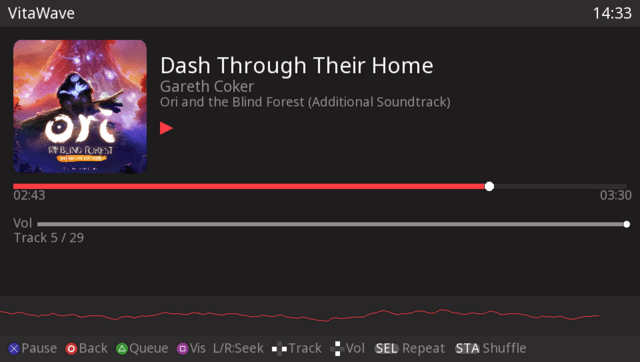
- Now Playing screen displaying album art, title, artist, a progress bar, and scrolling text.
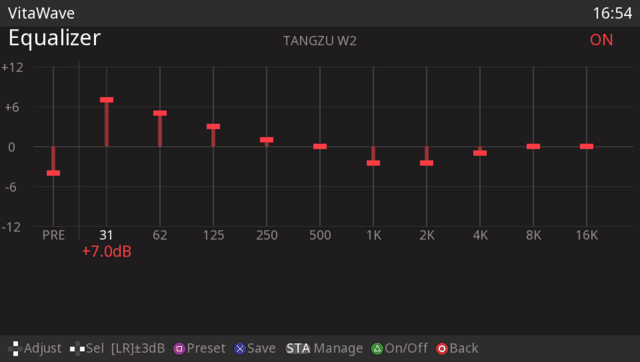
- 10-band parametric equalizer with presets and custom preset storage.
- Spectrum visualizer (KissFFT) with bars and waveform display modes.
- Playlist queue with shuffle, repeat, and crossfade between tracks.
- Named playlists saved as M3U files.
- Theme system supporting color palettes, background images (PNG, JPG, GIF), and custom fonts.
- Animated GIF support for per-screen background images.
- Background audio: continues playing when the screen is off or while in LiveArea.
- Rebuilds the Vita system music database on startup.
- Rounded album art corners and custom button icon rendering.
- Multi-script text rendering supporting Latin, Japanese, Korean, and Chinese.
Installation
Download the latest VitaWave.vpk from the releases page.
Copy the .vpk file to your Vita.
Install it using VitaShell. The application installs with Title ID VWAV00001 to ux0:app/VWAV00001/.
Custom themes can be installed by placing a folder containing a theme.ini file into ux0:data/VitaWave/themes/. Full documentation for creating themes is available in the repository at docs/creating_themes.md.
Custom fonts can be swapped at build time or on a per-theme basis. Documentation for changing fonts is available in the repository at docs/changing_fonts.md.
Controls
Cross - Play, Pause, Confirm
Circle - Back
Triangle - Queue, Open submenu
Square - Visualizer
L/R - Volume, EQ adjust
Select - Settings
Start - Exit
Screenshots
Changelog
v1.0
- First Release.