
4-e GBA: Difference between revisions
More actions
No edit summary |
No edit summary |
||
| Line 4: | Line 4: | ||
|description=An e-Reader emulator for Super Mario Advance 4. | |description=An e-Reader emulator for Super Mario Advance 4. | ||
|author=Mattie Behrens | |author=Mattie Behrens | ||
|lastupdated= | |lastupdated=2026/02/27 | ||
|type=Other Emulators | |type=Other Emulators | ||
|version= | |version=3.0 | ||
|license=MIT | |license=MIT | ||
|download=https://github.com/mattieb/4-e/releases | |download=https://github.com/mattieb/4-e/releases | ||
|website=http://mattiebee.dev/4-e | |website=http://mattiebee.dev/4-e | ||
|source=https://github.com/mattieb/4-e | |source=https://github.com/mattieb/4-e | ||
}} | }}<!--4egba.7z--> | ||
4-e is a Game Boy Advance homebrew application that can emulate an [https://www.mariowiki.com/E-Reader e-Reader] for [https://www.mariowiki.com/Super_Mario_Advance_4:_Super_Mario_Bros._3 Super Mario Advance 4]. | 4-e is a Game Boy Advance homebrew application that can emulate an [https://www.mariowiki.com/E-Reader e-Reader] for [https://www.mariowiki.com/Super_Mario_Advance_4:_Super_Mario_Bros._3 Super Mario Advance 4]. | ||
It allows you to | It allows you to send Super Mario Advance 4 e-Reader cards from one Game Boy Advance running 4-e to another running the game, using homebrew and decoded .bin versions of those cards instead of printed cards on an actual e-Reader. | ||
You can learn more about the | You can learn more about the project [https://mattiebee.io/52283/introducing-4-e-super-mario-advance-4-e-cards-without-an-e-reader on the author's blog]. | ||
== User guide == | == User guide == | ||
=== How to use === | === How to use === | ||
# Build the 4-e.gba ROM or download it | # Build the 4-e.gba ROM or download it from [https://github.com/mattieb/4-e/releases releases]. | ||
# | # Using [https://mattiebee.app/gbfs-web gbfs-web], attach the e-Card .bin files you wish to use to 4-e.gba, and save a new ROM. | ||
#* You can also use the standard tools | #* You can also use the standard tools from [https://pineight.com/gba/#gbfs GBFS] to create a GBFS file, then concatenate it to 4-e.gba. (These tools are also included in the "gba-tools" package in devkitARM.) | ||
# | #* ''New in v3.0!'' If you're using the command-line "gbfs" tool to build your GBFS files, and you use "padbin" to pad each GBFS file to 256 bytes, you can attach multiple GBFS files and quickly page through them to organize your cards. | ||
# On | # On one Game Boy Advance, run Super Mario Advance 4. Connect the player 1 end of a link cable to this system. | ||
# On | # On another Game Boy Advance, run your custom 4-e ROM. Connect the player 2 end of the link cable to this system. | ||
# Pick the e-Card you wish you send from the list. If your GBFS file only had one e-Card in it, it will be selected automatically. From this point on, you can cancel and reset by pressing B. | # Pick the e-Card you wish you send from the list. If your GBFS file only had one e-Card in it, it will be selected automatically. From this point on, you can cancel and reset by pressing B. | ||
# On the first system, start the e-Reader communication process. 4-e will connect to the game automatically and try to send your card. | # On the first system, start the e-Reader communication process. 4-e will connect to the game automatically and try to send your card. | ||
# When | # When 4-e has finished its work, press any button to reset so you can send another card if you wish. | ||
Need .bin files? The latest versions of the [https://smaghetti.mattgreer.dev Smaghetti] editor for Super Mario Advance 4 can save .bin files. Head to the flask icon in the lower-right corner of the editor to access Experiments—you can download your levels as .bin files there! | |||
=== Troubleshooting === | === Troubleshooting === | ||
| Line 35: | Line 37: | ||
Check that your link cable is connected firmly and correctly. | Check that your link cable is connected firmly and correctly. | ||
* If you're using the official Nintendo link cable, it must be connected with the purple end to the game and the gray end to 4-e. | * If you're using the official Nintendo link cable, it must be connected with the purple end to the game and the gray end to 4-e. | ||
* If you're using the Analogue Pocket link cable, it must be switched to GBA mode, not GB/C mode. | * If you're using the Analogue Pocket link cable, it must be switched to GBA mode, not GB/C mode. The end closest to the switch is player 1 (the game end); the other end is player 2 (the 4-e end). | ||
== Screenshots == | == Screenshots == | ||
| Line 45: | Line 47: | ||
== Compatibility == | == Compatibility == | ||
It has been tested to successfully and reliably send demo, power-up, and level cards between mGBA multiplayer windows as well as real Game Boys Advance | It has been tested to successfully and reliably send demo, power-up, and level cards between mGBA multiplayer windows as well as real Game Boys Advance and [https://www.analogue.co/pocket Analogue Pockets]. | ||
== Changelog == | == Changelog == | ||
'''v3.0 2026/02/27''' | |||
* Multi-volume support to help organize large collections. Multiple GBFS files can be concatenated to the ROM; page through them or switch volumes with L and R. | |||
* Refreshed user interface with pleasant colors. | |||
'''v2.1 2024/06/10''' | '''v2.1 2024/06/10''' | ||
* Allow canceling with B. | * Allow canceling with B. | ||
| Line 64: | Line 70: | ||
* [https://devkitpro.org/wiki/devkitARM devkitARM] | * [https://devkitpro.org/wiki/devkitARM devkitARM] | ||
* [https://github.com/gbadev-org/gba-makefile-template gba-makefile-template] | * [https://github.com/gbadev-org/gba-makefile-template gba-makefile-template] | ||
* GBATEK (specifically the section | * GBATEK (specifically the section on [https://problemkaputt.de/gbatek.htm#gbacommunicationports GBA Communication Ports]) | ||
* [https://pineight.com/gba/#gbfs GBFS] | * [https://pineight.com/gba/#gbfs GBFS] | ||
* [https://mgba.io/ mGBA] | * [https://mgba.io/ mGBA] | ||
Latest revision as of 02:25, 1 March 2026
| 4-e | |
|---|---|
 | |
| General | |
| Author | Mattie Behrens |
| Type | Other Emulators |
| Version | 3.0 |
| License | MIT License |
| Last Updated | 2026/02/27 |
| Links | |
| Download | |
| Website | |
| Source | |
4-e is a Game Boy Advance homebrew application that can emulate an e-Reader for Super Mario Advance 4.
It allows you to send Super Mario Advance 4 e-Reader cards from one Game Boy Advance running 4-e to another running the game, using homebrew and decoded .bin versions of those cards instead of printed cards on an actual e-Reader.
You can learn more about the project on the author's blog.
User guide
How to use
- Build the 4-e.gba ROM or download it from releases.
- Using gbfs-web, attach the e-Card .bin files you wish to use to 4-e.gba, and save a new ROM.
- You can also use the standard tools from GBFS to create a GBFS file, then concatenate it to 4-e.gba. (These tools are also included in the "gba-tools" package in devkitARM.)
- New in v3.0! If you're using the command-line "gbfs" tool to build your GBFS files, and you use "padbin" to pad each GBFS file to 256 bytes, you can attach multiple GBFS files and quickly page through them to organize your cards.
- On one Game Boy Advance, run Super Mario Advance 4. Connect the player 1 end of a link cable to this system.
- On another Game Boy Advance, run your custom 4-e ROM. Connect the player 2 end of the link cable to this system.
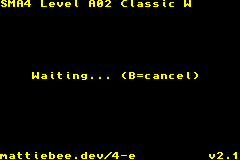
- Pick the e-Card you wish you send from the list. If your GBFS file only had one e-Card in it, it will be selected automatically. From this point on, you can cancel and reset by pressing B.
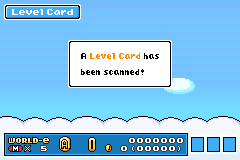
- On the first system, start the e-Reader communication process. 4-e will connect to the game automatically and try to send your card.
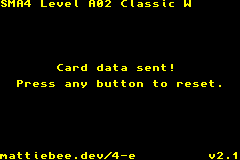
- When 4-e has finished its work, press any button to reset so you can send another card if you wish.
Need .bin files? The latest versions of the Smaghetti editor for Super Mario Advance 4 can save .bin files. Head to the flask icon in the lower-right corner of the editor to access Experiments—you can download your levels as .bin files there!
Troubleshooting
4-e doesn't respond when I start communication
Check that your link cable is connected firmly and correctly.
- If you're using the official Nintendo link cable, it must be connected with the purple end to the game and the gray end to 4-e.
- If you're using the Analogue Pocket link cable, it must be switched to GBA mode, not GB/C mode. The end closest to the switch is player 1 (the game end); the other end is player 2 (the 4-e end).
Screenshots
Compatibility
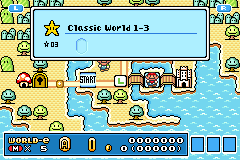
It has been tested to successfully and reliably send demo, power-up, and level cards between mGBA multiplayer windows as well as real Game Boys Advance and Analogue Pockets.
Changelog
v3.0 2026/02/27
- Multi-volume support to help organize large collections. Multiple GBFS files can be concatenated to the ROM; page through them or switch volumes with L and R.
- Refreshed user interface with pleasant colors.
v2.1 2024/06/10
- Allow canceling with B.
v2.0 2024/06/09
- implement file picker.
- Refresh and refine UI.
- Start out in waiting mode after reset.
- Add link troubleshooting info to README.
v1.0 2024/06/10
- Initial release.
Credits
4-e wouldn't exist without:
- devkitARM
- gba-makefile-template
- GBATEK (specifically the section on GBA Communication Ports)
- GBFS
- mGBA
External links
- Author's website - https://mattiebee.io/
- gbfs-web - https://mattiebee.app/gbfs-web
- GitHub - https://github.com/mattieb/4-e
| |||||||||||||||||||||||||||||||||||||||||||||||||||||||||||||||||||||||||||||||||||||||||||||||