
WasabiDS: Difference between revisions
More actions
m Text replacement - "|download=https://dlhb.gamebrew.org/dshomebrew/" to "|download=https://dlhb.gamebrew.org/dshomebrew2/" |
No edit summary |
||
| Line 4: | Line 4: | ||
|description=A Watara Supervision emulator for NDS. | |description=A Watara Supervision emulator for NDS. | ||
|author=Fredrik Ahlström (FluBBa) | |author=Fredrik Ahlström (FluBBa) | ||
|lastupdated= | |lastupdated=2026/01/07 | ||
|type=Handheld | |type=Handheld | ||
|version=0.2. | |version=0.2.5 | ||
|license=Mixed | |license=Mixed | ||
|download=https:// | |download=https://github.com/FluBBaOfWard/WasabiDS/releases | ||
|website=https:// | |website=https://gbatemp.net/threads/wasabids-a-watara-supervision-emulator-for-nds.618994/ | ||
|source=https://github.com/FluBBaOfWard/WasabiDS/ | |source=https://github.com/FluBBaOfWard/WasabiDS/ | ||
}} | }}<!--wasabids.7z--> | ||
Wasabi is a Watara/QuickShot Supervision emulator for the Nintendo DS. Ported from the [[Wasabi_GBA|GBA version]]. | Wasabi is a Watara/QuickShot Supervision emulator for the Nintendo DS. Ported from the [[Wasabi_GBA|GBA version]]. | ||
| Line 40: | Line 40: | ||
*Contrast - Change palette contrast. | *Contrast - Change palette contrast. | ||
*Palette - Here you can select between different palettes. | *Palette - Here you can select between different palettes. | ||
*Border - What to show outside the SV screen. | |||
'''Machine Settings: | '''Machine Settings: | ||
| Line 86: | Line 87: | ||
==Changelog== | ==Changelog== | ||
'''V0.2.5 2026/01/07''' | |||
* Fixed sound pitch of the two square waves. | |||
* Fixed amplitude of audio DMA channel. | |||
* Fixed noise calculation. | |||
* Fixed TVLink background. | |||
* Updated cpu core. | |||
* Broke save states compatibility. | |||
'''V0.2.4 2024/04/10''' | '''V0.2.4 2024/04/10''' | ||
*Just a maintenance release to sync up with GBA version. | *Just a maintenance release to sync up with GBA version. | ||
Latest revision as of 09:17, 9 January 2026
| WasabiDS | |
|---|---|
 | |
| General | |
| Author | Fredrik Ahlström (FluBBa) |
| Type | Handheld |
| Version | 0.2.5 |
| License | Mixed |
| Last Updated | 2026/01/07 |
| Links | |
| Download | |
| Website | |
| Source | |
Wasabi is a Watara/QuickShot Supervision emulator for the Nintendo DS. Ported from the GBA version.
Installation
Create a folder named wasabi in either the root of your flash card or in the data folder. This is where settings and save files end up.
Now put game files into a folder where you have (Supervision) roms.
Depending on your flashcart you might have to DLDI patch the emulator.
User guide
Menu
File:
- Load Game - Select a game to load.
- Load State - Load a previously saved state of the currently running game.
- Save State - Save a state of the currently running game.
- Save Settings - Save the current settings.
- Eject Game - Eject the cartridge from the console.
- Reset Console - Reset the currently running game.
Options
Controller:
- Autofire - Select if you want autofire.
- Swap A/B - Swap which NDS button is mapped to which SV button.
Display:
- Gamma - Lets you change the gamma ("brightness").
- Contrast - Change palette contrast.
- Palette - Here you can select between different palettes.
- Border - What to show outside the SV screen.
Machine Settings:
- Machine - Select the emulated machine.
Settings:
- Speed - Switch between speed modes (Normal, 200%, 50% or Max).
- Allow Refresh Change - Allow the Supervision to change NDS refresh rate.
- Autoload State - Toggle Savestate autoloading.Automagically load the savestate associated with the selected game.
- Autosave Settings - This will save settings when leaving menu if any changes are made.
- Autopause Game - Toggle if the game should pause when opening the menu.
- Powersave 2nd Screen - If graphics/light should be turned off for the GUI screen when menu is not active.
- Emulator on Bottom: Select if top or bottom screen should be used for emulator, when menu is active emulator screen is allways on top.
- Autosleep - Doesn't work.
Debug:
- Debug Output - Show FPS and logged text.
- Step Frame - Emulate one frame.
Controls
L+R or Touchscreen - Open menu
Menu:
D-Pad or Touchscreen - Navigate menus
A or Double tap - Select an option
B or Top of the screen - Go back a step
L/R or Touchscreen - Select between the tabs
Supervision:
A/B - SV A/B
Start - SV Start
Select - SV Select
D-Pad - SV D-Pad
Screenshots
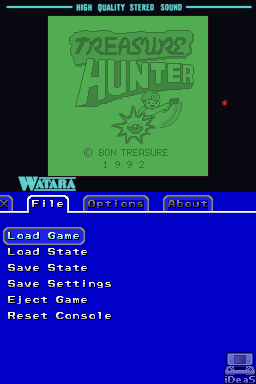
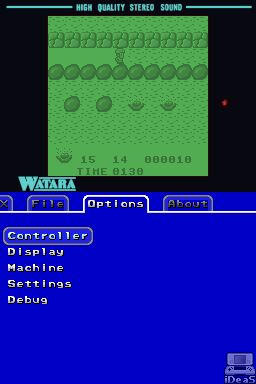
Changelog
V0.2.5 2026/01/07
- Fixed sound pitch of the two square waves.
- Fixed amplitude of audio DMA channel.
- Fixed noise calculation.
- Fixed TVLink background.
- Updated cpu core.
- Broke save states compatibility.
V0.2.4 2024/04/10
- Just a maintenance release to sync up with GBA version.
V0.2.2 2022/10/06
- Added new debug menu.
- Better menu traversing.
V0.2.1 2022/09/26
- Added mapping of X & Y as Start and Select.
- Added Frame stepping.
V0.2.0 2022/09/17
- First release for Nintendo DS.
V0.1.1 2022/08/24
- Started port to Nintendo DS & devkitPro.
V0.1.0 2004/11/30
- First release: cpu, vram emulated.
- Probably the last release as well.
Credits
Huge thanks to Loopy for the incredible PocketNES, without it this emu would probably never have been made.
Thanks to:
- Peter Trauner & Kevin Horton for docs about the Supervision.
- Osman Celimli for docs, tests & help about the Supervision.