
Sonic CD 2011 3DS Redux: Difference between revisions
More actions
m Text replacement - "|discussion=" to "|donation=" |
No edit summary |
||
| Line 1: | Line 1: | ||
{{Infobox 3DS Homebrews | {{Infobox 3DS Homebrews | ||
|title=Sonic CD 2011 3DS Redux | |title=Sonic CD 2011 3DS Redux | ||
| Line 10: | Line 4: | ||
|description=Another attempt at a Nintendo 3DS port of the Sonic CD (2011) Decompilation. | |description=Another attempt at a Nintendo 3DS port of the Sonic CD (2011) Decompilation. | ||
|author=Voxel9 | |author=Voxel9 | ||
|lastupdated= | |lastupdated=2025/02/02 | ||
|type=Platform | |type=Platform | ||
|version=1. | |version=1.2.0 | ||
|license=Mixed | |license=Mixed | ||
|download=https://dlhb.gamebrew.org/3dshomebrews/soniccd20113dsredux.7z | |download=https://dlhb.gamebrew.org/3dshomebrews/soniccd20113dsredux.7z | ||
| Line 18: | Line 12: | ||
|source=https://github.com/Voxel9/Sonic-CD-11-3DS-Redux | |source=https://github.com/Voxel9/Sonic-CD-11-3DS-Redux | ||
|donation= | |donation= | ||
}} | |||
{{#seo: | |||
|title= (Platform) - GameBrew | |||
|title_mode=append | |||
|image=soniccd20113dsredux.png | |||
|image_alt=Sonic CD 2011 3DS Redux | |||
}} | }} | ||
This is a brand new 3DS port based on the HW version of the [https://github.com/Rubberduckycooly/Sonic-CD-11-Decompilation decompilation]. It uses Citro3D for the graphics backend, SDL 1.2 for the audio backend, among the usual dependencies. | This is a brand new 3DS port based on the HW version of the [https://github.com/Rubberduckycooly/Sonic-CD-11-Decompilation decompilation]. It uses Citro3D for the graphics backend, SDL 1.2 for the audio backend, among the usual dependencies. | ||
| Line 24: | Line 24: | ||
== Features == | == Features == | ||
* Built on | * Built on recent decomp source, as of Feb 2025. | ||
* | * Both Old and New 3DS supported. | ||
* | * Fast hardware (GPU) rendering by default. | ||
* | * (NEW) Software renderer supported, but slow special stages on N3DS, and slow in general on O3DS. | ||
* ( | * (NEW) FMV playback (Currently slow on O3DS and choppy on N3DS, use ffmpeg to scale down OGVs). | ||
* | * (NEW) Mod support, set up and install them as you normally would. | ||
* | * Stereoscopic 3D support (hardware renderer only). | ||
* Remappable keys in settings.ini (uses [https://github.com/devkitPro/libctru/blob/master/libctru/include/3ds/services/hid.h bitmasks] from libctru). | |||
* Access dev menu at any time by pressing SELECT. | |||
==Installation== | ==Installation== | ||
| Line 68: | Line 70: | ||
https://dlhb.gamebrew.org/3dshomebrews/soniccd20113dsredux-05.png | https://dlhb.gamebrew.org/3dshomebrews/soniccd20113dsredux-05.png | ||
https://dlhb.gamebrew.org/3dshomebrews/soniccd20113dsredux-06.png | https://dlhb.gamebrew.org/3dshomebrews/soniccd20113dsredux-06.png | ||
About Data.rsdk: | About Data.rsdk: | ||
| Line 80: | Line 77: | ||
==Changelog== | ==Changelog== | ||
'''v1.2.0''' | |||
* Now built on the most recent decomp source, as of Feb 2025 | |||
* FMV playback (Currently slow on O3DS and choppy on N3DS, use ffmpeg to scale down OGVs) | |||
* Mods are now fully supported, install them the same way you would usually (in the mods folder) | |||
** Also copy the decompiled scripts to the Scripts folder from here: | |||
** https://github.com/RSDKModding/RSDKv3-Script-Decompilation | |||
* Software renderer now supported, but slow special stages on N3DS, and slow in general on O3DS | |||
** This isn't really useful when the hardware renderer exists, but is just nice to have | |||
* Navigation is now bound to both the circle pad and the dpad by default | |||
* Fixed special stage backgrounds rendering incorrect when stereo 3D was on | |||
* Fixed rendering in the game pause menu | |||
'''v1.1.0''' | '''v1.1.0''' | ||
* Experimental stereoscopic 3D support | * Experimental stereoscopic 3D support | ||
* Fixed an issue where the 3DS would hang indefinitely while trying to close the game from the HOME menu or powering the system off mid-game. | * Fixed an issue where the 3DS would hang indefinitely while trying to close the game from the HOME menu or powering the system off mid-game. | ||
'''v1.0''' | '''v1.0''' | ||
* First Release. | * First Release. | ||
Revision as of 06:28, 2 February 2025
| Sonic CD 2011 3DS Redux | |
|---|---|
 | |
| General | |
| Author | Voxel9 |
| Type | Platform |
| Version | 1.2.0 |
| License | Mixed |
| Last Updated | 2025/02/02 |
| Links | |
| Download | |
| Website | |
| Source | |
This is a brand new 3DS port based on the HW version of the decompilation. It uses Citro3D for the graphics backend, SDL 1.2 for the audio backend, among the usual dependencies.
Note: Please be aware that the load times for Sonic CD 2011 3DS Redux remain unchanged and are similar to those of other 3DS ports, which can range from 8 to 15 seconds on O3DS. However, N3DS users may experience slightly improved load times. Besides that, this version of the game should be a relatively smooth and trouble-free port.
Features
- Built on recent decomp source, as of Feb 2025.
- Both Old and New 3DS supported.
- Fast hardware (GPU) rendering by default.
- (NEW) Software renderer supported, but slow special stages on N3DS, and slow in general on O3DS.
- (NEW) FMV playback (Currently slow on O3DS and choppy on N3DS, use ffmpeg to scale down OGVs).
- (NEW) Mod support, set up and install them as you normally would.
- Stereoscopic 3D support (hardware renderer only).
- Remappable keys in settings.ini (uses bitmasks from libctru).
- Access dev menu at any time by pressing SELECT.
Installation
Support the official release
Without assets from the official release, this decompilation will not run. You can get an official release of Sonic CD from:
- Windows:
- Via Steam, whether it's the original release or from Sonic Origins
- Via the Epic Games Store, from Sonic Origins
- iOS (Via the App Store)
- Android:
- Via Google Play
- Via Amazon
- A tutorial for finding the game assets from the Android version can be found here.
Even if your platform isn't supported by the official releases, you must buy or officially download it for the assets (you don't need to run the official release, you just need the game assets). Note that only FMV files from the original Steam release of the game are supported; mobile and Origins video files do not work.
How to setup
- You need to dump the DSP firm before running the game, otherwise there will be no audio.
- Using Data.rsdk from the mobile version is highly recommended; see known issues below for reasons why.
- Just copy
SonicCD.3dsx(or installSonicCD.cia) andData.rsdkto/3ds/SonicCD/on the SD card. - Don't copy over an existing settings.ini; this might result in unexpected issues (i.e. no input). Just let a new settings.ini be generated on first startup before modifying anything in the config.
- FMVs are currently unsupported, so don't bother copying them. You'll only need the Data.rsdk for now.
- Similarly, mods are temporarily disabled as there is currently a linker error when trying to build the relevant code (undefined reference to
pathconfin a part of std::fs)
FAQ
Q: Can the D-Pad and Circle Pad both be mapped to movement at the same time?
Not yet. For now, choose one you feel most comfortable with and modify the keyboard mappings in settings.ini, using the key button masks defined in libctru.
Screenshots
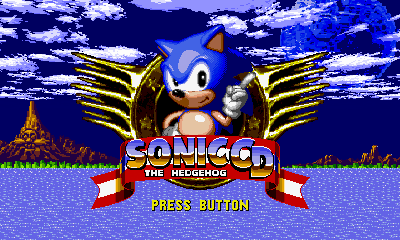
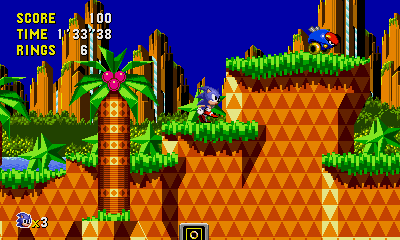
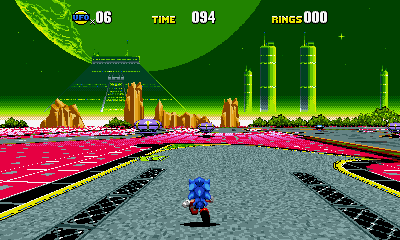
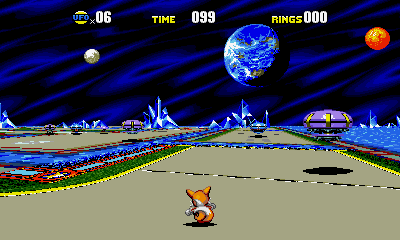
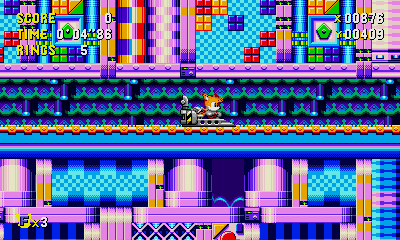
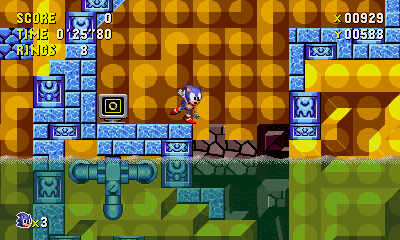
About Data.rsdk:
- When using non-mobile Data.rsdk, the floor in special stages is graphically broken (no LOD tiles?).
- When using non-mobile Data.rsdk, Tidal Tempest is completely graphically broken (black screen/garbage).
- When using mobile Data.rsdk, the pause button is mapped to the B button, and pausing doesn't work at all in special stages.
Changelog
v1.2.0
- Now built on the most recent decomp source, as of Feb 2025
- FMV playback (Currently slow on O3DS and choppy on N3DS, use ffmpeg to scale down OGVs)
- Mods are now fully supported, install them the same way you would usually (in the mods folder)
- Also copy the decompiled scripts to the Scripts folder from here:
- https://github.com/RSDKModding/RSDKv3-Script-Decompilation
- Software renderer now supported, but slow special stages on N3DS, and slow in general on O3DS
- This isn't really useful when the hardware renderer exists, but is just nice to have
- Navigation is now bound to both the circle pad and the dpad by default
- Fixed special stage backgrounds rendering incorrect when stereo 3D was on
- Fixed rendering in the game pause menu
v1.1.0
- Experimental stereoscopic 3D support
- Fixed an issue where the 3DS would hang indefinitely while trying to close the game from the HOME menu or powering the system off mid-game.
v1.0
- First Release.