
Usbhostfs Vita: Difference between revisions
From GameBrew
More actions
No edit summary |
|||
| Line 23: | Line 23: | ||
Copy the .suprx file to ux0:tai/ or ur0:tai/. | Copy the .suprx file to ux0:tai/ or ur0:tai/. | ||
Add the path to *KERNEL section of | Add the path to *KERNEL section of tai/config.txt (change to ur0 if you use SD2Vita) | ||
*KERNEL | *KERNEL | ||
ux0:tai/usbhostfs.skprx | ux0:tai/usbhostfs.skprx | ||
| Line 33: | Line 33: | ||
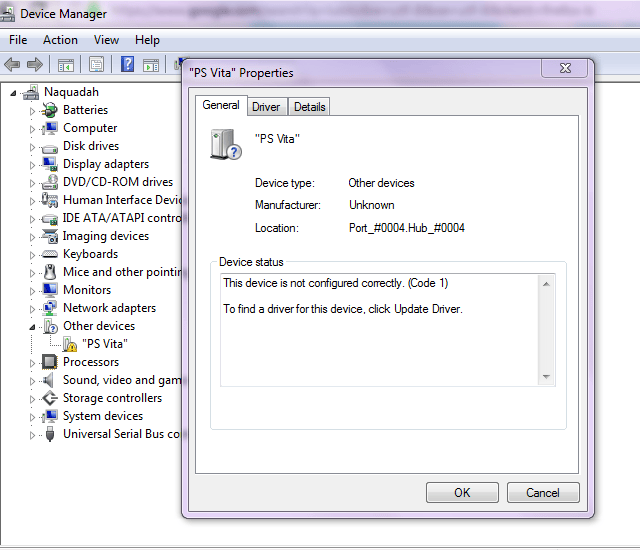
*Windows - Install libusb driver from "usbhostfs_release\windows\driver*" directory. | *Windows - Install libusb driver from "usbhostfs_release\windows\driver*" directory. | ||
*Windows 10 - Disable driver signature verification (https://goo.gl/tyfhHW). | *Windows 10 - Disable driver signature verification (https://goo.gl/tyfhHW). | ||
How to use: | |||
*Run usbhostfs_pc on the computer. | *Run usbhostfs_pc on the computer. | ||
*Connect the Vita with usb cable. | |||
*Use [[VitaShell]] or any application with host0 support to browse the computer. | |||
==Screenshots== | |||
https://dlhb.gamebrew.org/vitahomebrews/usbhostfsvita4.png | |||
https://dlhb.gamebrew.org/vitahomebrews/usbhostfsvita3.png | https://dlhb.gamebrew.org/vitahomebrews/usbhostfsvita3.png | ||
==Credits== | ==Credits== | ||
Revision as of 06:24, 6 January 2023
| usbhostfs | |
|---|---|
 | |
| General | |
| Author | cpasjuste |
| Type | Plugins |
| Version | 1.0 |
| License | Mixed |
| Last Updated | 2017/10/12 |
| Links | |
| Download | |
| Website | |
| Source | |
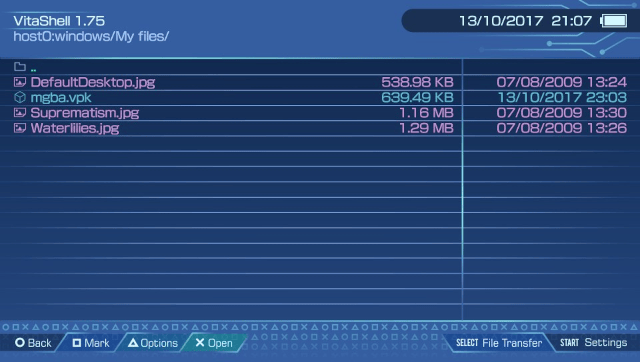
USBHostFS is a port of usbhostfs psp plugin to PS Vita system. It add a host0 drive on the vita device, allowing, for example, to browse your computer hard drive from VitaShell via USB.
Installation
Copy the .suprx file to ux0:tai/ or ur0:tai/.
Add the path to *KERNEL section of tai/config.txt (change to ur0 if you use SD2Vita)
*KERNEL
ux0:tai/usbhostfs.skprx
Reboot your Vita.
User guide
On the PC:
- Windows - Install libusb driver from "usbhostfs_release\windows\driver*" directory.
- Windows 10 - Disable driver signature verification (https://goo.gl/tyfhHW).
How to use:
- Run usbhostfs_pc on the computer.
- Connect the Vita with usb cable.
- Use VitaShell or any application with host0 support to browse the computer.
Screenshots
Credits
Thanks to consolex-bordeaux.fr, ScHlAuChi, noname120, motoharu, xyz, yifanlu, frangarcj, Rinnegatamante, davee and people I may forget for what they do for the PS Vita.