Video Games Hero: Difference between revisions
From GameBrew
More actions
No edit summary |
No edit summary |
||
| Line 1: | Line 1: | ||
{{Infobox homebrew | {{Infobox homebrew | ||
| image = | | image = https://dlhb.gamebrew.org/dshomebrew/videogameshero.png | ||
| type = Music | | type = Music | ||
| author = Sumiguchi & Spriteattack | | author = Sumiguchi & Spriteattack | ||
| version = Full | | version = Full | ||
| licence = Mixed | | licence = Mixed | ||
| download = | | download = https://dlhb.gamebrew.org/dshomebrew/videogameshero.7z | ||
| source = | | source = | ||
| website = http://www.videogameshero.com | | website = http://www.videogameshero.com | ||
}} | }} | ||
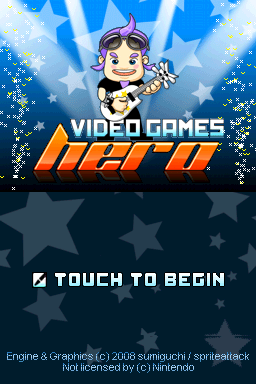
Video Games Hero is a rhythm game for the Nintendo DS, similar to the Guitar Hero series. | Video Games Hero is a rhythm game for the Nintendo DS, similar to the Guitar Hero series. | ||
| Line 16: | Line 14: | ||
It features over sixty five different songs of great selection of old school songs that take you back to video games of yesteryear. For example it has hits from the Castlevainia series, Monkey Island, Donkey Kong and much more. This game also supports the Guitar Hero: On Tour guitar grip and Motion Pak. | It features over sixty five different songs of great selection of old school songs that take you back to video games of yesteryear. For example it has hits from the Castlevainia series, Monkey Island, Donkey Kong and much more. This game also supports the Guitar Hero: On Tour guitar grip and Motion Pak. | ||
It is participated in the | It is participated in the NEO Summer Coding Compo 2008, ranked 2nd. It was voted the 7th Top DS homebrew in the 2009 best DS homebrew contest. | ||
==Features== | ==Features== | ||
| Line 35: | Line 33: | ||
==User guide== | ==User guide== | ||
===Difficulty=== | ===Difficulty=== | ||
* | * Easy - Has notes on three tracks. | ||
* | * Medium - Has notes on four tracks. | ||
* | * Hard - Has notes on all five tracks. | ||
* | * Expert - Has even more notes than hard. | ||
===Ready Menu=== | ===Ready Menu=== | ||
| Line 61: | Line 59: | ||
'''Controls:''' | '''Controls:''' | ||
* | * D-Pad/Buttons - Strike a note with D-pad/buttons as indicated on the bottom screen. | ||
* | * Stylus - Tap the appropriate color on the screen with Stylus. | ||
* | * Guitar Grip - From left to right, use D-Pad Left, Blue, Yellow, Red, Green. | ||
** Choose Flipped on the ready menu to line up the colors if you like. | ** Choose Flipped on the ready menu to line up the colors if you like. | ||
** If you forgot to insert the grip when you started the game, pause the game (press Start) and pop it in, it will be automatically detected. | ** If you forgot to insert the grip when you started the game, pause the game (press Start) and pop it in, it will be automatically detected. | ||
'''Scoring:''' | '''Scoring:''' | ||
* | * Easy - 30 points. | ||
* | * Medium - 40 points. | ||
* | * Hard & Expert - 50 points. | ||
'''Streaks:''' | '''Streaks:''' | ||
| Line 115: | Line 113: | ||
===Options=== | ===Options=== | ||
* | * SFX Volume - Adjust the volume of the sound effects (0 - 100 at increments of 5). | ||
* | * Menu scroll - Change or stop the background scrolling in menu (you can also use Select in any menu to adjust this). | ||
* | * Clear RVB Stats - Reset the statistics for the Red Vs Blue game mode. (Hold X/Y after selecting the menu option). | ||
==Controls== | ==Controls== | ||
| Line 131: | Line 129: | ||
For multiplayer, one player uses the D-pad, and the other uses the A/B/X/Y buttons. | For multiplayer, one player uses the D-pad, and the other uses the A/B/X/Y buttons. | ||
==Screenshots== | |||
https://dlhb.gamebrew.org/dshomebrew/videogameshero2.png | |||
https://dlhb.gamebrew.org/dshomebrew/videogameshero3.png | |||
==Media== | ==Media== | ||
| Line 144: | Line 146: | ||
* 2 New Sets = 10 new songs = 75 songs in total. | * 2 New Sets = 10 new songs = 75 songs in total. | ||
==External links== | |||
* Official website - [https://web.archive.org/web/20100421075130/http://www.videogameshero.com http://www.videogameshero.com] (archived) | |||
* Author's website (sumiguchi) - http://www.sumiguchi.ca/wp/2008/03/21/video-games-hero | |||
* NeoFlash - https://www.neoflash.com/forum/index.php?topic=5326.0 | |||
[[Category:DS homebrew games]] | [[Category:DS homebrew games]] | ||
[[Category:Homebrew music games on DS]] | [[Category:Homebrew music games on DS]] | ||