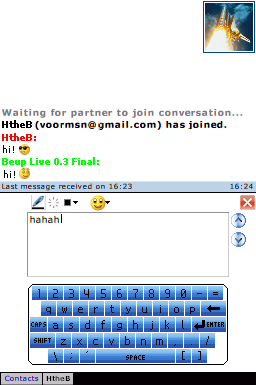
Beup Live: Difference between revisions
From GameBrew
More actions
No edit summary |
No edit summary |
||
| Line 3: | Line 3: | ||
{{Infobox homebrew | {{Infobox homebrew | ||
| title = Beup Live | | title = Beup Live | ||
| image = | | image = https://dlhb.gamebrew.org/dshomebrew/beuplive.png | ||
| type = Other | | type = Other | ||
| version = 0.7 | | version = 0.7 | ||
| licence = Mixed | | licence = Mixed | ||
| author = kevinC | | author = kevinC, HtheB | ||
| website = http://beup.supercard.fr | | website = http://beup.supercard.fr | ||
| download = | | download = https://dlhb.gamebrew.org/dshomebrew/beuplive.7z | ||
| source = | | source = | ||
}} | }} | ||
| Line 48: | Line 48: | ||
'''Q. Stuck at "Acquiring host info from DHCP." | '''Q. Stuck at "Acquiring host info from DHCP." | ||
Many Homebrew Wifi apps can't connect to Access Points using DHCP. The work around is to use a fixed IP address. For more details see Common Homebrew Wifi Problems. | Many Homebrew Wifi apps can't connect to Access Points using DHCP. The work around is to use a fixed IP address. | ||
For more details see Common Homebrew Wifi Problems. | |||
'''Q. Can't connect to Access Point with hidden SSID.''' | '''Q. Can't connect to Access Point with hidden SSID.''' | ||
This is a known issue with many Homebrew Wifi apps. Only fix is to unhide the SSID. See Common Homebrew Wifi Problems for more details. Note | This is a known issue with many Homebrew Wifi apps. Only fix is to unhide the SSID. | ||
See Common Homebrew Wifi Problems for more details. | |||
Note that if you unhide your wifi, then rehide it once logged on, you stay connected, even if your modem has to restart | |||
'''Q. SSL failed message.''' | '''Q. SSL failed message.''' | ||
| Line 68: | Line 74: | ||
'''Q. Avatar downloads may fail.''' | '''Q. Avatar downloads may fail.''' | ||
The official MSN client will refuse to send avatars if the last one was sent less than 5 minutes ago. That means that if you chat with somebody, disconnect, and then open the tab, avatar download may fail. (wait a few minutes, then try again). | The official MSN client will refuse to send avatars if the last one was sent less than 5 minutes ago. | ||
That means that if you chat with somebody, disconnect, and then open the tab, avatar download may fail. (wait a few minutes, then try again). | |||
'''Q. Stuck at Handshake.''' | '''Q. Stuck at Handshake.''' | ||
The MSN dispatch servers changed last year, make sure you are using the files downloaded from the main website not any of the mirrors holding | The MSN dispatch servers changed last year, make sure you are using the files downloaded from the main website not any of the mirrors holding fixed versions. | ||
== | Alternatively try rebooting your Access Point/router. | ||
==Controls== | |||
L+R - Scroll between tabs | L+R - Scroll between tabs | ||
| Line 81: | Line 91: | ||
* Fixed: You can login again with Beup Live (No more "Connection to notification server has died." error). | * Fixed: You can login again with Beup Live (No more "Connection to notification server has died." error). | ||
* Changed from MSNP9 to MSNP8. | * Changed from MSNP9 to MSNP8. | ||
'''v0.6''' | '''v0.6''' | ||
* Fixed: Now you will not get kicked/disconnected after a minute. | * Fixed: Now you will not get kicked/disconnected after a minute. | ||
| Line 104: | Line 115: | ||
HtheB, kevinC, Frigolit, .:Mik:., Dreamflat, Tassu, Supercard.fr, eBuddy team. | HtheB, kevinC, Frigolit, .:Mik:., Dreamflat, Tassu, Supercard.fr, eBuddy team. | ||
==External links== | |||
* Official website - http://beup.supercard.fr | |||
[[Category:DS homebrew applications]] | [[Category:DS homebrew applications]] | ||
[[Category:Other DS applications]] | [[Category:Other DS applications]] | ||