DSBible: Difference between revisions
From GameBrew
More actions
No edit summary |
No edit summary |
||
| Line 1: | Line 1: | ||
{{Infobox homebrew | {{Infobox homebrew | ||
| title = DSBible | | title = DSBible | ||
| image = | | image = https://dlhb.gamebrew.org/dshomebrew/dsbible.png | ||
| type = Other | | type = Other | ||
| version = 2.51 | | version = 2.51 | ||
| Line 7: | Line 7: | ||
| author = Jeremy Ruten | | author = Jeremy Ruten | ||
| website = https://viewsourcecode.org/old/homebrew.html | | website = https://viewsourcecode.org/old/homebrew.html | ||
| download = | | download = https://dlhb.gamebrew.org/dshomebrew/dsbible.7z | ||
| source = https://viewsourcecode.org/old/downloads/ds-bible-2.51-src.zip | | source = https://viewsourcecode.org/old/downloads/ds-bible-2.51-src.zip | ||
}} | }} | ||
| Line 23: | Line 23: | ||
==Installation== | ==Installation== | ||
Download and extract file | Download and extract file. | ||
[[DLDI|DLDI]] patch .nds file and copy bible.nds to storage device. | [[DLDI|DLDI]] patch .nds file and copy bible.nds to storage device. | ||
| Line 47: | Line 47: | ||
===Languages=== | ===Languages=== | ||
A number of translated versions are available from the [https://viewsourcecode.org/old/homebrew.html offical website] | A number of translated versions are available from the [https://viewsourcecode.org/old/homebrew.html offical website]. If you want to translate DSbible itself to another language, go to the /bible/lang directory, copy and paste one of the language files and translate the pasted one to your language. | ||
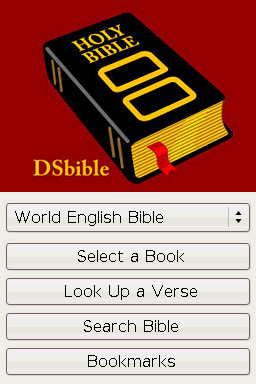
===Main Menu=== | ===Main Menu=== | ||
Change the Bible translation by holding the stylus on the select box, and dragging it to the translation you want. DSbible will remember which one you select so you don't have to change every time you start up the program. | Change the Bible translation by holding the stylus on the select box, and dragging it to the translation you want. DSbible will remember which one you select so you don't have to change every time you start up the program. Press one of the four buttons on the touch screen, depending on what you want to do: | ||
Press one of the four buttons on the touch screen, depending on what you want to do: | |||
* Select a Book. | * Select a Book. | ||
* Look Up a Verse. | * Look Up a Verse. | ||
| Line 59: | Line 57: | ||
===The Text Viewer=== | ===The Text Viewer=== | ||
The title bar at the top displays your current location in a format like Genesis 1:1. | The title bar at the top displays your current location in a format like Genesis 1:1. Drag the black rectangle up or down to scroll (scrollbar). There are two buttons on the far left at the bottom of the screen that skip texts to the previous chapter and the next chapter. | ||
Drag the black rectangle up or down to scroll (scrollbar). There are two buttons on the far left at the bottom of the screen that skip texts to the previous chapter and the next chapter. | |||
For Moonshell style, drag the stylus on the text to scroll. | For Moonshell style, drag the stylus on the text to scroll. | ||
| Line 108: | Line 104: | ||
Press the Cancel button to go back to where you were. | Press the Cancel button to go back to where you were. | ||
==Screenshots== | |||
https://dlhb.gamebrew.org/dshomebrew/dsbible2.png | |||
https://dlhb.gamebrew.org/dshomebrew/dsbible3.png | |||
==Changelog== | ==Changelog== | ||
| Line 137: | Line 137: | ||
JMS for formatting the French translation and translating DSbible to French. | JMS for formatting the French translation and translating DSbible to French. | ||
==External links== | |||
* Author's website - https://viewsourcecode.org/old/homebrew.html | |||
[[Category:DS homebrew applications]] | [[Category:DS homebrew applications]] | ||
[[Category:Other DS applications]] | [[Category:Other DS applications]] | ||