
Quick Menu Plus Vita by GrayJack: Difference between revisions
From GameBrew
More actions
No edit summary |
|||
| Line 12: | Line 12: | ||
|source=https://github.com/VitaArchive/QuickMenuPlus | |source=https://github.com/VitaArchive/QuickMenuPlus | ||
}} | }} | ||
This is a modification of [[Quick Menu Plus Vita|Quick Menu Plus]], a plugin that adds a number of new features to the Quick Menu on the PS Vita and | This is a modification of [[Quick Menu Plus Vita|Quick Menu Plus]], a plugin that adds a number of new features to the Quick Menu on the PS Vita and PSTV: | ||
* Power off, restart, and standby buttons. | * Power off, restart, and standby buttons. | ||
* Configurable power buttons. | * Configurable power buttons. | ||
Revision as of 05:41, 21 June 2025
| Quick Menu Plus Mod | |
|---|---|
 | |
| General | |
| Author | GrayJack |
| Type | Plugins |
| Version | 3.0.0 |
| License | GPL-3.0 |
| Last Updated | 2025/06/20 |
| Links | |
| Download | |
| Website | |
| Source | |
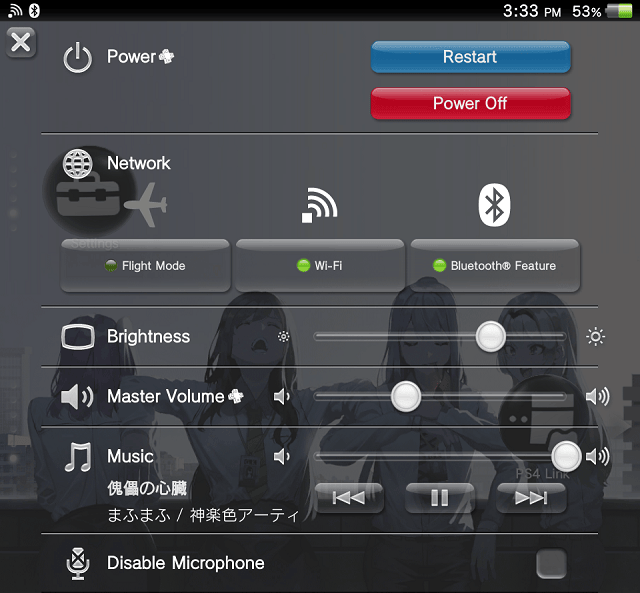
This is a modification of Quick Menu Plus, a plugin that adds a number of new features to the Quick Menu on the PS Vita and PSTV:
- Power off, restart, and standby buttons.
- Configurable power buttons.
- Volume slidebar.
- Faster Quick Menu open time.
- Custom background styles.
- Configurable background gradient.
Installation
Write the file path in the *main section of your taiHEN config.
*main
ur0:/tai/quickmenuplus.suprx
Configuration
Put files in the directory ur0:/data/quickmenuplus to configure Quick Menu Plus.
pushtime.txtsets the Quick Menu PS button push time. Put in the file the desired push time in microseconds.- For example, put
250000for 250 milliseconds. If the file does not exist, the default time is 500 milliseconds.
- For example, put
standbyisrestart.txtsets the standby button to function as a restart button.- Put in the file
1to enable, or0to disable. - If the file does not exist, the default is enabled on the Vita, and disabled on the PSTV. When this setting is disabled, hold the "Power Off・Restart" button to restart, and press to power off.
- Put in the file
bgstyle.txtsets the background style.- Put in the file
0for original,1for translucent, and2for black. - If the file does not exist, the default is original. Black can reduce power consumption for OLED screens.
- Put in the file
bggradient.txtsets the background gradient effect.- Put in the file
0to disable, and1to enable. If the file does not exist, the default is "enabled"
- Put in the file
Screenshots
Compatibility
Supported firmware versions:
Retail 3.60 - 3.73
Testkit 3.60, 3.65
Devkit 3.60
Changelog
v3.0.0 Undead Edition
- Add configuration to (un)set the Quick Menu background gradient.
- Changed default background style to "original" style.
- Builds using VitaSDK.
Credits
- Princess-of-Sleeping: Tip for SceShellUtil, ScePaf
- Team CBPS: For the original project