
Bouncy Marble: Difference between revisions
More actions
No edit summary |
No edit summary |
||
| Line 38: | Line 38: | ||
https://dlhb.gamebrew.org/dshomebrew/bouncymarble2.png | https://dlhb.gamebrew.org/dshomebrew/bouncymarble2.png | ||
https://dlhb.gamebrew.org/dshomebrew/bouncymarble3.png | https://dlhb.gamebrew.org/dshomebrew/bouncymarble3.png | ||
<!-- | |||
==Media== | ==Media== | ||
'''Bouncy Marble Replay Demo''' ([https://www.youtube.com/watch?v=qu_f9ofohJY n000bey]) <br> | '''Bouncy Marble Replay Demo''' ([https://www.youtube.com/watch?v=qu_f9ofohJY n000bey]) <br> | ||
<youtube width="515">qu_f9ofohJY</youtube> | <youtube width="515">qu_f9ofohJY</youtube>--> | ||
<!--BEGIN Online Emulator Section--> | <!--BEGIN Online Emulator Section--> | ||
==Online emulator== | ==Online emulator== | ||
Latest revision as of 06:45, 29 July 2025
| Bouncy Marble | |
|---|---|
 | |
| General | |
| Author | leinad (n00bey) |
| Type | Arcade Games |
| Version | 2009 |
| License | Mixed |
| Last Updated | 2009/08/21 |
| Links | |
| Download | |
| Website | |
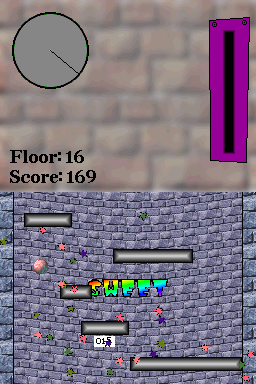
Bouncy Marble is an Icy Tower clone on the NDS. The game involves of jumping from one floor to the next and go as high as possible without falling and plunging off the screen.
This homebrew was submitted to the NEO Spring Coding Compo 2009 (NDS Game) and the NEO Summer Coding Compo 2009 (NDS Game).
Features
- Save and view game replays.
- Online highscore list (TOP100) for all three categories.
- Watch replays of online-highscores.
- 50 backgorund music to choose from.
- Eye candy.
Installation
Download and extract file.
DLDI patch it and copy it to the root directory of the card.
Note: DLDI patch is used for saving highscores.
User guide
Your goal is to get as high as possible, score most points or get the biggest combo.
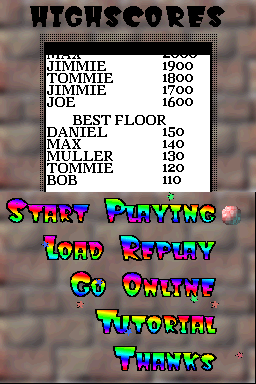
Best scores/floors/combos (5 each) are saved and will be displayed in the main menu.
Screenshots
Online emulator
| Nintendo DS | Keyboard |
|---|---|

|

|

|

|

|

|

|

|

|

|

|

|

|

|

|

|

|

|
Known issues
In some earlier testing phase the music-player freezes from time to time. By double tapping a shoulder button (R or L) you switch to the next sound file.