
Stock App Remover Vita: Difference between revisions
From GameBrew
More actions
No edit summary |
m Text replacement - "https://vitadb.rinnegatamante.it/" to "https://www.rinnegatamante.eu/vitadb/" |
||
| Line 39: | Line 39: | ||
==External links== | ==External links== | ||
* GitHub - https://github.com/AntHJ/Stock-App-Remover | * GitHub - https://github.com/AntHJ/Stock-App-Remover | ||
* VitaDB - https:// | * VitaDB - https://www.rinnegatamante.eu/vitadb/#/info/764 | ||
Latest revision as of 04:38, 5 January 2025
| Stock App Remover | |
|---|---|
 | |
| General | |
| Author | AntHJ |
| Type | Utilities |
| Version | 1.0 |
| License | Mixed |
| Last Updated | 2021/12/12 |
| Links | |
| Download | |
| Website | |
| Source | |
Quick and easy way to remove/hide stock apps.
Utilises Lua Player Plus Vita (lpp-vita).
User guide
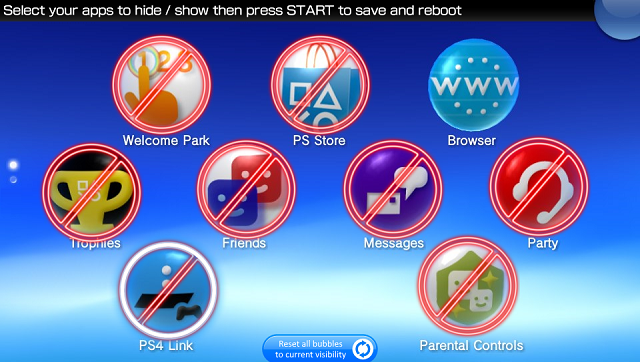
Hide apps - Simply select your desired app and press the Start button, this app will then hide your chosen bubbles and the system will reboot.
Show apps - Do the same to restore the apps. Restored bubbles will appear on the same page/folder as you have the app itself so make sure there is space around it, or make a folder with just this app in it.
Screenshots
Media
Stock App Remover - Custom LiveArea - Bubble Recall - PS Vita Utilities (Zealous Chuck)