
QuickLaunch Installer for PS Vita: Difference between revisions
More actions
m Text replacement - "GameBrew!" to "GameBrew" |
|||
| (4 intermediate revisions by the same user not shown) | |||
| Line 1: | Line 1: | ||
{{Obsolete}} | |||
{{#seo: | {{#seo: | ||
|title=Vita Homebrew Apps (Title Launchers) - GameBrew | |title=Vita Homebrew Apps (Title Launchers) - GameBrew | ||
|title_mode=append | |title_mode=append | ||
|image= | |image=quicklaunchinstallervita1up2.png | ||
|image_alt=QuickLaunch Installer for PS Vita | |image_alt=QuickLaunch Installer for PS Vita | ||
}} | }} | ||
{{Infobox Vita Homebrews | {{Infobox Vita Homebrews | ||
|title=QuickLaunch Installer for PS Vita | |title=QuickLaunch Installer for PS Vita | ||
|image= | |image=quicklaunchinstallervita1up2.png | ||
|description= | |description=Installs custom shortcuts to multitasking menu (push PS button on LiveArea). | ||
|author=1upus | |author=1upus | ||
|lastupdated=2017/11/09 | |lastupdated=2017/11/09 | ||
| Line 14: | Line 15: | ||
|version=0.51 | |version=0.51 | ||
|license=GPL-3.0 | |license=GPL-3.0 | ||
|download=https://dlhb.gamebrew.org/vitahomebrews/ | |download=https://dlhb.gamebrew.org/vitahomebrews/quicklaunchinstallervita1up.7z | ||
|website= | |website=https://github.com/1upus/QuickLaunch_installer_for_PSVita | ||
|source=https://github.com/1upus/QuickLaunch_installer_for_PSVita | |source=https://github.com/1upus/QuickLaunch_installer_for_PSVita | ||
}} | }} | ||
QuickLaunch Installer for PS Vita is a tool that can install custom shortcuts to multitasking menu (push PS button on LiveArea) on a homebrew enabled PS Vita. | |||
'''Note:''' This app is | '''Note:''' This app is outdated, please use [[QuickLaunch Installer Vita|QuickLaunch Installer]] instead. | ||
==User guide== | |||
Default shortcuts for installation: | |||
*[[ | *[[VitaShell]] | ||
*[[Adrenaline Vita|Adrenaline]] | *[[Adrenaline Vita|Adrenaline]] | ||
*[[Pkgi Vita|PKGi]] | *[[Pkgi Vita|PKGi]] | ||
== Multilanguage support == | ===Multilanguage support=== | ||
QL installer does automatically load the language that matches to the current system language. If your system language is for example russian, it will load from | QL installer does automatically load the language that matches to the current system language. | ||
If your system language is for example russian, it will load from ux0:data/qlinstall/lang/russian.txt. | |||
Please use ux0:data/qlinstall/lang/english_us.txt as base to make your translations. | Please use ux0:data/qlinstall/lang/english_us.txt as base to make your translations. | ||
Also you can use custom .ttf font specific to your language. Just put it to ux0:data/qlinstall/resources/%language%.ttf | Also you can use custom .ttf font specific to your language. Just put it to ux0:data/qlinstall/resources/%language%.ttf. | ||
File naming for translations *.txt and fonts *.ttf: | |||
*japanese | *japanese | ||
*english_us | *english_us | ||
| Line 57: | Line 59: | ||
*turkish | *turkish | ||
If your translation | If your translation doesn't loading automatically, it can miss some strings, so check actual english_us.txt to fix it. | ||
If you have incorrect width of default font chars, try to use russian.ttf as custom font and rename to %language%.ttf it may fix problem with cyrillic languages. | If you have incorrect width of default font chars, try to use russian.ttf as custom font and rename to %language%.ttf it may fix problem with cyrillic languages. | ||
==Screenshots== | |||
https://dlhb.gamebrew.org/vitahomebrews/quicklaunchinstallervita1up3.png | |||
https://dlhb.gamebrew.org/vitahomebrews/quicklaunchinstallervita1up4.png | |||
== | |||
==Media== | ==Media== | ||
'''PS Vita How To Install QuickLaunch!''' ([https://www.youtube.com/watch?v=Q78rGxMvQuE Tech James]) <br> | |||
<youtube>Q78rGxMvQuE</youtube> | <youtube>Q78rGxMvQuE</youtube> | ||
==Changelog== | ==Changelog== | ||
''' | '''v0.51''' | ||
* | *Multilang support code optimisation. | ||
* | *Fixed app crash on pop up messages. | ||
* | *Fixed screen blinking on pop up messages. | ||
* | *Basic support for userapps.ini (now read only). | ||
* | *Thx to gdljjrod ONELua for help. | ||
''' | '''v0.50 fix''' | ||
*multilang support improvements | *multilang support improvements. | ||
*code fixes | *code fixes | ||
''' | '''v0.2''' | ||
*Added autoupdate function | *Added autoupdate function. | ||
''' | '''v0.1''' | ||
* First Release. | * First Release. | ||
== | ==Credits== | ||
App created with LUA and based on sources by [https://github.com/ONElua/ Team OneLua]. | |||
== External links == | ==External links== | ||
* | * GitHub - https://github.com/1upus/QuickLaunch_installer_for_PSVita | ||
Latest revision as of 03:56, 16 December 2022
| This application has been obsoleted by one or more applications that serve the same purpose, but are more stable or maintained. |

| QuickLaunch Installer for PS Vita | |
|---|---|
 | |
| General | |
| Author | 1upus |
| Type | Title Launchers |
| Version | 0.51 |
| License | GPL-3.0 |
| Last Updated | 2017/11/09 |
| Links | |
| Download | |
| Website | |
| Source | |
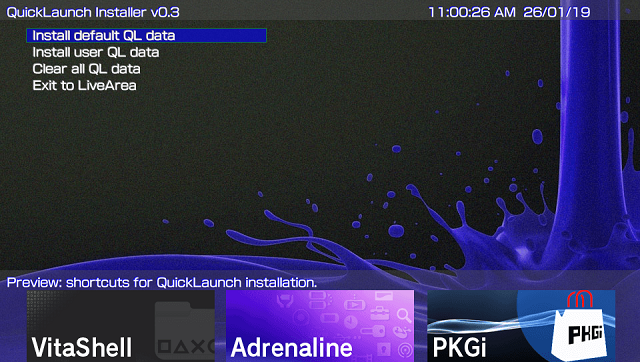
QuickLaunch Installer for PS Vita is a tool that can install custom shortcuts to multitasking menu (push PS button on LiveArea) on a homebrew enabled PS Vita.
Note: This app is outdated, please use QuickLaunch Installer instead.
User guide
Default shortcuts for installation:
Multilanguage support
QL installer does automatically load the language that matches to the current system language.
If your system language is for example russian, it will load from ux0:data/qlinstall/lang/russian.txt.
Please use ux0:data/qlinstall/lang/english_us.txt as base to make your translations.
Also you can use custom .ttf font specific to your language. Just put it to ux0:data/qlinstall/resources/%language%.ttf.
File naming for translations *.txt and fonts *.ttf:
- japanese
- english_us
- french
- spanish
- german
- italian
- dutch
- portuguese
- russian
- korean
- chinese_t
- chinese_s
- finnish
- swedish
- danish
- norwegian
- polish
- portuguese_br
- turkish
If your translation doesn't loading automatically, it can miss some strings, so check actual english_us.txt to fix it.
If you have incorrect width of default font chars, try to use russian.ttf as custom font and rename to %language%.ttf it may fix problem with cyrillic languages.
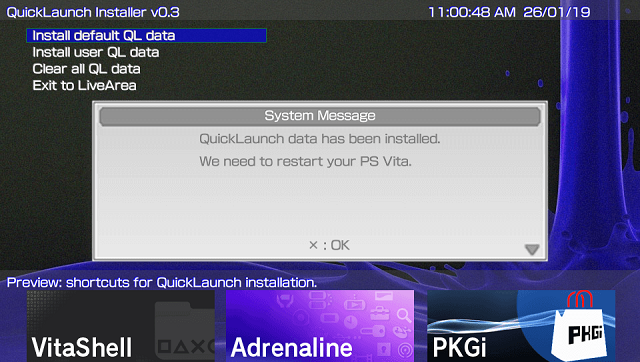
Screenshots
Media
PS Vita How To Install QuickLaunch! (Tech James)
Changelog
v0.51
- Multilang support code optimisation.
- Fixed app crash on pop up messages.
- Fixed screen blinking on pop up messages.
- Basic support for userapps.ini (now read only).
- Thx to gdljjrod ONELua for help.
v0.50 fix
- multilang support improvements.
- code fixes
v0.2
- Added autoupdate function.
v0.1
- First Release.
Credits
App created with LUA and based on sources by Team OneLua.