
Vita Moonlight: Difference between revisions
More actions
No edit summary |
0.13.2 |
||
| (19 intermediate revisions by 2 users not shown) | |||
| Line 1: | Line 1: | ||
{{Infobox Vita Homebrews | {{Infobox Vita Homebrews | ||
|title=Vita Moonlight | |title=Vita Moonlight | ||
|image= | |image=vitamoonlight2.png | ||
|description=NVIDIA Moonlight Streamer port. | |description=NVIDIA Moonlight Streamer port. | ||
|author=xyzz | |author=AorsiniYT, xyzz, d3m3vilurr, ShadowPrince | ||
|lastupdated= | |lastupdated=2025/11/16 | ||
|type=Other Apps | |type=Other Apps | ||
|version=0. | |version=0.13.2 | ||
|license=GPL-3.0 | |license=GPL-3.0 | ||
|download=https://dlhb.gamebrew.org/vitahomebrews/ | |download=https://dlhb.gamebrew.org/vitahomebrews/vitamoonlight.7z | ||
|website= | |website=https://github.com/xyzz/vita-moonlight | ||
|source=https://github.com/xyzz/vita-moonlight | |source=https://github.com/xyzz/vita-moonlight | ||
}} | }} | ||
{{#seo: | |||
|title=Vita Homebrew Apps (Other Apps) - GameBrew | |||
|title_mode=append | |||
|image=vitamoonlight2.png | |||
|image_alt=Vita Moonlight | |||
}} | |||
Vita Moonlight is a vita port of [https://github.com/irtimmer/moonlight-embedded Moonlight Embedded]. Moonlight is an open source implementation of NVIDIA GameStream. | |||
It allows you to stream your full collection of Steam games from your powerful Windows desktop to your PS Vita. | |||
==User guide== | |||
The latest release is marked as a risk application in [[VitaShell]], this may be just related to the latest vitasdk changes. Please don't panic about alert message. | |||
More information can be found at: | |||
* [https://github.com/moonlight-stream/moonlight-docs/wiki moonlight-docs]. | |||
* [https://github.com/irtimmer/moonlight-embedded/wiki moonlight-embedded]. | |||
* [https://github.com/xyzz/vita-moonlight/wiki vita-moonlight wiki]. | |||
* [https://www.cfwaifu.com/moonlight-ps-vita/ Setup guide from CFWaifu]. | |||
If you need more help, join the #vita-help channel in [https://discord.gg/atkmxxT Discord]. | |||
==Screenshots== | |||
https://dlhb.gamebrew.org/vitahomebrews/vitamoonlight4.png | |||
https://dlhb.gamebrew.org/vitahomebrews/vitamoonlight5.png | |||
==Media== | ==Media== | ||
'''PS Vita Hacks: Stream Your PC Games On Your Vita! Moon Light Homebrew Nvidia Game Stream Client 2021''' ([https://www.youtube.com/watch?v=IhD1nLUjYOY Robles Junior]) <br> | |||
<youtube>IhD1nLUjYOY</youtube> | <youtube>IhD1nLUjYOY</youtube> | ||
==Known issues== | |||
Many issues related NVIDIA GameStream's limitations, please check [https://forums.geforce.com/default/board/153/gamestream GeForce forum]. | |||
Cannot control on some games: | |||
* Most games can works controller if they support that. But very limited games cannot work on the stream. | |||
* But NVIDIA GameStream only support xinput, but these games only support DirectInput. | |||
Issues related to controls: | |||
*Control for games that use directinput instead of xinput [https://forums.geforce.com/default/topic/601517/control-for-games-that-use-directinput-instead-of-xinput/ #]. | |||
*Why do some games not detect the controller? [https://forums.geforce.com/default/topic/882613/why-do-some-games-not-detect-the-controller-/ #]. | |||
*No controls on some games? [https://github.com/xyzz/vita-moonlight/issues/74 #74]. | |||
*If you want to remote control these game, please check with xinput wrappers like [http://www.x360ce.com/ x360ce] and [https://sites.google.com/site/0dd14lab/xinput-plus XInput Plus]. | |||
See also [https://github.com/xyzz/vita-moonlight/issues vita-moonlight issues page]. | |||
Other Issues: | |||
*A handshake issue could be still alive. It needs to fix in the handshaking codeset or vitasdk part. | |||
==Changelog== | |||
'''v0.13.2''' | |||
* '''Major Features''' | |||
** PS Button Capture | |||
*** Optional PS button capture implemented - double press opens the menu, single press forwarded to Sunshine as PS/Xbox button mapping. | |||
*** To support PS button capture we disabled <code>-s</code> (safe) flag for <code>vita-make-fself</code> and added the <code>SceShell</code> permission (0x2800000000000001) to the Vita package. | |||
** Touch Zones While Touch Enabled | |||
*** Allow using front-screen touch zones independently of the selected touch input mode. When a zone is active, touch input in that area is ignored; unused touch zones behave as normal touch areas. | |||
* '''Core Improvements''' | |||
** feat: Implement MAC address handling for devices and remove deprecated MAC retrieval functions - host MACs are saved to <code>device.ini</code> and the legacy ARP/fetch logic is removed. | |||
** fix: Update subproject commits for <code>enet</code>, <code>inih</code>, and <code>moonlight-common-c</code>. | |||
* '''Under the Hood''' | |||
** Split <code>vitainput_process</code> into multiple smaller functions for readability and maintainability. | |||
** Refactor: input and shortcut handling cleanup, improved overlay/input state handling. | |||
'''v0.13.1''' | |||
* '''Major Features''' | |||
** Shortcuts Refactor: | |||
*** All shortcuts have been split into individual source files for better code organization and maintainability. | |||
* '''Core Improvements''' | |||
** Ghost Button Presses Fixed: | |||
*** Fixed an issue where ghost/phantom button presses could occur when handling overlays and shortcuts. Button state is now correctly reset and restored. | |||
* '''Under the Hood''' | |||
** Internal refactor and cleanup of shortcut handling logic. | |||
** More robust overlay and input state management. | |||
'''v0.13.0''' | |||
* '''Major Features''' | |||
** Unified Touchscreen Modes: | |||
*** You can now choose between three touchscreen modes: DS4 Touchpad, Absolute Mouse, and Tablet (Sunshine) from the settings menu. | |||
** DS4 Touchpad Emulation: | |||
*** The Vita screen can act as a DualShock 4-style multitouch touchpad, compatible with gestures and advanced controls in games and Steam Input. | |||
** Wake-on-LAN (WOL) Integration: | |||
*** Wake-on-LAN is now fully integrated into the host management menu, allowing you to power on your remote PC from the Vita using the saved MAC and automatically calculated broadcast address. (Remember to pair the host again so that it saves the mac address, or it will tell you that the mac address is not saved.) | |||
* '''Core Improvements''' | |||
** DS4 Touchpad Sensitivity: | |||
*** DS4 Touchpad mode is now more sensitive and precise for a smoother experience. | |||
** Host MAC Address Management: | |||
*** The host MAC address is now saved and loaded correctly from the device.ini file. | |||
** WOL Packet Debugging: | |||
*** Added Python script (wol_sniffer.py) to receive and verify Wake-on-LAN packets on the network, useful for testing without powering off the PC. | |||
** UI and Visual Feedback: | |||
*** Minor UI fixes and improved visual feedback in the host management menu. Host Management menu navigation improved (O/cancel returns), and status display is unified and clearer. | |||
* '''Under the Hood''' | |||
** Combos like L1+L2 and R1+R2 now work correctly even when used together with either touchscreen or backtouch. | |||
** In absolute touch mode, special button overlays no longer interfere with touch input, allowing for true absolute touch and making all screen corners usable. | |||
** Many bugfixes, code cleanups, and internal refactors for stability and maintainability. | |||
'''v0.12.3''' | |||
* '''Major Features''' | |||
** Automatic Folder Selection for Config and Cache: | |||
*** Moonlight now automatically selects and creates the best available folder for config and cache, improving compatibility and reliability. | |||
** New Host Management Menu: | |||
*** Manage paired hosts with improved status display, unified status text, and direct actions (connect, force connect, change IP/name, delete). | |||
** Show Port Next to IP: | |||
*** The connection and host management menus now show the port next to the IP (uses httpPort if available, otherwise httpsPort). | |||
* '''Core Improvements''' | |||
** Centralized and Robust Path Logic: | |||
*** All folder and config path logic is now centralized, reducing crashes and edge cases. | |||
** Improved Error Handling and Debug Logging: | |||
*** Enhanced error handling and debug logging for folder creation and config file setup. | |||
** Unified Host Status Display: | |||
*** Host status (paired/unpaired, online/offline, IP changed) is now shown in a unified way, matching the main menu logic. | |||
** Clearer Visual Feedback and Menu Options: | |||
*** Host management menu options and feedback are now clearer and more robust. | |||
* '''Under the Hood''' | |||
** Internal refactor: shared macro for path buffer size and helper for folder selection in main.c and check_dir.c. | |||
** Bugfix: Prevented crashes on startup due to buffer or path issues in folder selection logic. | |||
** Numerous bug fixes and general stability improvements. | |||
'''v0.12.2''' | |||
* '''Major Features''' | |||
** Swap L1/R1 and L2/R2 Buttons: | |||
***New option in the settings menu to swap the functions of the L1/R1 and L2/R2 buttons. | |||
** Gamepad Type Selection: | |||
***Choose between Xbox or PlayStation controller layout directly from the settings menu. | |||
* '''Core Improvements''' | |||
** Robust Host Scan Logic: | |||
*** Host scan is always restarted cleanly when returning to the main menu or after leaving any submenu. | |||
*** Main menu now waits for the scan thread to be ready before allowing host selection. | |||
** UI/UX Refinements: | |||
*** Swap and mapping exclusivity logic is now robust and bidirectional. | |||
*** Controller type selection in the UI now saves, loads, and updates immediately. | |||
*** Touch Mouse and Touchscreen toggles update their subname in the menu instantly after toggling. | |||
* '''Under the Hood''' | |||
** Cleaned up and stabilized code, especially around host scan thread handling and function declarations. | |||
** Numerous bug fixes and general stability improvements. | |||
'''v0.12.1''' | |||
* '''Major Features: | |||
** Automatic Pairing Fixed: | |||
*** Reliable pairing directly from Vita via "Search device" - no manual steps required. | |||
** Absolute Touch Support (Beta): | |||
*** Experimental touch controls for enhanced gameplay. | |||
** Motion Controls Integration: | |||
*** Gyroscope aiming for immersive motion experiences. | |||
** Elevated Floating Keyboard: | |||
*** Keyboard now overlays content without obscuring the screen (see screenshot below). | |||
* '''Core Improvements: | |||
** Enhanced Host Management: | |||
*** Status indicators: Online (green), Offline (red), IP Update Needed (yellow). | |||
*** Automatic IP change detection with confirmation dialog. | |||
*** Manual refresh via Triangle button in menus. | |||
** Network Optimization: | |||
*** New modular mDNS sniffer for faster device discovery. | |||
*** Updated libraries: moonlight-common-c, enet, inih. | |||
** UI/UX Refinements: | |||
*** Robust handling of missing/empty host fields. | |||
*** Improved debug logging and error handling. | |||
* '''Under the Hood: | |||
** Numerous bug fixes and stability enhancements. | |||
** Comprehensive code cleanup and optimization. | |||
'''v0.9.3''' | |||
* Fix pairing issue ([https://github.com/xyzz/vita-moonlight/pull/231 #231], [https://github.com/xyzz/vita-moonlight/commit/5494d93bfa4ce365e7633733c4b315cb01d54443 5494d93]). | |||
* Update latest moonlight-common-c & enet ([https://github.com/xyzz/vita-moonlight/commit/902cbedfb075e3b4e6400df893627142fafaac4c 902cbed]). | |||
* Update latest libgamestream ([https://github.com/xyzz/vita-moonlight/pull/232 #232]). | |||
'''v0.9.2''' | |||
* Fixed disconnects after stream is started ([https://github.com/xyzz/vita-moonlight/issues/222 #222]). | |||
'''v0.9.1''' | |||
* Support GFE 3.22 ([https://github.com/xyzz/vita-moonlight/commit/2452e98ecfc78f5484978b7150e37a74813e13c8 2452e98]). | |||
'''v0.9.0''' | |||
https:// | * Expose local audio setting to the end user ([https://github.com/xyzz/vita-moonlight/pull/173 #173]). | ||
https:// | * Remember the currently connected address ([https://github.com/xyzz/vita-moonlight/commit/7998108c02e4d76a24055af3a7ec2cf1d4d08d6b 7998108]). | ||
https:// | * Add a 21:9 resolution (1280x540) to Settings ([https://github.com/xyzz/vita-moonlight/commit/f1eb93169dca4ce05fad9e5a00c8548d4ed0ad7b f1eb931]). | ||
https:// | * Properly display stream in the correct display ratio, and place in the middle of the screen ([https://github.com/xyzz/vita-moonlight/commit/14e3a2c06383bbc1204b0b4d41a582112f85c85c 14e3a2c]). | ||
https:// | * Since GFE will add blackbars to the stream even when a non-16:9 monitor is using 16:9 resolution, there is another option to use along the 21:9 resolution to only display the center 16:9 region ([https://github.com/xyzz/vita-moonlight/commit/5b7a2ccf27be1968bd1eebbf4ee9b01c670d6867 5b7a2cc]). | ||
https:// | * Detect supported resolutions ([https://github.com/xyzz/vita-moonlight/pull/193 #193]). | ||
https:// | * Add new option to enable/disable of the vita vblank waiting ([https://github.com/xyzz/vita-moonlight/pull/197 #197]). | ||
https:// | |||
Full list of changes can be found [https://github.com/xyzz/vita-moonlight/releases here]. | |||
== | ==Credits== | ||
*Icon - [https://github.com/moonlight-stream moonlight-stream] project logo. | |||
* | *Livearea background - [http://www.publicdomainpictures.net/view-image.php?image=130014&picture=moonlight-reflection Moonlight Reflection] Public domain. | ||
== External links == | == External links == | ||
* | * GitHub - https://github.com/xyzz/vita-moonlight | ||
* VitaDB - https://www.rinnegatamante.eu/vitadb/#/info/76 | |||
* VitaDB - https:// | |||
Latest revision as of 05:21, 21 November 2025
| Vita Moonlight | |
|---|---|
 | |
| General | |
| Author | AorsiniYT, xyzz, d3m3vilurr, ShadowPrince |
| Type | Other Apps |
| Version | 0.13.2 |
| License | GPL-3.0 |
| Last Updated | 2025/11/16 |
| Links | |
| Download | |
| Website | |
| Source | |
Vita Moonlight is a vita port of Moonlight Embedded. Moonlight is an open source implementation of NVIDIA GameStream.
It allows you to stream your full collection of Steam games from your powerful Windows desktop to your PS Vita.
User guide
The latest release is marked as a risk application in VitaShell, this may be just related to the latest vitasdk changes. Please don't panic about alert message.
More information can be found at:
If you need more help, join the #vita-help channel in Discord.
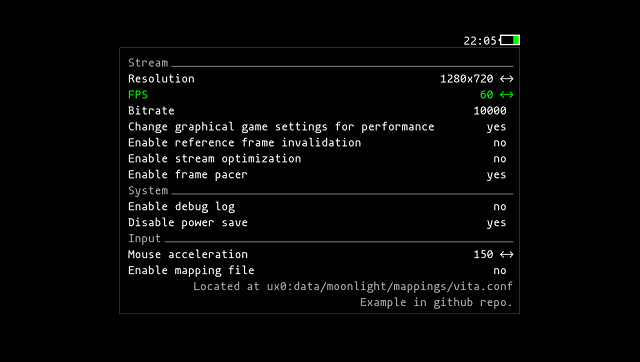
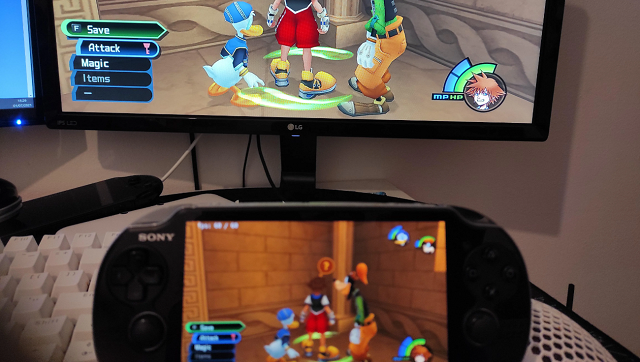
Screenshots
Media
PS Vita Hacks: Stream Your PC Games On Your Vita! Moon Light Homebrew Nvidia Game Stream Client 2021 (Robles Junior)
Known issues
Many issues related NVIDIA GameStream's limitations, please check GeForce forum.
Cannot control on some games:
- Most games can works controller if they support that. But very limited games cannot work on the stream.
- But NVIDIA GameStream only support xinput, but these games only support DirectInput.
Issues related to controls:
- Control for games that use directinput instead of xinput #.
- Why do some games not detect the controller? #.
- No controls on some games? #74.
- If you want to remote control these game, please check with xinput wrappers like x360ce and XInput Plus.
See also vita-moonlight issues page.
Other Issues:
- A handshake issue could be still alive. It needs to fix in the handshaking codeset or vitasdk part.
Changelog
v0.13.2
- Major Features
- PS Button Capture
- Optional PS button capture implemented - double press opens the menu, single press forwarded to Sunshine as PS/Xbox button mapping.
- To support PS button capture we disabled
-s(safe) flag forvita-make-fselfand added theSceShellpermission (0x2800000000000001) to the Vita package.
- Touch Zones While Touch Enabled
- Allow using front-screen touch zones independently of the selected touch input mode. When a zone is active, touch input in that area is ignored; unused touch zones behave as normal touch areas.
- PS Button Capture
- Core Improvements
- feat: Implement MAC address handling for devices and remove deprecated MAC retrieval functions - host MACs are saved to
device.iniand the legacy ARP/fetch logic is removed. - fix: Update subproject commits for
enet,inih, andmoonlight-common-c.
- feat: Implement MAC address handling for devices and remove deprecated MAC retrieval functions - host MACs are saved to
- Under the Hood
- Split
vitainput_processinto multiple smaller functions for readability and maintainability. - Refactor: input and shortcut handling cleanup, improved overlay/input state handling.
- Split
v0.13.1
- Major Features
- Shortcuts Refactor:
- All shortcuts have been split into individual source files for better code organization and maintainability.
- Shortcuts Refactor:
- Core Improvements
- Ghost Button Presses Fixed:
- Fixed an issue where ghost/phantom button presses could occur when handling overlays and shortcuts. Button state is now correctly reset and restored.
- Ghost Button Presses Fixed:
- Under the Hood
- Internal refactor and cleanup of shortcut handling logic.
- More robust overlay and input state management.
v0.13.0
- Major Features
- Unified Touchscreen Modes:
- You can now choose between three touchscreen modes: DS4 Touchpad, Absolute Mouse, and Tablet (Sunshine) from the settings menu.
- DS4 Touchpad Emulation:
- The Vita screen can act as a DualShock 4-style multitouch touchpad, compatible with gestures and advanced controls in games and Steam Input.
- Wake-on-LAN (WOL) Integration:
- Wake-on-LAN is now fully integrated into the host management menu, allowing you to power on your remote PC from the Vita using the saved MAC and automatically calculated broadcast address. (Remember to pair the host again so that it saves the mac address, or it will tell you that the mac address is not saved.)
- Unified Touchscreen Modes:
- Core Improvements
- DS4 Touchpad Sensitivity:
- DS4 Touchpad mode is now more sensitive and precise for a smoother experience.
- Host MAC Address Management:
- The host MAC address is now saved and loaded correctly from the device.ini file.
- WOL Packet Debugging:
- Added Python script (wol_sniffer.py) to receive and verify Wake-on-LAN packets on the network, useful for testing without powering off the PC.
- UI and Visual Feedback:
- Minor UI fixes and improved visual feedback in the host management menu. Host Management menu navigation improved (O/cancel returns), and status display is unified and clearer.
- DS4 Touchpad Sensitivity:
- Under the Hood
- Combos like L1+L2 and R1+R2 now work correctly even when used together with either touchscreen or backtouch.
- In absolute touch mode, special button overlays no longer interfere with touch input, allowing for true absolute touch and making all screen corners usable.
- Many bugfixes, code cleanups, and internal refactors for stability and maintainability.
v0.12.3
- Major Features
- Automatic Folder Selection for Config and Cache:
- Moonlight now automatically selects and creates the best available folder for config and cache, improving compatibility and reliability.
- New Host Management Menu:
- Manage paired hosts with improved status display, unified status text, and direct actions (connect, force connect, change IP/name, delete).
- Show Port Next to IP:
- The connection and host management menus now show the port next to the IP (uses httpPort if available, otherwise httpsPort).
- Automatic Folder Selection for Config and Cache:
- Core Improvements
- Centralized and Robust Path Logic:
- All folder and config path logic is now centralized, reducing crashes and edge cases.
- Improved Error Handling and Debug Logging:
- Enhanced error handling and debug logging for folder creation and config file setup.
- Unified Host Status Display:
- Host status (paired/unpaired, online/offline, IP changed) is now shown in a unified way, matching the main menu logic.
- Clearer Visual Feedback and Menu Options:
- Host management menu options and feedback are now clearer and more robust.
- Centralized and Robust Path Logic:
- Under the Hood
- Internal refactor: shared macro for path buffer size and helper for folder selection in main.c and check_dir.c.
- Bugfix: Prevented crashes on startup due to buffer or path issues in folder selection logic.
- Numerous bug fixes and general stability improvements.
v0.12.2
- Major Features
- Swap L1/R1 and L2/R2 Buttons:
- New option in the settings menu to swap the functions of the L1/R1 and L2/R2 buttons.
- Gamepad Type Selection:
- Choose between Xbox or PlayStation controller layout directly from the settings menu.
- Swap L1/R1 and L2/R2 Buttons:
- Core Improvements
- Robust Host Scan Logic:
- Host scan is always restarted cleanly when returning to the main menu or after leaving any submenu.
- Main menu now waits for the scan thread to be ready before allowing host selection.
- UI/UX Refinements:
- Swap and mapping exclusivity logic is now robust and bidirectional.
- Controller type selection in the UI now saves, loads, and updates immediately.
- Touch Mouse and Touchscreen toggles update their subname in the menu instantly after toggling.
- Robust Host Scan Logic:
- Under the Hood
- Cleaned up and stabilized code, especially around host scan thread handling and function declarations.
- Numerous bug fixes and general stability improvements.
v0.12.1
- Major Features:
- Automatic Pairing Fixed:
- Reliable pairing directly from Vita via "Search device" - no manual steps required.
- Absolute Touch Support (Beta):
- Experimental touch controls for enhanced gameplay.
- Motion Controls Integration:
- Gyroscope aiming for immersive motion experiences.
- Elevated Floating Keyboard:
- Keyboard now overlays content without obscuring the screen (see screenshot below).
- Automatic Pairing Fixed:
- Core Improvements:
- Enhanced Host Management:
- Status indicators: Online (green), Offline (red), IP Update Needed (yellow).
- Automatic IP change detection with confirmation dialog.
- Manual refresh via Triangle button in menus.
- Network Optimization:
- New modular mDNS sniffer for faster device discovery.
- Updated libraries: moonlight-common-c, enet, inih.
- UI/UX Refinements:
- Robust handling of missing/empty host fields.
- Improved debug logging and error handling.
- Enhanced Host Management:
- Under the Hood:
- Numerous bug fixes and stability enhancements.
- Comprehensive code cleanup and optimization.
v0.9.3
- Fix pairing issue (#231, 5494d93).
- Update latest moonlight-common-c & enet (902cbed).
- Update latest libgamestream (#232).
v0.9.2
- Fixed disconnects after stream is started (#222).
v0.9.1
- Support GFE 3.22 (2452e98).
v0.9.0
- Expose local audio setting to the end user (#173).
- Remember the currently connected address (7998108).
- Add a 21:9 resolution (1280x540) to Settings (f1eb931).
- Properly display stream in the correct display ratio, and place in the middle of the screen (14e3a2c).
- Since GFE will add blackbars to the stream even when a non-16:9 monitor is using 16:9 resolution, there is another option to use along the 21:9 resolution to only display the center 16:9 region (5b7a2cc).
- Detect supported resolutions (#193).
- Add new option to enable/disable of the vita vblank waiting (#197).
Full list of changes can be found here.
Credits
- Icon - moonlight-stream project logo.
- Livearea background - Moonlight Reflection Public domain.