
VitaPlex: Difference between revisions
From GameBrew
More actions
No edit summary |
|||
| (2 intermediate revisions by one other user not shown) | |||
| Line 19: | Line 19: | ||
|image_alt=VitaPlex | |image_alt=VitaPlex | ||
}} | }} | ||
VitaPlex is a native [https://watch.plex.tv/ Plex] client for PlayStation Vita and beyond. It streams movies, TV, music, and live TV from a Plex Media Server directly on the device, with controller and touch support. | |||
VitaPlex is a native Plex client for PlayStation Vita and beyond. It streams movies, TV, music, and live TV from a Plex Media Server directly on the device, with controller and touch support. | |||
== Features == | == Features == | ||
* Home and browsing: | * Home and browsing: | ||
** Continue Watching, On Deck, Recently Added, and per-library hubs. | |||
** Library tab with grid view, batch operations, and library-specific sections. | |||
** Music tab with artists, albums, playlists, and album hubs for Albums, Singles, and EPs. | |||
** Search across movies, TV, music, and Live TV. | |||
** Hidden libraries and custom sidebar order. | |||
* Player: | * Player: | ||
** mpv-based player. | |||
** Hardware-accelerated decoding where supported by the platform. | |||
** Direct Play first, with transcode fallback and quality/bitrate controls. | |||
** Subtitle search with OpenSubtitles. | |||
** Subtitle size presets and default language. | |||
** Auto-skip intro/credits using Plex markers. | |||
** Auto-play next episode. | |||
** Resume playback. | |||
** Adjustable seek interval. | |||
** Configurable controls auto-hide. | |||
** Optional on-screen mpv stats overlay for diagnostics. | |||
* Music: | * Music: | ||
** Background music playback after leaving the player. | |||
** Configurable default track action: queue, play, or ask. | |||
** Artist hubs grouped by Albums, Singles, and EPs. | |||
* Live TV and DVR: | * Live TV and DVR: | ||
** Full EPG grid with on-now hero card, per-row horizontal scrolling, and sticky channel column. | |||
** Configurable guide window of 6, 12, or 24 hours. | |||
** Hover live-updates the hero with the show under focus. | |||
** One-press recording from the guide. | |||
** DVR settings for default target library, start/end recording padding, partial recording toggle, and minimum recording quality. | |||
* Plex Home users: | * Plex Home users: | ||
** User picker at login and app boot. | |||
** Toggleable auto-login as last-used user. | |||
** Switch User option from Settings without logging out. | |||
** PIN-protected user support. | |||
* Downloads and offline: | * Downloads and offline: | ||
** Download any movie, episode, or album for offline viewing. | |||
** Bidirectional progress sync, including pushing local progress and pulling server progress. | |||
** Delete-after-watch option. | |||
** Full offline mode when the server is unreachable. | |||
* Customization: | * Customization: | ||
** Light, dark, and system theme options. | |||
** Hide libraries, reorder sidebar, and collapse sidebar to icons. | |||
** Hide titles in grid. | |||
** Skip single-season seasons view. | |||
** Toggle Collections, Playlists, and Genres in library views. | |||
** Per-platform sensible defaults for quality, bitrate, and controls auto-hide. | |||
* Supported mobile platforms: | * Supported mobile platforms: | ||
** Android. | |||
** iOS/iPadOS. | |||
** PS Vita. | |||
* Supported console platforms: | * Supported console platforms: | ||
** PS4. | |||
** Android TV. | |||
** Nintendo Switch. | |||
** Apple TV/tvOS. | |||
* Supported desktop platforms: | * Supported desktop platforms: | ||
** Windows. | |||
** macOS. | |||
** Linux. | |||
== Installation == | == Installation == | ||
Requirements: | Requirements: | ||
* Plex Media Server running and accessible. | * Plex Media Server running and accessible. | ||
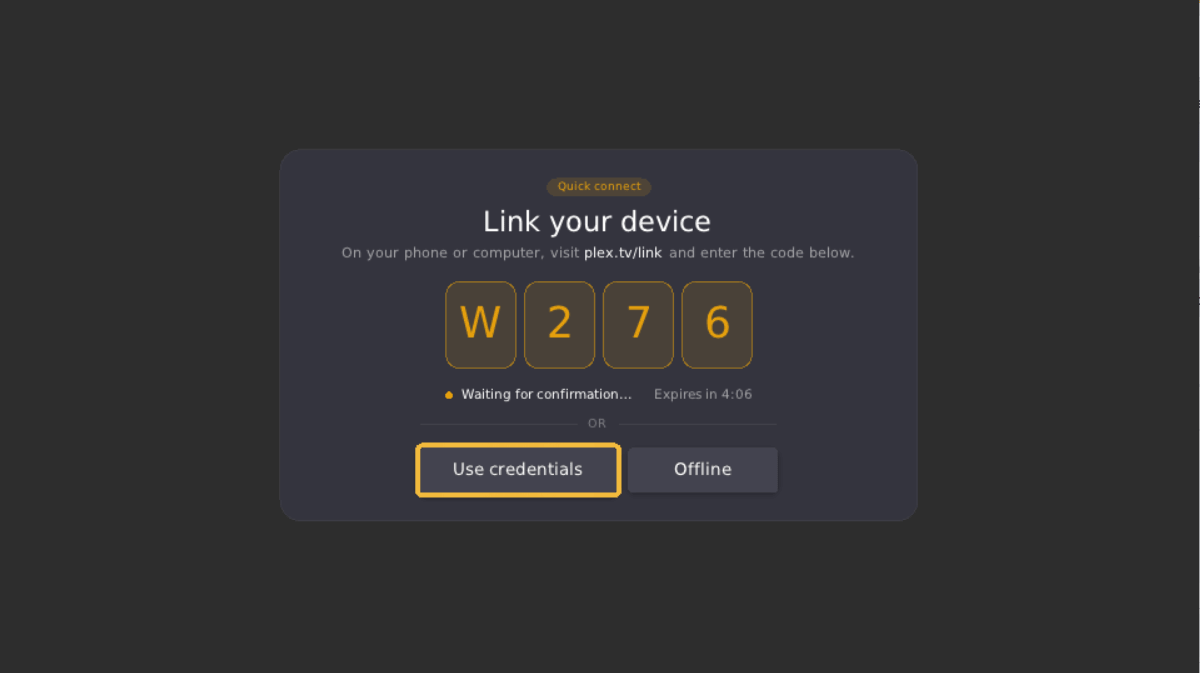
* Plex account, with sign-in via username/password or plex.tv/link PIN. | * Plex account, with sign-in via username/password or plex.tv/link PIN. | ||
| Line 90: | Line 88: | ||
* PS Vita requires HENkaku/Enso. | * PS Vita requires HENkaku/Enso. | ||
Instructions: | |||
* Download the VPK file from [https://github.com/Breezyslasher/Vita_plex/releases Releases]. | |||
* Transfer it to the Vita via USB or FTP. | |||
* Install it using [[VitaShell]]. | |||
* On first launch, sign in via username/password or plex.tv/link. | |||
==Screenshots== | ==Screenshots== | ||
| Line 105: | Line 103: | ||
==Changelog== | ==Changelog== | ||
'''Beta 1.1.9''' | '''Beta 1.1.9''' | ||
* Search was rebuilt from the ground up. | * Search was rebuilt from the ground up. | ||
* Added a built-in on-screen keyboard. | * Added a built-in on-screen keyboard. | ||
| Line 115: | Line 112: | ||
'''Beta 1.1.8''' | '''Beta 1.1.8''' | ||
* Artist page releases are split by type, including albums, singles, EPs, compilations, and live releases. | * Artist page releases are split by type, including albums, singles, EPs, compilations, and live releases. | ||
* Fixed category scroll focus so off-screen artist sections can take focus. | * Fixed category scroll focus so off-screen artist sections can take focus. | ||
'''Beta 1.1.7''' | '''Beta 1.1.7''' | ||
* Movie and TV show detail pages were substantially reworked. | * Movie and TV show detail pages were substantially reworked. | ||
* Added Cast & Crew and Recommended rows. | * Added Cast & Crew and Recommended rows. | ||
| Line 133: | Line 128: | ||
'''Beta 1.1.6''' | '''Beta 1.1.6''' | ||
* Added SyncLounge watch party support. | * Added SyncLounge watch party support. | ||
* Added host-following playback sync. | * Added host-following playback sync. | ||
| Line 154: | Line 148: | ||
'''Beta 1.1.5''' | '''Beta 1.1.5''' | ||
* Merged the audio and subtitle dialogs into one tabbed picker. | * Merged the audio and subtitle dialogs into one tabbed picker. | ||
* Online subtitle search results received a dedicated result row layout. | * Online subtitle search results received a dedicated result row layout. | ||
| Line 161: | Line 154: | ||
'''Beta 1.1.4''' | '''Beta 1.1.4''' | ||
* Context menus now use a compact anchored popover design with icons. | * Context menus now use a compact anchored popover design with icons. | ||
* Improved popover styling. | * Improved popover styling. | ||
| Line 170: | Line 162: | ||
'''Beta 1.1.3''' | '''Beta 1.1.3''' | ||
* Redesigned Plex Home user picker and PIN entry. | * Redesigned Plex Home user picker and PIN entry. | ||
* Fixed keypad D-pad navigation. | * Fixed keypad D-pad navigation. | ||
| Line 180: | Line 171: | ||
'''Beta 1.1.2''' | '''Beta 1.1.2''' | ||
* Reworked sign-in and server connection flow. | * Reworked sign-in and server connection flow. | ||
* Login now leads with device-link PIN sign-in. | * Login now leads with device-link PIN sign-in. | ||
| Line 200: | Line 190: | ||
'''Beta 1.1.1''' | '''Beta 1.1.1''' | ||
* Fixed Live TV frame rate by avoiding unnecessary per-frame work. | * Fixed Live TV frame rate by avoiding unnecessary per-frame work. | ||
* Ported text-rendering patches from Vita_Suwayomi for sharper and more reliable text. | * Ported text-rendering patches from Vita_Suwayomi for sharper and more reliable text. | ||
'''Beta 1.1.0''' | '''Beta 1.1.0''' | ||
* Live TV was substantially reworked. | * Live TV was substantially reworked. | ||
* Added On Now hero and full-width guide. | * Added On Now hero and full-width guide. | ||
| Line 224: | Line 212: | ||
'''Beta 1.0.2''' | '''Beta 1.0.2''' | ||
* Added responsive and orientation-aware layout. | * Added responsive and orientation-aware layout. | ||
* Added live relayout on rotation. | * Added live relayout on rotation. | ||
| Line 237: | Line 224: | ||
'''Beta 1.0.1''' | '''Beta 1.0.1''' | ||
* Added START button context menu to episodes. | * Added START button context menu to episodes. | ||
* Downloads tab no longer constantly rebuilds during active downloads. | * Downloads tab no longer constantly rebuilds during active downloads. | ||
| Line 248: | Line 234: | ||
'''Beta 1.0.0''' | '''Beta 1.0.0''' | ||
* First release where Vita Plex runs beyond PS Vita. | * First release where Vita Plex runs beyond PS Vita. | ||
* Added support targets for PS Vita, Nintendo Switch, Android, Android TV, PS4, Windows, Linux, and macOS. | * Added support targets for PS Vita, Nintendo Switch, Android, Android TV, PS4, Windows, Linux, and macOS. | ||
| Line 263: | Line 248: | ||
'''Beta 0.6.1''' | '''Beta 0.6.1''' | ||
* Added extras support for trailers, deleted scenes, and featurettes. | * Added extras support for trailers, deleted scenes, and featurettes. | ||
* Moved TV show extras to the show detail page. | * Moved TV show extras to the show detail page. | ||
| Line 281: | Line 265: | ||
'''Beta 0.6.0''' | '''Beta 0.6.0''' | ||
* Added auto-play next episode. | * Added auto-play next episode. | ||
* Added credits-to-next-episode behavior. | * Added credits-to-next-episode behavior. | ||
| Line 297: | Line 280: | ||
'''Beta 0.5.1''' | '''Beta 0.5.1''' | ||
* Fixed crash when opening playlists in music library. | * Fixed crash when opening playlists in music library. | ||
* Fixed image cache clearing on every track change. | * Fixed image cache clearing on every track change. | ||
| Line 308: | Line 290: | ||
'''Beta 0.5.0''' | '''Beta 0.5.0''' | ||
* Reworked video downloads to use HLS segments. | * Reworked video downloads to use HLS segments. | ||
* Added proper Plex headers on download requests. | * Added proper Plex headers on download requests. | ||
| Line 332: | Line 313: | ||
'''Beta 0.4.2''' | '''Beta 0.4.2''' | ||
* Warning: video playback remains unstable and may crash; music and audio playback work correctly. | * Warning: video playback remains unstable and may crash; music and audio playback work correctly. | ||
* Reworked download reliability, thread safety, and UX. | * Reworked download reliability, thread safety, and UX. | ||
| Line 364: | Line 344: | ||
'''Beta 0.4.1''' | '''Beta 0.4.1''' | ||
* Added hold-to-drag queue reordering. | * Added hold-to-drag queue reordering. | ||
* Added START button context menus for all media types. | * Added START button context menus for all media types. | ||
| Line 375: | Line 354: | ||
'''Beta 0.4.0''' | '''Beta 0.4.0''' | ||
* Major music experience overhaul. | * Major music experience overhaul. | ||
* Refreshed music player UI. | * Refreshed music player UI. | ||
| Line 390: | Line 368: | ||
'''Beta 0.3.1''' | '''Beta 0.3.1''' | ||
* Warning: video playback remains unstable and may crash; music and audio playback work correctly. | * Warning: video playback remains unstable and may crash; music and audio playback work correctly. | ||
* Warning: Downloads system has known bugs. | * Warning: Downloads system has known bugs. | ||
| Line 404: | Line 381: | ||
'''Beta 0.3.0''' | '''Beta 0.3.0''' | ||
* Major music player overhaul. | * Major music player overhaul. | ||
* Added always-visible controls in music mode. | * Added always-visible controls in music mode. | ||
| Line 430: | Line 406: | ||
'''Beta 0.2.3''' | '''Beta 0.2.3''' | ||
* Warning: video playback remains unstable and may crash; music and audio playback work correctly. | * Warning: video playback remains unstable and may crash; music and audio playback work correctly. | ||
* Settings previously present in the UI but with no effect are now functional. | * Settings previously present in the UI but with no effect are now functional. | ||
| Line 447: | Line 422: | ||
'''Beta 0.2.2''' | '''Beta 0.2.2''' | ||
* Warning: video playback remains unstable and may crash; music and audio playback work correctly. | * Warning: video playback remains unstable and may crash; music and audio playback work correctly. | ||
* Audio and subtitle track selection work correctly. | * Audio and subtitle track selection work correctly. | ||
| Line 463: | Line 437: | ||
'''Beta 0.2.1''' | '''Beta 0.2.1''' | ||
* Warning: video playback remains unstable and may crash; music and audio playback work correctly. | * Warning: video playback remains unstable and may crash; music and audio playback work correctly. | ||
* Redesigned player control bar. | * Redesigned player control bar. | ||
| Line 489: | Line 462: | ||
'''Beta 0.2.0''' | '''Beta 0.2.0''' | ||
* Warning: video playback remains unstable and may crash; music and audio playback work correctly. | * Warning: video playback remains unstable and may crash; music and audio playback work correctly. | ||
* Improved video playback rendering. | * Improved video playback rendering. | ||
| Line 513: | Line 485: | ||
'''Beta 0.1.0''' | '''Beta 0.1.0''' | ||
* Warning: video playback is currently unstable and will crash; music and audio playback work correctly. | * Warning: video playback is currently unstable and will crash; music and audio playback work correctly. | ||
* Full UI rewrite using Borealis. | * Full UI rewrite using Borealis. | ||
| Line 546: | Line 517: | ||
== External links == | == External links == | ||
* GitHub - https://github.com/Breezyslasher/Vita_plex | |||
* Reddit - https://old.reddit.com/r/vitahacks/comments/1ubwv0g/made_custom_plex_client_like_switchfin_called/ | * Reddit - https://old.reddit.com/r/vitahacks/comments/1ubwv0g/made_custom_plex_client_like_switchfin_called/ | ||
Latest revision as of 08:12, 28 June 2026
| VitaPlex | |
|---|---|
 | |
| General | |
| Author | Breezyslasher |
| Type | Media Players |
| Version | 1.1.9 |
| License | N/A |
| Last Updated | 2026/06/26 |
| Links | |
| Download | |
| Website | |
| Source | |
VitaPlex is a native Plex client for PlayStation Vita and beyond. It streams movies, TV, music, and live TV from a Plex Media Server directly on the device, with controller and touch support.
Features
- Home and browsing:
- Continue Watching, On Deck, Recently Added, and per-library hubs.
- Library tab with grid view, batch operations, and library-specific sections.
- Music tab with artists, albums, playlists, and album hubs for Albums, Singles, and EPs.
- Search across movies, TV, music, and Live TV.
- Hidden libraries and custom sidebar order.
- Player:
- mpv-based player.
- Hardware-accelerated decoding where supported by the platform.
- Direct Play first, with transcode fallback and quality/bitrate controls.
- Subtitle search with OpenSubtitles.
- Subtitle size presets and default language.
- Auto-skip intro/credits using Plex markers.
- Auto-play next episode.
- Resume playback.
- Adjustable seek interval.
- Configurable controls auto-hide.
- Optional on-screen mpv stats overlay for diagnostics.
- Music:
- Background music playback after leaving the player.
- Configurable default track action: queue, play, or ask.
- Artist hubs grouped by Albums, Singles, and EPs.
- Live TV and DVR:
- Full EPG grid with on-now hero card, per-row horizontal scrolling, and sticky channel column.
- Configurable guide window of 6, 12, or 24 hours.
- Hover live-updates the hero with the show under focus.
- One-press recording from the guide.
- DVR settings for default target library, start/end recording padding, partial recording toggle, and minimum recording quality.
- Plex Home users:
- User picker at login and app boot.
- Toggleable auto-login as last-used user.
- Switch User option from Settings without logging out.
- PIN-protected user support.
- Downloads and offline:
- Download any movie, episode, or album for offline viewing.
- Bidirectional progress sync, including pushing local progress and pulling server progress.
- Delete-after-watch option.
- Full offline mode when the server is unreachable.
- Customization:
- Light, dark, and system theme options.
- Hide libraries, reorder sidebar, and collapse sidebar to icons.
- Hide titles in grid.
- Skip single-season seasons view.
- Toggle Collections, Playlists, and Genres in library views.
- Per-platform sensible defaults for quality, bitrate, and controls auto-hide.
- Supported mobile platforms:
- Android.
- iOS/iPadOS.
- PS Vita.
- Supported console platforms:
- PS4.
- Android TV.
- Nintendo Switch.
- Apple TV/tvOS.
- Supported desktop platforms:
- Windows.
- macOS.
- Linux.
Installation
Requirements:
- Plex Media Server running and accessible.
- Plex account, with sign-in via username/password or plex.tv/link PIN.
- Network connectivity between the device and server.
- PS Vita requires HENkaku/Enso.
Instructions:
Screenshots
|
|

Changelog
Beta 1.1.9
- Search was rebuilt from the ground up.
- Added a built-in on-screen keyboard.
- Added physical keyboard typing for devices with a real keyboard.
- Search results now appear as home-style carousels.
- Requests up to 100 results per type.
- Episode result cards are larger and use the correct aspect ratio.
- Episode results are filtered more intelligently and restore S#E# prefixes.
Beta 1.1.8
- Artist page releases are split by type, including albums, singles, EPs, compilations, and live releases.
- Fixed category scroll focus so off-screen artist sections can take focus.
Beta 1.1.7
- Movie and TV show detail pages were substantially reworked.
- Added Cast & Crew and Recommended rows.
- Selecting a cast member browses their other titles in the library.
- Added a full-page scroll with fixed header.
- Added centered scrolling.
- Combined actions into one row: Play, Mark Watched, Audio, Subtitles, Download.
- Audio button icon now reflects selected track channel layout.
- Cast-member results screen now uses a hero-header layout and filter chips.
- Poster cells now show rating, role, and popcorn-percentage badges.
- Home tab gained a Recent Channels rail.
Beta 1.1.6
- Added SyncLounge watch party support.
- Added host-following playback sync.
- Added auto-join prompts.
- Added a content matching engine for different Plex libraries and servers.
- Added cross-server episode matching.
- Improved drift correction.
- Added take/hand-off host support.
- Added Room Auto Host control.
- Added Party Pause.
- Added Party Members dialog.
- Blocked non-host followers from manually dragging the party out of sync.
- Saves SyncLounge server URL and room code.
- Improved host exit handling.
- Improved outbound episode metadata.
- Improved transcode-aware seeking.
- Fixed seek-bar duration handling.
- Added corrupt-transcode recovery.
- Fixed Direct Play still using an HLS transcode URL.
Beta 1.1.5
- Merged the audio and subtitle dialogs into one tabbed picker.
- Online subtitle search results received a dedicated result row layout.
- Polished subtitle dialog badges and navigation.
- Description handling was reworked so descriptions are display-only.
Beta 1.1.4
- Context menus now use a compact anchored popover design with icons.
- Improved popover styling.
- Added missing album and track options.
- Added a working Download action for individual tracks.
- Fixed Downloads tab UP navigation.
- Fixed LEFT/RIGHT navigation between download rows and action buttons.
Beta 1.1.3
- Redesigned Plex Home user picker and PIN entry.
- Fixed keypad D-pad navigation.
- Cleaned up server card version display and PIN-link spacing.
- Downloads tab gained All, Movies, Shows, and Music sub-tabs.
- Left in Downloads returns focus to the sidebar.
- Fixed an empty-state layout regression.
- Reverted warm-charcoal surfaces to neutral dark greys while keeping the gold accent.
Beta 1.1.2
- Reworked sign-in and server connection flow.
- Login now leads with device-link PIN sign-in.
- Redesigned server picker.
- Redesigned connecting dialog.
- Added scrollable, focusable probe list.
- Removed redundant server-select footer hints.
- Removed duplicate Server URL field.
- Refreshed login visuals.
- Added Home user picker at login/boot with auto-login and switch-user option.
- Fixed handling of restricted Home users versus PIN-protected users.
- Swapped app-wide accent to Plex yellow.
- Reorganized Settings into a two-pane master/detail layout.
- Added Live TV settings.
- Restored MPV Stats Overlay toggle.
- Added real Network Test on every platform.
- Added disk-backed HTTP cache.
- Added hold OK to open Options on Android TV.
Beta 1.1.1
- Fixed Live TV frame rate by avoiding unnecessary per-frame work.
- Ported text-rendering patches from Vita_Suwayomi for sharper and more reliable text.
Beta 1.1.0
- Live TV was substantially reworked.
- Added On Now hero and full-width guide.
- Added live hero preview on hover.
- Added full 12-hour guide.
- Added per-row horizontal scrolling with sticky channel column.
- Restored channel logos with numbers.
- Removed the Favourites row.
- Added per-channel EPG fallback.
- Fixed duplicate channels.
- Fixed recordings via subscription template.
- Improved Live TV navigation and scrolling.
- Improved Live TV guide performance.
- Fixed tuning connection hang.
- Fixed several Nintendo Switch crashes.
- Added diagnostic logging for Switch.
- Added experimental iOS/tvOS build support.
Beta 1.0.2
- Added responsive and orientation-aware layout.
- Added live relayout on rotation.
- Album cover now scales to screen.
- Added foldable support.
- Tightened portrait grids.
- Fixed Android TV player OSD behavior.
- Fixed album track list navigation.
- Added per-platform button art.
- Linux tarball now bundles required libraries for SteamOS and Bazzite.
- Settings now shows a friendly version string.
Beta 1.0.1
- Added START button context menu to episodes.
- Downloads tab no longer constantly rebuilds during active downloads.
- Added live group-detail updates.
- Fixed group-detail crash.
- Preserved focus on rebuild.
- Fixed UP-to-Play navigation.
- Added tap feedback on in-progress downloads.
- Fixed delete-after-watching crash for last episode in a group.
Beta 1.0.0
- First release where Vita Plex runs beyond PS Vita.
- Added support targets for PS Vita, Nintendo Switch, Android, Android TV, PS4, Windows, Linux, and macOS.
- Added platform-aware playback and layout.
- Added long-press context menus on touch devices.
- Reduced memory usage for PS Vita.
- Improved grid culling.
- Media cells now paint their own cover art.
- Fixed detail view summary display.
- Scoped transparent background to video playback only.
- Added TLS hardening.
- Hardened token and credential handling.
- Reviewed security headers.
Beta 0.6.1
- Added extras support for trailers, deleted scenes, and featurettes.
- Moved TV show extras to the show detail page.
- Added CLIP media type.
- Added music videos on artist pages.
- Expanded EPG guide to 12 hours.
- Added channel/EPG caching.
- Added EPG channel matching strategies.
- Fixed Live TV tuning.
- Added DVR recording support.
- Improved detail view descriptions.
- Added music album-by-type rows.
- Added settings to hide movie/show titles and skip seasons for single-season shows.
- Removed Load More button.
- Fixed resume time display and slider seek with resume offset.
- Improved Downloads tab stability.
Beta 0.6.0
- Added auto-play next episode.
- Added credits-to-next-episode behavior.
- Fixed playback end detection.
- Reset intro/credits state when auto-playing next episode.
- Stops background music when video starts.
- Added full Plex Play Queue API support.
- Improved queue performance for large playlists.
- Reworked drag-to-reorder performance.
- Fixed cover art and ImageLoader issues.
- Added UI improvements for pill-style buttons.
- Cleaned up detail view and context menus.
- Fixed shuffle and playback issues.
- Improved offline mode behavior.
Beta 0.5.1
- Fixed crash when opening playlists in music library.
- Fixed image cache clearing on every track change.
- Improved search result metadata extraction.
- Improved QueueItem thumbnail fallback chain.
- Fixed cover art race condition.
- Standardized cover art thumbnails to 300×300.
- Reduced album art size to fit Vita screen.
- Hid empty artist label in player controls.
Beta 0.5.0
- Reworked video downloads to use HLS segments.
- Added proper Plex headers on download requests.
- Added decision response parsing.
- Added unique session IDs.
- Added transcoding progress indicator.
- Disabled Download Queue API for video downloads.
- Downloads tab now groups items by playlist, album, artist, or TV show.
- Added full-screen group detail view.
- Added context menus on grouped items.
- Added cover art on all download items.
- Added skip already-downloaded behavior.
- Fixed offline null texture crash.
- Offline mode now shows only Downloads and Settings tabs.
- Added offline error notifications.
- Player now prioritizes local cover art.
- Improved queue touch drag-to-reorder.
- Fixed auto-play next song and audio-only end-of-file detection.
- Split music search results into Albums and Tracks.
- Added START button menu for albums.
- Added B button dismissal for context menus.
- Improved queue and shuffle performance.
Beta 0.4.2
- Warning: video playback remains unstable and may crash; music and audio playback work correctly.
- Reworked download reliability, thread safety, and UX.
- Added thread-safe download access.
- Fixed progress callback race.
- Removed 10-minute download timeout.
- Added write error checking.
- Added retry logic.
- Capped transcode error retry loop.
- Made direct file download the primary method.
- Audio downloads now use direct part path.
- Video downloads use Download Queue API with polling.
- Added TRANSCODING state.
- Added HTTP for LAN downloads.
- Fixed Plex API parameters.
- Added fast-fail on unsupported Download Queue API.
- Improved download button state handling.
- Added offline playback progress saving.
- Saved music cover art with downloads.
- Added Offline Mode button on login page.
- Added offline local music playback.
- Play button detects downloaded content.
- Fixed playlist loading.
- Added Add to Playlist.
- Added playlist context menu.
- Added playlist support in sidebar music libraries.
- Improved large playlist performance.
- Improved queue overlay lazy loading and batched row creation.
- Fixed music library 401 error.
- Added focus and crash fixes.
Beta 0.4.1
- Added hold-to-drag queue reordering.
- Added START button context menus for all media types.
- Added artist view using Plex hubs API.
- Fixed Plex API type codes.
- Fixed downloads crashes and URL encoding.
- Added Debug tab.
- Moved Network Test to Settings.
- Added dialog and exit fixes.
Beta 0.4.0
- Major music experience overhaul.
- Refreshed music player UI.
- Added swipe gesture on album art for previous/next track.
- Added track duration and total queue duration display.
- Added queue touch gestures and reorder.
- Improved queue and shuffle display.
- Added and then removed timed lyrics support due to persistent crashes.
- Changed track click behavior to play only the selected track.
- Added Play This Track Only option.
- Fixed album START button and context menu.
- Artist/album descriptions now expand inline.
- Added MPV audio configuration fixes.
Beta 0.3.1
- Warning: video playback remains unstable and may crash; music and audio playback work correctly.
- Warning: Downloads system has known bugs.
- Added shuffle toggle button.
- Added repeat toggle button.
- Added new shuffle/repeat icons.
- Lyrics now load as external subtitles.
- Stream cache resets on track change.
- Repositioned Start button hint.
- Removed misleading artist view download button.
- Player stays open when queue ends.
- Corrected default track action and settings persistence.
Beta 0.3.0
- Major music player overhaul.
- Added always-visible controls in music mode.
- Added song info between cover art and controls.
- Enlarged album art.
- Added dedicated lyrics toggle button.
- Added scrollable queue overlay.
- Added queue button.
- Added background music setting.
- Fixed resume without restart.
- Added configurable default track action.
- Fixed album track list layout.
- Added context menu on album cells.
- Added track row download shortcut.
- Fixed artist view layout.
- Fixed music progress reporting.
- Added Skip Intro and Skip Credits.
- Added resume near-end behavior.
- Continue Watching now plays immediately.
- X button pauses/unpauses when controls are hidden.
- Rebuilt download system for correctness and thread safety.
- Added 401 reauth handling.
- Improved remote/relay login timeouts.
- Fixed fatal startup crash caused by invalid XML attribute.
Beta 0.2.3
- Warning: video playback remains unstable and may crash; music and audio playback work correctly.
- Settings previously present in the UI but with no effect are now functional.
- Removed unsupported settings.
- Seek interval setting now works.
- Resume playback setting now works.
- Auto-play next episode setting now works.
- Delete after watch setting now works.
- Force transcode, Direct Play, subtitle display, subtitle size, and connection timeout settings now work.
- Burn subtitles option removed.
- Added bidirectional progress sync on connect.
- Disabled screen dimming during playback.
- Added Controls Auto-Hide setting.
- Subtitle toggling now takes effect immediately.
- Track/subtitle switching no longer restarts from the beginning.
Beta 0.2.2
- Warning: video playback remains unstable and may crash; music and audio playback work correctly.
- Audio and subtitle track selection work correctly.
- Subtitle search crash was resolved.
- Added audio, subtitle, and video track overlay UI.
- Audio tracks are sourced from Plex metadata.
- Audio track switching triggers stream reload.
- Subtitle overlay includes Off option.
- Added subtitle search.
- Added controller focus handling for overlay open/close.
- Added video track button.
- Fixed getTrackList memory corruption.
- Fixed subtitle search lambda capture.
- Fully resolved subtitle search crash.
Beta 0.2.1
- Warning: video playback remains unstable and may crash; music and audio playback work correctly.
- Redesigned player control bar.
- Added Material Design icon PNGs for player buttons.
- Play/pause icon now updates in real time.
- Tap, Start, or Y toggles control overlay visibility.
- X cycles audio tracks and Y cycles subtitle tracks in video mode.
- Queue mode hints show X for Shuffle and Y for Repeat.
- Improved touch targets.
- Episodes now display landscape still thumbnails.
- Added dynamic media cell sizing.
- Improved progress bar conditions.
- Added album track list scrolling.
- Added collapsible description.
- Added music year info.
- Replaced HScrollingFrame with HorizontalScrollRow.
- Improved row-to-row navigation.
- Added auto-scroll to focused item.
- Added touch pan scrolling.
- Added search result counts.
- Added stale result prevention.
- Extended crash prevention guards to all tabs.
- Added ImageLoader cancel on disappear.
- Eliminated use-after-free from async callbacks.
Beta 0.2.0
- Warning: video playback remains unstable and may crash; music and audio playback work correctly.
- Improved video playback rendering.
- Fixed render callback timing.
- Corrected GXM FBO format.
- Added MPV_RENDER_PARAM_FLIP_Y.
- Reverted rendering through brls::sync().
- Added fullscreen video layout.
- Deferred render enable until first decoded frame.
- Added GXM pipeline flush before render.
- Fixed audio duration handling.
- Fixed progress slider infinite seek loop.
- Improved Live TV API usage.
- Rewrote channel fetching.
- Fixed EPG grid data and parsing.
- Improved channel matching.
- Populated full EPG window.
- Populated nextProgram field.
- Added tune fallback to transcode.
- Fixed DVR URL construction.
- Parsed channelVcn field.
- Added internal and build improvements.
Beta 0.1.0
- Warning: video playback is currently unstable and will crash; music and audio playback work correctly.
- Full UI rewrite using Borealis.
- Added activity-based navigation.
- Added tabbed main navigation.
- Added hardware-accelerated rendering.
- Added flexbox layout system.
- Added automatic controller navigation.
- Added touch support.
- Added Vita-compatible fonts.
- Fixed GXM build issues.
- Added PIN and credential login.
- Added auto-detect servers after login.
- Added local-first connection preference.
- Added Plex relay support.
- Added settings persistence.
- Added Accept: application/json header to server API calls.
- Added debug logging.
- Added Continue Watching row.
- Added Recently Added rows by type.
- Added horizontal scrolling rows.
- Added async content loading.
- Added Library tab with library sections, browse, collections, categories, hidden libraries, sidebar libraries, and sidebar ordering.
- Added Music tab.
- Added Search tab.
- Added Live TV tab.
- Added Downloads tab.
- Added Settings.
- Music playback works.
- Video playback remains unstable.
- Installation notes: download VitaPlex.vpk, transfer to PS Vita, install with VitaShell or similar, launch from LiveArea, and sign in with Plex account.