
EQVita: Difference between revisions
More actions
Created page with "{{Infobox Vita Homebrews |title=EQVita |image=EQVita.png |description=System-wide EQ kernel plugin and app for PS Vita. |author=shev0k |lastupdated=2025/12/22 |type=Utilities |version=1.10 |license=N/A |download=https://dlhb.gamebrew.org/vitahomebrews/EQVita.7z |website=https://github.com/shev0k/EQVita |source=https://github.com/shev0k/EQVita |donation= }} {{#seo: |title=Vita Homebrew Apps (Utilities) - GameBrew |title_mode=append |image=EQVita.png |image_alt=EQVita }} E..." |
1.14.0 |
||
| (2 intermediate revisions by the same user not shown) | |||
| Line 1: | Line 1: | ||
{{Infobox Vita Homebrews | {{Infobox Vita Homebrews | ||
|title=EQVita | |title=EQVita | ||
|image= | |image=EQVita2.png | ||
|description=System-wide EQ kernel plugin and app for PS Vita. | |description=System-wide EQ kernel plugin and app for PS Vita. | ||
|author=shev0k | |author=shev0k | ||
|lastupdated= | |lastupdated=2026/07/07 | ||
|type=Utilities | |type=Utilities | ||
|version=1. | |version=1.14.0 | ||
|license= | |license=GPL-3.0 | ||
|download=https://dlhb.gamebrew.org/vitahomebrews/EQVita.7z | |download=https://dlhb.gamebrew.org/vitahomebrews/EQVita.7z | ||
|website=https://github.com/shev0k/EQVita | |website=https://github.com/shev0k/EQVita | ||
| Line 19: | Line 19: | ||
|image_alt=EQVita | |image_alt=EQVita | ||
}} | }} | ||
EQVita is a | EQVita is a hobby homebrew project made to give the Vita a richer sound. It ships as a kernel plugin plus a small Vita app. | ||
Install it, open the app, pick a preset, and make the Vita sound less flat. Nerd version: the plugin hooks <code>sceAudioOutOutput</code>, while the app handles presets, route hints, themes, logs, and boot state. | |||
== Features == | |||
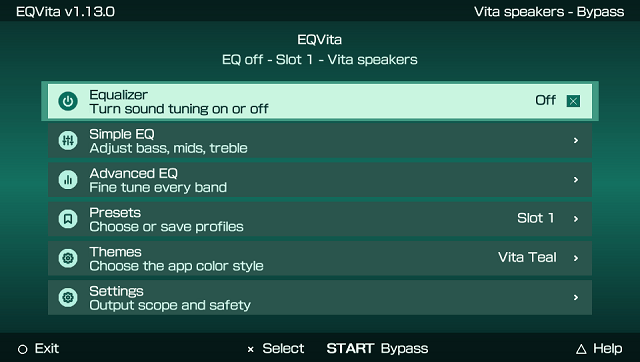
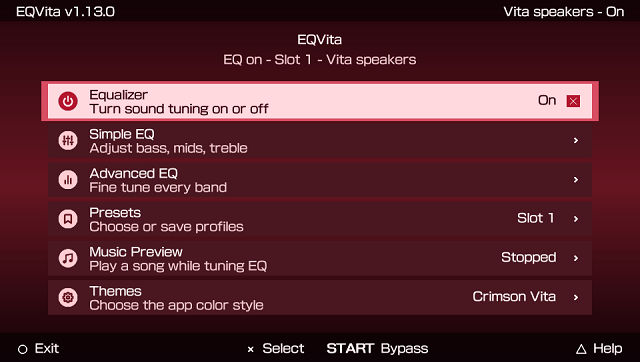
* 10-band graphic EQ from <code>31 Hz</code> to <code>16 kHz</code>. | |||
* Simple EQ mode for bass, mids, treble, and preamp. | |||
* Advanced EQ mode for every band and preamp. | |||
* Built-in <code>STOCK Depth</code> and <code>MOD Switch</code> presets. | |||
* Preset slots with save/load support. | |||
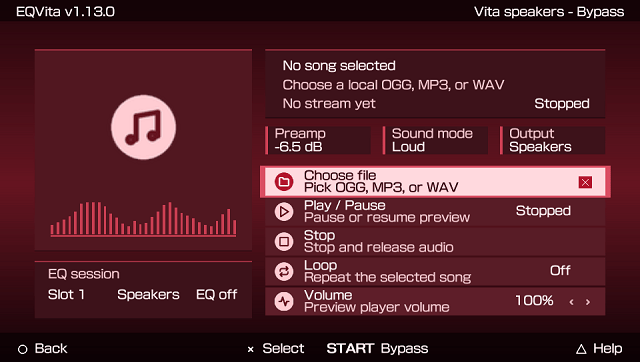
* Music Preview for playing a local <code>OGG</code>, <code>MP3</code>, or <code>WAV</code> while tuning EQ. | |||
* Speaker-only mode or all-output mode for wired/Bluetooth too. | |||
* Optional HPF (Bass guard), which cuts very low rumble. | |||
* Safe, Loud, and Direct headroom modes. | |||
* Vita-style app UI with themes. <code>Crimson Vita</code> is the default. | |||
* Boot persistence through <code>ur0:data/eqvita/boot.eqbs</code>. | |||
* App log at <code>ur0:data/eqvita/app.log</code>. | |||
== | == Installation == | ||
Copy <code>eq_speaker.skprx</code> to <code>ur0:tai/</code>. | |||
Add to <code>ur0:tai/config.txt</code> under <code>*KERNEL</code>: | |||
<pre>*KERNEL | <pre>*KERNEL | ||
ur0:tai/eq_speaker.skprx</pre></ | ur0:tai/eq_speaker.skprx</pre> | ||
< | |||
< | Reboot, install <code>EQVita.vpk</code> through [[VitaShell]]. | ||
< | |||
Open EQVita and pick a preset. | |||
'''Note:''' Keep the app and plugin from the same release. Mixed versions can fail or behave weirdly. | |||
== User guide == | |||
=== Presets And Data === | |||
EQVita stores data in: <code>ur0:data/eqvita/</code> | |||
Files you may see there: | |||
* <code>preset0.eqvp</code>, <code>preset1.eqvp</code>, <code>preset2.eqvp</code> - preset slots. | |||
* <code>boot.eqbs</code> - boot state. | |||
* <code>theme.cfg</code> - selected app theme. | |||
* <code>app.log</code> - useful log for bug reports. | |||
There are three preset slots. EQ changes apply live, and saving writes the current settings into the selected slot. | |||
The built-in presets are starting points. Applying <code>STOCK Depth</code> or <code>MOD Switch</code> saves that preset into the active slot and startup state. | |||
Small warning: every Vita, speaker mod, headphone, and Bluetooth setup is different. Blindly copying my bass-heavy presets can cause clipping or ugly distortion on your setup. If that happens, lower preamp first. | |||
If you make a preset that sounds nice, please share it in this repo's [https://github.com/shev0k/EQVita/discussions Discussions]. Over time, it would be cool to build a small preset library from real user setups instead of pretending one preset fits everything. | |||
The boot state is what lets the plugin load your saved sound after reboot, before you open the app again. | |||
Old raw <code>preset%d.bin</code> files are imported read-only when a matching <code>.eqvp</code> file does not exist. | |||
=== Music Preview === | |||
The app can play a local song while you tune EQ. | |||
Put an <code>OGG</code>, <code>MP3</code>, or <code>WAV</code> file somewhere on your Vita, open <code>Music Preview</code>, choose the file, then adjust EQ like normal. | |||
Notes: | |||
* No music is bundled in the VPK. | |||
* <code>ux0:music/</code> is shown as a shortcut in the file picker when available. | |||
* Preview playback stops and releases the audio port when you stop it or close EQVita. | |||
* This is only for tuning. It is not trying to replace your normal music player. | |||
== | === Output Modes === | ||
<code>Vita speakers</code> mode applies EQ only to the Vita speakers. | |||
<code>All outputs</code> mode also allows wired headphones and Bluetooth output. | |||
* | |||
* | If EQ is bypassed, the app tries to show why. Common reasons are: | ||
* | * EQ is turned off. | ||
* The selected output mode does not match the current route. | |||
* The output port is unknown or busy. | |||
* The audio format is unsupported. | |||
* The app and plugin ABI do not match. | |||
Short bypasses can happen when the Vita opens, closes, or reconfigures audio ports. If it is quick and does not sound bad, it is usually fine. | |||
== Controls == | |||
D-Pad/Left Analog - Move through rows | |||
Left/Right - Adjust selected value | |||
L/R - Bigger EQ value changes | |||
Cross - Select, toggle, or activate | |||
Circle - Back, Exit from main menu | |||
Start - Quick EQ on/off | |||
Triangle - Help | |||
Touch - Tap rows or drag lists | |||
EQVita follows the Vita enter-button setting for Cross/Circle. | |||
==Screenshots== | ==Screenshots== | ||
https://dlhb.gamebrew.org/vitahomebrews/images/ | https://dlhb.gamebrew.org/vitahomebrews/images/EQVita3.png | ||
https://dlhb.gamebrew.org/vitahomebrews/images/EQVita4.png | |||
https://dlhb.gamebrew.org/vitahomebrews/images/ | https://dlhb.gamebrew.org/vitahomebrews/images/EQVita5.png | ||
==Compatibility== | |||
Hardware Tested: | |||
* Vita model - PS Vita 1000 | |||
* Firmware - 3.65 Enso | |||
* Output - Vita speakers, Bluetooth | |||
* Games/apps tested - Persona 4 Golden, God of War, VitaShell, Vita home screen | |||
* Known limits - heavy games can still stress Vita audio; short bypasses during port changes can happen. | |||
==Changelog== | |||
'''v1.14.0''' | |||
* What's New | |||
** App/plugin ABI bumped to <code>1.14.0</code>. | |||
* Fixed | |||
** Fixed audio port tracking when different apps reuse the same Vita port ids. | |||
** Fixed recovered BGM ports being tracked with the wrong port type. | |||
** Improved handling for games and apps that open, release, or reconfigure audio ports often. | |||
'''v1.13.0''' | |||
* What's New | |||
** New Vita-style app UI with themes, cleaner pages, and better controls. | |||
** New Music Preview screen for playing a local <code>OGG</code>, <code>MP3</code>, or <code>WAV</code> while tuning EQ. | |||
** New preset flow with save prompts, discard behavior, and active preset persistence. | |||
** Better logs and telemetry for audio/debug reports. | |||
** Proper full system-wide equalizer support. The plugin should now affect all audio ports. | |||
* Fixed | |||
** Fixed preset saving/loading and active slot persistence. | |||
** Fixed compatibility with the official Music Player; the plugin now affects it correctly. | |||
** Fixed compatibility with the music_premium.skprx plugin. | |||
** Improved app exit, theme switching, and Music Preview cleanup. | |||
** Improved audio stability and reduced timing spikes on stock Vita clocks. | |||
** Fixed Windows/WSL script and source-test release checks. | |||
'''v1.10''' | '''v1.10''' | ||
* First Release. | * First Release. | ||
==Credits== | |||
UI images adapted from VitaShell. | |||
== External links == | == External links == | ||
* | * GitHub - https://github.com/shev0k/EQVita | ||
* VitaDB - https://www.rinnegatamante.eu/vitadb/#/info/1353 | * VitaDB - https://www.rinnegatamante.eu/vitadb/#/info/1353 | ||
Latest revision as of 03:30, 10 July 2026
| EQVita | |
|---|---|
 | |
| General | |
| Author | shev0k |
| Type | Utilities |
| Version | 1.14.0 |
| License | GPL-3.0 |
| Last Updated | 2026/07/07 |
| Links | |
| Download | |
| Website | |
| Source | |
EQVita is a hobby homebrew project made to give the Vita a richer sound. It ships as a kernel plugin plus a small Vita app.
Install it, open the app, pick a preset, and make the Vita sound less flat. Nerd version: the plugin hooks sceAudioOutOutput, while the app handles presets, route hints, themes, logs, and boot state.
Features
- 10-band graphic EQ from
31 Hzto16 kHz. - Simple EQ mode for bass, mids, treble, and preamp.
- Advanced EQ mode for every band and preamp.
- Built-in
STOCK DepthandMOD Switchpresets. - Preset slots with save/load support.
- Music Preview for playing a local
OGG,MP3, orWAVwhile tuning EQ. - Speaker-only mode or all-output mode for wired/Bluetooth too.
- Optional HPF (Bass guard), which cuts very low rumble.
- Safe, Loud, and Direct headroom modes.
- Vita-style app UI with themes.
Crimson Vitais the default. - Boot persistence through
ur0:data/eqvita/boot.eqbs. - App log at
ur0:data/eqvita/app.log.
Installation
Copy eq_speaker.skprx to ur0:tai/.
Add to ur0:tai/config.txt under *KERNEL:
*KERNEL
ur0:tai/eq_speaker.skprx
Reboot, install EQVita.vpk through VitaShell.
Open EQVita and pick a preset.
Note: Keep the app and plugin from the same release. Mixed versions can fail or behave weirdly.
User guide
Presets And Data
EQVita stores data in: ur0:data/eqvita/
Files you may see there:
preset0.eqvp,preset1.eqvp,preset2.eqvp- preset slots.boot.eqbs- boot state.theme.cfg- selected app theme.app.log- useful log for bug reports.
There are three preset slots. EQ changes apply live, and saving writes the current settings into the selected slot.
The built-in presets are starting points. Applying STOCK Depth or MOD Switch saves that preset into the active slot and startup state.
Small warning: every Vita, speaker mod, headphone, and Bluetooth setup is different. Blindly copying my bass-heavy presets can cause clipping or ugly distortion on your setup. If that happens, lower preamp first.
If you make a preset that sounds nice, please share it in this repo's Discussions. Over time, it would be cool to build a small preset library from real user setups instead of pretending one preset fits everything.
The boot state is what lets the plugin load your saved sound after reboot, before you open the app again.
Old raw preset%d.bin files are imported read-only when a matching .eqvp file does not exist.
Music Preview
The app can play a local song while you tune EQ.
Put an OGG, MP3, or WAV file somewhere on your Vita, open Music Preview, choose the file, then adjust EQ like normal.
Notes:
- No music is bundled in the VPK.
ux0:music/is shown as a shortcut in the file picker when available.- Preview playback stops and releases the audio port when you stop it or close EQVita.
- This is only for tuning. It is not trying to replace your normal music player.
Output Modes
Vita speakers mode applies EQ only to the Vita speakers.
All outputs mode also allows wired headphones and Bluetooth output.
If EQ is bypassed, the app tries to show why. Common reasons are:
- EQ is turned off.
- The selected output mode does not match the current route.
- The output port is unknown or busy.
- The audio format is unsupported.
- The app and plugin ABI do not match.
Short bypasses can happen when the Vita opens, closes, or reconfigures audio ports. If it is quick and does not sound bad, it is usually fine.
Controls
D-Pad/Left Analog - Move through rows
Left/Right - Adjust selected value
L/R - Bigger EQ value changes
Cross - Select, toggle, or activate
Circle - Back, Exit from main menu
Start - Quick EQ on/off
Triangle - Help
Touch - Tap rows or drag lists
EQVita follows the Vita enter-button setting for Cross/Circle.
Screenshots
Compatibility
Hardware Tested:
- Vita model - PS Vita 1000
- Firmware - 3.65 Enso
- Output - Vita speakers, Bluetooth
- Games/apps tested - Persona 4 Golden, God of War, VitaShell, Vita home screen
- Known limits - heavy games can still stress Vita audio; short bypasses during port changes can happen.
Changelog
v1.14.0
- What's New
- App/plugin ABI bumped to
1.14.0.
- App/plugin ABI bumped to
- Fixed
- Fixed audio port tracking when different apps reuse the same Vita port ids.
- Fixed recovered BGM ports being tracked with the wrong port type.
- Improved handling for games and apps that open, release, or reconfigure audio ports often.
v1.13.0
- What's New
- New Vita-style app UI with themes, cleaner pages, and better controls.
- New Music Preview screen for playing a local
OGG,MP3, orWAVwhile tuning EQ. - New preset flow with save prompts, discard behavior, and active preset persistence.
- Better logs and telemetry for audio/debug reports.
- Proper full system-wide equalizer support. The plugin should now affect all audio ports.
- Fixed
- Fixed preset saving/loading and active slot persistence.
- Fixed compatibility with the official Music Player; the plugin now affects it correctly.
- Fixed compatibility with the music_premium.skprx plugin.
- Improved app exit, theme switching, and Music Preview cleanup.
- Improved audio stability and reduced timing spikes on stock Vita clocks.
- Fixed Windows/WSL script and source-test release checks.
v1.10
- First Release.
Credits
UI images adapted from VitaShell.