
YATA Plus 3DS: Difference between revisions
From GameBrew
More actions
Created page with "{{Infobox 3DS homebrew | title = YATA Plus | image = https://dlhb.gamebrew.org/3dshomebrew/YATAPlus.jpg|250px | type = PC Utilities | version = v1.8 | licence = Mixed | author..." |
m Text replacement - "Category:3DS homebrew applications" to "" |
||
| (20 intermediate revisions by the same user not shown) | |||
| Line 1: | Line 1: | ||
{{Infobox 3DS | {{Infobox 3DS Homebrews | ||
| title = YATA Plus | |title=YATA Plus | ||
| image = | |image=Yataplus2.png | ||
| type = | |description=3DS theme editor. | ||
| version = | |author=exelix11 | ||
| | |lastupdated=2016/04/25 | ||
| | |type=Theme Tools | ||
| website = https://gbatemp.net/threads/release-yet-another-theme-application-plus-yata-3ds-theme-editor.393355/ | |version=1.8 | ||
|license=Mixed | |||
| source = https:// | |download=https://dlhb.gamebrew.org/3dshomebrews/yataplus.7z | ||
|website=https://gbatemp.net/threads/release-yet-another-theme-application-plus-yata-3ds-theme-editor.393355/ | |||
|source=https://github.com/exelix11/YATA-PLUS | |||
}} | }} | ||
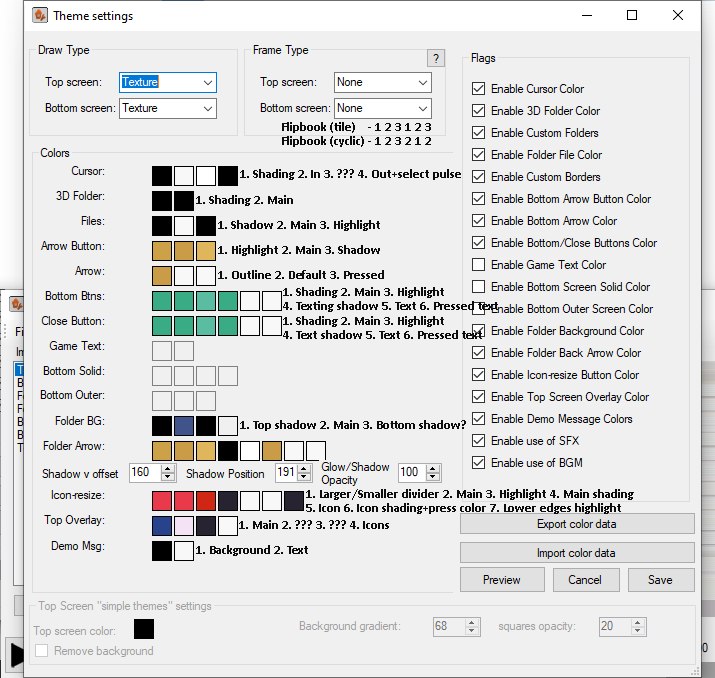
YATA+, also known as Yet Another Theme Application PLUS, is a 3DS theme editor that aims to be the complete solution for creating custom themes for 3DS. This application is a mod of Reisyukaku's [[Yet Another Theme Application 3DS|YATA]], with some new features and bug fixes. | |||
'''This application is not | '''Note:''' This application is not being supported anymore. You might also want to check out the [[Yata_online_3DS|online version of this tool]]. | ||
You might also want to check out | |||
==Features== | |||
* WAV to CWAV without relying on copyrighted software. | |||
* Theme simulator with every UI element. | |||
* Requires .NET 4.5. | |||
* [https://gbatemp.net/threads/tutorial-creating-a-3ds-custom-theme-from-scratch-with-yata-v1-1.393602 Guide] on how to make themes with YATA+. | |||
==Screenshots== | |||
https://dlhb.gamebrew.org/3dshomebrews/yataplus3.png | |||
https://dlhb.gamebrew.org/3dshomebrews/yataplus4.png | |||
https://dlhb.gamebrew.org/3dshomebrews/yataplus5.png | |||
https://dlhb.gamebrew.org/3dshomebrews/yataplus7.png | |||
Version 1. | ==Changelog== | ||
'''Version 1.8''' | |||
* Added scrollbars in the theme settings window for PCs with small screens, now that window can be resized as someone asked. | |||
* Fixed loading themes with Cwav = null. | |||
'''Version 1.7''' | |||
*Faster startup: the update check is now done in background. | |||
*Added size checks for the CWAV chunk (sometimes if the section is too big the CWAVs won't play). | |||
*Theme sender now sends the themes via FTP in the themes folder (or another one) in the sd without using zip files, so it doesn't require anymore the YATA+ theme installer. | |||
*Some other minor fixes in the simulator and the main window. | |||
'''Version 1.6''' | |||
* Fixed a overflow bug when editing the colors in a theme. | |||
* Replaced Windows Media Player with an embedded player. | |||
* Now you can disable the player and use your default player like YATA+ lite. | |||
* Added option to send themes to CHMM2 by Rinnegatamante. | |||
* Added tooltips in the theme settings windows. | |||
* Added support for "custom colors" in the color dialog for the theme settings window. | |||
* Now the top and bottom images are aligned in the theme preview. | |||
'''Version 1.5 & 1.5 LITE''' | |||
* This version doesn't add any new feature, but fixes many bugs, also, YATA+ should not have more than one instance opened at the same time or you may have problems with conflicting temp files. | |||
'''Version 1.4 & 1.4 LITE''' | |||
* Released "YATA+ Lite" which doesn't require windows media player. | |||
* Fixed support for back arrow, thanks everyone on gbatemp who figured out how those bytes works. | |||
* New basic theme templates. | |||
* Now YATA supports file associations (bin, brstm, bcstm, cwav). | |||
* Added cursor in the theme simulator. | |||
* Now drag and drop supports importing images too (only PNGs). | |||
* Multi-languages support. | |||
* Realtime color preview in the theme settings. | |||
* WAV -> CWAV conversion now works properly (still need SDK tool). | |||
* WAV optimization (channel, frequency, bits) before converting to CWAV can be edited or disabled. | |||
* Remote theme installing via FTP (download the homebrews pack from this thread). | |||
* Export/import colors in the theme settings (this also will allow to set every color to one, export, hex edit the exported file and reimport). | |||
* Some other little features and fixes. | |||
* Notice that YATA+ LITE is a separated branch from YATA+, so the LITE version won't receive the minor updates the .1 ones, but will always have the same features as the normal YATA+ (except the media player). | |||
'''Version 1.3.1''' | |||
* Fixed a bug with the theme simulator. | |||
* Now the no background option for "Solid w/ Texture squares" themes is supported. | |||
* Other fixes. | |||
Version 1. | '''Version 1.2''' | ||
* WAV -> CWAV and CWAV -> WAV conversions now support spaces. | |||
* WAV -> CWAV and CWAV -> WAV conversions now support multiple files at once. | |||
* Implemented drag and drop. | |||
* Auto "optimization" WAV files to 8-bit, 8000hz, mono before converting to CWAVS. | |||
* Fixes in the CWAV importing. | |||
* Fixes in the CWAV dumper. | |||
* Some other minor fixes. | |||
'''Version 1.1''' | |||
* Auto check for updates. | |||
* Added an embedded player for playng CWAVs/BCSTMs. | |||
* Converting CWAVs, BCWAVs and other formats (check the spoiler at the end of the post) to WAVs. | |||
* Added option to choice the position of the buttons in the theme settings screen (For pc with larger fonts). | |||
* Fixed some bugs with the CWAVs dumper. | |||
* Full support for "simple themes", such as "simple orange" and "mood matrix". | |||
* Now vgmstream and his DLLs aren't deleted anymore. | |||
* Fixed a bug that makes YATA read the wrong colors from an image. | |||
* Some other minor fixes. | |||
'''Version 1.0''' | |||
Version 1. | |||
Features added: | Features added: | ||
* "new" key in the File menu. | |||
* Loading uncompressed themes. | |||
* Auto open image in a photo editor. | |||
* Gui for the WAV -> CWAV converter of the leaked SDK. | |||
* Generating CWAV chunks (Replace SFX in the theme). | |||
* Dumping and playing CWAVs. | |||
* User preferences. | |||
* Generating theme previews for CHMM. | |||
Known bugs fixed: | Known bugs fixed: | ||
* Changing scroll types. | |||
* Other bugs relative to saving the theme (When writing a theme the offsets for images, colors etc weren't updated so sometimes the theme generated would be invalid). | |||
* close button and bottom buttons swapping when saving the theme's settings. | |||
==Credits== | |||
Thanks to: | Thanks to: | ||
Reisyukaku for the original application. | * Reisyukaku for the original application. | ||
Team Fail for the source of 3DS .CWAV dumper | * Team Fail for the source of 3DS .CWAV dumper | ||
Xextil for the source of | * Xextil for the source of "Custom Theme Cwavs". | ||
HCS for vgmstream. | * HCS for vgmstream. | ||
And | * And everyone who contributed indirectly from GBAtemp and 3dbrew.org. | ||
==External links== | |||
* GitHub - https://github.com/exelix11/YATA-PLUS | |||
* GBAtemp - https://gbatemp.net/threads/release-yet-another-theme-application-plus-yata-3ds-theme-editor.393355 | |||
Latest revision as of 11:11, 6 May 2024
| YATA Plus | |
|---|---|
 | |
| General | |
| Author | exelix11 |
| Type | Theme Tools |
| Version | 1.8 |
| License | Mixed |
| Last Updated | 2016/04/25 |
| Links | |
| Download | |
| Website | |
| Source | |
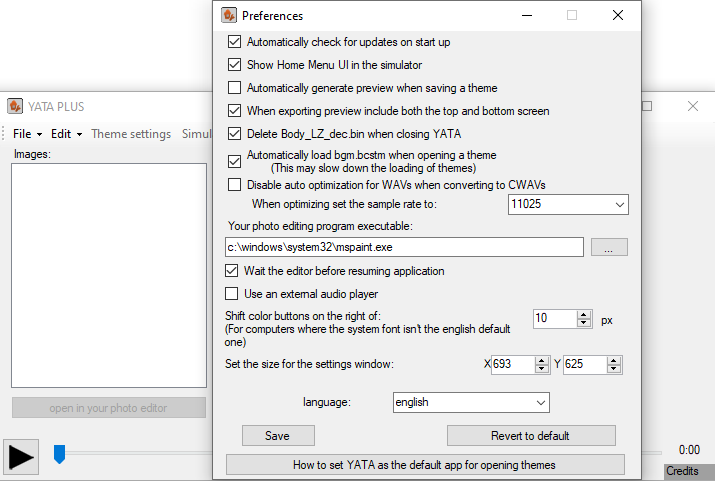
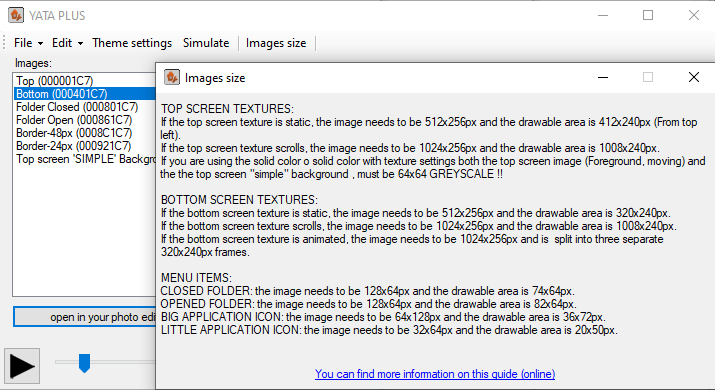
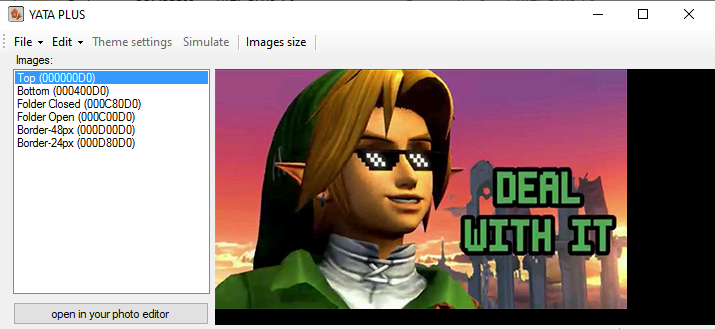
YATA+, also known as Yet Another Theme Application PLUS, is a 3DS theme editor that aims to be the complete solution for creating custom themes for 3DS. This application is a mod of Reisyukaku's YATA, with some new features and bug fixes.
Note: This application is not being supported anymore. You might also want to check out the online version of this tool.
Features
- WAV to CWAV without relying on copyrighted software.
- Theme simulator with every UI element.
- Requires .NET 4.5.
- Guide on how to make themes with YATA+.
Screenshots
Changelog
Version 1.8
- Added scrollbars in the theme settings window for PCs with small screens, now that window can be resized as someone asked.
- Fixed loading themes with Cwav = null.
Version 1.7
- Faster startup: the update check is now done in background.
- Added size checks for the CWAV chunk (sometimes if the section is too big the CWAVs won't play).
- Theme sender now sends the themes via FTP in the themes folder (or another one) in the sd without using zip files, so it doesn't require anymore the YATA+ theme installer.
- Some other minor fixes in the simulator and the main window.
Version 1.6
- Fixed a overflow bug when editing the colors in a theme.
- Replaced Windows Media Player with an embedded player.
- Now you can disable the player and use your default player like YATA+ lite.
- Added option to send themes to CHMM2 by Rinnegatamante.
- Added tooltips in the theme settings windows.
- Added support for "custom colors" in the color dialog for the theme settings window.
- Now the top and bottom images are aligned in the theme preview.
Version 1.5 & 1.5 LITE
- This version doesn't add any new feature, but fixes many bugs, also, YATA+ should not have more than one instance opened at the same time or you may have problems with conflicting temp files.
Version 1.4 & 1.4 LITE
- Released "YATA+ Lite" which doesn't require windows media player.
- Fixed support for back arrow, thanks everyone on gbatemp who figured out how those bytes works.
- New basic theme templates.
- Now YATA supports file associations (bin, brstm, bcstm, cwav).
- Added cursor in the theme simulator.
- Now drag and drop supports importing images too (only PNGs).
- Multi-languages support.
- Realtime color preview in the theme settings.
- WAV -> CWAV conversion now works properly (still need SDK tool).
- WAV optimization (channel, frequency, bits) before converting to CWAV can be edited or disabled.
- Remote theme installing via FTP (download the homebrews pack from this thread).
- Export/import colors in the theme settings (this also will allow to set every color to one, export, hex edit the exported file and reimport).
- Some other little features and fixes.
- Notice that YATA+ LITE is a separated branch from YATA+, so the LITE version won't receive the minor updates the .1 ones, but will always have the same features as the normal YATA+ (except the media player).
Version 1.3.1
- Fixed a bug with the theme simulator.
- Now the no background option for "Solid w/ Texture squares" themes is supported.
- Other fixes.
Version 1.2
- WAV -> CWAV and CWAV -> WAV conversions now support spaces.
- WAV -> CWAV and CWAV -> WAV conversions now support multiple files at once.
- Implemented drag and drop.
- Auto "optimization" WAV files to 8-bit, 8000hz, mono before converting to CWAVS.
- Fixes in the CWAV importing.
- Fixes in the CWAV dumper.
- Some other minor fixes.
Version 1.1
- Auto check for updates.
- Added an embedded player for playng CWAVs/BCSTMs.
- Converting CWAVs, BCWAVs and other formats (check the spoiler at the end of the post) to WAVs.
- Added option to choice the position of the buttons in the theme settings screen (For pc with larger fonts).
- Fixed some bugs with the CWAVs dumper.
- Full support for "simple themes", such as "simple orange" and "mood matrix".
- Now vgmstream and his DLLs aren't deleted anymore.
- Fixed a bug that makes YATA read the wrong colors from an image.
- Some other minor fixes.
Version 1.0
Features added:
- "new" key in the File menu.
- Loading uncompressed themes.
- Auto open image in a photo editor.
- Gui for the WAV -> CWAV converter of the leaked SDK.
- Generating CWAV chunks (Replace SFX in the theme).
- Dumping and playing CWAVs.
- User preferences.
- Generating theme previews for CHMM.
Known bugs fixed:
- Changing scroll types.
- Other bugs relative to saving the theme (When writing a theme the offsets for images, colors etc weren't updated so sometimes the theme generated would be invalid).
- close button and bottom buttons swapping when saving the theme's settings.
Credits
Thanks to:
- Reisyukaku for the original application.
- Team Fail for the source of 3DS .CWAV dumper
- Xextil for the source of "Custom Theme Cwavs".
- HCS for vgmstream.
- And everyone who contributed indirectly from GBAtemp and 3dbrew.org.