
Quick Menu Plus Vita by GrayJack: Difference between revisions
From GameBrew
More actions
No edit summary |
No edit summary |
||
| (2 intermediate revisions by the same user not shown) | |||
| Line 1: | Line 1: | ||
{{Infobox Vita Homebrews | {{Infobox Vita Homebrews | ||
|title=Quick Menu Plus | |title=Quick Menu Plus | ||
|image=quickmenuplusvitamod.png | |image=quickmenuplusvitamod.png | ||
|description=Power Features in the Vita Quick Menu. | |description=Power Features in the Vita Quick Menu. | ||
| Line 30: | Line 30: | ||
** For example, put <code>250000</code> for 250 milliseconds. If the file does not exist, the default time is 500 milliseconds. | ** For example, put <code>250000</code> for 250 milliseconds. If the file does not exist, the default time is 500 milliseconds. | ||
* <code>standbyisrestart.txt</code> sets the standby button to function as a restart button. | * <code>standbyisrestart.txt</code> sets the standby button to function as a restart button. | ||
** Put in the file <code>1</code> to enable, or <code>0</code> to disable | ** Put in the file <code>1</code> to enable, or <code>0</code> to disable. When this setting is disabled, hold the "Power Off・Restart" button to restart, and press to power off. | ||
** If the file does not exist, the default is enabled on the Vita, and disabled on the PSTV. | |||
* <code>bgstyle.txt</code> sets the background style. | * <code>bgstyle.txt</code> sets the background style. | ||
** Put in the file <code>0</code> for original, <code>1</code> for translucent, and <code>2</code> for black. | ** Put in the file <code>0</code> for original, <code>1</code> for translucent, and <code>2</code> for black. | ||
Latest revision as of 05:49, 21 June 2025
| Quick Menu Plus | |
|---|---|
 | |
| General | |
| Author | GrayJack |
| Type | Plugins |
| Version | 3.0.0 |
| License | GPL-3.0 |
| Last Updated | 2025/06/20 |
| Links | |
| Download | |
| Website | |
| Source | |
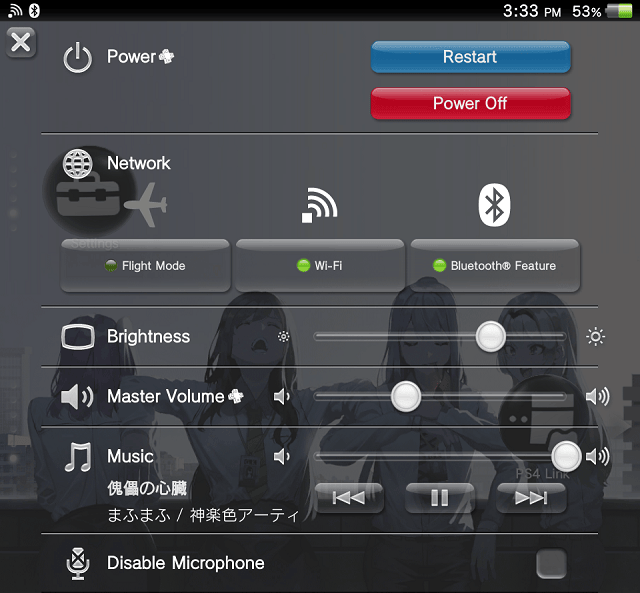
This is a modification of Quick Menu Plus, a plugin that adds a number of features to the Quick Menu on the PS Vita and PSTV:
- Power off, restart, and standby buttons.
- Configurable power buttons.
- Volume slidebar.
- Faster Quick Menu open time.
- Custom background styles.
- Configurable background gradient.
Installation
Write the file path in the *main section of your taiHEN config.
*main
ur0:/tai/quickmenuplus.suprx
Configuration
Put files in the directory ur0:/data/quickmenuplus to configure Quick Menu Plus.
pushtime.txtsets the Quick Menu PS button push time. Put in the file the desired push time in microseconds.- For example, put
250000for 250 milliseconds. If the file does not exist, the default time is 500 milliseconds.
- For example, put
standbyisrestart.txtsets the standby button to function as a restart button.- Put in the file
1to enable, or0to disable. When this setting is disabled, hold the "Power Off・Restart" button to restart, and press to power off. - If the file does not exist, the default is enabled on the Vita, and disabled on the PSTV.
- Put in the file
bgstyle.txtsets the background style.- Put in the file
0for original,1for translucent, and2for black. - If the file does not exist, the default is original. Black can reduce power consumption for OLED screens.
- Put in the file
bggradient.txtsets the background gradient effect.- Put in the file
0to disable, and1to enable. If the file does not exist, the default is "enabled".
- Put in the file
Screenshots
Compatibility
Supported firmware versions:
Retail 3.60 - 3.73
Testkit 3.60, 3.65
Devkit 3.60
Changelog
v3.0.0 Undead Edition
- Add configuration to (un)set the Quick Menu background gradient.
- Changed default background style to "original" style.
- Builds using VitaSDK.
Credits
- Princess-of-Sleeping: Tip for SceShellUtil, ScePaf
- Team CBPS: For the original project