
Minecraft: New Nintendo 3DS Edition Modernization MegaPack: Difference between revisions
More actions
Created page with "{{Infobox 3DS Homebrews |title=Minecraft: New Nintendo 3DS Edition Modernization MegaPack |image=mc3dsmodern.png |description=A LayeredFS modpack to modernize Minecraft: New Nintendo 3DS Edition. |author=wyndchyme |lastupdated=2024/12/26 |type=Game Hacks |format= |version=1.6.0 |license=Mixed |download=https://dlhb.gamebrew.org/3dshomebrews/mc3dsmodern.7z |website=https://github.com/wyndchyme/mc3ds-modern |source=https://github.com/wyndchyme/mc3ds-modern }} This is a mod..." |
No edit summary |
||
| (8 intermediate revisions by 2 users not shown) | |||
| Line 3: | Line 3: | ||
|image=mc3dsmodern.png | |image=mc3dsmodern.png | ||
|description=A LayeredFS modpack to modernize Minecraft: New Nintendo 3DS Edition. | |description=A LayeredFS modpack to modernize Minecraft: New Nintendo 3DS Edition. | ||
|author= | |author=The MegaPack Authors | ||
|lastupdated= | |lastupdated=2026/02/20 | ||
|type=Game Hacks | |type=Game Hacks | ||
|version=3.1.3 | |||
|version=1. | |||
|license=Mixed | |license=Mixed | ||
|download=https://dlhb.gamebrew.org/3dshomebrews/mc3dsmodern.7z | |download=https://dlhb.gamebrew.org/3dshomebrews/mc3dsmodern.7z | ||
| Line 17: | Line 16: | ||
This pack only officially supports English (US) and English (UK). Other languages can be used but will have lesser compatibility with Modernization MegaPack and the larger font. | This pack only officially supports English (US) and English (UK). Other languages can be used but will have lesser compatibility with Modernization MegaPack and the larger font. | ||
Please refer to the [https://github.com/wyndchyme/mc3ds-modern/ | Please refer to the [https://github.com/wyndchyme/mc3ds-modern/ README] for a list of mods included in the modpack. | ||
== Installation == | == Installation == | ||
| Line 23: | Line 22: | ||
* A physical/digital copy of Minecraft: New Nintendo 3DS Edition | * A physical/digital copy of Minecraft: New Nintendo 3DS Edition | ||
* Update 1.9.19 installed on your console | * Update 1.9.19 installed on your console | ||
* | * The latest version of [[Luma3DS|Luma]] | ||
* Purchased DLC (for access to Classic texture pack) | * Purchased DLC (for access to Classic texture pack) | ||
| Line 31: | Line 30: | ||
'''Install instructions:''' | '''Install instructions:''' | ||
#Ensure that you have game patching enabled in your [[Luma3DS|Luma]] settings by holding the Select button on startup. If there is an '(x)' to the left of 'Enable game patching' in your Luma settings, then game patching is enabled. | #Ensure that you have game patching enabled in your [[Luma3DS|Luma]] settings by holding the Select button on startup. If there is an '(x)' to the left of 'Enable game patching' in your Luma settings, then game patching is enabled. | ||
#Download the latest release of Modernization MegaPack for your region from the [https://github.com/wyndchyme/mc3ds-modern/releases releases page]. | #Download the latest release of Modernization MegaPack for your region from the [https://github.com/wyndchyme/mc3ds-modern/releases releases page] and extract it. | ||
# | #Open your console's microSD card using a microSD card reader or an FTP client. Move the folder named <code>Minecraft 3DS</code> to the root (highest level) of your microSD card. | ||
#On the root (highest level) of your microSD card, there should be a directory named <code>luma</code>. Enter that directory and look for a directory named <code>titles</code>. If the 'titles' directory is not present, create it. | |||
#In the zip folder you downloaded in step 2, enter the 'titles' directory and move the folder beginning with <code>0004</code> to <code>sdmc:/luma/titles/</code> on your SD card. | |||
#In the zip folder you downloaded in step 2, enter the 'plugins' directory and move the folder beginning with <code>0004</code> to <code>sdmc:/luma/plugins/</code> on your SD card. If there is already a folder beginning with '0004' in your 'plugins' directory, delete it. | |||
#Enable the Plugin Loader and Input Redirection (in the miscellaneous section) of the Rosalina menu. | |||
#Launch Minecraft: New Nintendo 3DS Edition. If the game displays the new Mojang Studios logo (not the default black and red Mojang logo from the vanilla game) then the modpack has been applied successfully. | #Launch Minecraft: New Nintendo 3DS Edition. If the game displays the new Mojang Studios logo (not the default black and red Mojang logo from the vanilla game) then the modpack has been applied successfully. | ||
'''Manual update:''' | '''Manual update:''' | ||
*Delete the folder beginning with <code>0004</code> from the <code>titles</code> | *Delete the folder beginning with <code>0004</code> from the <code>titles</code> and <code>plugins</code> directories, then repeat the process above using the latest release. | ||
=== Method 2: | === Method 2: Unistore(Automatic) === | ||
Requires internet access on your New Nintendo 3DS system and [[Universal-Updater 3DS|Universal-Updater]]. Installation may take a long time, please be patient. | Requires internet access on your New Nintendo 3DS system and [[Universal-Updater 3DS|Universal-Updater]]. Installation may take a long time, please be patient. | ||
| Line 44: | Line 47: | ||
#Ensure that you have game patching enabled in your [[Luma3DS|Luma]] settings by holding the Select button on startup. If there is an '(x)' to the left of 'Enable game patching' in your Luma settings, then game patching is enabled. | #Ensure that you have game patching enabled in your [[Luma3DS|Luma]] settings by holding the Select button on startup. If there is an '(x)' to the left of 'Enable game patching' in your Luma settings, then game patching is enabled. | ||
#Ensure that you have Universal-Updater installed on your console. [https://universal-team.net/projects/universal-updater Universal-Updater can be downloaded here]. | #Ensure that you have Universal-Updater installed on your console. [https://universal-team.net/projects/universal-updater Universal-Updater can be downloaded here]. | ||
#Open Universal-Updater and press the Settings icon in the bottom left corner of the touch screen. Press <code>Select | #Open Universal-Updater and press the Settings icon in the bottom left corner of the touch screen. Press <code>Select Unistore...</code> | ||
#At the bottom of the <code>Select a | #At the bottom of the <code>Select a Unistore</code> screen, press the + button. Select <code>Minecraft 3DS Community Unistore</code> on the <code>Recommended Unistore</code>. | ||
#Return to the 'Select a | #Return to the 'Select a Unistore' screen and select minecraft-3ds-community.unistore. | ||
#Find or search for Modernization MegaPack. Press 'A' while you have it selected. Select the correct download for your region from the Available Downloads screen. | #Find or search for Modernization MegaPack. Press 'A' while you have it selected. Select the correct download for your region from the Available Downloads screen. | ||
#Press the <code>Queue</code> button on the touch screen (directly above the search button) and press <code>Action required!</code> | #Press the <code>Queue</code> button on the touch screen (directly above the search button) and press <code>Action required!</code> | ||
#Press <code>Accept</code> when prompted. | #Press <code>Accept</code> when prompted. | ||
#Wait for Modernization MegaPack installation to complete. This may take a long time. | #Wait for Modernization MegaPack installation to complete. This may take a long time. | ||
#Ensure you have the latest version of Luma3DS installed. | |||
#Enable the Plugin Loader and Input Redirection (in the miscellaneous section) of the Rosalina menu. | |||
#After installation is complete, quit Universal-Updater and launch Minecraft: New Nintendo 3DS Edition. If the game displays the new Mojang Studios logo (not the default black and red Mojang logo from the vanilla game) then the modpack has been applied successfully. | #After installation is complete, quit Universal-Updater and launch Minecraft: New Nintendo 3DS Edition. If the game displays the new Mojang Studios logo (not the default black and red Mojang logo from the vanilla game) then the modpack has been applied successfully. | ||
'''Updating with Universal-Updater:''' | '''Updating with Universal-Updater:''' | ||
*In the Minecraft 3DS Community Unistore, navigate to 'Customization Removal' and press 'A' while you have it selected. | *In the Minecraft 3DS Community Unistore, navigate to 'Customization Removal' and press 'A' while you have it selected. | ||
*Note that this will delete all mods you have installed. Reinstall Modernization MegaPack by repeating steps 5- | *Note that this will delete all mods you have installed. Reinstall Modernization MegaPack by repeating steps 5-12 above. | ||
*Note that the | *Note that the Unistore may take some time to add the latest version of Modernization MegaPack. | ||
== Screenshots == | == Screenshots == | ||
| Line 66: | Line 71: | ||
== Changelog == | == Changelog == | ||
'''3.1.3 | #fff1a1 | h22''' | |||
* Actually fixed a bug where opening the Patch Notes menu would lock up the system| h26 | |||
'''3.1.2 | #f2ed85 | h22''' | |||
* Fixed a bug where opening the Patch Notes menu would lock up the system| h26 | |||
'''3.1.0 | #c3d0eb | h22''' | |||
* Added the CrafTR Cheat Console mod, which restores functionality that was previously in Asterium, thanks to Damienne| h26 | |||
* Fixed new block names and localizations, thanks to Damienne| h26 | |||
* Credits now reflect new additions in 3.0.0 "Cupid"| h26 | |||
'''3.0.0 | #ffbdf8 | h22''' | |||
* Swapped out Asterium for the LunaCore API, which allows custom Lua scripting for mods, thanks to STBUniverse| h26 | |||
* Improved sprint swimming functionality, thanks to Zexlo| h26 | |||
* Added parts of Deepslate and Mud block sets, which can be accessed through villager trades, crafting recipes, and the creative inventory, thanks to Zexlo and Damienne| h26 | |||
* Tameable, ridable Zombie Horses will now spawn at night in plains and savanna biomes| h26 | |||
* Adult zombies will now sometimes spawn with the ability to mount zombie horses| h26 | |||
* Carrots can now again be used to heal and grow horses| h26 | |||
* Mason villagers now offer polished deepslate| h26 | |||
* Wandering Trader loot tables have been updated to match 1.20.2| h26 | |||
* Spawn egg textures have been updated to include the fixed zombie horse, mooshroom, and blaze eggs| h26 | |||
* Zombie horse texture has been updated | |||
* Leader zombies now have the same health range as in other versions| h26 | |||
* Vex loot table has been updated, as vexes no longer drop loot in the latest versions| h26 | |||
* Fixed Enderman spawn egg texture not having a transparent background, thanks to TheGamer| h26 | |||
* Off-center GUI textures have been improved, thanks to TheGamer| h26 | |||
* Ghast texture changes are now reflected in 2.4.0 "Gabriel" patch notes| h26 | |||
'''2.4.0 | #e1ffc2 | h22''' | |||
* 2.3.0 "Shelley" patch notes header now has a unique color| h26 | |||
* Added the new dye sprites from the latest Bedrock preview version, thanks to Zexlo| h26 | |||
'''2.3.1 | #c2c8ff | Frankenstein''' | |||
* Fixed a bug where Wither Skeletons would not move| h26 | |||
'''2.3.0 | #c2c8ff | Shelley''' | |||
* Added Asterium 3GX plugin, which adds numerous new features including true sprint swimming, cheats, and more; see Asterium Discord server for full feature list| h26 | |||
* Carrots are now valid items for healing and growing horses and donkeys, for parity with new Java Edition changes, thanks to Zexlo| h26 | |||
* Cloud textures have been updated for parity with new appearance changes, thanks to Zexlo| h26 | |||
* A vanilla bug involving cloud faces sometimes having incorrect colors has been fixed, thanks to Zexlo| h26 | |||
* Removed MegaPack Plugin due to deprecation| h26 | |||
* Edited 2.2.0 "Byron" patch notes to better reflect changes| h26" | |||
'''2.2.0| #c2c8ff| Byron''' | |||
* Added Cracko298's MegaPack Plugin, which adds numerous game patches and custom configuration settings| h26 | |||
* Added the Wandering Trader, thanks to Zexlo| h26 | |||
* Added Nikki (Swapdoodle)'s "Sink, Don't Swim"| h26 | |||
* Iron Golems can now be healed/repaired with iron ingots, for parity with post-Java Edition 1.15 functionality| h26 | |||
* Wolf health and attack damage have been increased for parity with the Armored Paws drop update| h26 | |||
* Wolves have been updated to follow from a greater distance and attack from a greater range| h26 | |||
* Game patches like Better View Bobbing and Aquatic Swimming are now applied using a 3GX plugin for better compatibility and more features, thanks to Cracko298| h26 | |||
* Background panorama resolution has been increased, thanks to Zexlo| h26 | |||
* Fixed display bugs within in-game credits| h26 | |||
* Fixed a typo in 2.1.0 "Austen" patch notes| h26 | |||
* JSON structures have been cleaned up, thanks to Pizzaleader| h26 | |||
* Added Pizzaleader to Special Thanks section within in-game credits| h26" | |||
'''2.1.0| #bdffec| Austen''' | |||
* Increased swimming speed for parity with the Update Aquatic, thanks to Cracko298| h26 | |||
* All spawn egg items have been updated with their new appearances for parity with Java Edition 25w08a, thanks to Zexlo| h26 | |||
* Added Cracko298's Better View Bobbing patch| h26 | |||
* Creepers can now be ignited using fire charges, for parity with Java Edition| h26 | |||
* Zombie villagers can now spawn with armor, for parity with Java Edition| h26 | |||
* Blaze attack range has been tweaked, for parity with Java Edition| h26 | |||
* Guardians now drop cooked fish if burned to death, for parity with Java Edition| h26 | |||
* Implemented a limited version of the biome-based sheep color system for parity with Java Edition 25w08a, thanks to Zexlo| h26 | |||
* Rabbits now drop at least one raw rabbit when killed| h26 | |||
* All texture packs now use new UI icons introduced in 2.0.0 "Romantic"| h26 | |||
* Fixed bugs involving zombie villagers and 1.14 villager profession changes| h26 | |||
* Fish types now use the correct naming scheme| h26 | |||
* Zombie villagers will no longer spawn with armor, due to visual bugs| h26 | |||
* Fixed slime texture not displaying correctly, thanks to Zexlo| h26 | |||
* GitHub docs now deploy to a GitHub Pages website| h26" | |||
'''2.0.0| #f1c9ff| h22''' | |||
* Added Pillager Outposts| h26 | |||
* Added many of the new villager professions introduced in the Village and Pillage update| h26 | |||
* Numerous villager trades have been changed or modified for parity with post-Java Edition 1.14 functionality| h26 | |||
* Added the proper villager models and textures for parity with post-Java Edition 1.14 appearances, thanks to STBrian| h26 | |||
* Zombie Pigmen are now Zombified Piglins for parity with the Nether Update, thanks to STBrian| h26 | |||
* Baby zombies now burn in sunlight, for parity with post-Java Edition 1.13 functionality| h26 | |||
* Zombies will no longer attempt to break down doors in Normal and Easy difficulties| h26 | |||
* Changed breaking down doors to be a rare trait only adult zombies can spawn with| h26 | |||
* Zombie leader spawning has been reduced to fix balancing| h26 | |||
* Villagers now avoid Husks| h26 | |||
* Villagers now avoid Evokers from a greater distance than in the vanilla game| h26 | |||
* All potion textures have been changed for parity with post-Java Edition 1.19.4 colors| h26 | |||
* Brewing inventory icon has been changed to match new potions| h26 | |||
* Added the ability for baby zombies to piggyback on adult zombies for parity with Bedrock Edition| h26 | |||
* Added support for Zexlo's music plugin| h26 | |||
* Vexes have been doubled in size as a quality of life change| h26 | |||
* Modified loot tables for Vexes, Witches, and Vindicators for parity with their updated drops| h26 | |||
* Fishing junk and treasure loot tables have been modified for parity as well| h26 | |||
* Water vibrance has been toned down| h26 | |||
* Gravel, terracotta, and concrete now have random texture rotation applied| h26 | |||
* Obsidian no longer has random texture rotation applied| h26 | |||
* "Fish" is now "Cod" for parity with post-Update Aquatic naming| h26 | |||
* "Clownfish" is now "Tropical Fish" for parity with post-Update Aquatic naming| h26 | |||
* Changed panorama and world thumbnail image to that of Java Edition 1.14| h26 | |||
* Options, Skins and Manual/Patch Notes menu icons have been completely redone| h26 | |||
* Certain GUI switches and buttons have been redone for parity with Bedrock Edition, thanks to Zexlo| h26 | |||
* All effect icons have been redone for parity with their new textures| h26 | |||
* Reverted change to top menu bar brightness from 1.5.2| h26 | |||
* Reverted changes to D-Pad button prompts from 1.6.0 "Rococo"| h26 | |||
* Fixed a bug where swamps would use the snowy grass side texture| h26 | |||
* Tweaked swamp grass side texture to better match more vibrant colormaps| h26 | |||
* Edit 'Pencil' icon in the default texture pack spritesheet no longer appears cut off| h26 | |||
* The color of arrows in the default texture pack inventory have been adjusted to appear more yellow| h26 | |||
* The background of arrow buttons in the default texture pack inventory are now a solid color| h26 | |||
* Renamed 'Standard' skin pack to 'Default'| h26 | |||
* Renamed 'Choose Skin' menu to 'Select Skin'| h26 | |||
* Enderman Spawn Egg has been brightened slightly for better visibility against black background| h26 | |||
* Fixed a bug introduced in the vanilla game where bugged map items could spawn in stronghold chests| h26 | |||
* Changed 'STBUniverse' to 'STBrian' in documentation and in-game credits| h26 | |||
* 'ENDERMANYK' is now fully capitalized in in-game credits| h26 | |||
* Condensed certain mod entries in README, UniStore description, and in-game credits| h26 | |||
* Update codenames introduced starting in 1.6.0 "Rococo" will now be displayed in the Patch Notes menu| h26 | |||
* Version headers in Patch Notes menu have been condensed| h26 | |||
* Alphabetized mod names within in-game credits and GitHub README| h26 | |||
* Added 1.0.0 patch notes to in-game Patch Notes menu| h26 | |||
* Added mod compatibility list to GitHub README, thanks to Cracko| h26 | |||
* Added contributing guidelines to GitHub repository| h26 | |||
'''1.6.0| #c46de5| h22''' | '''1.6.0| #c46de5| h22''' | ||
* Added Zexlo's Bedrock Wither mod| h26 | * Added Zexlo's Bedrock Wither mod| h26 | ||
| Line 183: | Line 302: | ||
Modders: | Modders: | ||
* Cracko298 | * Cracko298 | ||
* Nikki (Swapdoodle) | |||
* rairai6895 | |||
* STBrian | |||
* TheRustico36 | * TheRustico36 | ||
* wyndchyme | * wyndchyme | ||
* Zexlo | * Zexlo | ||
| Line 200: | Line 321: | ||
* STBrian | * STBrian | ||
* Nawrek | * Nawrek | ||
* Pizzaleader | |||
* Zexlo | * Zexlo | ||
== External links == | == External links == | ||
* GitHub - https://github.com/wyndchyme/mc3ds-modern | * GitHub - https://github.com/wyndchyme/mc3ds-modern | ||
Latest revision as of 06:51, 20 February 2026
| Minecraft: New Nintendo 3DS Edition Modernization MegaPack | |
|---|---|
 | |
| General | |
| Author | The MegaPack Authors |
| Type | Game Hacks |
| Version | 3.1.3 |
| License | Mixed |
| Last Updated | 2026/02/20 |
| Links | |
| Download | |
| Website | |
| Source | |
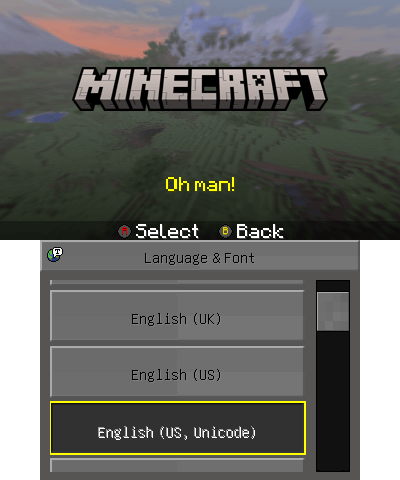
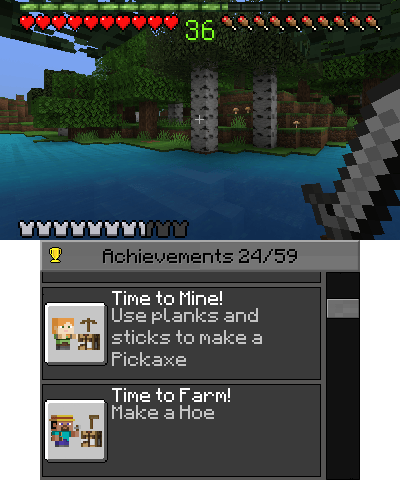
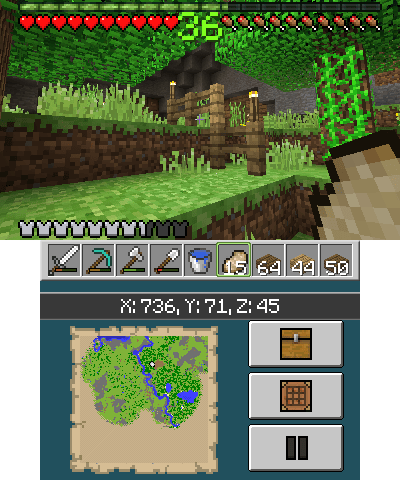
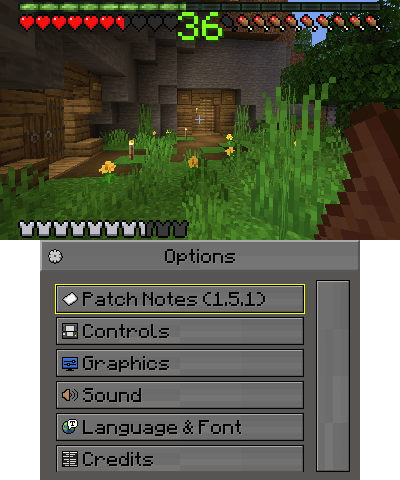
This is a modpack for Minecraft: New Nintendo 3DS Edition that aims to modernize the game. This pack adds new texture packs (including a 100% conversion of the post-1.14 textures), a new look for the game's user interface and icons, the original Minecraft font, the ability to swap between fonts at will in the Language menu, and more.
This pack only officially supports English (US) and English (UK). Other languages can be used but will have lesser compatibility with Modernization MegaPack and the larger font.
Please refer to the README for a list of mods included in the modpack.
Installation
Requirements
- A physical/digital copy of Minecraft: New Nintendo 3DS Edition
- Update 1.9.19 installed on your console
- The latest version of Luma
- Purchased DLC (for access to Classic texture pack)
Method 1: Manual (Fastest)
Requires access to a microSD card reader OR an FTP client.
Install instructions:
- Ensure that you have game patching enabled in your Luma settings by holding the Select button on startup. If there is an '(x)' to the left of 'Enable game patching' in your Luma settings, then game patching is enabled.
- Download the latest release of Modernization MegaPack for your region from the releases page and extract it.
- Open your console's microSD card using a microSD card reader or an FTP client. Move the folder named
Minecraft 3DSto the root (highest level) of your microSD card. - On the root (highest level) of your microSD card, there should be a directory named
luma. Enter that directory and look for a directory namedtitles. If the 'titles' directory is not present, create it. - In the zip folder you downloaded in step 2, enter the 'titles' directory and move the folder beginning with
0004tosdmc:/luma/titles/on your SD card. - In the zip folder you downloaded in step 2, enter the 'plugins' directory and move the folder beginning with
0004tosdmc:/luma/plugins/on your SD card. If there is already a folder beginning with '0004' in your 'plugins' directory, delete it. - Enable the Plugin Loader and Input Redirection (in the miscellaneous section) of the Rosalina menu.
- Launch Minecraft: New Nintendo 3DS Edition. If the game displays the new Mojang Studios logo (not the default black and red Mojang logo from the vanilla game) then the modpack has been applied successfully.
Manual update:
- Delete the folder beginning with
0004from thetitlesandpluginsdirectories, then repeat the process above using the latest release.
Method 2: Unistore(Automatic)
Requires internet access on your New Nintendo 3DS system and Universal-Updater. Installation may take a long time, please be patient.
Install instructions:
- Ensure that you have game patching enabled in your Luma settings by holding the Select button on startup. If there is an '(x)' to the left of 'Enable game patching' in your Luma settings, then game patching is enabled.
- Ensure that you have Universal-Updater installed on your console. Universal-Updater can be downloaded here.
- Open Universal-Updater and press the Settings icon in the bottom left corner of the touch screen. Press
Select Unistore... - At the bottom of the
Select a Unistorescreen, press the + button. SelectMinecraft 3DS Community Unistoreon theRecommended Unistore. - Return to the 'Select a Unistore' screen and select minecraft-3ds-community.unistore.
- Find or search for Modernization MegaPack. Press 'A' while you have it selected. Select the correct download for your region from the Available Downloads screen.
- Press the
Queuebutton on the touch screen (directly above the search button) and pressAction required! - Press
Acceptwhen prompted. - Wait for Modernization MegaPack installation to complete. This may take a long time.
- Ensure you have the latest version of Luma3DS installed.
- Enable the Plugin Loader and Input Redirection (in the miscellaneous section) of the Rosalina menu.
- After installation is complete, quit Universal-Updater and launch Minecraft: New Nintendo 3DS Edition. If the game displays the new Mojang Studios logo (not the default black and red Mojang logo from the vanilla game) then the modpack has been applied successfully.
Updating with Universal-Updater:
- In the Minecraft 3DS Community Unistore, navigate to 'Customization Removal' and press 'A' while you have it selected.
- Note that this will delete all mods you have installed. Reinstall Modernization MegaPack by repeating steps 5-12 above.
- Note that the Unistore may take some time to add the latest version of Modernization MegaPack.
Screenshots
Changelog
3.1.3 | #fff1a1 | h22
- Actually fixed a bug where opening the Patch Notes menu would lock up the system| h26
3.1.2 | #f2ed85 | h22
- Fixed a bug where opening the Patch Notes menu would lock up the system| h26
3.1.0 | #c3d0eb | h22
- Added the CrafTR Cheat Console mod, which restores functionality that was previously in Asterium, thanks to Damienne| h26
- Fixed new block names and localizations, thanks to Damienne| h26
- Credits now reflect new additions in 3.0.0 "Cupid"| h26
3.0.0 | #ffbdf8 | h22
- Swapped out Asterium for the LunaCore API, which allows custom Lua scripting for mods, thanks to STBUniverse| h26
- Improved sprint swimming functionality, thanks to Zexlo| h26
- Added parts of Deepslate and Mud block sets, which can be accessed through villager trades, crafting recipes, and the creative inventory, thanks to Zexlo and Damienne| h26
- Tameable, ridable Zombie Horses will now spawn at night in plains and savanna biomes| h26
- Adult zombies will now sometimes spawn with the ability to mount zombie horses| h26
- Carrots can now again be used to heal and grow horses| h26
- Mason villagers now offer polished deepslate| h26
- Wandering Trader loot tables have been updated to match 1.20.2| h26
- Spawn egg textures have been updated to include the fixed zombie horse, mooshroom, and blaze eggs| h26
- Zombie horse texture has been updated
- Leader zombies now have the same health range as in other versions| h26
- Vex loot table has been updated, as vexes no longer drop loot in the latest versions| h26
- Fixed Enderman spawn egg texture not having a transparent background, thanks to TheGamer| h26
- Off-center GUI textures have been improved, thanks to TheGamer| h26
- Ghast texture changes are now reflected in 2.4.0 "Gabriel" patch notes| h26
2.4.0 | #e1ffc2 | h22
- 2.3.0 "Shelley" patch notes header now has a unique color| h26
- Added the new dye sprites from the latest Bedrock preview version, thanks to Zexlo| h26
2.3.1 | #c2c8ff | Frankenstein
- Fixed a bug where Wither Skeletons would not move| h26
2.3.0 | #c2c8ff | Shelley
- Added Asterium 3GX plugin, which adds numerous new features including true sprint swimming, cheats, and more; see Asterium Discord server for full feature list| h26
- Carrots are now valid items for healing and growing horses and donkeys, for parity with new Java Edition changes, thanks to Zexlo| h26
- Cloud textures have been updated for parity with new appearance changes, thanks to Zexlo| h26
- A vanilla bug involving cloud faces sometimes having incorrect colors has been fixed, thanks to Zexlo| h26
- Removed MegaPack Plugin due to deprecation| h26
- Edited 2.2.0 "Byron" patch notes to better reflect changes| h26"
2.2.0| #c2c8ff| Byron
- Added Cracko298's MegaPack Plugin, which adds numerous game patches and custom configuration settings| h26
- Added the Wandering Trader, thanks to Zexlo| h26
- Added Nikki (Swapdoodle)'s "Sink, Don't Swim"| h26
- Iron Golems can now be healed/repaired with iron ingots, for parity with post-Java Edition 1.15 functionality| h26
- Wolf health and attack damage have been increased for parity with the Armored Paws drop update| h26
- Wolves have been updated to follow from a greater distance and attack from a greater range| h26
- Game patches like Better View Bobbing and Aquatic Swimming are now applied using a 3GX plugin for better compatibility and more features, thanks to Cracko298| h26
- Background panorama resolution has been increased, thanks to Zexlo| h26
- Fixed display bugs within in-game credits| h26
- Fixed a typo in 2.1.0 "Austen" patch notes| h26
- JSON structures have been cleaned up, thanks to Pizzaleader| h26
- Added Pizzaleader to Special Thanks section within in-game credits| h26"
2.1.0| #bdffec| Austen
- Increased swimming speed for parity with the Update Aquatic, thanks to Cracko298| h26
- All spawn egg items have been updated with their new appearances for parity with Java Edition 25w08a, thanks to Zexlo| h26
- Added Cracko298's Better View Bobbing patch| h26
- Creepers can now be ignited using fire charges, for parity with Java Edition| h26
- Zombie villagers can now spawn with armor, for parity with Java Edition| h26
- Blaze attack range has been tweaked, for parity with Java Edition| h26
- Guardians now drop cooked fish if burned to death, for parity with Java Edition| h26
- Implemented a limited version of the biome-based sheep color system for parity with Java Edition 25w08a, thanks to Zexlo| h26
- Rabbits now drop at least one raw rabbit when killed| h26
- All texture packs now use new UI icons introduced in 2.0.0 "Romantic"| h26
- Fixed bugs involving zombie villagers and 1.14 villager profession changes| h26
- Fish types now use the correct naming scheme| h26
- Zombie villagers will no longer spawn with armor, due to visual bugs| h26
- Fixed slime texture not displaying correctly, thanks to Zexlo| h26
- GitHub docs now deploy to a GitHub Pages website| h26"
2.0.0| #f1c9ff| h22
- Added Pillager Outposts| h26
- Added many of the new villager professions introduced in the Village and Pillage update| h26
- Numerous villager trades have been changed or modified for parity with post-Java Edition 1.14 functionality| h26
- Added the proper villager models and textures for parity with post-Java Edition 1.14 appearances, thanks to STBrian| h26
- Zombie Pigmen are now Zombified Piglins for parity with the Nether Update, thanks to STBrian| h26
- Baby zombies now burn in sunlight, for parity with post-Java Edition 1.13 functionality| h26
- Zombies will no longer attempt to break down doors in Normal and Easy difficulties| h26
- Changed breaking down doors to be a rare trait only adult zombies can spawn with| h26
- Zombie leader spawning has been reduced to fix balancing| h26
- Villagers now avoid Husks| h26
- Villagers now avoid Evokers from a greater distance than in the vanilla game| h26
- All potion textures have been changed for parity with post-Java Edition 1.19.4 colors| h26
- Brewing inventory icon has been changed to match new potions| h26
- Added the ability for baby zombies to piggyback on adult zombies for parity with Bedrock Edition| h26
- Added support for Zexlo's music plugin| h26
- Vexes have been doubled in size as a quality of life change| h26
- Modified loot tables for Vexes, Witches, and Vindicators for parity with their updated drops| h26
- Fishing junk and treasure loot tables have been modified for parity as well| h26
- Water vibrance has been toned down| h26
- Gravel, terracotta, and concrete now have random texture rotation applied| h26
- Obsidian no longer has random texture rotation applied| h26
- "Fish" is now "Cod" for parity with post-Update Aquatic naming| h26
- "Clownfish" is now "Tropical Fish" for parity with post-Update Aquatic naming| h26
- Changed panorama and world thumbnail image to that of Java Edition 1.14| h26
- Options, Skins and Manual/Patch Notes menu icons have been completely redone| h26
- Certain GUI switches and buttons have been redone for parity with Bedrock Edition, thanks to Zexlo| h26
- All effect icons have been redone for parity with their new textures| h26
- Reverted change to top menu bar brightness from 1.5.2| h26
- Reverted changes to D-Pad button prompts from 1.6.0 "Rococo"| h26
- Fixed a bug where swamps would use the snowy grass side texture| h26
- Tweaked swamp grass side texture to better match more vibrant colormaps| h26
- Edit 'Pencil' icon in the default texture pack spritesheet no longer appears cut off| h26
- The color of arrows in the default texture pack inventory have been adjusted to appear more yellow| h26
- The background of arrow buttons in the default texture pack inventory are now a solid color| h26
- Renamed 'Standard' skin pack to 'Default'| h26
- Renamed 'Choose Skin' menu to 'Select Skin'| h26
- Enderman Spawn Egg has been brightened slightly for better visibility against black background| h26
- Fixed a bug introduced in the vanilla game where bugged map items could spawn in stronghold chests| h26
- Changed 'STBUniverse' to 'STBrian' in documentation and in-game credits| h26
- 'ENDERMANYK' is now fully capitalized in in-game credits| h26
- Condensed certain mod entries in README, UniStore description, and in-game credits| h26
- Update codenames introduced starting in 1.6.0 "Rococo" will now be displayed in the Patch Notes menu| h26
- Version headers in Patch Notes menu have been condensed| h26
- Alphabetized mod names within in-game credits and GitHub README| h26
- Added 1.0.0 patch notes to in-game Patch Notes menu| h26
- Added mod compatibility list to GitHub README, thanks to Cracko| h26
- Added contributing guidelines to GitHub repository| h26
1.6.0| #c46de5| h22
- Added Zexlo's Bedrock Wither mod| h26
- Added Zexlo's Java Zombies and Husks mod| h26
- Certain inventory/crafting and HUD icons in default and Classic texture packs have been redone, thanks to Zexlo| h26
- Added bomba.cat, ENDERMANYK, and Zexlo to Special Thanks section within in-game credits| h26
- Alphabetized names within in-game credits| h26
1.5.6| #40eb3d| h22
- Fixed incorrect grass side texture for snow in Classic pack as well| h26
- Added new textures for Nether Bricks and Red Nether Bricks in Classic pack| h26
1.5.5| #40eb3d| h22
- Fixed incorrect grass side texture for snow| h26
1.5.4| #40eb3d| h22
- Changed certain aspects of Classic pack GUI for more of a classic Minecraft feel| h26
- Added outlines to more Classic food items| h26
- Tweaked top menu bar color for better visibility with text| h26
- Tweaked certain inventory icons in default texture pack for consistency with outlines| h26
- Dyed water inside cauldrons now uses correct texture in Classic pack| h26
- Renamed various dyes for parity with post-Java Edition 1.14 naming scheme (example: 'Rose Red' is now 'Red Dye')| h26
- Removed more redundant files| h26
- Tweaked 1.5.2 patch notes| h26
- Version naming scheme in Patch Notes and GitHub repository is now consistent| h26
1.5.3| #40eb3d| h22
- Completely revamped in-game credits, with new graphics, all mods included, and a "Thanks for Downloading" note at the end| h26
- GUI has been tweaked to be cleaner| h26
- Modified certain grass block side textures to better match new foliage colormaps introduced by Modernization MegaPack| h26
- Fixed a variety of scaling issues on inventory/crafting icons in Plastic texture pack| h26
- Fixed a text sizing issue on Achievement Unlocked toast| h26
- Plastic, City, Natural and Fantasy bat textures have been updated| h26
- Fixed visual bugs on certain food items in Classic texture pack| h26
- Removed Modernization MegaPack logo from bottom of credits| h26
- Removed more redundant files| h26
- Fixed missing bullet point characters in vanilla patch notes| h26
- Tweaked 1.5.1 patch notes| h26
- Added personnel to GitHub repository README| h26
1.5.2| #40eb3d | h22
- Water in Classic texture pack is now bluer| h26
- "Sea" and "Stage" paintings in Classic texture pack now use pre-Alpha v1.1.1 equivalents |h26
- Painting back texture in default texture pack now uses post-Java 1.17 equivalent| h26
- Removed Enhanced Particles mod due to crashing issues reported by some users| h26
1.5.1| #40eb3d| h22
- Updated crafting icon on bottom screen for default pack| h26
- Button prompt icons have been tweaked and some are now more vibrant| h26
- All texture packs now use Modernization MegaPack button prompt and menu icons| h26
- Updated vanilla pack icon and comparison art for parity| h26
- Farmer villagers and their zombie variant now use default villager head, as their hats displayed incorrectly| h26
- Centered 'Brewing' inventory category icon in default and Classic packs| h26
- Fixed a bug where bottom of minimap would appear glitched| h26
- Modernization MegaPack and vanilla patch notes are now more clearly separated| h26
- Removed more redundant files| h26
- Fixed incorrect loading texture in GitHub source files| h26
- GitHub readme has been completely reworked| h26
- Added Code of Conduct to GitHub repository| h26
1.5.0| #40eb3d| h22
- Added Classic texture pack, which implements Java Edition Alpha-esque textures (overwrites Candy texture pack)| h26
- Added ability to swap between original Minecraft font and Unicode font in Languages menu (overwrites Russian language file)| h26
- Added new comparison art for all texture packs, indicating which packs are added by Modernization MegaPack and which packs are in the vanilla game| h26
- Replaced stone background and loading icon with black variants| h26
- Fixed a bug where bat textures would display incorrectly in texture packs other than the default pack| h26
- "Select Language" menu has been renamed to "Language & Font"| h26
- Language icon has been tweaked to reflect new functionality| h26
- "Elytra Wings" has been renamed to "Elytra" for parity with other Minecraft versions| h26
- "Cooked Beef" has been renamed to "Steak" for parity with Bedrock Edition 1.21.30| h26
- Removed a variety of redundant files| h26
- Removed errors in 1.4.0 and 1.3.0 patch notes| h26
1.4.0| #de59dc| h22
- Water now is now more teal in color to match post-Update Aquatic water| h26
- All blocks now use proper, correct mipmapping| h26
- "Manual" and "Patch Notes" icons have been adjusted to use post-Java 1.14 paper texture| h26
- Added Modernization MegaPack logo to top of in-game credits| h26
- Adjusted text colors for Modernization MegaPack credits to match logo| h26
- Installed Modernization MegaPack version is now displayed next to "Patch Notes" text in Options menu| h26
- Sugar cane has again been adjusted to be more vibrant in color| h26
- "Done!" text at completion of world load has been changed to "Let's Go!" for parity with Bedrock Edition| h26
- Slightly adjusted pause icon on pause menu to appear more 3D| h26
- Prerelease builds can now be downloaded from GitHub repository| h26
1.3.0| #ffb469| h22
- Replaced world thumbnail texture with Caves and Cliffs Part II screenshot| h26
- Replaced three inventory icons with new icons that use 1.14 block textures| h26
- Adjusted sugar canes to be more vibrant in color for parity with new biome colors| h26
- Sugar cane item now uses post-Java 1.14 texture| h26
- Pumpkin now uses uncarved texture variant for parity| h26
- Stonecutter texture has been retouched to blend in better with 1.14 textures| h26
- Observer top texture has been retouched| h26
- A variety of items have had their names changed for parity with Bedrock 1.21.30: "Enchantment Table" is now "Enchanting Table", "Cooked Beef" is now "Steak", "Chain [Armor]" is now "Chainmail [Armor]", "Sugar Canes" is now "Sugar Cane", "Seeds" are now "Wheat Seeds", "Enchanted Apple" is now "Enchanted Golden Apple", "Double Tallgrass" is now "Tall Grass", "Very Damaged Anvil" is now "Damaged Anvil", "Slightly Damaged Anvil" is now "Chipped Anvil", "Daylight Sensor" is now "Daylight Detector", "Head" is now "Player Head", all mentions of "Monster Egg" have been changed to "Infested" and Weighted Pressure Plate naming scheme has been updated| h26
- Manually edited entirety of End Poem text file to fix text sizing issues| h26
- Renamed certain Achievements to fit better on-screen| h26
- Trimmed certain Achievement descriptions so they fit on-screen| h26
- Trimmed certain Skin Pack names to fit better on-screen| h26
- Multiplayer disclaimer has been shortened to fit better on-screen| h26
- Added credits to the end of the End Poem for parity| h26
- Japanese logo texture is now consistent with standard logo| h26
- "Game" settings icon has been redrawn to match new Minecraft desktop icons| h26
- "Credits" icon has been adjusted for consistency with other icons| h26
- Fast-forward and pause icons in credits menu have been adjusted for better visibility against GUI backgrounds| h26
- Lock icon has been retouched for better visibility| h26
- Moon now has correct rotation| h26
- Fixed a visual bug on Jungle Leaves texture in inventory| h26
- Spider eyes now glow in the dark correctly| h26
- Fixed "Decorations" inventory icon being off-center| h26
- Removed downloads that do not contain new font as they are no longer required as a result of the fixes implemented in this update| h26
- Added "Special Thanks" section to Modernization MegaPack credits| h26
- Adjusted Modernization MegaPack section within in-game credits| h26
- Changed earlier Modernization MegaPack patch notes to use new version numbering system| h26
- Fixed a typo in 1.2.0 patch notes| h26
Credits
Modders:
- Cracko298
- Nikki (Swapdoodle)
- rairai6895
- STBrian
- TheRustico36
- wyndchyme
- Zexlo
Distribution:
- Nawrek
Compiled by:
- wyndchyme
Thanks to:
- bomba.cat
- Cracko298
- ENDERMANYK
- STBrian
- Nawrek
- Pizzaleader
- Zexlo