
PSP-PDA PSP: Difference between revisions
More actions
m Text replacement - "Category:Homebrew utility applications on PSP" to "" |
No edit summary |
||
| (One intermediate revision by the same user not shown) | |||
| Line 3: | Line 3: | ||
|image=psppda.png | |image=psppda.png | ||
|description=A set of PDA programs/utility applications for PSP. | |description=A set of PDA programs/utility applications for PSP. | ||
|author= | |author=rob_psp, Zx-81 | ||
|lastupdated=2008/05/09 | |lastupdated=2008/05/09 | ||
|type=Utilities | |type=Utilities | ||
| Line 102: | Line 102: | ||
* QuickJump - http://forums.qj.net/zx-81s-homebrew-releases/139811-psp-pda-set-pda-applications-psp-v1-3-2-a.html | * QuickJump - http://forums.qj.net/zx-81s-homebrew-releases/139811-psp-pda-set-pda-applications-psp-v1-3-2-a.html | ||
[[Category:Support the author]] | [[Category:Support the author]] | ||
Latest revision as of 00:54, 8 February 2025
| PSP-PDA | |
|---|---|
 | |
| General | |
| Author | rob_psp, Zx-81 |
| Type | Utilities |
| Version | 1.3.2 |
| License | Mixed |
| Last Updated | 2008/05/09 |
| Links | |
| Download | |
| Website | |
| Support Author | |
PSP-PDA is a PDA program with numerous useful applications such as notepad, music player, image viewer, address book, calendar, calculator and clock-alarm.
Originally written by Rob_psp and updated by Ludovic Jacomme (aka Zx-81).
User guide
Menu options:
- New text.
- Open files (compatible for each application).
- Burn or open files.
- USB connection.
- Address Book.
- Calculator.
- Calendar.
- Clock, alarm and stopwatch.
- Applications (shows main screen).
- Exit (save and exit).
Music player:
- Open playlist.
- Stop playback.
- Plays next song.
Settings:
- Keyboard Settings.
- Font Size.
- Text Color: Sets the background color.
- Custom Themes (icons, view, screen, etc) .
- Return to default.
Virtual keyboard:
You can uses IR-keyboard and edit the file pspirkeyb.ini according to your IR keyboard model.
Controls
D-Pad - Navigate through the applications
Cross - Select application
Start - Open Main Menu
IR-keyboard:
Cross - CTRL-X
Square - CTRL-S
Circle - CTRL-F
Triangle - CTRL-E
Start - CTRL-W, Tab
Select - CTRL-Q, Escape
L - CTRL-Z
R - CTRL-R
D-Pad - Arrows
In the notepad application, you can use arrows to move on the text, but you have to press Escape key (or CTRL-Q) to return to edit mode.
Screenshots
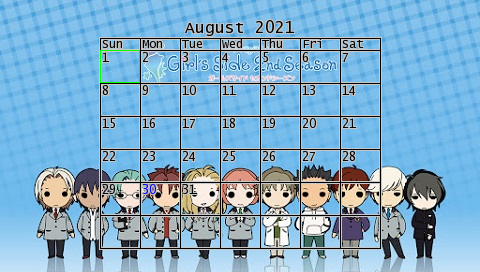
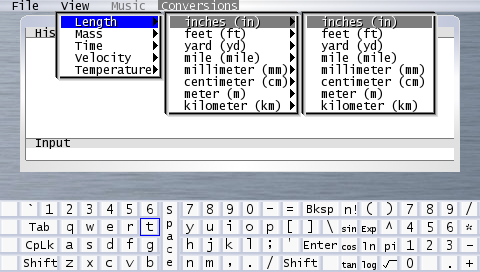
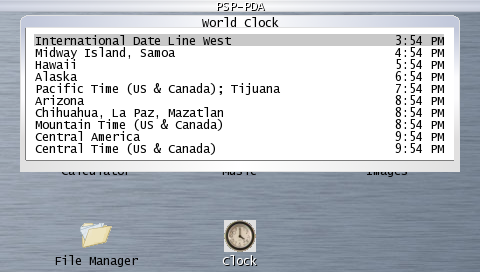
Changelog
v1.3.2 (by zx-81)
- Work now with fw3x.
- IR keyboard works now with fw >= 3.80.
v1.3.1 (by zx-81)
- Improve IR-keyboard handler.
- Bug fix in theme chooser (but you need now to restart psp-pda to view the new theme).
- Many bug fix in calendar.
- New theme designed by Vashts121.
v1.3 (by zx-81)
- IR-keyboard support.
v1.x
- Previous releases from Rob_psp.