
ASCIIJump 3DS: Difference between revisions
From GameBrew
More actions
Created page with "{{Infobox 3DS homebrew | title = ASCIIJump | image = https://dlhb.gamebrew.org/3dshomebrew/|250px | type = Platform | version = v1.0 | licence = Mixed | author = MCJack123 | w..." |
m Text replacement - "Category:3DS homebrew games" to "" |
||
| (10 intermediate revisions by the same user not shown) | |||
| Line 1: | Line 1: | ||
{{Infobox 3DS | {{Infobox 3DS Homebrews | ||
| title = ASCIIJump | |title=ASCIIJump | ||
| image = | |image=Asciijump3ds2.png | ||
| type = Platform | |description=ASCII Geometry Dash clone for 3DS. | ||
| version = | |author=MCJack123 | ||
| | |lastupdated=2016/03/20 | ||
| | |type=Platform | ||
| website = https://github.com/Emerson-School-Coders/ASCIIJump | |version=1.0 | ||
| | |license=Mixed | ||
|download=https://dlhb.gamebrew.org/3dshomebrews/asciijump3ds.7z | |||
|website=https://github.com/Emerson-School-Coders/ASCIIJump | |||
|source=https://github.com/Emerson-School-Coders/ASCIIJump | |||
}} | }} | ||
ASCIIJump is a clone of Geometry Dash in plain text for the 3DS. | |||
==Features== | |||
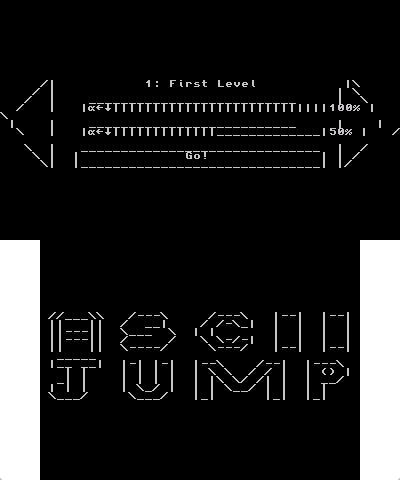
* Beautiful main menu. | |||
== Features == | * Coming soon message for unmade levels. | ||
* Beautiful main menu | * R & L buttons work on the menu as well as Circle Pad and D-Pads. | ||
* Coming soon message for unmade levels | * Speed is the same as Geometry Dash (11 squares per second). | ||
* R & | * Jump is the same as Geometry Dash (3*4 jump area). | ||
* Speed is the same as Geometry Dash (11 squares per second) | * Easy level implementation in the code with simple ASCII characters and a define function. | ||
* Jump is the same as Geometry Dash (3*4 jump area) | * Percentage scores (they do not save to the scores file, though). | ||
* Easy level implementation in the code with simple ASCII characters and a define function | * Cube customization (you can't save the cube you have, so you have to change it each play). | ||
* Press Y to access the menu. | |||
==Installation== | |||
Drop the 3dsx/cia/elf file into the destination, and place the data folder next to your executable. | |||
If there is no data folder, make it like specified below. Here is the directory structure: | |||
Root | |||
|-3ds/ | |||
| |-ASCIIJump/ | |||
| | |-ASCIIJump3DS.3dsx/elf/cia | |||
* Percentage scores (they do not save to the scores file, though) | | | |-(ASCIIJump3DS.smdh) | ||
* | | | |-data/ | ||
| | | |-scores.txt | |||
| | | |-cube.txt | |||
| | | |-(background-loop.bin) | |||
| | | |-(level.bin) | |||
* | |||
==User guide== | |||
Blocks included: | |||
* Square Cube (B). | |||
* Lined Cube (D). | |||
* Small Spike (x). | |||
== | * Big Spike (X). | ||
Drop the 3dsx/cia/elf file into the destination, and place the data folder next to your executable. If there is no data folder, make it like specified below. Here is the directory structure: | * Spike Grid (s). | ||
* Top half-cube (-) and bottom half-cube (_). | |||
* Slopes (/ and ) (does not have collision detection ATM). | |||
* C means not complete. | |||
* F means level end. | |||
* Space means air block. | |||
==Screenshots== | |||
* ( | https://dlhb.gamebrew.org/3dshomebrews/asciijump3ds2.png | ||
https://dlhb.gamebrew.org/3dshomebrews/asciijump3ds3.png | |||
==Known issues== | |||
The music is not working yet. | |||
==External links== | |||
* GitHub - https://github.com/MCJack123/ASCIIJump | |||
Latest revision as of 05:47, 6 May 2024
| ASCIIJump | |
|---|---|
 | |
| General | |
| Author | MCJack123 |
| Type | Platform |
| Version | 1.0 |
| License | Mixed |
| Last Updated | 2016/03/20 |
| Links | |
| Download | |
| Website | |
| Source | |
ASCIIJump is a clone of Geometry Dash in plain text for the 3DS.
Features
- Beautiful main menu.
- Coming soon message for unmade levels.
- R & L buttons work on the menu as well as Circle Pad and D-Pads.
- Speed is the same as Geometry Dash (11 squares per second).
- Jump is the same as Geometry Dash (3*4 jump area).
- Easy level implementation in the code with simple ASCII characters and a define function.
- Percentage scores (they do not save to the scores file, though).
- Cube customization (you can't save the cube you have, so you have to change it each play).
- Press Y to access the menu.
Installation
Drop the 3dsx/cia/elf file into the destination, and place the data folder next to your executable.
If there is no data folder, make it like specified below. Here is the directory structure:
Root
 |-3ds/
 |  |-ASCIIJump/
 |  |  |-ASCIIJump3DS.3dsx/elf/cia
 |  |  |-(ASCIIJump3DS.smdh)
 |  |  |-data/
 |  |  |  |-scores.txt
 |  |  |  |-cube.txt
 |  |  |  |-(background-loop.bin)
 |  |  |  |-(level.bin)
User guide
Blocks included:
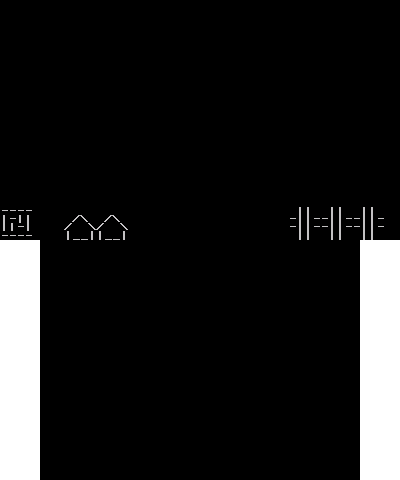
- Square Cube (B).
- Lined Cube (D).
- Small Spike (x).
- Big Spike (X).
- Spike Grid (s).
- Top half-cube (-) and bottom half-cube (_).
- Slopes (/ and ) (does not have collision detection ATM).
- C means not complete.
- F means level end.
- Space means air block.
Screenshots
Known issues
The music is not working yet.