
3DS Video: Difference between revisions
From GameBrew
More actions
Created page with "{{Infobox 3DS homebrew | title =3DS Video | image =200px | type =utility | author =SifJar | version =v1.32 | licence =Mixed | downloa..." |
No edit summary |
||
| (19 intermediate revisions by the same user not shown) | |||
| Line 1: | Line 1: | ||
{{Infobox 3DS | {{Infobox 3DS Homebrews | ||
| title | |title=3DS Video | ||
| image | |image=3dsvideo3.png | ||
| | |description=Video converter for 3DS. | ||
| author | |author=SifJar | ||
| version | |lastupdated=2013/03/24 | ||
| | |type=File Operation | ||
| download | |version=1.32 | ||
|license=Mixed | |||
|download=https://dlhb.gamebrew.org/3dshomebrews/3dsvideo_1.32.zip | |||
|website=https://gbatemp.net/threads/3ds-video-beta.315365 | |||
}} | |||
This is a program for converting videos to the 3DS, based on the findings by [https://www.socoder.net/index.php?blogs=29000 spinal_cord]. It can convert both 3D and 2D videos (3D videos in either top-bottom or side-by-side formats). | |||
This | '''Note:''' This software has been discontinued. | ||
Options | ==User guide== | ||
===Options=== | |||
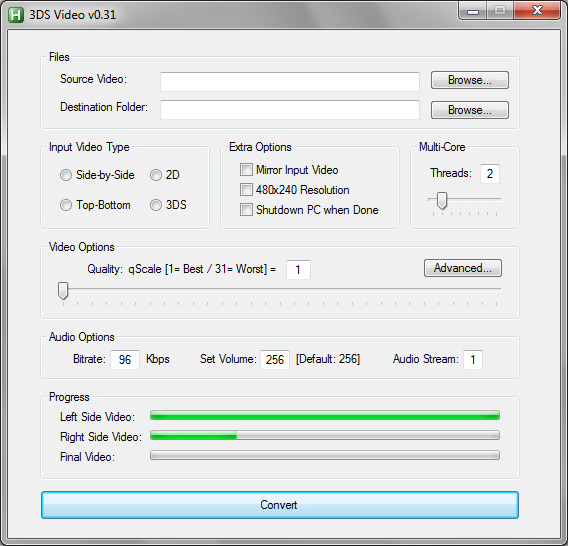
* Source Video - Choose the video you want to convert. | |||
* Video Folder - Folder to place converted video in (e.g. 3DS video folder). | |||
* Format - Type of 3D video, or 2D video. | |||
* Quality - Quality (31 is lowest, 1 is max). | |||
* Advanced... - Show advanced options (replace Quality with Bitrate & FPS). | |||
* Bitrate - Bitrate of converted video. | |||
* Framerate - Framerate of converted video. | |||
'''Note:''' The included ffmpeg.exe is 32-bit. If you have a 64-bit CPU, you may want to replace it. | |||
==Screenshots== | |||
https://dlhb.gamebrew.org/3dshomebrews/3dsvideo3.png | |||
==Changelog== | |||
'''v1.32''' | |||
*Fixed: Simple Mode now rounds down the original framerate to the nearest integer and uses a maximum of 30 fps by BelowZero. | |||
'''v1.31''' | |||
*Fixed problem with Progressbars when the program was canceled before. | |||
*Fixed MsgBox prompt in Simple Mode. | |||
'''v1.3''' | |||
*Simple Mode now takes over the original framerate to a max of 30 fps by BelowZero. | |||
* | *Conversion of very short Testfiles works correctly now by BelowZero. | ||
'''v1.21''' | |||
* | *Added choice of the duration of the test file option by BelowZero. | ||
'''v1.2''' | |||
* | *Added media infos by BelowZero. | ||
* | *Added test file option by BelowZero. | ||
*Added several audio options by BelowZero. | |||
*Enabled upscaling of video framerate by BelowZero. | |||
'''v1.1''' | |||
*Added | *Added keep aspect ratio option by amzg. | ||
*Improved progress bars by BelowZero. | |||
'''v1.00''' | |||
* | *GUI rewrite by amzg. | ||
* | *Mirrored input option fixed by amzg. | ||
* | *Progress bars added by BelowZero and amzg. | ||
* | *New error if destination folder has spaces. | ||
*GUI is disabled while converting. | |||
'''v0.30''' | |||
*Added | *Added mirrored input option. | ||
* | *Added option for 480x240 resolution (default is still 400x240). | ||
'''v0.23''' | |||
* | *More bug fixes (thanks to amzg, xxNathanxx and Guy.brush at GBATemp). | ||
*Remembers video folder. | |||
*Source tidied a bit. | |||
* | |||
* | |||
'''v0.22''' | |||
* | *Fix splitting 3D video (thanks to Stylpe at GBATemp). | ||
'''v0.21''' | |||
* | *Fixing (some of) the bugs of v0.2. | ||
'''v0.2''' | |||
* | *Added auto-splitting of files. | ||
*Added "Advanced..." options. | |||
'''v0.15''' | |||
* | *Fixed bugs of v0.1. | ||
'''v0.1''' | |||
* | *Initial release. | ||
==External links== | |||
* | * GBAtemp - https://gbatemp.net/threads/3ds-video-beta.315365 | ||
- | |||

Latest revision as of 10:33, 22 June 2024
| 3DS Video | |
|---|---|
 | |
| General | |
| Author | SifJar |
| Type | File Operation |
| Version | 1.32 |
| License | Mixed |
| Last Updated | 2013/03/24 |
| Links | |
| Download | |
| Website | |
This is a program for converting videos to the 3DS, based on the findings by spinal_cord. It can convert both 3D and 2D videos (3D videos in either top-bottom or side-by-side formats).
Note: This software has been discontinued.
User guide
Options
- Source Video - Choose the video you want to convert.
- Video Folder - Folder to place converted video in (e.g. 3DS video folder).
- Format - Type of 3D video, or 2D video.
- Quality - Quality (31 is lowest, 1 is max).
- Advanced... - Show advanced options (replace Quality with Bitrate & FPS).
- Bitrate - Bitrate of converted video.
- Framerate - Framerate of converted video.
Note: The included ffmpeg.exe is 32-bit. If you have a 64-bit CPU, you may want to replace it.
Screenshots
Changelog
v1.32
- Fixed: Simple Mode now rounds down the original framerate to the nearest integer and uses a maximum of 30 fps by BelowZero.
v1.31
- Fixed problem with Progressbars when the program was canceled before.
- Fixed MsgBox prompt in Simple Mode.
v1.3
- Simple Mode now takes over the original framerate to a max of 30 fps by BelowZero.
- Conversion of very short Testfiles works correctly now by BelowZero.
v1.21
- Added choice of the duration of the test file option by BelowZero.
v1.2
- Added media infos by BelowZero.
- Added test file option by BelowZero.
- Added several audio options by BelowZero.
- Enabled upscaling of video framerate by BelowZero.
v1.1
- Added keep aspect ratio option by amzg.
- Improved progress bars by BelowZero.
v1.00
- GUI rewrite by amzg.
- Mirrored input option fixed by amzg.
- Progress bars added by BelowZero and amzg.
- New error if destination folder has spaces.
- GUI is disabled while converting.
v0.30
- Added mirrored input option.
- Added option for 480x240 resolution (default is still 400x240).
v0.23
- More bug fixes (thanks to amzg, xxNathanxx and Guy.brush at GBATemp).
- Remembers video folder.
- Source tidied a bit.
v0.22
- Fix splitting 3D video (thanks to Stylpe at GBATemp).
v0.21
- Fixing (some of) the bugs of v0.2.
v0.2
- Added auto-splitting of files.
- Added "Advanced..." options.
v0.15
- Fixed bugs of v0.1.
v0.1
- Initial release.