
VitaDeploy: Difference between revisions
From GameBrew
More actions
m HydeWing moved page Vitadeploy Vita to VitaDeploy without leaving a redirect |
No edit summary |
||
| (5 intermediate revisions by one other user not shown) | |||
| Line 1: | Line 1: | ||
{{Infobox Vita Homebrews | {{Infobox Vita Homebrews | ||
|title=VitaDeploy | |title=VitaDeploy | ||
|image= | |image=vitadeploy2.png | ||
|description=Toolbox that makes homebrewing the Playstation Vita/TV easier. | |description=Toolbox that makes homebrewing the Playstation Vita/TV easier. | ||
|author=SKGleba | |author=SKGleba | ||
|lastupdated= | |lastupdated=2025/10/25 | ||
|type=System Tools | |type=System Tools | ||
|version=1. | |version=1.2.3 | ||
|license=MIT | |license=MIT | ||
|download=https://dlhb.gamebrew.org/vitahomebrews/vitadeploy.7z | |download=https://dlhb.gamebrew.org/vitahomebrews/vitadeploy.7z | ||
|website= | |website=https://github.com/SKGleba/VitaDeploy | ||
|source=https://github.com/SKGleba/VitaDeploy | |source=https://github.com/SKGleba/VitaDeploy | ||
}} | |||
{{#seo: | |||
|title=Vita Homebrew Apps (System Tools) - GameBrew | |||
|title_mode=append | |||
|image=vitadeploy2.png | |||
|image_alt=VitaDeploy | |||
}} | }} | ||
Toolbox that makes homebrewing the Playstation Vita/TV easier. | Toolbox that makes homebrewing the Playstation Vita/TV easier. | ||
== | ==Features== | ||
*File manager (VitaShell). | |||
*sd2vita mount/format. | |||
*Firmware updater/downgrader. | |||
*3.65 preset "Quick Install". | |||
*Optional enso install. | |||
*Optional taihen setup. | |||
*App downloader (for core hb apps). | |||
*Internal memory creation tool (imcunlock). | |||
*Storage format utility. | |||
*AutoAVLS enable/disable. | |||
*kKosk and manufacturing mode disable. | |||
*Can run entirely on vs0. | |||
==Installation== | |||
Pick your version: | |||
*VitaDeploy.vpk - Default homebrew package to install via VitaShell. | |||
*VitaDeploy-mshell.vpk - Comes with molecularShell instead of VitaShell. | |||
Notes: | |||
*[https://guide.psp2.dev/start Vita hacking from scratch with VitaDeploy]. | |||
*It is recommended to disable all plugins before using VitaDeploy. | |||
==User guide== | |||
===Firmware installer=== | |||
*VitaDeploy can download the following OS: 3.60, 3.65 or 3.68. | |||
*The following tai presets are available for download via VD: | |||
**Vanilla - taiHEN and HENkaku only. | |||
**Recommended - taiHENkaku and some core homebrew plugins. | |||
**R + YAMT - Recommended preset with the YAMT storage tool. | |||
*"Quick install" installs the 3.65 OS with the R+YAMT preset. | |||
*You can install your own PUP by putting it in ud0:PSP2UPDATE/. | |||
Notes: | |||
*If you do not have network access you can [https://mega.nz/folder/egoijADB#aBS8os-NEToqbLcrysjwiw download] the packages manually. | |||
*Put the zip in "ur0:vd-udl.zip", VD will skip OS and tai download. | |||
*"Format target storage"/"Clean the update partition" does not work on 3.74. | |||
*With the release of henlo, finalhe packages ( VitaDeploy-FHE.zip ) are no longer distributed. | |||
===Included tools=== | |||
*[[VitaShell]]. | |||
*[https://github.com/SKGleba/modoru/tree/tiny tiny modoru]. | |||
*[https://github.com/SKGleba/enso universal enso]. | |||
*[[IMCUnlock_Vita|IMCUnlock]]. | |||
*[[YAMT_Vita|YAMT]]. | |||
*[[VITA-NoAutoAvls|Vita-NoAutoAvls]]. | |||
==Screenshots== | ==Screenshots== | ||
https://dlhb.gamebrew.org/vitahomebrews/ | https://dlhb.gamebrew.org/vitahomebrews/vitadeploy3.png | ||
https://dlhb.gamebrew.org/vitahomebrews/ | |||
https://dlhb.gamebrew.org/vitahomebrews/vitadeploy4.png | |||
==Compatibility== | |||
For firmware 3.60-3.74. | |||
==Changelog== | |||
'''v1.2.3''' | |||
* Replacing an already-replaced Near will now update VitaDeploy | |||
* Updated tiny-modoru to the latest version | |||
* This version fixes rare instances where reinstalling enso on a hacked unit could make the system unusable if the OS install failed. | |||
'''v1.2.1''' | |||
* Changed file repository URLs (both master and backup). | |||
* On 22.02.2022 gen.xyz url forwarder stopped working, so the main and backup file repos were unaccessible | |||
* The main repo now uses Google DNS and Github storage | |||
* The backup repo still uses gen.xyz DNS and Gitlab storage | |||
* Repos no longer use url forwarding, straight up cname/alias now | |||
'''v1.2''' | |||
* "Format target storage" now supports firmware 3.74 | |||
* Added an option to reset the battery controller like batteryFixer does, can be found under "Miscellaneous" | |||
* The livearea widget now points to the new henlo_jb url ( jailbreak.psp2.dev ) | |||
'''v1.1.1''' | |||
* Removed AutoPlugin due to licensing issues. | |||
'''v1.1''' | |||
* Made the app downloader install the downloaded packages | |||
* Replacing near now creates a restorable backup | |||
** The tool now also warns the user that the bubble layout will be reset | |||
* Added Autoplugin2 and VitaDB downloader to downloadable tools, removed vhbb | |||
* Updated the livearea widget to point to henlo instead of henkaku | |||
'''v1.0.1''' | |||
* 3.74 support | |||
'''v1.0''' | |||
* Initial release | |||
== | ==Credits== | ||
*Team Molecule for taiHENkaku and enso. | |||
* | *theflow0 for modoru. | ||
*xerpi for vita2d. | |||
*All vitasdk contributors. | |||
== External links == | ==External links== | ||
* | * GitHub - https://github.com/SKGleba/VitaDeploy | ||
Latest revision as of 03:10, 26 October 2025
| VitaDeploy | |
|---|---|
 | |
| General | |
| Author | SKGleba |
| Type | System Tools |
| Version | 1.2.3 |
| License | MIT License |
| Last Updated | 2025/10/25 |
| Links | |
| Download | |
| Website | |
| Source | |
Toolbox that makes homebrewing the Playstation Vita/TV easier.
Features
- File manager (VitaShell).
- sd2vita mount/format.
- Firmware updater/downgrader.
- 3.65 preset "Quick Install".
- Optional enso install.
- Optional taihen setup.
- App downloader (for core hb apps).
- Internal memory creation tool (imcunlock).
- Storage format utility.
- AutoAVLS enable/disable.
- kKosk and manufacturing mode disable.
- Can run entirely on vs0.
Installation
Pick your version:
- VitaDeploy.vpk - Default homebrew package to install via VitaShell.
- VitaDeploy-mshell.vpk - Comes with molecularShell instead of VitaShell.
Notes:
- Vita hacking from scratch with VitaDeploy.
- It is recommended to disable all plugins before using VitaDeploy.
User guide
Firmware installer
- VitaDeploy can download the following OS: 3.60, 3.65 or 3.68.
- The following tai presets are available for download via VD:
- Vanilla - taiHEN and HENkaku only.
- Recommended - taiHENkaku and some core homebrew plugins.
- R + YAMT - Recommended preset with the YAMT storage tool.
- "Quick install" installs the 3.65 OS with the R+YAMT preset.
- You can install your own PUP by putting it in ud0:PSP2UPDATE/.
Notes:
- If you do not have network access you can download the packages manually.
- Put the zip in "ur0:vd-udl.zip", VD will skip OS and tai download.
- "Format target storage"/"Clean the update partition" does not work on 3.74.
- With the release of henlo, finalhe packages ( VitaDeploy-FHE.zip ) are no longer distributed.
Included tools
Screenshots
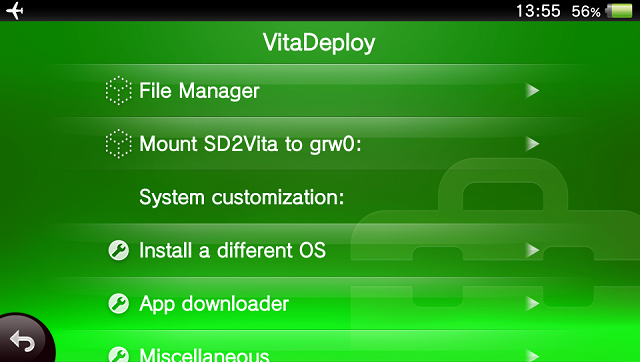
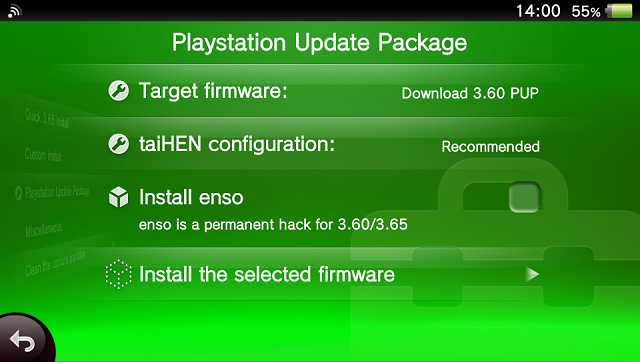
Compatibility
For firmware 3.60-3.74.
Changelog
v1.2.3
- Replacing an already-replaced Near will now update VitaDeploy
- Updated tiny-modoru to the latest version
- This version fixes rare instances where reinstalling enso on a hacked unit could make the system unusable if the OS install failed.
v1.2.1
- Changed file repository URLs (both master and backup).
- On 22.02.2022 gen.xyz url forwarder stopped working, so the main and backup file repos were unaccessible
- The main repo now uses Google DNS and Github storage
- The backup repo still uses gen.xyz DNS and Gitlab storage
- Repos no longer use url forwarding, straight up cname/alias now
v1.2
- "Format target storage" now supports firmware 3.74
- Added an option to reset the battery controller like batteryFixer does, can be found under "Miscellaneous"
- The livearea widget now points to the new henlo_jb url ( jailbreak.psp2.dev )
v1.1.1
- Removed AutoPlugin due to licensing issues.
v1.1
- Made the app downloader install the downloaded packages
- Replacing near now creates a restorable backup
- The tool now also warns the user that the bubble layout will be reset
- Added Autoplugin2 and VitaDB downloader to downloadable tools, removed vhbb
- Updated the livearea widget to point to henlo instead of henkaku
v1.0.1
- 3.74 support
v1.0
- Initial release
Credits
- Team Molecule for taiHENkaku and enso.
- theflow0 for modoru.
- xerpi for vita2d.
- All vitasdk contributors.