
Brightness Control 661 PSP
From GameBrew
More actions
| Brightness Control 6.61 | |
|---|---|
 | |
| General | |
| Author | fLaSh, Joel16 |
| Type | Plugins |
| Version | 1.6 |
| License | Mixed |
| Last Updated | 2015/01/24 |
| Links | |
| Download | |
| Website | |
| Source | |
Update version of Brightness Control that added support for 6.61.
Features
- Load/Save last brightness (brightness.bin to plugin folder), used to stay the same brightness after start eboot or reboots.
- Change brightness levels (can be disabled).
- Pressing SCREEN for 2 seconds the display turn off and to back only response to SCREEN button press (nice for music).
- When turn screen off, and turn on, back to the same brightness.
- Two brightness steps, 1 and 10.
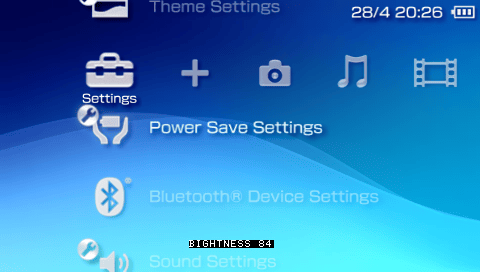
- Show brightness message on screen (can be disabled).
- Lock the combination buttons to the system when pressed.
- Change brightness message and color.
Installation
Copy the .ini and .prx files to the ms0(ef0):/seplugins/.
Write the following line in the vsh.txt and game.txt
ms0:/seplugins/brightness.prx 1
For PSP Go, write this line instead
ef0:/seplugins/brightness.prx 1
Reset the VSH from the Recovery Menu.
Controls
L+R - Key
Key+Up/Down - Change up/down with step 1
Key+Right - Change up/down with step 10
The values can be changed via brightness.ini.
Screenshots
Compatibility
Works on 6.20, 6.35, 6.39, 6.60, 6,61
May not work with pops.txt.
Does not work with some plugins.
Changelog
V1.6
- Update for 6.61 NOTE: the sceDisplaySetBrightness function, is hooked by this plugin, then only this plugin can change the brightness.
- Works only with FW versions 6.20, 6.35, 6.39 and 660 and now 6.61 (I just added this NIDs).
- Display Brightness string on top right below the time.